
1. Einleitung
This manual provides essential information for the safe and efficient operation of your BLUETTI AC70 Portable Power Station. Please read this manual thoroughly before using the product and keep it for future reference. The BLUETTI AC70 is a versatile power solution designed for various applications, including outdoor activities, emergency backup, and mobile power needs.
2. Sicherheitshinweise
Um einen sicheren Betrieb zu gewährleisten, befolgen Sie bitte stets diese Richtlinien:
- Zerlegen, reparieren oder modifizieren Sie das Gerät nicht.
- Halten Sie das Gerät von Feuer, Wasser und extremen Temperaturen fern.
- Use only BLUETTI-approved accessories and charging cables.
- Sorgen Sie während des Gebrauchs und des Ladevorgangs für ausreichende Belüftung, um eine Überhitzung zu vermeiden.
- Außerhalb der Reichweite von Kindern und Haustieren aufbewahren.
- Vermeiden Sie es, das Gerät fallen zu lassen oder starken Stößen auszusetzen.
3. Packungsinhalt
Prüfen Sie, ob alle Artikel in Ihrem Paket enthalten sind:
- BLUETTI AC70 Tragbares Kraftwerk
- 100W Solar Panel (Ships Separately)
- AC-Ladekabel
- Autoladekabel
- Solar-Ladekabel
- Bedienungsanleitung

Figure 1: BLUETTI AC70 Portable Power Station with its standard accessories.
4. Produktüberschreitungview
4.1 Frontplatte
The front panel features the main display, input/output ports, and control buttons.
- LCD Anzeige: Zeigt den Akkustand und die Eingangs-/Ausgangsleistung an.tage, verbleibende Laufzeit und Fehlerindikatoren.
- DC/PV-Eingang: For connecting solar panels or other DC charging sources.
- Gleichstromausgang (12 V/10 A): Standard car-style outlet.
- USB-C-Anschlüsse (100 W): Two ports for fast charging compatible devices.
- USB-A-Anschlüsse (12 W): Two ports for standard USB charging.
- AC Outlets (120V/1000W): Two standard AC outlets.
- Netzschalter: Schaltet das Gerät ein/aus.
- DC-Ausgangstaste: Activates/deactivates DC output.
- AC-Ausgangstaste: Activates/deactivates AC output.

Figure 2: Front panel layout of the BLUETTI AC70.
4.2 Rückseite
The rear panel includes the AC input port and ventilation.
- AC-Eingang: Zum Anschließen des Netzladekabels.
- Lüftungsgitter: Gewährleistet eine ausreichende Luftzirkulation zur Kühlung.
4.3 Oberes Bedienfeld
The top panel features a sturdy handle for portability.

Figure 3: Top handle for easy portability.
5. Einrichtung
5.1 Erstaufladung
Before first use, fully charge the BLUETTI AC70. Connect the AC charging cable to the AC input port on the rear of the unit and plug it into a wall outlet. The LCD display will show the charging status. A full charge from 0% to 100% typically takes about 1.5 hours.
5.2 Anschluss des Solarmoduls
If using the included 100W solar panel, unfold it and position it in direct sunlight. Connect the solar charging cable to the solar panel and then to the DC/PV input port on the front of the AC70. The display will indicate solar input wattage.
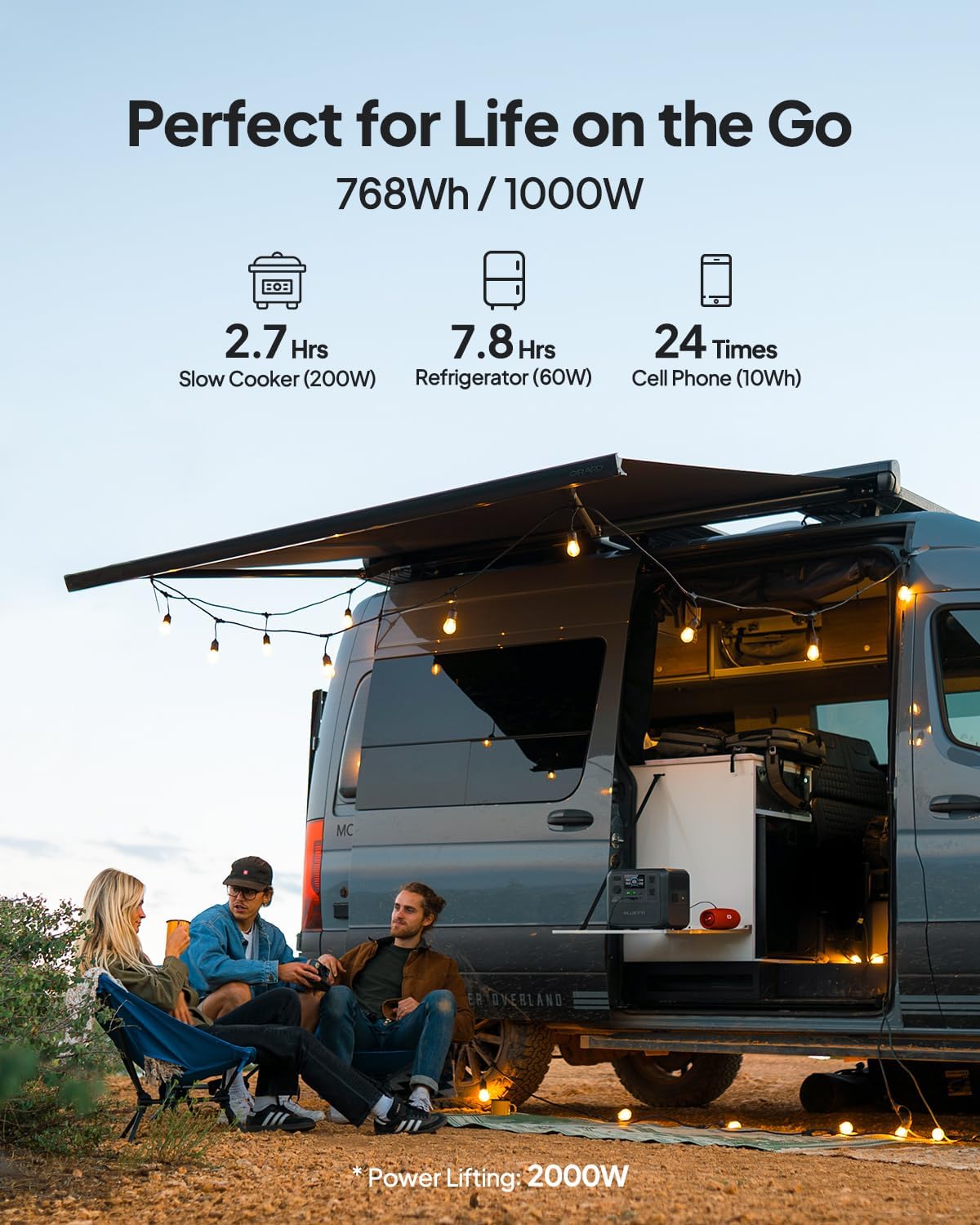
Figure 4: Connecting the BLUETTI AC70 to a solar panel.
6. Bedienungsanleitung
6.1 Ein-/Ausschalten
Press and hold the main Power Button for 2-3 seconds to turn the unit on or off.
6.2 Verwendung der Ausgaben
Press the respective DC Output Button or AC Output Button to activate the desired output ports. The corresponding icons on the LCD display will illuminate.

Figure 5: Various output ports of the BLUETTI AC70 in use.
6.3 BLUETTI APP Control
Download the BLUETTI APP from your smartphone's app store. Connect your AC70 via Bluetooth to monitor its status, adjust settings (like charging mode), and update firmware remotely.

Figure 6: Monitoring and controlling the AC70 using the BLUETTI App.
6.4 Power-Lifting-Modus
The Power Lifting mode allows the AC70 to handle high-power resistive loads up to 2000W, exceeding its rated 1000W output. This is particularly useful for devices like hair dryers or electric kettles. Activate this mode via the BLUETTI APP.
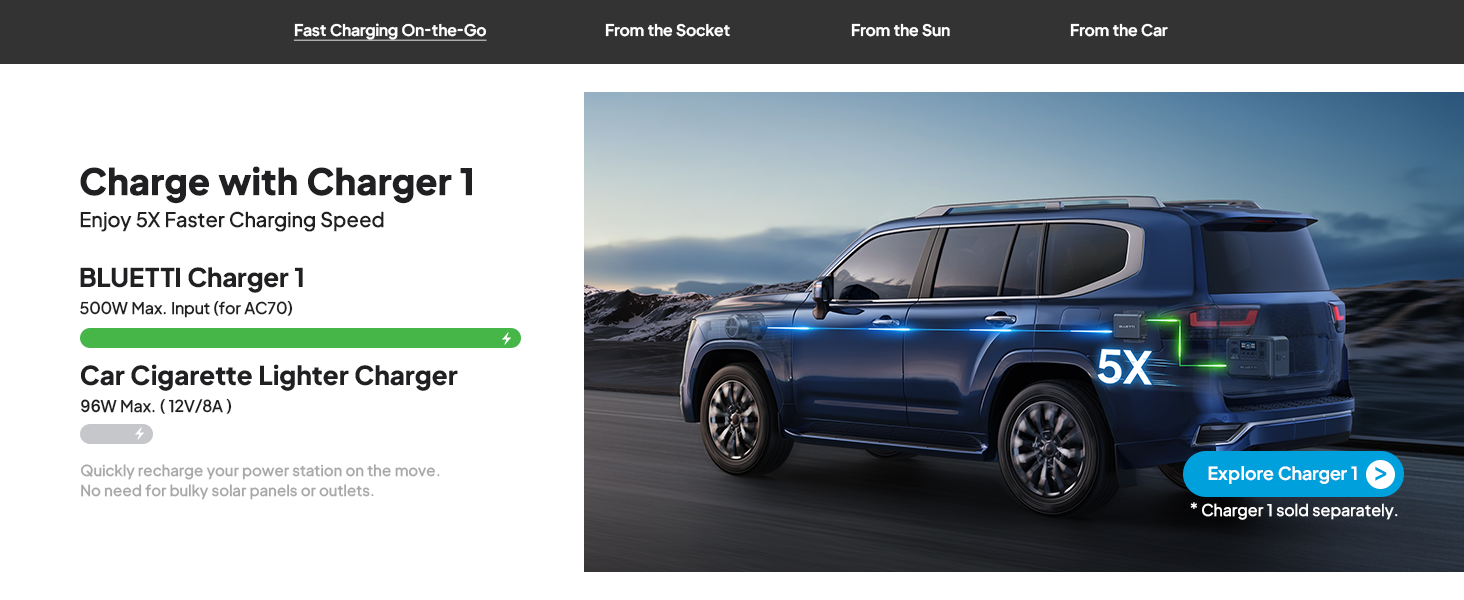
Figure 7: AC70 utilizing Power Lifting mode for higher wattage Geräte.
6.5 USV-Funktionalität
The AC70 features an Uninterruptible Power Supply (UPS) function with a switching time of ≤20ms. When connected to a wall outlet and powering devices, it can automatically switch to battery power in the event of a power outage, ensuring continuous operation for connected electronics.
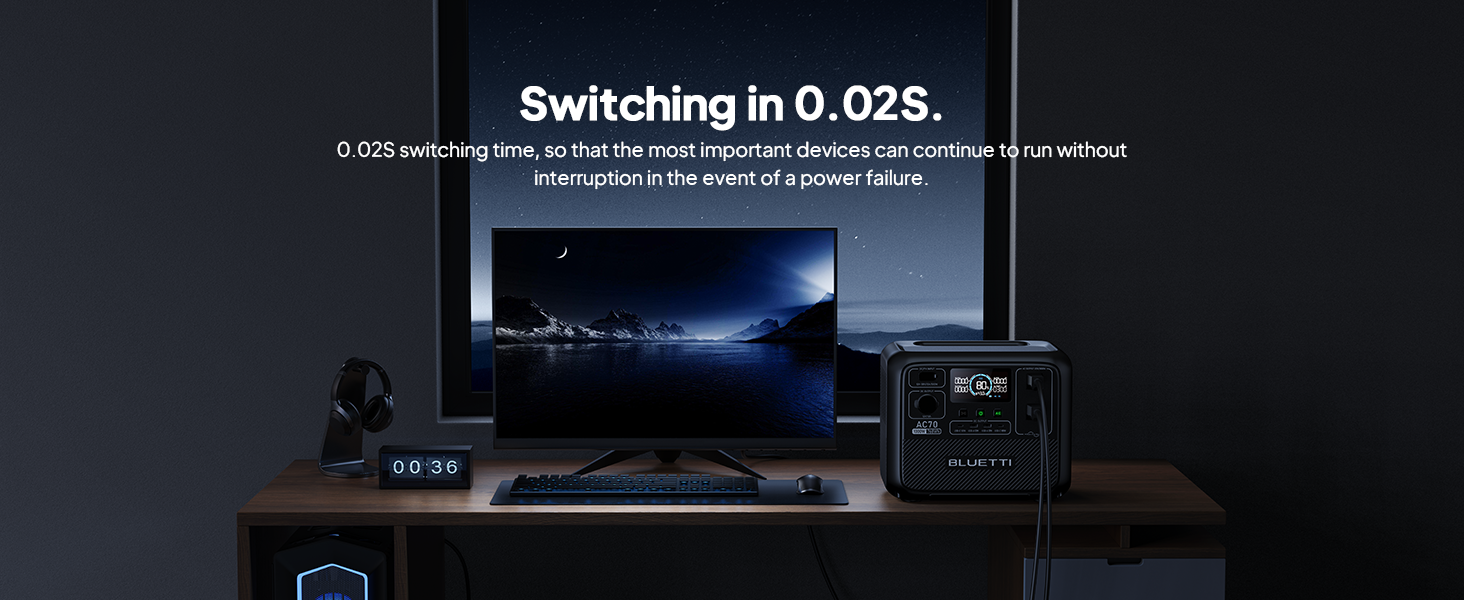
Figure 8: AC70 acting as an Uninterruptible Power Supply (UPS).
7. Charging the AC70
7.1 AC-Laden
Connect the AC charging cable to the AC input port and a wall outlet. The AC70 supports up to 950W fast charging, reaching 80% in 45 minutes and 100% in 1.5 hours.

Figure 9: AC70 charging from a standard wall outlet.
7.2 Solarladung
Connect compatible solar panels (up to 500W) to the DC/PV input port using the solar charging cable. The AC70 can be fully charged via solar power in 1.9-2.4 hours under optimal sunlight conditions.

Figure 10: AC70 charging using solar panels.
7.3 Aufladen des Autos
Use the car charging cable to connect the AC70 to your vehicle's 12V/24V cigarette lighter port. This allows for convenient charging while on the go, with a full charge taking approximately 3.2-7 hours.
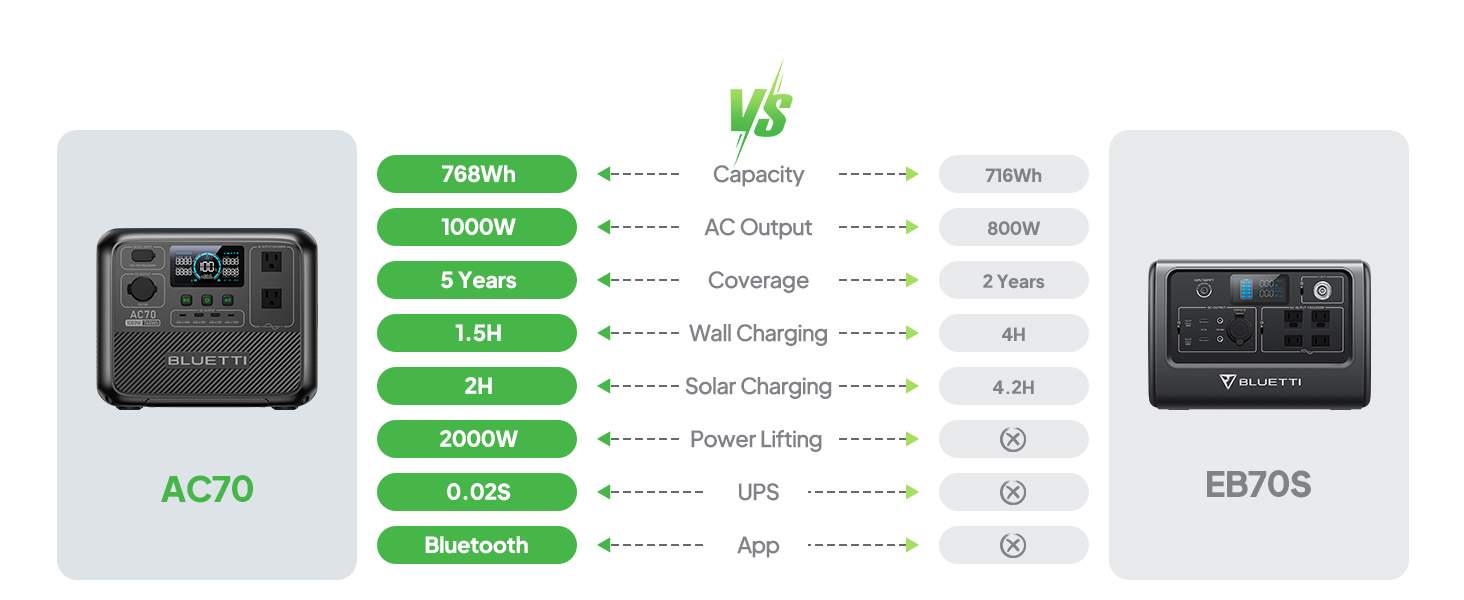
Figure 11: AC70 charging from a vehicle's 12V/24V outlet.
8. Wartung
Proper maintenance ensures the longevity and performance of your AC70:
- Lagern Sie das Gerät an einem kühlen, trockenen Ort und schützen Sie es vor direkter Sonneneinstrahlung.
- Um die Batterieleistung zu erhalten, sollte das Gerät alle 3 bis 6 Monate aufgeladen werden, wenn es nicht regelmäßig benutzt wird.
- Reinigen Sie die Außenseite mit einem trockenen, weichen Tuch. Verwenden Sie keine scharfen Chemikalien oder Scheuermittel.
- Halten Sie die Lüftungsöffnungen frei von Staub und Schmutz.
9. Fehlerbehebung
If you encounter issues with your AC70, refer to the following common problems and solutions:
| Problem | Mögliche Ursache | Lösung |
|---|---|---|
| Gerät lässt sich nicht einschalten | Niedriger Batteriestand oder Gerät ausgeschaltet. | Laden Sie das Gerät auf. Halten Sie den Ein-/Ausschalter 2-3 Sekunden lang gedrückt. |
| AC-Ausgang funktioniert nicht | AC output is off or overloaded. | Press the AC output button. Reduce the load or check for short circuits. |
| Solarladung funktioniert nicht | Insufficient sunlight, incorrect connection, or incompatible panel. | Ensure direct sunlight, check cable connections, verify panel compatibility. |
| APP stellt keine Verbindung her | Bluetooth is off or unit is too far. | Ensure Bluetooth is enabled on your phone and AC70. Move closer to the unit. |
10. Spezifikationen
| Besonderheit | Detail |
|---|---|
| Marke | BLUETTI |
| Modellname | AC70 |
| Batteriekapazität | 768 Wh (LiFePO4) |
| AC-Ausgang | 2 x 1000W (2000W Kraftlift) |
| DC-Ausgang | 1 x 12V/10A |
| USB-C-Ausgang | 2 x 100 W max. |
| USB-A-Ausgang | 2 x 12 W max. |
| AC-Eingang | 950W Max (0-80% in 45 min, 0-100% in 1.5 hrs) |
| Sonneneinstrahlung | 500W Max (0-100% in 1.9-2.4 hrs) |
| Aufladen im Auto | 12V/24V, 10A (0-100% in 3.2-7 hrs) |
| Batteriezyklen | 3000+ auf 80% Kapazität |
| USV-Umschaltzeit | ≤20ms |
| Artikelgewicht | 22.5 Pfund |
| Technische Daten | 12.4 Zoll L x 8.2 Zoll B x 10.1 Zoll H |
11. Garantie und Support
The BLUETTI AC70 Portable Power Station comes with a 5-year warranty. For technical support, troubleshooting assistance, or warranty claims, please contact BLUETTI customer service through their official website or the BLUETTI APP.
Video 1: Official BLUETTI AC70 product overview highlighting its features and portability.