
1. Einleitung
The Rakstore XY-AP50H is a compact and versatile TPA3116D2 stereo digital amplifier board featuring Bluetooth 5.0 connectivity. It delivers 50W+50W output, making it suitable for various audio applications including home theater systems. This manual provides detailed instructions for setup, operation, and maintenance to ensure optimal performance and longevity of your device.
2. Sicherheitshinweise
- Stellen Sie sicher, dass die Stromversorgungslautstärketage is within the specified range of DC 5-27V. Using an incorrect voltagDies kann zu Schäden am Gerät führen.
- Always connect speakers and power supply before powering on the ampschwerer.
- Vermeiden Sie Kurzschlüsse an den Lautsprecherausgängen oder den Stromeingangsklemmen.
- Das Gerät darf keiner Feuchtigkeit, keinem Wasser und keinen extremen Temperaturen ausgesetzt werden.
- Bewahren Sie das Gerät außerhalb der Reichweite von Kindern auf.
- Vor jeglichen Wartungsarbeiten oder dem Herstellen von Verbindungen die Stromzufuhr unterbrechen.
3. Produktmerkmale
- Hohe Ausgangsleistung: 50W + 50W stereo output.
- Bluetooth 5.0-Konnektivität: Stable wireless audio transmission up to 15 meters (unobstructed).
- Breites Volumentage Reichweite: Operates on DC 5-27V / 2A or above.
- Mehrere Audioeingänge: Supports Bluetooth, AUX, and USB Sound Card functions.
- Schutzmechanismen: Includes power supply reverse connection protection, short circuit protection, and self-recovery overheating protection.
- Lautsprecherkompatibilität: Adaptable for 10W-200W, 4Ω/8Ω speakers.
4. Produktüberschreitungview und Komponenten
Familiarize yourself with the various components and connection points of the XY-AP50H amplifier-Board.
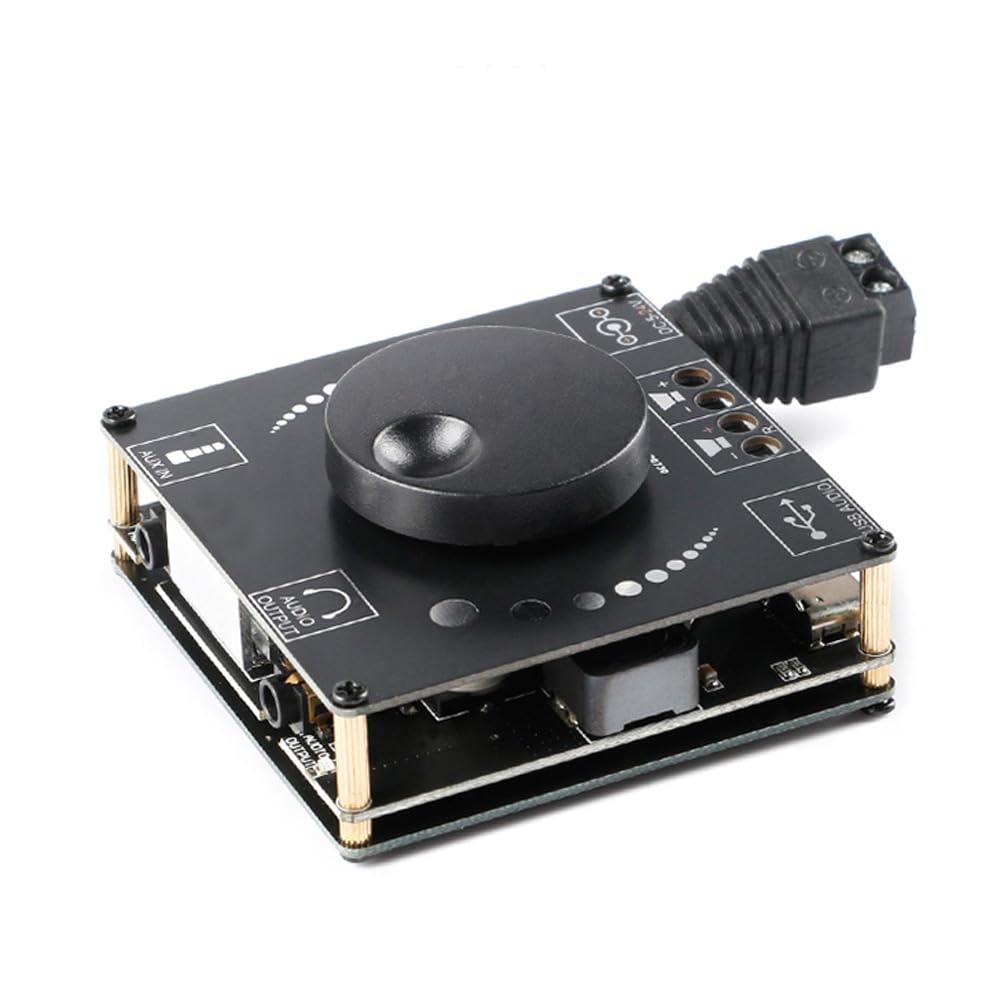
Bild 4.1: Spitze view of the XY-AP50H amplifier board, showing the main components including the volume knob, power input, speaker terminals, AUX input, and USB port.

Bild 4.2: Unten view of the XY-AP50H amplifier board, indicating the USB Audio input, speaker outputs (SPKR, SPKL), and DC 5-24V power input.

Bild 4.3: Dimensions of the XY-AP50H amplifier board, measuring approximately 60mm by 60mm.
5. Einrichtungsanweisungen
5.1 Stromanschluss
- Stellen Sie sicher, dass amplifier is powered off and disconnected from any power source.
- Connect a DC 5-27V / 2A or above power adapter to the DC power input jack on the board. Observe polarity if using bare wires.
5.2 Lautsprecheranschluss
- Identify the left (SPKL) and right (SPKR) speaker output terminals on the board.
- Connect your passive speakers (10W-200W, 4Ω/8Ω) to the corresponding terminals. Ensure correct polarity (+ to + and - to -) for each speaker.
5.3 Audioeingangsoptionen
The XY-AP50H supports three audio input methods: Bluetooth, AUX, and USB Sound Card.
5.3.1 Bluetooth-Verbindung
- Schalten Sie den amplifier-Board.
- Aktivieren Sie auf Ihrem Audio-Quellgerät (z. B. Smartphone, Tablet) Bluetooth und suchen Sie nach verfügbaren Geräten.
- Select "XY-AP50H" from the list to pair. A confirmation sound will indicate successful pairing.
5.3.2 AUX-Eingangsanschluss
- Connect a 3.5mm audio cable from your audio source device's headphone jack to the AUX input port on the amplifier-Board.
- Der ampDer Verstärker schaltet automatisch in den AUX-Eingangsmodus, sobald ein Kabel erkannt wird.
5.3.3 USB-Soundkartenfunktion

Bild 5.1: Illustration of connecting the XY-AP50H to a computer via a data cable to utilize its USB sound card function, providing improved audio output quality.
- Verbinden Sie amplifier board to your computer using a USB data cable (Type-C to USB-A or Type-C to Type-C, depending on your computer's ports).
- Most computers will automatically recognize the amplifier as an external sound card.
- If prompted, select the XY-AP50H as the audio output device in your computer's sound settings.
- Open your computer's audio playback software to play music. The amplifier will output the audio.
6. Bedienungsanleitung
6.1 Ein-/Ausschalten
Connect or disconnect the DC power supply to power on or off the amplifier-Board.
6.2 Lautstärkeregelung
Rotate the potentiometer knob on the board clockwise to increase volume and counter-clockwise to decrease volume.
6.3 Eingangsmodusumschaltung
Der amplifier automatically prioritizes inputs. Bluetooth is typically the default. Connecting an AUX cable will switch to AUX. Connecting via USB to a computer will activate the USB sound card mode.
7. Spezifikationen
| Besonderheit | Spezifikation |
|---|---|
| Modell | XY-AP50H |
| AmpLifier-Chip | TPA3116D2 |
| Bluetooth-Version | BLE 5.0 |
| Ausgangsleistung | 50W + 50W (Stereo) |
| Versorgungsvolumentage | DC 5-27V / 2A above |
| Übertragungsdistanz | 15 Meter (frei) |
| Anzahl der Kanäle | Linker und rechter Dualkanal (Stereo) |
| Angepasste Lautsprecher | 10W-200W, 4Ω/8Ω |
| Schutzmechanismen | Schutz vor Verpolung der Stromversorgung, Kurzschlussschutz, Selbstheilungsfunktion bei Überhitzung |
8. Fehlerbehebung
- Kein Ton:
- Check power supply connection and ensure it meets DC 5-27V / 2A or above.
- Prüfen Sie, ob die Lautsprecheranschlüsse sicher und korrekt polarisiert sind.
- Ensure the correct audio input mode is selected (Bluetooth paired, AUX cable connected, or USB sound card active).
- Stellen Sie den Lautstärkeregler am ampVerstärker und Ihr Audio-Quellgerät.
- Verzerrter Klang:
- Reduce the volume from both the ampVerstärker und die Audioquelle.
- Check speaker impedance and power rating to ensure compatibility.
- Ensure power supply is stable and sufficient (at least 2A).
- Bluetooth-Trennung:
- Ensure the audio source device is within 15 meters of the amplifier and there are no major obstructions.
- Versuchen Sie, das Gerät zu entkoppeln und anschließend erneut zu koppeln.
- Stellen Sie sicher, dass keine anderen Geräte das Bluetooth-Signal stören.
- Überhitzung:
- Sorgen Sie für ausreichende Belüftung um das amplifier-Board.
- Reduce output volume or check speaker impedance. The board has self-recovery overheating protection, which may temporarily shut down output.
9. Wartung
- Behalten Sie die ampDie Verstärkerplatine muss sauber und staubfrei sein. Verwenden Sie zum Reinigen ein weiches, trockenes Tuch.
- Avoid placing the board in environments with high humidity or extreme temperatures.
- Do not attempt to disassemble or modify the board, as this may void any potential warranty and cause damage.
10. Garantie und Support
For warranty information and technical support, please refer to the seller's policies or contact Rakstore customer service directly. Keep your purchase receipt as proof of purchase.