
1. Einleitung
This manual provides essential information for the safe and effective operation of the CONTEC ECG 300G VET 3-Channel Electrocardiograph. Please read this manual thoroughly before using the device and keep it for future reference.
Produkt überview
The CONTEC ECG 300G VET is a sophisticated 3-channel electrocardiograph designed for veterinary use. It is capable of simultaneously acquiring signals from 12 leads and printing waveforms using an integrated thermal printing system. The device allows for recording and displaying ECG waveforms in both automatic and manual modes, featuring automatic parameter measurement and analysis. It incorporates synchronous collection and digital signal processing technology to ensure high-quality ECG waveforms, utilizing power frequency, baseline, and EMG filters. Key operational parameters such as 12-lead ECG display, print mode, sensitivity, print speed, and filter status are conveniently shown on the screen. The device offers various print modes and formats, including automatic and manual, with adjustable waveform length via a timed print function.
2. Sicherheitshinweise
Wichtige Sicherheitsvorkehrungen:
- Befolgen Sie beim Betrieb des Geräts stets die Anweisungen in diesem Handbuch.
- Ensure the device is connected to a properly grounded power source.
- Do not use the device in the presence of flammable anesthetics or other explosive atmospheres. This poses a significant explosion hazard.
- Only qualified personnel should operate and maintain this equipment.
- Regularly inspect cables and electrodes for damage before each use.
- Halten Sie das Gerät von Wasser und übermäßiger Feuchtigkeit fern.
- Do not attempt to service the device yourself. Refer all servicing to authorized personnel.

Bildbeschreibung: Eine Nahaufnahme view of the CONTEC ECG 300G VET device. The image prominently displays the thermal printer paper slot on the left side and a warning label below it. The label clearly states "DANGER Possible explosion hazard if used in the presence of flammable anesthetics," emphasizing a critical safety precaution.
3. Einrichtung
3.1 Auspacken und Prüfen
- Carefully remove the ECG unit and all accessories from the packaging.
- Inspect the device for any signs of damage that may have occurred during transit. If damage is found, contact your supplier immediately.
- Prüfen Sie, ob alle in der Packliste aufgeführten Komponenten vorhanden sind.
3.2 Stromversorgung anschließen
- Ensure the device's power switch is in the OFF position.
- Connect the power cord to the AC power inlet on the rear of the ECG unit.
- Stecken Sie das andere Ende des Netzkabels in eine geerdete Steckdose.
- The device can also operate on its internal rechargeable battery. Ensure the battery is charged before initial use or if operating without AC power.
Bildbeschreibung: Eine Seite view of the CONTEC ECG 300G VET device. This angle clearly shows the power input port on the right side, along with a power switch. On the left side, a multi-pin data connector (likely for lead connection) and a USB port are visible, indicating connectivity options.
3.3 Leads verbinden
- Locate the multi-pin connector for the patient lead cable.
- Align the connector carefully and plug it into the corresponding port on the side of the ECG unit.
- Sorgen Sie für eine sichere Verbindung.
- Attach the individual lead wires to the appropriate electrodes according to standard veterinary ECG lead placement protocols.
4. Bedienungsanleitung
4.1 Ein-/Ausschalten
- Zum Einschalten drücken Sie die EIN/AUS Taste auf dem Bedienfeld.
- The display will illuminate, and the system will perform a self-test.
- Halten Sie zum Ausschalten die Taste gedrückt EIN/AUS Taste, bis das Gerät herunterfährt.

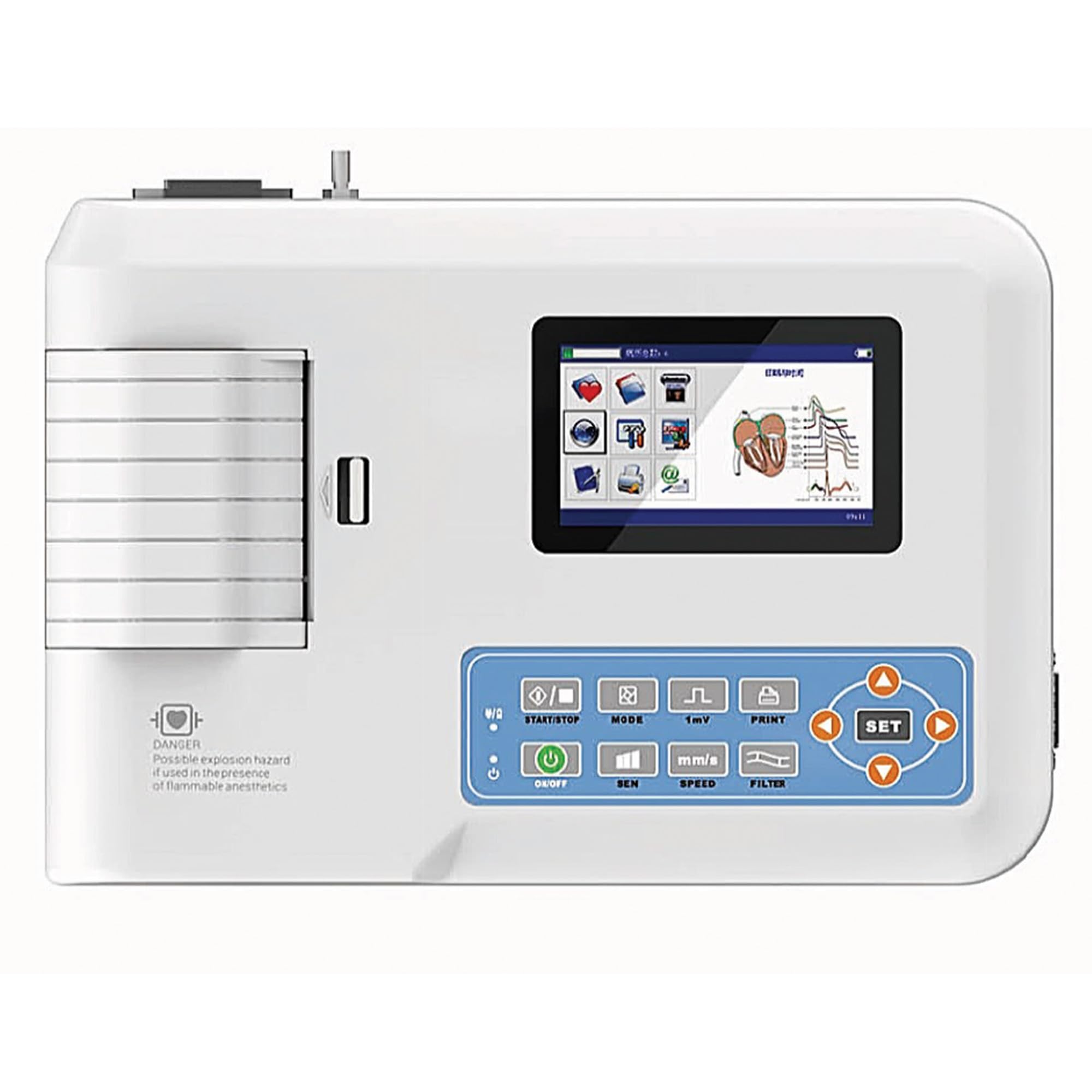
Bildbeschreibung: Ein Top-Down view of the CONTEC ECG 300G VET. The image prominently displays the device's control panel with various buttons, including ON/OFF, MODE, SEN (Sensitivity), SPEED, PRINT, FILTER, and SET, along with directional arrows. A color display screen is also visible, showing graphical user interface elements. The thermal printer output slot is on the left.
4.2 Grundlegende Betriebsarten
The ECG 300G VET supports both automatic and manual operation modes for recording and displaying ECG waveforms.
- Automatik-Modus: The device automatically measures and analyzes parameters, providing a comprehensive report.
- Manueller Modus: Allows the user to manually control recording and printing, offering flexibility for specific diagnostic needs.
Verwenden Sie die MODUS button to switch between available modes.
4.3 Einstellungen anpassen
The control panel features dedicated buttons for adjusting key parameters:
- SEN (Sensitivity): Passt die amplitude of the ECG waveform.
- GESCHWINDIGKEIT: Controls the print speed of the thermal recorder, affecting the horizontal scale of the waveform.
- FILTER: Activates or deactivates various filters (power frequency, baseline, EMG) to reduce artifact interference and improve signal quality.
- DRUCKEN: Initiates or stops the thermal printing process.
- EINSTELLEN: Used to enter menu options and confirm selections, often in conjunction with the directional arrow buttons.

Bildbeschreibung: A detailed close-up of the CONTEC ECG 300G VET's control panel and display. The screen shows a graphical representation of an ECG waveform and menu icons. The buttons for START/STOP, MODE, 1mV (sensitivity), PRINT, ON/OFF, SEN, SPEED, FILTER, and SET with directional arrows are clearly visible, indicating the primary user interface for device control.
4.4 Printing ECG Waveforms
- Ensure thermal paper is correctly loaded into the printer slot.
- Select the desired print mode (automatic or manual) and adjust sensitivity and speed as needed.
- Drücken Sie die DRUCKEN button to begin printing the ECG waveform.
- The waveform length can be adjusted using the timed print function, accessible via the SATZ Speisekarte.
5. Wartung
5.1 Gerät reinigen
- Vor der Reinigung das Gerät immer ausschalten und vom Stromnetz trennen.
- Wipe the exterior surfaces of the unit with a soft cloth dampened with a mild, non-abrasive disinfectant.
- Lassen Sie keine Flüssigkeiten in das Gerät eindringen.
- Clean the thermal print head regularly with a specialized cleaning pen or isopropyl alcohol to ensure optimal print quality.
5.2 Batteriepflege
- Recharge the internal battery regularly, even if the device is not in frequent use, to maintain battery life.
- Vermeiden Sie nach Möglichkeit eine vollständige Entladung des Akkus.
- If the device will be stored for an extended period, charge the battery to approximately 50% and store in a cool, dry place.
5.3 Lead and Electrode Care
- Inspect lead wires and electrodes for wear, cracks, or damage before and after each use.
- Clean electrodes thoroughly after each use to remove gel residue and ensure good conductivity.
- Replace damaged leads or electrodes immediately to ensure accurate readings and patient safety.
6. Fehlerbehebung
| Problem | Mögliche Ursache | Lösung |
|---|---|---|
| Gerät lässt sich nicht einschalten. | No power, discharged battery, faulty power cord. | Check power connection, charge battery, replace power cord if damaged. |
| Poor ECG signal quality / Excessive noise. | Poor electrode contact, damaged leads, electrical interference, incorrect filter settings. | Ensure proper electrode placement and skin preparation, check lead integrity, move device away from other electrical equipment, adjust filter settings. |
| Drucker druckt nicht. | No thermal paper, paper loaded incorrectly, print head dirty, printer malfunction. | Load new thermal paper, ensure correct orientation, clean print head, contact support if issue persists. |
| Der Bildschirm ist leer oder eingefroren. | Software error, hardware malfunction. | Try restarting the device. If the problem persists, contact technical support. |
7. Spezifikationen
| Besonderheit | Detail |
|---|---|
| Hersteller | QINHHUANGDAO CONTEC MEDICAL SYSTEMS |
| Modellnummer | 80650 |
| ASIN | B0CMJ3YR2C |
| Kanäle | 3-channel acquisition and printing |
| Lead Acquisition | Simultaneous 12-lead signal acquisition |
| Drucksystem | Thermal printing system |
| Betriebsarten | Automatisch und manuell |
| Signalverarbeitung | Digital signal processing with power frequency, baseline, and EMG filters |
| Anzeige | Screen display for ECG waveforms, print mode, sensitivity, print speed, filter status |
| Abmessungen (Paket) | 40.4 x 29.7 x 20.7 cm |
| Gewicht (Paket) | 2.95 kg |
| Garantierte Software-Updates bis | Unbekannt |
8. Garantie und Support
8.1 Garantieinformationen
Specific warranty terms and conditions for the CONTEC ECG 300G VET are typically provided with the product at the time of purchase. Please refer to the warranty card or documentation included in your product packaging for detailed information regarding coverage, duration, and claims procedures. Keep your proof of purchase for warranty validation.
8.2 Technischer Support
For technical assistance, troubleshooting beyond this manual, or service inquiries, please contact your authorized CONTEC distributor or the manufacturer directly. Contact information can usually be found on the product packaging, the manufacturer's official website, or in the accompanying documentation.