
TYLT 4902Q
TYLT MagSafe Wireless Charger Ring Stand User Manual
Modell: 4902Q
Marke: TYLT
1. Einleitung
Thank you for choosing the TYLT MagSafe Wireless Charger Ring Stand. This device combines powerful MagSafe wireless charging with the convenience of a built-in kickstand, designed to seamlessly power and prop up your iPhone 12, 13, 14, and 15 series devices. This manual provides essential information for the proper setup, operation, and maintenance of your new charger.
2. Produktüberschreitungview
The TYLT MagSafe Wireless Charger Ring Stand is a compact and versatile charging solution. It features a magnetic charging pad with an integrated ring kickstand.
2.1 Komponenten
- Magnetic Wireless Charging Pad with Integrated Ring Stand
- 4-foot USB-C Cable (attached)
2.2 Produkt Views

Abbildung 2.2.1: Oben view of the TYLT MagSafe Wireless Charger Ring Stand. This image displays the circular charging pad with its black surface and the surrounding grey metallic ring. The TYLT logo and product information are visible on the black surface.

Abbildung 2.2.2: Vorderseite view of the TYLT MagSafe Wireless Charger Ring Stand. This image shows the smooth, unadorned black charging surface with a subtle TYLT logo, highlighting its sleek design.

Abbildung 2.2.3: Seite view of the TYLT MagSafe Wireless Charger Ring Stand with the kickstand extended. This angle demonstrates how the integrated ring stand props up the charger, ready to support a phone for hands-free viewing.

Abbildung 2.2.4: Schräg view of the TYLT MagSafe Wireless Charger Ring Stand with the kickstand extended. This perspective highlights the charger's profile and the integrated USB-C cable connection point.

Figure 2.2.5: The TYLT MagSafe Wireless Charger Ring Stand magnetically attached to the back of an iPhone. This image illustrates the secure MagSafe connection and how the kickstand supports the phone in a vertical orientation.
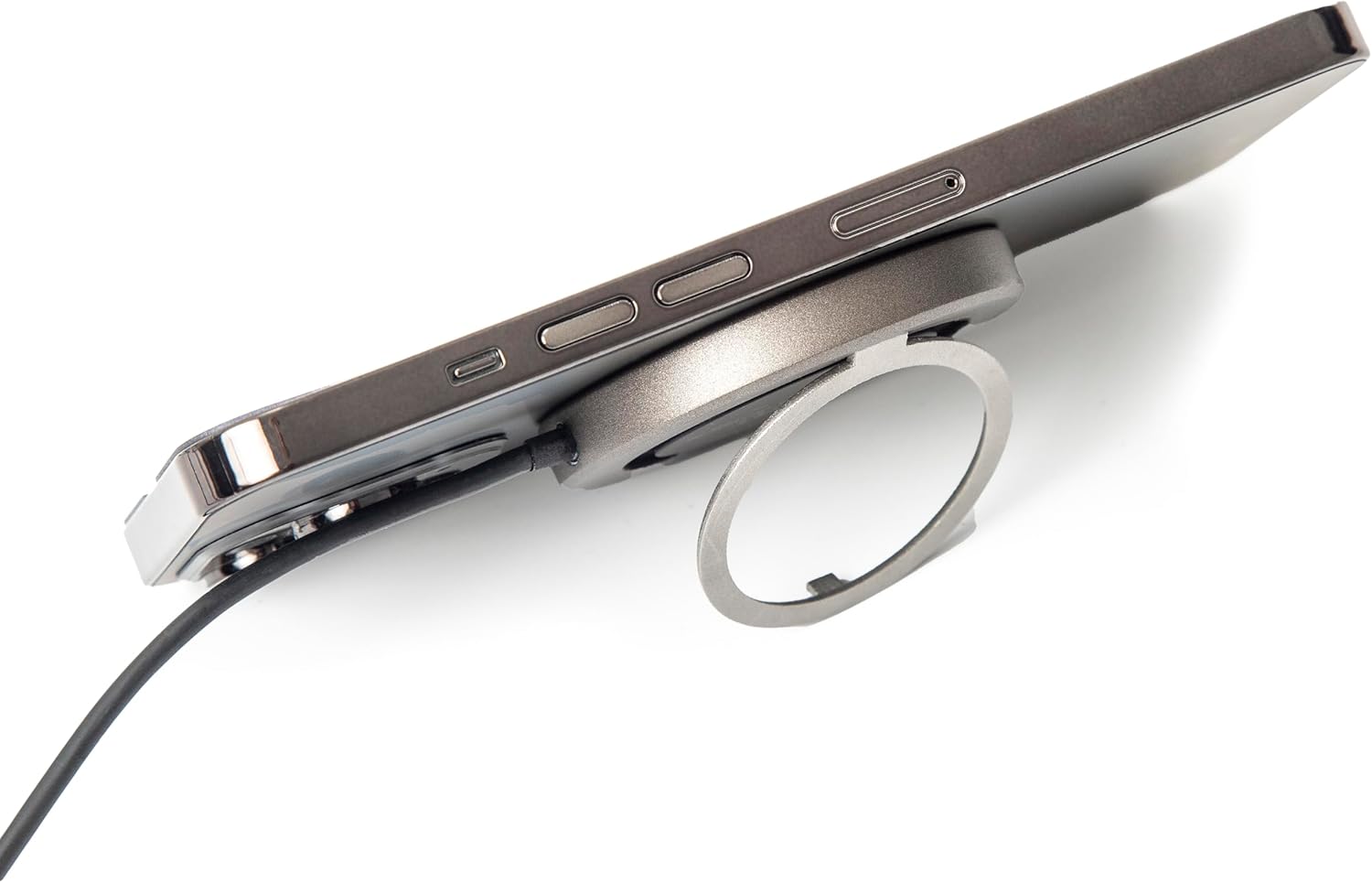
Abbildung 2.2.6: Seite view of the TYLT MagSafe Wireless Charger Ring Stand attached to an iPhone. This image emphasizes the slim profile of the charger when connected to a device, maintaining portability.

Figure 2.2.7: The TYLT MagSafe Wireless Charger Ring Stand with an iPhone attached, positioned on a desk. This image showcases the charger's functionality as a stand for hands-free viewing in a typical usage scenario.
3. Einrichtung
- An die Stromversorgung anschließen: Plug the USB-C connector of the attached 4-foot cable into a compatible USB-C power adapter (not included). For optimal 15W fast charging, use a power adapter that supports Power Delivery (PD) with an output of at least 9V/1.8A or 12V/1.67A.
- Einschalten: Once connected to a power source, the charger is ready for use. There is no power button.
4. Bedienungsanleitung
4.1 Kabelloses Laden
- Align Your Device: Place your MagSafe-compatible iPhone (iPhone 12, 13, 14, or 15 series) onto the black charging surface of the TYLT charger. The charger will magnetically snap into place, ensuring proper alignment for efficient charging.
- Ladeanzeige: Your iPhone's screen will indicate that charging has begun. The charger is designed to work with most MagSafe-compatible phone cases, eliminating the need for case removal.
- Optimales Laden: Ensure no foreign objects (e.g., metal plates, credit cards) are between your phone and the charger, as this can interfere with wireless charging.
4.2 Verwendung des integrierten Ständers
- Klappen Sie den Seitenständer aus: Gently pull out the integrated ring from the back of the charger.
- Anpassen Viewing-Winkel: The ring can rotate and adjust to multiple viewing angles, allowing you to prop up your phone in either portrait or landscape orientation for hands-free viewing of videos, video calls, or other content.
- Klappen Sie den Seitenständer ein: When not in use, fold the ring back into its recess on the charger for a compact and portable form factor.
5. Wartung
- Reinigung: Trennen Sie das Ladegerät vor der Reinigung vom Stromnetz. Wischen Sie die Oberfläche des Ladegeräts mit einem weichen, trockenen und fusselfreien Tuch ab. Verwenden Sie keine scharfen Chemikalien, Lösungsmittel oder aggressive Reinigungsmittel.
- Lagerung: Bewahren Sie das Ladegerät an einem kühlen, trockenen Ort ohne direkte Sonneneinstrahlung und extreme Temperaturen auf.
- Handhabung: Avoid dropping the charger or subjecting it to strong impacts. Do not disassemble the device.
6. Fehlerbehebung
| Problem | Mögliche Ursache | Lösung |
|---|---|---|
| Gerät lädt nicht oder nur langsam. |
|
|
| Kickstand does not hold phone securely. |
|
|
| Das Ladegerät fühlt sich während des Gebrauchs warm an. |
|
|
7. Spezifikationen
| Besonderheit | Detail |
|---|---|
| Modellnummer | 4902Q |
| Eingang | 5V–2A, 9V–1.8A, 12V–1.67A |
| Ausgabe | 15 W (max.) |
| Konnektivitätstechnologie | USB-C (attached cable) |
| Kompatible Geräte | iPhone 12, 13, 14, 15 Series (MagSafe compatible) |
| Technische Daten | 10 x 8 x 1 Zoll |
| Artikelgewicht | 3.17 Unzen |
| Farbe | Schwarz |
8. Sicherheitshinweise
Bitte lesen Sie vor der Verwendung dieses Produkts alle Sicherheitshinweise, um Verletzungen oder Schäden zu vermeiden.
- Do not expose the device to liquids, moisture, or humidity.
- Setzen Sie das Gerät keinen extremen Temperaturen aus.
- Halten Sie das Gerät von starken Magnetfeldern fern.
- Versuchen Sie nicht, das Gerät zu zerlegen, zu reparieren oder zu modifizieren.
- Außerhalb der Reichweite von Kindern aufbewahren.
- Use only with compatible power adapters.
9. Garantie und Support
For information regarding warranty coverage, returns, or technical support, please refer to the original purchase documentation or contact TYLT customer service directly.
Rückgaberecht: This product typically has a 30-day return/replacement policy from the date of purchase. Please check with your retailer for specific details.
Hersteller: TYLT
For further assistance, visit the official TYLT webBesuchen Sie die Website oder kontaktieren Sie deren Supportkanäle.
Ask a question about this manual
Ask about setup, troubleshooting, compatibility, parts, safety, or missing instructions. Manuals+ will review the question and use this page’s manual context to help answer it.