
Einführung
The LivePure LP500 Clean Heat is a versatile 3-in-1 appliance designed to enhance your indoor environment. It functions as an air purifier, a fan, and an electric heater, providing year-round comfort and improved air quality. This manual provides essential information for the safe and efficient operation, maintenance, and troubleshooting of your device.

Image: The LivePure LP500 unit in a room, illustrating its air purification capabilities, cleaning up to 400 sq ft and 28 times per day.

Bild: Überview of the LivePure LP500's key functions, including powerful air purification and heating, multiple heat modes, remote control, and space-saving design.
Hauptmerkmale:
- 3-in-1-Funktionalität: Combines an air purifier, fan, and electric heater.
- Four Fan Speed Options: Low, Medium, High, and Turbo for customized airflow and purification.
- Two Heat Modes: Provides adjustable heat settings for personal comfort.
- Fernbedienung: Passen Sie Einstellungen bequem aus der Ferne an.
- Tragbares Design: Lightweight and easy to move between rooms.
- 2-Stage Filtration: Includes a Coconut Carbon Pre-Filter and a True HEPA Filter.
Wichtige Sicherheitshinweise
Bitte lesen Sie vor der Benutzung dieses Geräts alle Anweisungen sorgfältig durch. Die Nichtbeachtung dieser Anweisungen kann zu Stromschlag, Brand oder schweren Verletzungen führen.
- Schließen Sie das Heizgerät immer direkt an eine Wandsteckdose an. Niemals mit einem Verlängerungskabel oder einem verschiebbaren Stromanschluss (Steckdose/Steckdosenleiste) verwenden.
- Dieses Heizgerät wird im Betrieb heiß. Um Verbrennungen zu vermeiden, berühren Sie die heißen Oberflächen nicht mit bloßer Haut. Benutzen Sie beim Transport des Heizgeräts die Griffe.
- Halten Sie brennbare Materialien wie Möbel, Kissen, Bettzeug, Papiere, Kleidung und Vorhänge mindestens 3 m von der Vorderseite des Heizgeräts und auch von den Seiten und der Rückseite fern.
- Bei der Verwendung eines Heizgeräts durch oder in der Nähe von Kindern oder behinderten Personen sowie immer dann, wenn das Heizgerät in Betrieb und unbeaufsichtigt bleibt, ist äußerste Vorsicht geboten.
- Betreiben Sie kein Heizgerät mit beschädigtem Kabel oder Stecker oder nachdem das Heizgerät nicht richtig funktioniert, fallen gelassen oder in irgendeiner Weise beschädigt wurde. Heizgerät entsorgen oder zur Überprüfung und/oder Reparatur an eine autorisierte Serviceeinrichtung zurücksenden.
- Nicht im Freien verwenden.
- Um die Heizung zu trennen, stellen Sie die Bedienelemente auf AUS und ziehen Sie dann den Stecker aus der Steckdose.
- Führen Sie keine Fremdkörper in die Belüftungs- oder Abluftöffnungen ein und lassen Sie nicht zu, dass diese in diese eindringen. Dies kann zu einem Stromschlag oder Brand führen oder das Heizgerät beschädigen.
- Um einen möglichen Brand zu verhindern, blockieren Sie Lufteinlässe oder -auslässe in keiner Weise. Verwenden Sie das Gerät nicht auf weichen Oberflächen wie einem Bett, wo Öffnungen blockiert werden könnten.
- This heater has an automatic tip-over safety switch that shuts off the unit if it is knocked over.
- Ziehen Sie bei Nichtgebrauch immer den Stecker aus der Steckdose.
Aufstellen
- Auspacken: Nehmen Sie das Gerät vorsichtig aus der Verpackung. Bewahren Sie die Verpackung für die spätere Lagerung oder den Transport auf.
- Platzierung: Place the unit on a firm, level surface. Ensure there is at least 3 feet (0.9 m) of clear space around the unit to allow for proper airflow and to prevent fire hazards. Do not place it near curtains or other combustible materials.
- Stromanschluss: Plug the power cord directly into a standard 120V AC electrical outlet. Do not use extension cords or power strips.
- Erste Verwendung: For optimal air purification, ensure the filters are correctly installed before first use.

Image: Room Size Chart indicating air exchange rates per hour for different room dimensions (e.g., Bedroom, Kitchen, Living Room, Bathroom).
Bedienungsanleitung
The LivePure LP500 can be operated using the control panel on the unit or the included remote control.

Image: Diagram of the LivePure LP500 control panel, highlighting buttons for On/Off, Fan Speed & Sleep Mode, Heating Mode, Accent Light, Timer, Rotation Mode, and Filter Indicator Light.
Funktionen des Bedienfelds und der Fernbedienung:
- Ein-/Ausschalten: Drücken Sie, um das Gerät ein- oder auszuschalten.
- Fan Speed & Sleep Mode: Cycle through Low, Medium, High, and Turbo fan speeds. Press and hold for Sleep Mode, which operates at a low fan speed with reduced display brightness.
- Heizbetrieb: Select between Low Heat, High Heat, or Auto Heat modes. The unit will maintain a set temperature in Auto Heat mode.
- Akzentlicht: Turn the ambient accent light on or off.
- Timer: Set an operating timer for automatic shut-off (e.g., 1, 2, 4, 8 hours).
- Rotationsmodus: Activate or deactivate the oscillation feature for wider heat/air distribution.
- Filteranzeigeleuchte: Illuminates when it's time to check or replace the air filter.
Verwenden der Fernbedienung:
The remote control provides access to all functions available on the main control panel. Ensure the remote has working batteries and is pointed towards the unit's receiver.
Wartung
Regular maintenance ensures optimal performance and extends the lifespan of your LivePure LP500.
Filtersystem:
The unit utilizes a 2-stagDas Filtersystem:

Image: Diagram illustrating the two stages of filtration: Coconut Carbon Pre-Filter and True HEPA Filter, with descriptions of what each filter captures.
- Coconut Carbon Pre-Filter: Captures large particles like dust, pet dander, and pollen. It also helps reduce odors from cooking, smoking, and pets.
- H13 Echter HEPA-Filter: Removes up to 99.97% of airborne particles as small as 0.3 microns, including smoke, dust, pollen, pet hair, dander, mold spores, and dust mites.
Filterwechsel:
- When the Filter Indicator Light illuminates, it's time to check or replace the filter.
- Ziehen Sie den Stecker aus der Steckdose.
- Locate the filter compartment (usually at the base of the unit).
- Nehmen Sie den alten Filter heraus. Entsorgen Sie ihn fachgerecht.
- Setzen Sie den neuen Filter ein und achten Sie darauf, dass er richtig sitzt.
- Schließen Sie das Filterfach.
- Plug the unit back in. Reset the filter indicator by pressing and holding the Filter button (if available) or following specific instructions in the full manual.
Note: Filter lifespan varies based on usage and air quality. Replace filters as needed to maintain purification efficiency.
Reinigung des Geräts:
- Ziehen Sie vor der Reinigung immer den Stecker aus der Steckdose.
- Wischen Sie die Außenflächen mit einem weichen, damp Tuch. Keine Scheuer- oder Lösungsmittel verwenden.
- Es ist sicherzustellen, dass kein Wasser in die internen Bauteile eindringt.
- Clean the air intake and exhaust vents with a soft brush or vacuum cleaner attachment to remove dust buildup.
Fehlerbehebung
If you encounter issues with your LivePure LP500, refer to the following common problems and solutions:
| Problem | Mögliche Ursache | Lösung |
|---|---|---|
| Gerät lässt sich nicht einschalten. | Not plugged in; power outlet malfunction; tip-over switch activated. | Ensure unit is securely plugged into a working outlet. Check household breaker. Ensure unit is on a flat, stable surface. |
| Keine Heizleistung. | Heat mode not selected; thermostat setting too low; safety overheat protection activated. | Select a heat mode (Low/High). Increase desired temperature. Unplug unit, wait 10 minutes, then plug back in. |
| Air purification seems ineffective. | Dirty or clogged filter; incorrect fan speed. | Check and replace the air filter if the indicator light is on. Increase fan speed. |
| Das Gerät macht ungewöhnliche Geräusche. | Obstruction in fan; unit not on a level surface; internal component issue. | Unplug and check for obstructions. Ensure unit is on a stable surface. If noise persists, contact customer support. |
| Fernbedienung funktioniert nicht. | Leere Batterien; Blockade zwischen Fernbedienung und Gerät. | Replace remote control batteries. Ensure a clear line of sight to the unit's sensor. |
Technische Daten
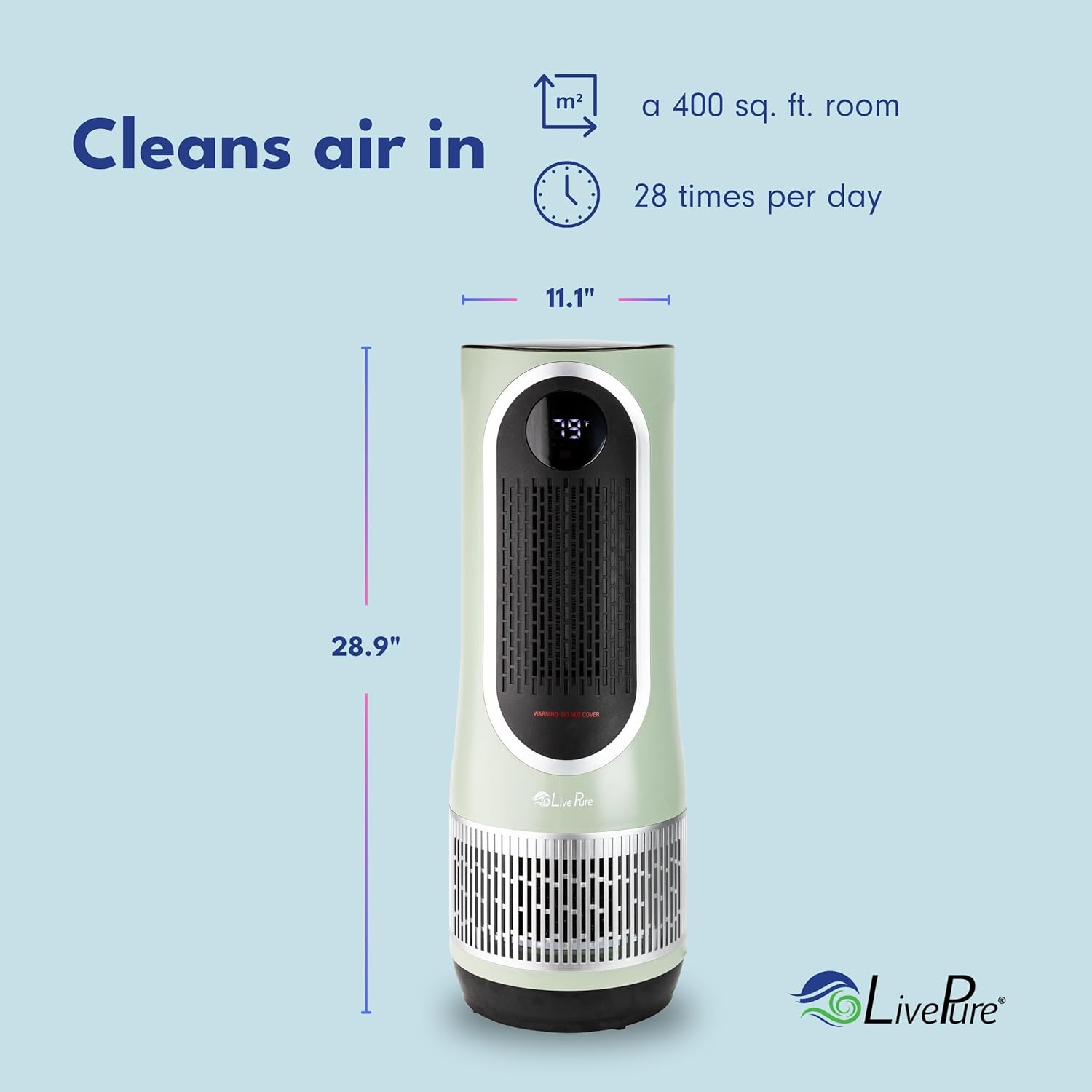
Image: Diagram showing the dimensions of the LivePure LP500 unit: 11.1 inches wide and 28.9 inches high.
| Besonderheit | Detail |
|---|---|
| Modellnummer | LP500APHTR |
| Technische Daten | 8.38"T x 8.38"B x 24.5"H (21.3 cm T x 21.3 cm B x 62.2 cm H) |
| Artikelgewicht | 9.4 Pfund (4.26 kg) |
| Stromquelle | Kabelgebundener Elektrisch (120 V AC) |
| Marke | LivePure |
| Filtertyp | 2-Stage (Coconut Carbon Pre-Filter, H13 True HEPA Filter) |
| Abdeckungsbereich | Bis zu 400 m² |
Produktvideos
Watch these official videos for more information on your LivePure LP500 Clean Heat Air Purifier & Electric Heater.
LivePure LP500 Overview (3:45)
Video: Ein umfassender Überblickview of the LivePure LP500 Clean Heat Air Purifier and Electric Heater, demonstrating its features and benefits.
Quick Features Guide (0:35)
Video: A short guide highlighting the key features of the LivePure LP500, including its 3-in-1 functionality and controls.
Detailed Product Walkthrough (1:29)
Video: A detailed walkthrough of the LivePure LP500, explaining its various modes and settings.
LivePure Product Demonstration (3:54)
Video: A demonstration of the LivePure LP500 in action, showcasing its air purification and heating capabilities.
Features and Benefits (2:39)
Video: An explanation of the various features and benefits of the LivePure LP500, including its filtration system and heating functions.
Product Showcase (2:27)
Video: A showcase of the LivePure LP500, highlighting its design and functionality.
Vertical Product Overview (1:19)
Video: A vertical format overview of the LivePure LP500, suitable for mobile viewing, detailing its features.
In-depth Look (2:37)
Video: An in-depth look at the LivePure LP500, covering its design, controls, and performance.
Quick Start Guide (1:04)
Video: A quick start guide for setting up and beginning to use the LivePure LP500.
Full Product Review (4:29)
Video: Eine umfassende Review of the LivePure LP500, covering all aspects of its performance and design.
Garantie und Support
LivePure products are designed for reliability and performance. For warranty information, product registration, or technical support, please refer to the contact information provided with your purchase or visit the official LivePure webWebsite.
Es wird empfohlen, den Kaufbeleg als Kaufnachweis für Garantieansprüche aufzubewahren.
Kontaktinformationen: Please refer to the documentation included in your product packaging or visit the LivePure Store on Amazon für Unterstützungsressourcen.