
OQIMAX CP212-Vitt
OQIMAX Bluetooth 5.0/5.3 Transmitter Receiver 2-in-1 Audio Adapter
Model: CP212-Vitt
Einführung
The OQIMAX Bluetooth 5.0/5.3 Transmitter Receiver is a versatile 2-in-1 audio adapter designed to enhance your audio experience. It allows you to wirelessly transmit audio from non-Bluetooth devices or receive audio on non-Bluetooth devices, offering flexibility for various home and car audio setups. Featuring Bluetooth 5.3 technology and CVC noise reduction, it ensures stable connections and clear sound quality.
This adapter supports both Transmitter (TX) and Receiver (RX) modes, making it compatible with a wide range of devices such as TVs, PCs, MP3/MP4 players, car audio systems, speakers, and headphones. Its compact design and long battery life provide convenience for both stationary and portable use.
Produkt überview
Familiarize yourself with the components and controls of your OQIMAX Bluetooth Audio Adapter.

Bild: Detailed diagram of the OQIMAX Bluetooth adapter, highlighting its key features: the 3.5mm Audio Port, Type-C Charging Port, RX/TX mode switch, Multi-function Button, and the Connection Indicator Light with its different states (Pairing State - Red/Blue flash, Low Battery Warning - Red flash, Connected - Blue/Red solid).
- 3.5-mm-Audioanschluss: For connecting to audio sources or output devices using the included AUX cable.
- Typ-C-Ladeanschluss: For charging the device using the provided Micro USB cable.
- RX/TX-Schalter: Toggles between Receiver (RX) and Transmitter (TX) modes.
- Multifunktionstaste: Used for powering on/off, pairing, answering/ending calls, and playing/pausing music.
- Connection Indicator Light: Displays the device's status:
- Blue Light (fast flashing): Ready for pairing in RX mode.
- Red Light (fast flashing): Ready for pairing in TX mode.
- Blue Light (solid): Connected in RX mode.
- Red Light (solid): Connected in TX mode.
- Red Light (flashing slowly): Warnung bei niedrigem Batteriestand.

Bild: The OQIMAX Bluetooth adapter package contents, showing the white adapter unit, a 3.5mm audio cable, and a USB charging cable.
Packungsinhalt:
- OQIMAX Bluetooth 5.0/5.3 Transmitter Receiver
- 3.5-mm-Audiokabel
- Micro-USB-Ladekabel
- Bedienungsanleitung
Einrichten und Aufladen
Erstladung
Bitte laden Sie das Gerät vor der ersten Benutzung vollständig auf.
- Connect the provided Micro USB charging cable to the Type-C Charging Port on the adapter.
- Verbinden Sie das andere Ende des USB-Kabels mit einem Standard-USB-Netzteil (nicht im Lieferumfang enthalten) oder einem USB-Anschluss Ihres Computers.
- The indicator light will show charging status (specific color/behavior not detailed in source, assume it indicates charging).
- Eine vollständige Aufladung dauert in der Regel etwa 2 Stunden.

Bild: The OQIMAX Bluetooth adapter next to a battery icon, illustrating its battery life: up to 8 hours for music playback and 2 hours for a full charge.
Notiz: It is not recommended to use the device while charging, as this may introduce current noise.
Bedienungsanleitung
Modi wechseln
The device features a physical switch to select between Receiver (RX) and Transmitter (TX) modes. Always shut down the device before switching modes.

Bild: An illustration demonstrating the ease of operation, showing the RX/TX switch on the OQIMAX Bluetooth adapter. The top panel shows TX mode used with a TV and headphones, while the bottom panel shows RX mode used with a smartphone and wired headphones.
Empfängermodus (RX)
In RX mode, the adapter receives Bluetooth audio from your smartphone or other Bluetooth-enabled devices and outputs it to non-Bluetooth audio equipment like wired headphones, car audio systems, or home speakers.
- Stellen Sie sicher, dass das Gerät aufgeladen ist.
- Connect the OQIMAX adapter (B-10S) to your non-Bluetooth audio device (e.g., headphones, car AUX input, speaker) using the 3.5mm audio cable.
- Slide the mode switch to the RX Position.
- Press and hold the Multi-function Button to power on the device. The blue indicator light will flash rapidly, indicating it is in pairing mode.
- On your Bluetooth-enabled device (e.g., smartphone), search for Bluetooth devices and select "B-10S" to pair.
- Once connected, the blue indicator light will become solid. You can now stream audio wirelessly to your connected non-Bluetooth device.
- To answer/end calls or play/pause music, press the Multi-function Button.

Bild: The OQIMAX Bluetooth adapter in Receiver (RX) mode, wirelessly connected to a smartphone and outputting audio to a speaker, demonstrating its use in a home setting.
Sendermodus (TX)
In TX mode, the adapter transmits audio from non-Bluetooth devices (like TVs or PCs) to Bluetooth-enabled headphones or speakers.
- Stellen Sie sicher, dass das Gerät aufgeladen ist.
- Connect the OQIMAX adapter (B-10S) to your non-Bluetooth audio source (e.g., TV, PC, CD player) using the 3.5mm audio cable.
- Slide the mode switch to the TX Position.
- Press and hold the Multi-function Button to power on the device. The red indicator light will flash rapidly, indicating it is in pairing mode.
- Versetzen Sie Ihre Bluetooth-Kopfhörer oder Ihren Lautsprecher in den Kopplungsmodus.
- The OQIMAX adapter will automatically search for and connect to nearby Bluetooth receiving devices.
- Once connected, the red indicator light will become solid. Audio from your non-Bluetooth source will now be transmitted wirelessly to your Bluetooth headphones/speaker.
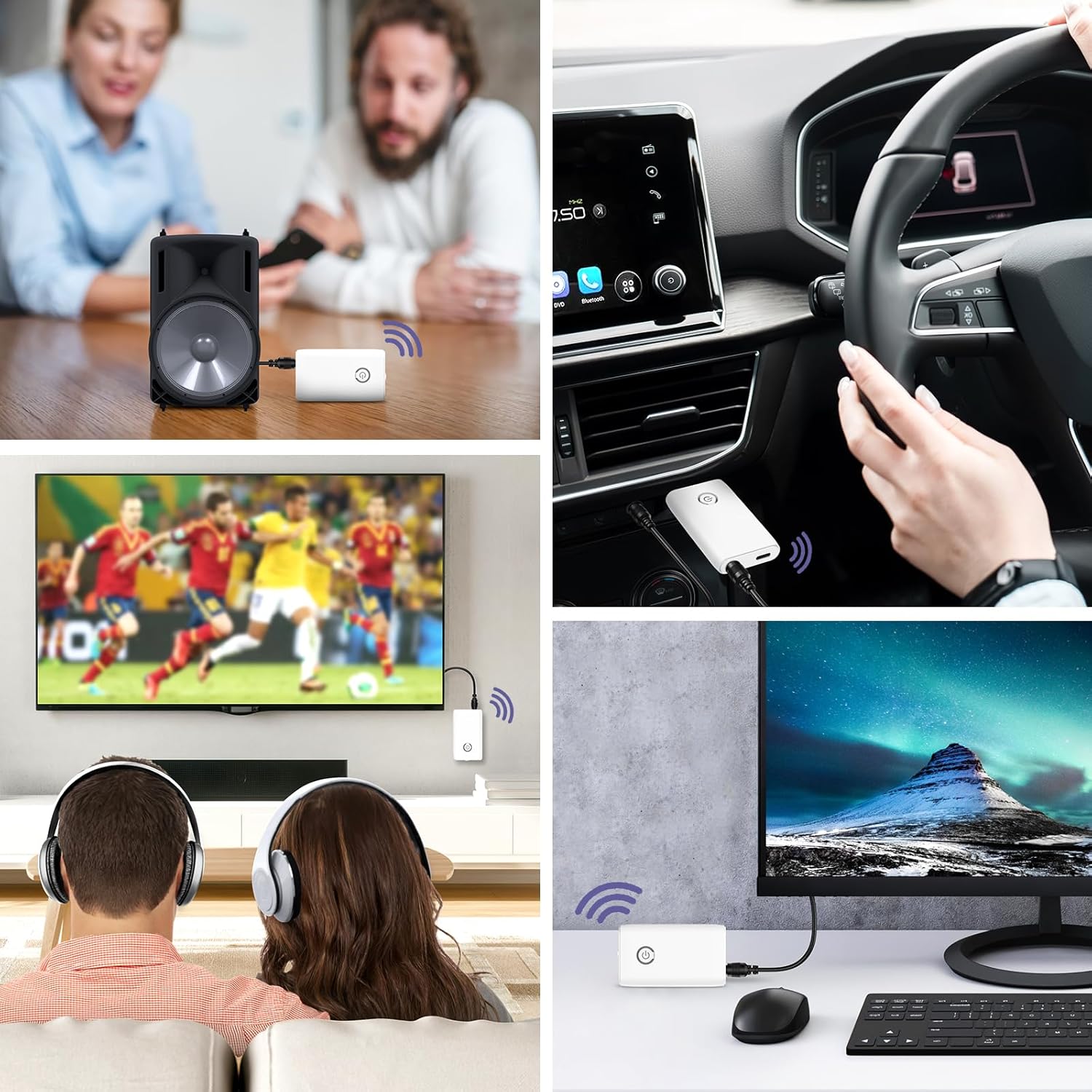
Bild: A collage of usage scenarios for the OQIMAX Bluetooth adapter. It shows the adapter transmitting audio from a TV to headphones, from a PC to headphones, and receiving audio from a phone to a car audio system or a portable speaker.
Wartung
- Halten Sie das Gerät trocken. Feuchtigkeit kann elektronische Schaltkreise beschädigen.
- Setzen Sie das Gerät keinen extremen Temperaturen aus. Hohe Temperaturen können die Lebensdauer elektronischer Geräte verkürzen, Akkus beschädigen und bestimmte Kunststoffe verformen oder schmelzen.
- Verwenden Sie zur Reinigung des Geräts keine scharfen Chemikalien, Lösungsmittel oder starke Reinigungsmittel. Wischen Sie es mit einem weichen, leicht feuchten Tuch ab.amp Tuch.
- Vermeiden Sie es, das Gerät fallen zu lassen, anzustoßen oder zu schütteln. Unsachgemäße Behandlung kann die internen Schaltkreise und die Feinmechanik beschädigen.
Fehlerbehebung
| Problem | Mögliche Ursache | Lösung |
|---|---|---|
| Gerät lässt sich nicht einschalten. | Schwache Batterie. | Laden Sie das Gerät vollständig auf. |
| Cannot pair with another device. | Falscher Modus ausgewählt (TX/RX). Gerät nicht im Kopplungsmodus. Other device not in pairing mode. Too far from the other device. | Ensure the correct mode is selected and the device is powered off before switching. Press and hold the Multi-function Button until the indicator light flashes rapidly. Ensure the target Bluetooth device is also in pairing mode. Move devices closer (within 10 meters). |
| Kein Ton oder schlechte Tonqualität. | Falsche Kabelverbindung. Lautstärke zu gering. Interferenz. Nutzung während des Ladevorgangs. | Check that the 3.5mm audio cable is securely connected to both the adapter and the audio device. Stellen Sie die Lautstärke sowohl am Adapter als auch am angeschlossenen Audiogerät ein. Halten Sie Abstand zu anderen drahtlosen Geräten oder Störquellen. Avoid using the device while it is charging to prevent current noise. |
| Die Verbindung bricht häufig ab. | Entfernung zu groß. Hindernisse. Schwache Batterie. | Verringern Sie den Abstand zwischen dem Adapter und dem angeschlossenen Gerät. Ensure there are no major obstructions (walls, large metal objects) between devices. Laden Sie das Gerät auf. |
Technische Daten
| Marke | OQIMAX |
| Modellnummer | CP212-Vitt |
| Bluetooth-Version | 5.3 |
| Konnektivitätstechnologie | Bluetooth, AUX (3.5mm), USB (for charging) |
| Besondere Merkmale | Hands-free calling, CVC Noise Reduction, Low Latency, 2-in-1 Transmitter/Receiver |
| Kompatible Geräte | Headphones, Speakers, Computers, Radios, Car Stereo Systems, Televisions |
| Stromquelle | Batteriebetrieben (wiederaufladbar) |
| Batteriekapazität | 250 mAh |
| Play Time (Receiver Mode) | Bis zu 8 Stunden |
| Play Time (Transmitter Mode) | Bis zu 6 Stunden |
| Ladezeit | Ungefähr 2 Stunden |
| Bluetooth-Reichweite | Bis zu 10 Meter (33 Fuß) |
| Technische Daten | 6.4L x 3.7B x 1.2H Zentimeter |
| Artikelgewicht | 11 Gramm |
| Farbe | Weiß |
Sicherheitswarnungen
Please adhere to the following safety guidelines for battery use:
- Do not expose the battery to high heat or open flames.
- Werfen Sie die Batterie nicht ins Feuer.
- Recycle or dispose of the battery according to local regulations.
- Außerhalb der Reichweite von Kindern aufbewahren.
Garantie und Support
For warranty information and technical support, please refer to the contact details provided with your purchase or visit the official OQIMAX webWebsite.
Kundendienst: Please contact your retailer or OQIMAX customer support for assistance.
Ask a question about this manual
Ask about setup, troubleshooting, compatibility, parts, safety, or missing instructions. Manuals+ will review the question and use this page’s manual context to help answer it.