
JMT 007
JMT M.2 RGB SSD Enclosure
Modell: 007 - Bedienungsanleitung
1. Einleitung
Thank you for choosing the JMT M.2 RGB SSD Enclosure, Model 007. This enclosure is designed to provide a high-speed, portable storage solution for your M.2 NVMe and SATA SSDs. It supports both M-Key and B+M Key SSDs in the 2280 form factor, offering versatile compatibility for your storage needs.
The Model 007 features a robust all-aluminum design for optimal heat dissipation and durability. It utilizes a Master Control 9210B chip, enabling dual-protocol support for NVMe (up to 10Gbps) and SATA (up to 6Gbps) drives via a USB 3.2 interface. This model does not include a touch screen.

Abbildung 1: Vorderseite view of the JMT M.2 RGB SSD Enclosure (Model 007), showcasing its sleek design and integrated RGB light bar.
2. Einrichtung und Installation
This section guides you through the process of installing your M.2 SSD into the enclosure and connecting it to your device.
2.1. SSD-Installation
- Bereiten Sie das Gehäuse vor: Gently slide open the enclosure cover. The Model 007 typically has a sliding mechanism or screws to access the internal PCB.
- Setzen Sie die SSD ein: Align your M.2 2280 NVMe or SATA SSD with the M-Key or B+M Key slot on the enclosure's circuit board. Insert the SSD firmly but carefully into the slot at an angle.
- SSD sichern: Once inserted, gently push down the SSD until it is flat against the PCB. Secure it with the provided screw or rubber fastener at the end of the SSD.
- Schließen Sie das Gehäuse: Slide the cover back onto the enclosure until it clicks into place or secure it with the screws. Ensure it is fully closed to protect the internal components.
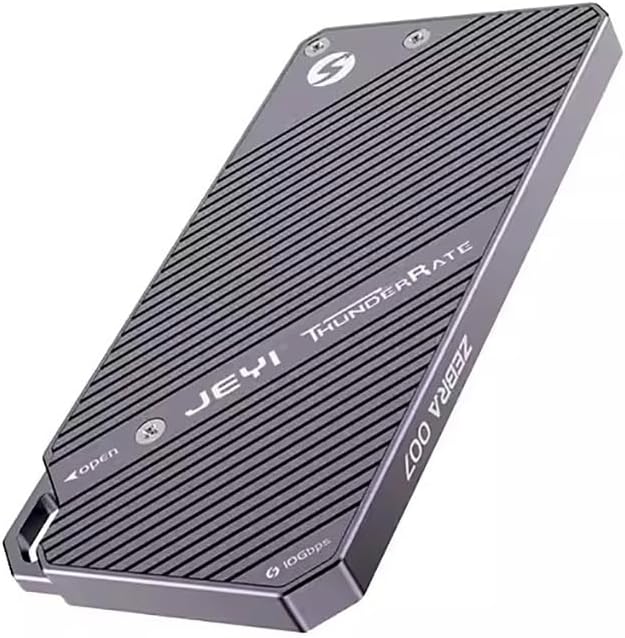
Abbildung 2: Rückseite view of the enclosure, indicating the access points for SSD installation. Note the "JEYI ThunderRate ZEBRA 007" branding.
2.2. Verbindung mit Ihrem Gerät herstellen
- USB-Kabel anschließen: Use the provided USB-C to USB-C or USB-C to USB-A cable to connect the enclosure's USB-C port to a compatible USB port on your computer or device.
- Geräteerkennung: Your operating system should automatically detect the new storage device. For new SSDs, you may need to initialize and format the drive through Disk Management (Windows) or Disk Utility (macOS) before it appears as a usable drive.

Abbildung 3: Seite view of the enclosure, highlighting the USB-C port for connection and the "10Gbps" speed indicator.
3. Bedienungsanleitung
Once connected, the JMT M.2 RGB SSD Enclosure functions as an external storage device. You can drag and drop files, or use it for backups and other data management tasks.
3.1. Datenübermittlung
- Hochgeschwindigkeitsleistung: The enclosure supports USB 3.2, providing data transfer speeds of up to 10Gbps with NVMe drives and up to 6Gbps with SATA drives. Ensure your computer's USB port also supports USB 3.2 (or higher) for optimal performance.
- RGB-Anzeige: The integrated RGB light bar indicates activity and status. Its dynamic lighting provides visual feedback during operation.

Figure 4: The enclosure with its RGB light bar illuminated, indicating operational status.
3.2. Read and Write Protection
The enclosure supports read and write protection features to safeguard your data. Consult your operating system's disk management tools for options to enable or disable write protection for the drive, if applicable. This feature helps prevent accidental data deletion or modification.
4. Wartung
Proper maintenance ensures the longevity and optimal performance of your SSD enclosure.
- Reinigung: Use a soft, dry cloth to wipe the exterior of the enclosure. Avoid using liquid cleaners or abrasive materials.
- Wärmeableitung: The all-aluminum design is optimized for heat dissipation. Ensure the enclosure is placed in a well-ventilated area during prolonged use to prevent overheating, especially during large data transfers.
- Lagerung: Wenn das Gehäuse nicht in Gebrauch ist, lagern Sie es an einem kühlen, trockenen Ort, geschützt vor direkter Sonneneinstrahlung und extremen Temperaturen.
- Sicherer Ausstieg: Always safely eject the enclosure from your operating system before disconnecting the USB cable to prevent data corruption.
5. Fehlerbehebung
If you encounter issues with your JMT M.2 RGB SSD Enclosure, refer to the following common troubleshooting steps:
- Gehäuse nicht erkannt:
- Ensure the USB cable is securely connected to both the enclosure and your computer.
- Probieren Sie einen anderen USB-Anschluss an Ihrem Computer aus.
- Testen Sie es mit einem anderen USB-Kabel.
- Verify that the M.2 SSD is correctly seated and secured within the enclosure.
- Check Disk Management (Windows) or Disk Utility (macOS) to see if the drive is detected but uninitialized/unformatted.
- Langsame Übertragungsgeschwindigkeiten:
- Ensure you are using a USB 3.0/3.1/3.2 port on your computer. Connecting to a USB 2.0 port will result in significantly slower speeds.
- Verify the type of SSD installed (NVMe drives are faster than SATA drives).
- Prüfen Sie, ob Hintergrundprozesse Systemressourcen oder Festplatten-E/A verbrauchen.
- Ensure the enclosure is not overheating during large transfers.
- RGB Light Not Illuminating:
- Stellen Sie sicher, dass das Gehäuse ordnungsgemäß an einen USB-Anschluss mit Stromversorgung angeschlossen ist.
- If the drive is detected and functioning, the light issue might be minor and not affect functionality.
Sollten die Probleme weiterhin bestehen, konsultieren Sie bitte die Supportinformationen in Abschnitt 7.
6. Spezifikationen
| Besonderheit | Detail |
|---|---|
| Modell | 007 |
| Master-Control-Chip | Nr. 9210B |
| Unterstützte SSD-Typen | M.2 NVMe / SATA (2280 form factor only) |
| Unterstützte Tasten | M-Key, B+M Key |
| Schnittstelle | USB 3.2 Typ C |
| NVMe Transfer Speed | Bis zu 10 Gbit/s |
| SATA Transfer Speed | Bis zu 6 Gbit/s |
| Material | Aluminium |
| Besonderheit | RGB Light Bar, Read/Write Protection |
| Anzeige | None (Model 007) |
7. Garantie und Support
JMT products are designed for reliability and performance. For specific warranty details, please refer to the documentation included with your purchase or visit the official JMT webWebsite.
For technical support, troubleshooting assistance, or inquiries regarding your JMT M.2 RGB SSD Enclosure, please contact JMT customer service. You can often find contact information on the official JMT brand store or product packaging.
JMT Brand Store: Visit the JMT Store on Amazon