
1. Einleitung
The Sonoro MeisterSTÜCK Compact System (Gen.2) is an advanced all-in-one audio system designed for high-fidelity sound and versatile connectivity. This manual provides essential information for setting up, operating, and maintaining your device, ensuring optimal performance and longevity.

Abbildung 1: Vorderseite view of the Sonoro MeisterSTÜCK Compact System (Gen.2).
2. Einrichtung
2.1 Auspacken und Aufstellen
- Alle Komponenten vorsichtig aus der Verpackung entnehmen. Die Verpackung für späteren Transport oder Service aufbewahren.
- Place the MeisterSTÜCK on a stable, level surface, ensuring adequate ventilation around the unit. Avoid direct sunlight, heat sources, and excessive moisture.
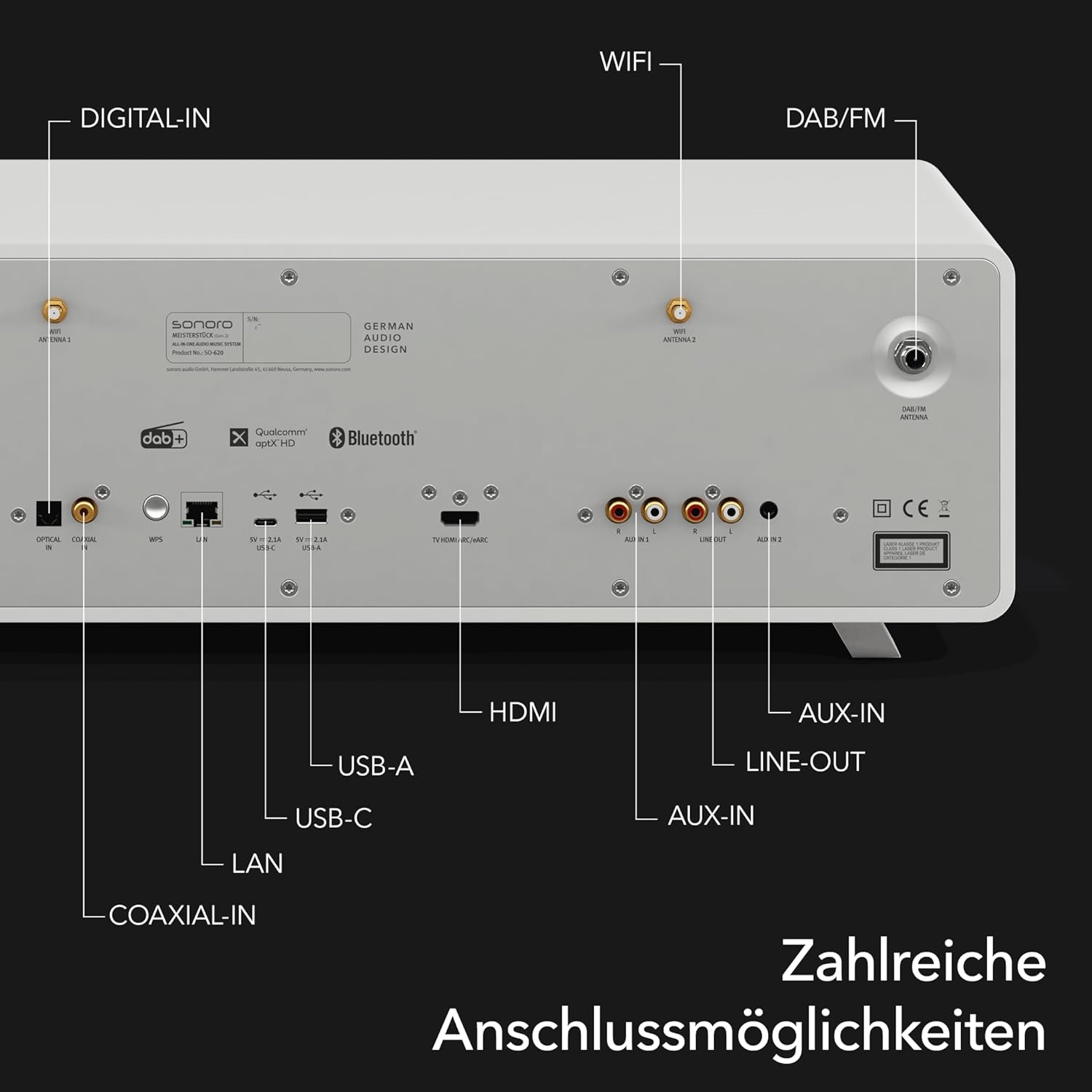
Abbildung 2: Bspample placement of the Sonoro MeisterSTÜCK in a home environment.
2.2 Stromanschluss
- Connect the power cable to the AC IN port on the rear of the unit, then plug it into a suitable wall outlet.
2.3 Ersteinrichtung
- Upon first power-on, the system will guide you through initial setup steps, including language selection and network configuration (Wi-Fi).
- For optimal sound, utilize the dedicated room correction application to calibrate the audio output to your specific room acoustics.
3. Bedienungsanleitung
3.1 Grundlegende Bedienelemente
- Ein-/Ausschalten: Drücken Sie den Netzschalter an der Vorderseite oder an der Fernbedienung.
- Lautstärkeregelung: Use the rotary knob on the front panel or the volume buttons on the remote control.
- Quellenauswahl: Press the 'Source' button on the front panel or remote to cycle through available inputs (CD, FM, DAB+, Internet Radio, Bluetooth, Aux, Optical, HDMI).
3.2 Bedienung des CD-Players
- Insert a CD into the slot on the front panel. The system will automatically detect and begin playback.
- Use the Play/Pause, Skip Forward, and Skip Backward buttons on the front panel or remote for control.
- To eject a CD, press the Eject button.
3.3 Radio (FM/DAB+/Internet Radio)
- Select FM, DAB+, or Internet Radio as the source.
- Use the navigation controls to browse stations. For Internet Radio, you can search by genre, location, or name.
- Speichern Sie Ihre Lieblingssender als Voreinstellungen für den Schnellzugriff.
3.4 Wireless Streaming (Bluetooth, AirPlay, Google Cast, Spotify Connect)
- Bluetooth: Select Bluetooth as the source. On your mobile device, search for 'Sonoro MeisterSTÜCK' in Bluetooth settings and pair. The system supports bidirectional Bluetooth for connecting headphones or external speakers.
- AirPlay/Google Cast: Ensure your device and the MeisterSTÜCK are on the same Wi-Fi network. Select the MeisterSTÜCK from the AirPlay or Google Cast options in your streaming application.
- Spotify Connect: Open the Spotify app on your device, play music, and select the MeisterSTÜCK as the playback device.
3.5-Fernbedienung

Figure 3: The included remote control for the Sonoro MeisterSTÜCK.
The remote control provides full functionality for the MeisterSTÜCK, including power, volume, source selection, playback controls, and menu navigation. Ensure the included AAA batteries are correctly inserted.
4. Verbindungen
The MeisterSTÜCK offers a wide array of connectivity options on its rear panel to integrate with various audio and video devices.

Abbildung 4: Ausführlich view der rückseitigen Anschlussleiste.
- HDMI (eARC): Connect to a compatible TV for enhanced audio return channel functionality.
- USB-A: Zur Medienwiedergabe von USB-Speichergeräten.
- USB-C: Supports both charging external devices and media playback.
- Optischer Digitaleingang: Connect digital audio sources such as TVs or game consoles.
- Auxiliary Input (3.5mm & RCA): Connect analog audio sources like MP3 players or older audio equipment.
- LAN (Ethernet): Für eine stabile kabelgebundene Netzwerkverbindung.
- DAB/FM-Antenne: Connect the included antennas for digital and analog radio reception.
- Line Out: Zum Anschluss an externe Geräte ampVerstärker oder Aufnahmegeräte.
5. Wartung
5.1 Reinigung
- Wischen Sie das Gerät mit einem weichen, trockenen Tuch ab. Verwenden Sie keine Scheuermittel, Wachse oder Lösungsmittel.
- Stellen Sie sicher, dass das Gerät vor der Reinigung vom Stromnetz getrennt ist.
5.2 Softwareaktualisierungen
- Periodically check for software updates through the system's menu or the Sonoro app to ensure optimal performance and access to new features.
6. Fehlerbehebung
- Kein Strom: Check if the power cable is securely connected to both the unit and the wall outlet. Ensure the outlet is functional.
- Kein Ton: Verify the volume level is not muted or too low. Check source selection and ensure external devices are properly connected and powered on.
- Verbindungsprobleme: For Wi-Fi, ensure the unit is within range of your router. For Bluetooth, ensure the device is in pairing mode and within range.
- CD-Wiedergabefehler: Ensure the CD is clean and free of scratches. Try a different CD.
If problems persist, consult the Sonoro support webBesuchen Sie unsere Website oder kontaktieren Sie unseren Kundenservice für weitere Unterstützung.
7. Spezifikationen
| Besonderheit | Spezifikation |
|---|---|
| Marke | Sonoro |
| Modellnummer | SO-6200-100 |
| Farbe | Mattweiß |
| Konnektivitätstechnologie | Auxiliary, Bluetooth, USB, Wi-Fi, LAN |
| Kompatible Geräte | Personal computer, smartphone, television, MP3 player, tablet |
| Lautsprechertyp | Stereo with integrated subwoofer |
| Leistungsabgabe | 30 Watt (RMS) |
| Stromquelle | Kabelgebundene Elektrik |
| Unterstützte Standards | Bluetooth, AirPlay, Chromecast, USB, Auxiliary |
| Bluetooth-kompatibel | Yes (Bidirectional) |
| Unterstützte Audioformate | CD-DA, MP3, AAC |
| Batterie (Fernbedienung) | 2 AAA (enthalten) |
| Hersteller | Sonoro Audio GmbH |
8. Garantie und Support
The Sonoro MeisterSTÜCK Compact System (Gen.2) comes with a manufacturer's warranty. Please refer to the warranty card included with your product or visit the official Sonoro webAuf der Webseite finden Sie die detaillierten Garantiebedingungen.
For technical support, spare parts, or service inquiries, please contact Sonoro customer support through their official channels. Information regarding software updates and product registration can also be found on their webWebsite.