
IPRO IPRO P1
IPRO P1 GSM 2G Mobiltelefon Benutzerhandbuch
Model: IPRO P1
Einführung
This manual provides comprehensive instructions for the IPRO P1 GSM 2G Mobile Phone. Designed for ease of use, particularly for seniors, this phone features large buttons, a clear display, and essential functions. Please read this manual carefully before using your device to ensure proper operation and maintenance.
Lieferumfang
Bitte überprüfen Sie nach dem Auspacken, ob alle folgenden Artikel enthalten sind:
- 1 x IPRO P1 Mobile Phone
- 1 x Micro-USB Charger
- 1 x Batterie
- 1 x Benutzerhandbuch
Aufstellen
1. Einlegen der SIM-Karte und des Akkus
- Entfernen Sie vorsichtig die Rückseite des Telefons.
- Insert your 2G GSM SIM card(s) into the designated SIM card slot(s). This phone supports Dual SIM.
- Insert the battery into the battery compartment, ensuring the gold contacts align with the phone's terminals.
- Bringen Sie die Rückseite wieder an, bis sie sicher einrastet.
2. Laden des Akkus
Vor der ersten Benutzung muss der Akku des Telefons vollständig aufgeladen werden.
- Connect the Micro-USB charger cable to the charging port on the phone.
- Stecken Sie das Ladegerät in eine Steckdose.
- The charging indicator on the phone will show the charging status. Once fully charged, disconnect the charger.

Abbildung 1: Vorder- und Rückseite view of the IPRO P1 mobile phone, showcasing its compact design and textured back cover.
Bedienungsanleitung
1. Ein-/Ausschalten
- To power on: Press and hold the Power/End Call button (usually red) until the screen lights up.
- To power off: Press and hold the Power/End Call button until the power off options appear, then select "Power off".
2. Anrufe tätigen
- Geben Sie die Telefonnummer über die Tastatur ein.
- Drücken Sie die Anruftaste (normalerweise grün), um den Anruf zu starten.
- Um einen Anruf zu beenden, drücken Sie die Taste „Ein/Aus/Anruf beenden“.
3. Versenden von SMS-Nachrichten
- Navigieren Sie vom Hauptbildschirm aus zum Menü „Nachrichten“.
- Wählen Sie „Nachricht schreiben“ oder „Neue SMS“.
- Geben Sie Ihre Nachricht über die Tastatur ein.
- Geben Sie die Telefonnummer des Empfängers ein oder wählen Sie eine aus den Kontakten aus.
- Wählen Sie „Senden“.
4. Using Key Features

Abbildung 2: The IPRO P1 phone with visual representations of its core functionalities, including communication, settings, multimedia, and utility features.
- FM Radio: Plug in headphones (not included) to use as an antenna, then navigate to the FM Radio application.
- Kamera: Access the camera application from the menu to take photos. The phone has a basic camera.
- Bluetooth: Enable Bluetooth in the settings menu to connect to compatible devices like headsets.
- Taschenlampe: The phone features a powerful LED flashlight. It can usually be activated by a dedicated button or a long press of a specific key (refer to quick guide or on-screen prompts).
- Wecker: Set alarms through the "Clock" or "Alarm" application.
- Kalender & Taschenrechner: Basic utility applications are available in the menu.

Abbildung 3: The IPRO P1 phone demonstrating its powerful LED flashlight feature, illuminating a dark path.
Wartung
- Reinigung: Reinigen Sie die Oberfläche des Telefons mit einem weichen, trockenen Tuch. Vermeiden Sie flüssige Reinigungsmittel oder scheuernde Materialien.
- Batteriepflege: Setzen Sie den Akku keinen extremen Temperaturen aus. Wenn das Telefon längere Zeit nicht benutzt wird, laden Sie es regelmäßig auf, um die Akkuleistung zu erhalten.
- Lagerung: Bewahren Sie das Telefon an einem kühlen, trockenen Ort fern von direkter Sonneneinstrahlung und Feuchtigkeit auf.
- Vermeiden Sie Tropfen: While durable, avoid dropping the phone to prevent damage to internal components or the screen.
Fehlerbehebung
| Problem | Mögliche Ursache | Lösung |
|---|---|---|
| Telefon lässt sich nicht einschalten | Die Batterie ist schwach oder nicht richtig eingesetzt. | Laden Sie den Akku auf. Stellen Sie sicher, dass der Akku richtig eingesetzt ist. |
| Anrufe können weder getätigt noch empfangen werden. | Keine SIM-Karte, SIM-Karte nicht aktiv oder außerhalb der Netzabdeckung. | Stellen Sie sicher, dass die SIM-Karte eingelegt und aktiviert ist. Überprüfen Sie die Netzempfangsstärke. Kontaktieren Sie Ihren Mobilfunkanbieter. |
| Schlechte Anrufqualität | Schwaches Netzwerksignal oder Störungen. | Move to an area with better signal. Avoid using near other electronic devices. |
| Der Akku entlädt sich schnell | Häufige Nutzung, Hintergrundanwendungen oder ein alter Akku. | Reduzieren Sie die Bildschirmhelligkeit. Schließen Sie nicht benötigte Anwendungen. Erwägen Sie einen Akkutausch, falls der Akku alt ist. |
| Der Bildschirm reagiert nicht | Softwarefehler. | Um das Telefon neu zu starten, muss der Akku entfernt und wieder eingesetzt werden. |
Technische Daten
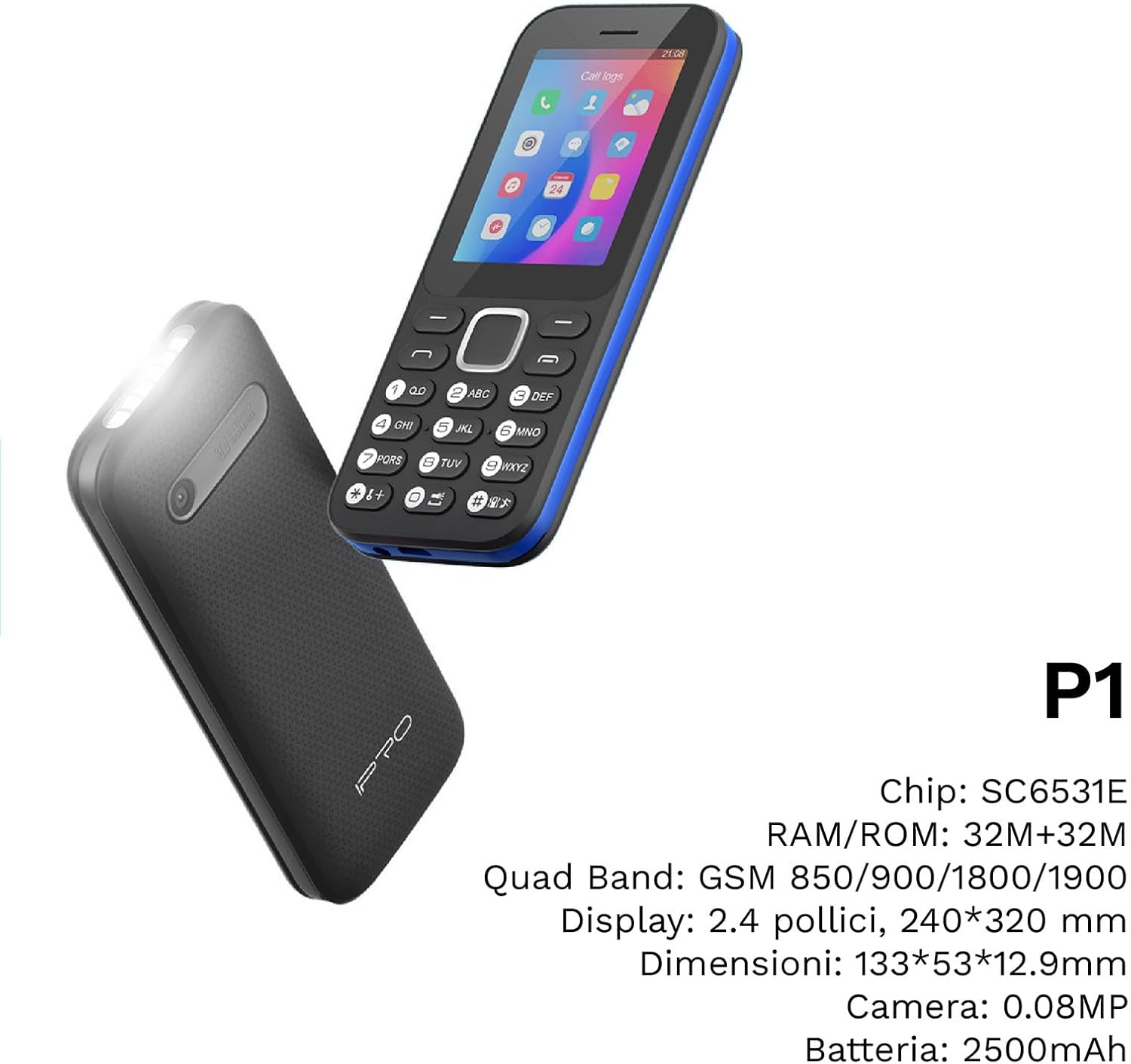
Abbildung 4: Ein abgewinkelter view of the IPRO P1 phone, accompanied by a summary of its technical specifications.
- Netzwerk: 2G GSM Quadband (850/900/1800/1900 MHz)
- Chipsatz: SC6531E
- Anzeige: 2.4-inch Color Display (240 x 320 resolution)
- RAM: 4 MB
- ROM: 4 MB
- Erweiterbarer Speicher: Supports up to 16 GB (MicroSD card not included)
- SIM-Karte: Dual-SIM-Unterstützung
- Konnektivität: Bluetooth
- Merkmale: Camera, FM Radio, MP3, MP4, Alarm Clock, Calendar, Calculator, Integrated Games, LED Flashlight
- Batterie: 2500 mAh Lithium-Ionen
- Sprachen: Spanish, English, French, Italian, Portuguese
- Farbe: Schwarz
- Produktabmessungen: 133 x 53 x 12.9 mm
- Gewicht: Ungefähr 200 Gramm

Abbildung 5: A close-up of the IPRO P1's screen, illustrating its 2.4-inch display size for clear viewing.
Garantie und Support
IPRO offers technical service and customer support for two years from the date of purchase. This warranty covers manufacturing defects but does not include artificial damage.
For support, please contact IPRO customer service through the details provided on the product packaging or the official IPRO website. When contacting support, please have your product model number (IPRO P1) and purchase details ready.

Abbildung 6: A visual representation of the IPRO P1 phone's target audience, showing various seniors comfortably interacting with mobile devices, highlighting its user-friendly design.

Abbildung 7: Display of the IPRO P1 phone in two color variants: classic black and a version with a distinctive blue trim.