
1. Einleitung
This manual provides essential information for setting up, operating, maintaining, and troubleshooting your Xiaomi Redmi 13C smartphone. Please read this guide carefully to ensure proper use and optimal performance of your device.
The Xiaomi Redmi 13C is a new product featuring 128GB storage and 6GB RAM, with Dual SIM capability, in Midnight Black. This device is supplied by a specialized distributor.
2. Lieferumfang
Überprüfen Sie nach dem Auspacken Ihres Xiaomi Redmi 13C, ob alle folgenden Artikel enthalten sind:
- Xiaomi Redmi 13C-Smartphone
- USB-Kabel
- Ladegerät
- SIM-Karten-Auswurfwerkzeug
3. Gerät überview
Familiarize yourself with the key components of your Redmi 13C.

Abbildung 3.1: Überview of Xiaomi Redmi 13C key features, including its 6.74-inch 90Hz display, 50MP AI triple camera, 5000mAh battery with 18W fast charging, and powerful octa-core processor.
The Redmi 13C features a large 6.74-inch display with a 90Hz refresh rate for smooth visuals. It is equipped with a 50MP AI triple camera system and a robust 5000mAh battery supporting 18W fast charging. The device is powered by an octa-core processor, ensuring efficient performance.
4. Einrichtung
4.1. Einlegen der SIM- und SD-Karte
Your Redmi 13C supports Dual SIM cards and expandable storage via a microSD card (up to 128GB). Use the provided SIM tray ejector tool to open the SIM card slot.
- Suchen Sie den SIM-Karten-Einschub an der Seite Ihres Telefons.
- Führen Sie das SIM-Auswurfwerkzeug in die kleine Öffnung neben dem Fach ein und drücken Sie fest, bis das Fach herausspringt.
- Legen Sie Ihre Nano-SIM-Karte(n) und/oder microSD-Karte in die dafür vorgesehenen Schlitze des Kartenfachs ein. Achten Sie darauf, dass die goldenen Kontakte nach unten zeigen.
- Setzen Sie die Schublade vorsichtig wieder in das Telefon ein.
4.2. Erste Inbetriebnahme und Konfiguration
- Halten Sie den Ein-/Ausschalter gedrückt, bis das Xiaomi-Logo erscheint.
- Folgen Sie den Anweisungen auf dem Bildschirm, um Ihre Sprache und Region auszuwählen, eine WLAN-Verbindung herzustellen und Ihr Google-Konto einzurichten.
- You can also set up fingerprint recognition for enhanced security during this initial setup.
5. Bedienung Ihres Geräts
5.1. Anzeigefunktionen

Figure 5.1: The Redmi 13C features an immersive 6.74-inch display, providing a fluid visual experience.
The Redmi 13C boasts a 6.74-inch display with a 90Hz refresh rate, offering a smooth and immersive viewing experience for all your content. The maximum display resolution is 720x1600 pixels with a 16:9 aspect ratio.
5.2. Kameranutzung
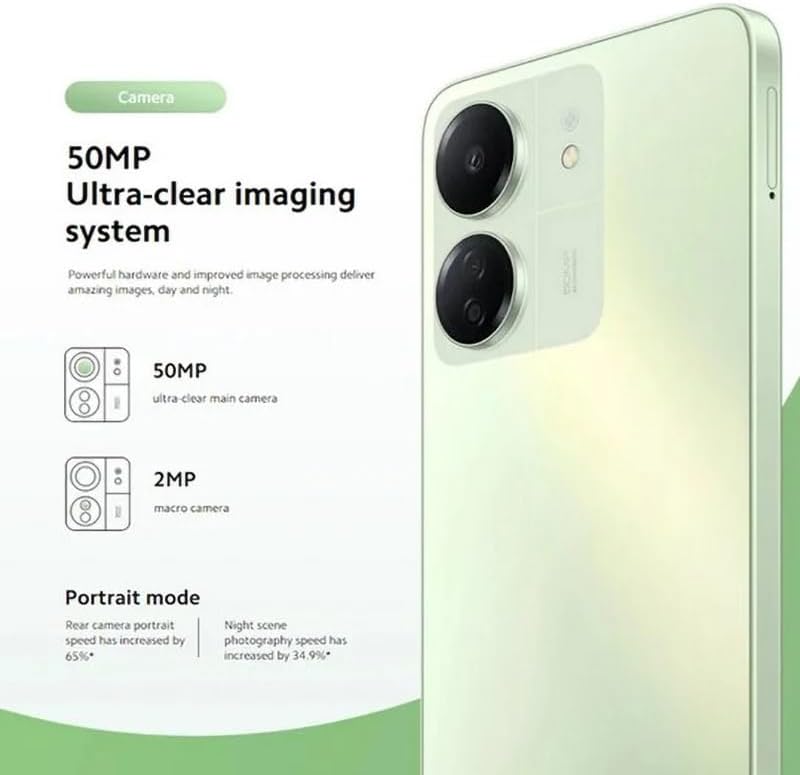
Figure 5.2: The Redmi 13C's 50MP Ultra-clear imaging system includes a 50MP main camera and a 2MP macro camera, supporting Portrait and Night modes.
The device is equipped with a 50MP Ultra-clear imaging system. The rear camera setup includes a 50MP main sensor and a 2MP macro camera. The front camera has an 8MP sensor. Utilize various shooting modes such as Portrait mode and Night mode to capture high-quality photos in different conditions.
5.3. Batteriemanagement
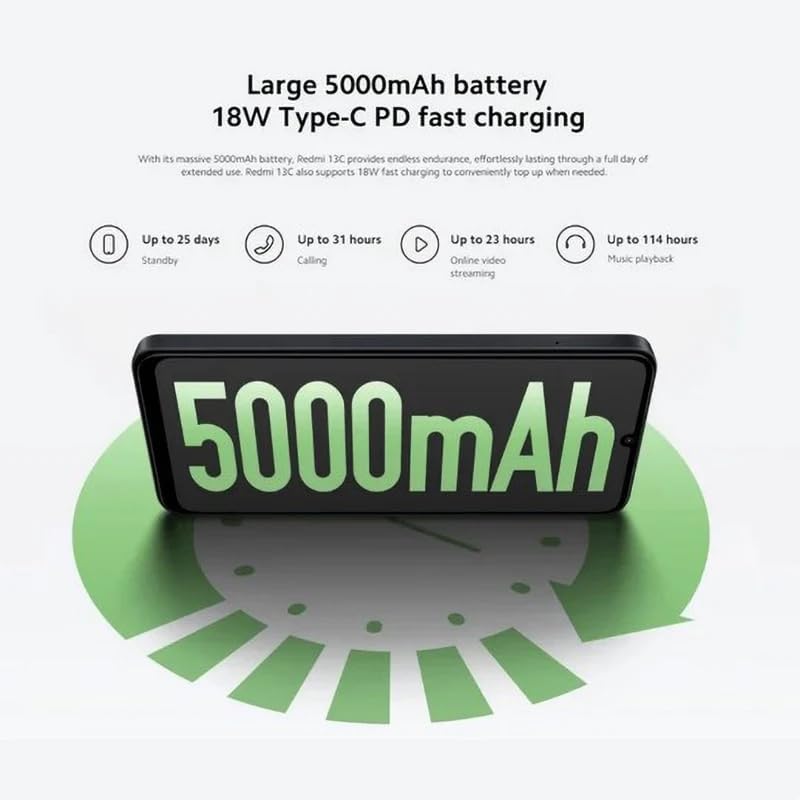
Figure 5.3: The Redmi 13C features a large 5000mAh battery with 18W Type-C PD fast charging, offering extended usage times.
Your Redmi 13C comes with a large 5000mAh Lithium-ion battery, providing extended usage. It supports 18W Type-C PD fast charging, allowing for quick power-ups. For optimal battery life, use the provided charger and avoid extreme temperatures.
- Bis zu 25 Tage Standby
- Bis zu 31 Stunden Anrufzeit
- Up to 23 hours online video streaming
- Bis zu 114 Stunden Musikwiedergabe
5.4. Leistung

Figure 5.4: The Redmi 13C is powered by an Octa-core MediaTek Helio G85 processor, delivering smooth and stable performance.
The Redmi 13C is powered by a MediaTek Helio G85 octa-core processor, ensuring smooth and stable performance for daily tasks and applications. It comes with 6GB of RAM and 128GB of internal storage, expandable up to 1TB with a microSD card.
5.5. Konnektivität und Sicherheit
The device supports Wi-Fi, Bluetooth, and 4G cellular technology. It is an unlocked phone, allowing use with various wireless carriers. For security, the Redmi 13C includes a fingerprint recognition feature.
6. Wartung
6.1. Reinigen Ihres Geräts
To clean your Redmi 13C, use a soft, lint-free cloth. Avoid using harsh chemicals or abrasive materials, as these can damage the screen and finish. The device is not water-resistant, so avoid exposure to liquids.
6.2. Software-Updates
Regularly check for and install software updates to ensure your device has the latest features, security patches, and performance improvements. You can usually find this option in the phone's settings under "About phone" or "System updates."
6.3. Batteriepflege
To prolong battery life, avoid fully discharging the battery frequently. Charge your phone using the original charger and cable. Do not expose the device to extreme heat or cold.
7. Fehlerbehebung
In diesem Abschnitt werden häufig auftretende Probleme behandelt, die bei Ihrem Redmi 13C auftreten können.
- Gerät lässt sich nicht einschalten: Stellen Sie sicher, dass der Akku geladen ist. Schließen Sie das Telefon an das Ladegerät an und warten Sie einige Minuten, bevor Sie versuchen, es wieder einzuschalten.
- Apps stürzen ab oder frieren ein: Schließen Sie im Hintergrund laufende Apps. Leeren Sie den Cache der problematischen App oder installieren Sie sie neu. Besteht das Problem weiterhin, sollten Sie einen Werksreset durchführen (sichern Sie vorher Ihre Daten).
- Schlechte Akkulaufzeit: Reduce screen brightness, disable unnecessary features like GPS or Bluetooth when not in use, and check for apps consuming excessive power in battery settings.
- Probleme mit der Netzwerkverbindung: Ensure your SIM card is properly inserted. Try restarting the device. Check your network settings and contact your carrier if problems persist.
- Fingerabdrucksensor funktioniert nicht: Stellen Sie sicher, dass Ihr Finger sauber und trocken ist. Registrieren Sie Ihre Fingerabdrücke erneut in den Sicherheitseinstellungen.
8. Spezifikationen
| Besonderheit | Spezifikation |
|---|---|
| Marke | XIAOMI |
| Modellname | Redmi 13C |
| Betriebssystem | Android |
| Installierte RAM-Größe | 6 GB |
| Speicherkapazität | 128 GB (erweiterbar auf bis zu 1 TB) |
| CPU Modell | MediaTek Helio G85 (Octa-core) |
| CPU-Geschwindigkeit | Bis zu 2.0 GHz |
| Anzeigetyp | AMOLED |
| Anzeigegröße | 6.74 Zoll |
| Maximale Bildschirmauflösung | 720 x 1600 |
| Bildwiederholrate | 90 Hz |
| Rear Camera Sensor Resolution | 50 Megapixels (Main), 2 Megapixels (Macro) |
| Front Camera Sensor Resolution | 8 Megapixel |
| Batteriekapazität | 5000 mAh (Lithium-Ionen) |
| Laden | 18-W-Schnellladung über USB-C PD |
| Konnektivitätstechnologie | Bluetooth, Wi-Fi, 4G LTE |
| SIM-Kartensteckplätze | Dual SIM (Nano) |
| Biometrische Sicherheit | Fingerabdruckerkennung |
| Kopfhöreranschluss | USB Typ C |
| Farbe | Mitternachtsschwarz |
| Artikelgewicht | 410 Gramm |
| Wasserbeständigkeit | Nicht wasserfest |
| Modelljahr | 2023 |
9. Garantie und Support
9.1. Garantieinformationen
The Xiaomi Redmi 13C comes with a standard manufacturer's warranty. Please refer to the warranty card included with your product for specific terms and conditions. Spare parts availability is stated as 2 years.
9.2. Official Documents and Support
For additional information and support, you can refer to the official user guide and data transparency statement:
For further assistance, please visit the official XIAOMI support webWebsite oder wenden Sie sich an den Kundendienst.