
glo 10189920
glo HYPER PRO Device User Manual
Modell: 10189920
1. Einleitung
The glo HYPER PRO is an advanced tobacco heating device designed to provide an enhanced experience. It features an EasyView LED display for monitoring device status, a TasteSelect selector for choosing between Standard and Boost modes, and HeatBoost technology for consistent intensity. The device also includes fast charging capabilities and extended battery life.
Important Safety Notice: This product is not risk-free and contains nicotine, which is addictive.
2. Sicherheitshinweise
- This product, when used with its intended tobacco sticks, is not risk-free and delivers nicotine, a highly addictive substance.
- The device itself does not contain tobacco sticks, liquids, pre-filled cartridges, or refills. These must be purchased separately.
- The glo HYPER PRO operates without combustion, producing zero ash and less odor compared to traditional cigarettes.
- Always read the label, warnings, and instructions provided on the product packaging before use. Information on the packaging may differ from online descriptions.
- Außerhalb der Reichweite von Kindern und Haustieren aufbewahren.
- Setzen Sie das Gerät keinen extremen Temperaturen, direkter Sonneneinstrahlung oder Wasser aus.
- Use only the charging cable provided or a certified USB-C cable with a compatible power adapter.
3. Packungsinhalt
Please check that your glo HYPER PRO package contains the following items:
- glo HYPER PRO Device
- USB-C-Ladekabel
- Reinigungsbürste
- Benutzerhandbuch (dieses Dokument)
4. Gerät überview
Familiarize yourself with the components of your glo HYPER PRO device.
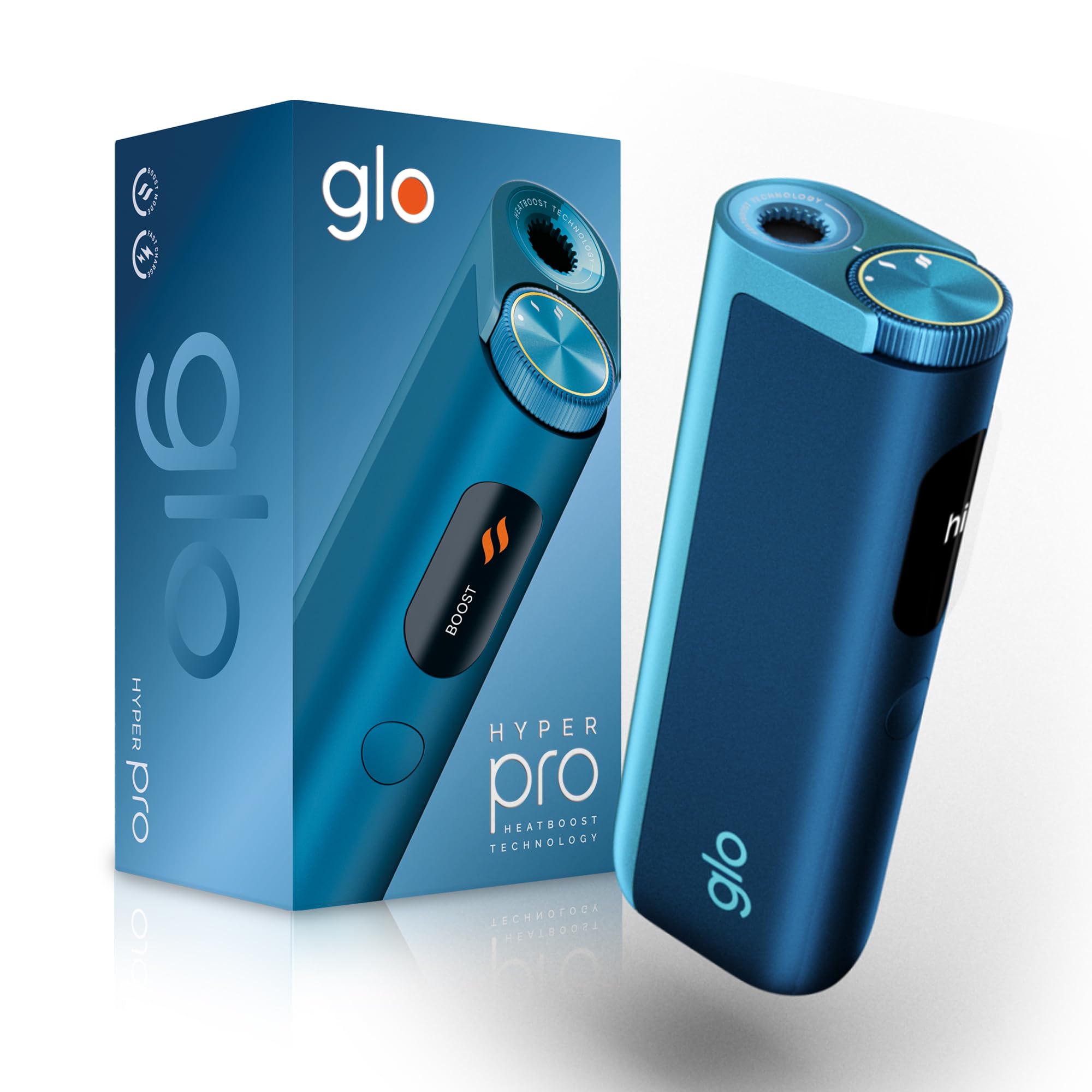
This image displays the glo HYPER PRO device in blue, highlighting its compact dimensions (96.4mm height, 36.5mm width) and weight (92 grams). Key features such as Boost Mode, EasyView Display, and Fast Charge are indicated.
- Heizkammer: Where the tobacco stick is inserted.
- TasteSelect Selector: Button to switch between Standard and Boost modes.
- EinfachView LED-Anzeige: Shows selected mode, session progress, and battery status.
- USB-C-Anschluss: Zum Aufladen des Gerätes.
5. Ersteinrichtung
5.1 Aufladen des Geräts
Before first use, fully charge your glo HYPER PRO device. The device features fast charging and extended battery life.
- Schließen Sie das USB-C-Ladekabel an den USB-C-Anschluss des Geräts an.
- Plug the other end of the cable into a compatible USB power adapter.
- Das EinfacheView LED display will indicate the charging progress.
- Sobald das Gerät vollständig aufgeladen ist, trennen Sie es vom Ladegerät.
5.2 Erste Inbetriebnahme
To turn on the device for the first time:
- Press the TasteSelect button 5 times rapidly.
- The device will vibrate and the EasyView LED display will illuminate, indicating it is ready for use.
6. Bedienung des Geräts
6.1 Inserting a Tobacco Stick
Ensure the device is clean before inserting a tobacco stick.
- Gently insert a compatible tobacco stick into the heating chamber at the top of the device.
- Do not force the stick.
6.2 Selecting a Mode (Standard or Boost)
The TasteSelect selector allows you to choose your preferred intensity.

This image illustrates two glo HYPER PRO devices, demonstrating the selection between Standard and Boost intensity modes.
- Standardmodus: For a balanced experience. Press and hold the TasteSelect button until the device vibrates once.
- Boost-Modus: For superior intensity, featuring HeatBoost technology. Press and hold the TasteSelect button until the device vibrates twice.
Das EinfacheView LED display will show the selected mode and the heating progress.
6.3 Starten einer Sitzung
- After inserting the tobacco stick and selecting your mode, the device will begin heating.
- Das EinfacheView LED display will show a countdown or progress indicator.
- The device will vibrate when it is ready for use.
- Once the session is complete, the device will vibrate again and the display will turn off.
6.4 Beenden einer Sitzung
Nach der Sitzung:
- Remove the used tobacco stick from the heating chamber.
- Dispose of the used stick responsibly.
- Lassen Sie das Gerät abkühlen, bevor Sie es reinigen oder weglegen.
7. Wartung und Reinigung
Regular cleaning ensures optimal performance and longevity of your glo HYPER PRO device.
7.1 Cleaning the Heating Chamber
- Vor der Reinigung sicherstellen, dass das Gerät ausgeschaltet und vollständig abgekühlt ist.
- Use the provided cleaning brush to gently remove any tobacco residue from the heating chamber.
- Avoid using water or liquid cleaners directly on the heating element.
- For stubborn residue, a dry cotton swab can be used carefully.
7.2 Äußere Reinigung
Wipe the exterior of the device with a soft, dry cloth as needed.
8. Fehlerbehebung
If you encounter issues with your glo HYPER PRO, refer to the following common problems and solutions:
| Problem | Mögliche Ursache | Lösung |
|---|---|---|
| Gerät lässt sich nicht einschalten | Niedrige oder keine Batterieladung | Laden Sie das Gerät mit dem mitgelieferten USB-C-Kabel vollständig auf. |
| Gerät heizt nicht | Tabakstick nicht richtig eingesetzt; Gerätefehlfunktion | Ensure the tobacco stick is fully and correctly inserted. Try restarting the device. If the issue persists, contact customer support. |
| Das Laden ist langsam oder funktioniert nicht | Faulty cable or adapter; Dirty charging port | Check the USB-C cable and power adapter for damage. Try a different compatible cable/adapter. Clean the charging port gently with a dry, soft brush. |
| LED-Anzeige funktioniert nicht | Gerätestörung | Versuchen Sie, das Gerät neu zu starten. Sollte das Problem weiterhin bestehen, wenden Sie sich bitte an den Kundendienst. |
9. Spezifikationen
| Besonderheit | Detail |
|---|---|
| Marke | glo |
| Modellnummer | 10189920 |
| Abmessungen (LxBxH) | 9.6 x 3.6 x 2.1 cm |
| Gewicht | 150 Gramm |
| Batteriekapazität | 2580 mAh (Lithium-Ionen) |
| Ladeanschluss | USB-C |
| Besonderheit | Kompaktes Design |
| Hersteller | Nicoventures Trading Limited |
10. Garantie und Support
10.1 Garantieinformationen
For detailed warranty information, please refer to the warranty card included in your product packaging or visit the official glo webDie Garantiebedingungen können je nach Region variieren.
10.2 Kundendienst
If you have any questions, require assistance, or need to report an issue with your glo HYPER PRO device, please contact glo customer support through their official webWebsite oder die in Ihrer Produktdokumentation angegebenen Kontaktdaten.
Ask a question about this manual
Ask about setup, troubleshooting, compatibility, parts, safety, or missing instructions. Manuals+ will review the question and use this page’s manual context to help answer it.