
1. Einleitung
This manual provides detailed instructions for the safe and effective use of your LLAVETOR Digital Torque Adapter. Please read this manual thoroughly before operation and retain it for future reference. This digital torque adapter is designed for precise torque measurement in various applications, including bicycle, motorcycle, and car maintenance.
2. Sicherheitshinweise
- Tragen Sie beim Umgang mit Werkzeugen stets geeignete persönliche Schutzausrüstung, wie z. B. eine Schutzbrille.
- Ensure the adapter is securely attached to the drive tool and the fastener before applying torque.
- Do not exceed the maximum torque capacity of the adapter (340 NM).
- Avoid dropping the adapter or subjecting it to severe impacts, as this may affect its accuracy.
- Den Adapter von Wasser, Feuchtigkeit und extremen Temperaturen fernhalten.
- Do not attempt to disassemble or modify the adapter. Refer all servicing to qualified personnel.
- Ensure batteries are inserted correctly and replace them when the low battery indicator appears.

3. Packungsinhalt
The LLAVETOR Digital Torque Adapter package includes the following items:
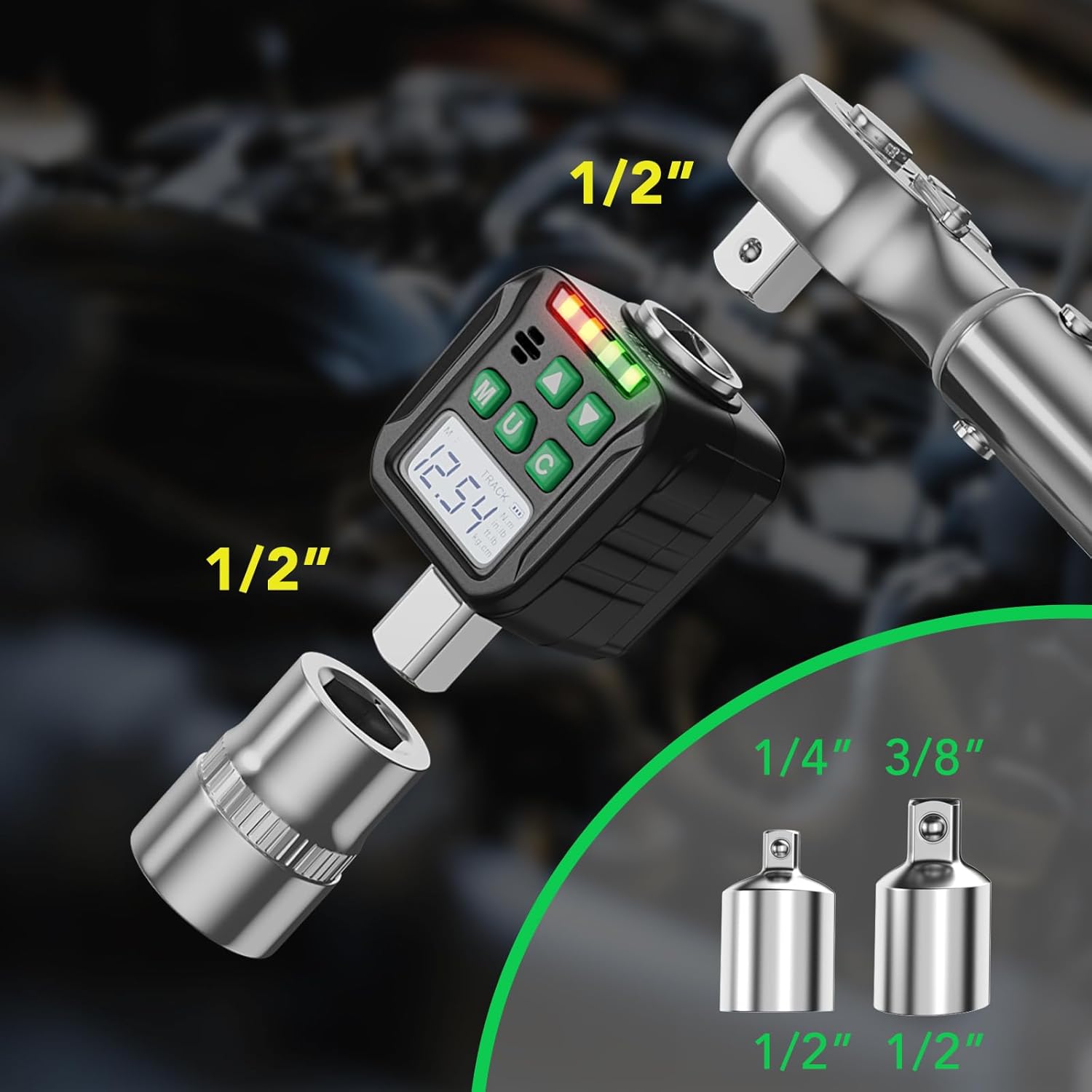
- 1 x Digital Torque Adapter (1/2 inch drive)
- 1 x 1/4 inch adapter
- 1 x 3/8 inch adapter
- 2 x AAA-Batterien
- 1 x Schraubendreher (für Batteriefach)
- 1 x Benutzerhandbuch
4. Produktmerkmale
- Hohe Präzision: Professionally calibrated with an accuracy of ± 2%.
- Mehrere Maßeinheiten: Supports N.m, Ft.lb, In.lb, and Kg.cm.
- Zwei Betriebsarten: TACK mode for real-time display and PEAK mode for maximum value retention.
- Preset Torque Values: Features 6 preset memory values (M1-M6).
- Visuelle und akustische Indikatoren: Equipped with an LED indicator light (green to red) and a buzzer for reaching target torque.
- Von hinten beleuchteter LCD-Bildschirm: High-definition display for clear visibility in various lighting conditions.
- Breite Anwendung: Suitable for bicycle, motorcycle, and car maintenance.


5. Einrichtung
5.1 Einlegen der Batterie
- Locate the battery compartment on the back of the digital torque adapter.
- Verwenden Sie den mitgelieferten Schraubendreher, um die Abdeckung des Batteriefachs zu öffnen.
- Legen Sie zwei AAA-Batterien ein und achten Sie dabei auf die richtige Polarität (+/-).
- Bringen Sie die Batteriefachabdeckung wieder an und sichern Sie sie mit der Schraube.
5.2 Attaching to a Wrench
- Select a suitable square drive wrench (e.g., ratchet wrench, breaker bar).
- Insert the 1/2 inch square drive of the digital torque adapter into the drive end of your wrench. Ensure it is fully seated.
- If using a smaller drive size (1/4 inch or 3/8 inch), attach the corresponding adapter to the digital torque adapter first, then attach your socket to the adapter.
6. Bedienungsanleitung
6.1 Ein-/Ausschalten
Press the 'M' button to power on the device. The LCD screen will illuminate. To power off, press and hold the 'M' button for a few seconds.
6.2 Einheitenumrechnung
With the device powered on, press the 'U' button to cycle through the available measurement units: N.m, Ft.lb, In.lb, Kg.cm. Select the desired unit for your application.
6.3 Mode Selection (TACK / PEAK)
Press and hold the 'U' button for 3 seconds to switch between TACK and PEAK modes. Use the up/down arrow buttons to confirm the selection.
- TACK Mode: Displays the torque value in real-time as force is applied.
- PEAK-Modus: Captures and displays the maximum torque value achieved during the tightening process. The value remains on the screen after force is removed.

6.4 Setting Target Torque and Presets
The adapter allows you to set a target torque value. When this value is approached and reached, the device will provide visual and audible alerts.
- Press the 'M' button to enter the preset mode. You can cycle through M1-M6 preset values.
- Use the up/down arrow buttons to adjust the target torque value for the selected preset.
- Once the desired value is set, press 'M' again to save and exit the preset setting.

6.5 Anlegen eines Drehmoments
- Attach the adapter and wrench to the fastener you wish to tighten.
- Apply smooth, steady force to the wrench handle. Observe the torque reading on the LCD screen.
- As you approach the target torque, the LED indicator will turn green, and the buzzer will emit a slow beep.
- When the target torque is reached, the LED indicator will turn red, and the buzzer will emit a continuous beep. Stop applying force immediately.

7. Wartung
- Reinigung: Wipe the adapter with a soft, dry cloth after each use. Do not use abrasive cleaners or solvents.
- Lagerung: Store the adapter in a dry, clean place, away from direct sunlight and extreme temperatures. Remove batteries if the device will not be used for an extended period.
- Kalibrierung: For optimal accuracy, it is recommended to have the digital torque adapter professionally calibrated periodically, especially after heavy use or impacts.
8. Fehlerbehebung
| Problem | Mögliche Ursache | Lösung |
|---|---|---|
| Gerät lässt sich nicht einschalten. | Defekte oder falsch eingesetzte Batterien. | Batteriepolarität prüfen. Batterien durch neue AAA-Alkalibatterien ersetzen. |
| Ungenaue Drehmomentmesswerte. | Adapter not properly seated; Exceeding capacity; Needs calibration. | Ensure adapter is fully seated. Do not exceed 340 NM. Consider professional calibration. |
| Buzzer/LED not working. | Settings incorrect; Malfunction. | Verify target torque is set. If problem persists, contact customer support. |
| Der LCD-Bildschirm ist dunkel oder leer. | Low battery; Extreme temperature. | Replace batteries. Operate within recommended temperature range. |
9. Spezifikationen
| Besonderheit | Spezifikation |
|---|---|
| Modellnummer | LDTA |
| Marke | LLAVETOR |
| Drehmomentbereich | 17-340 NM (1/2 inch drive) |
| Genauigkeit | ± 2 % |
| Laufwerksgröße | 1/2 inch (includes 1/4 inch and 3/8 inch adapters) |
| Maßeinheiten | N.m, Ft.lb, In.lb, Kg.cm |
| Betriebsarten | TACK, PEAK |
| Stromquelle | 2 x AAA-Alkalibatterien |
| Material | Eisen |
| Beenden | Gebürstet |
| Verpackungsabmessungen | 14.81 x 12.9 x 5.69 cm |
| Gewicht | 540 Gramm |
10. Garantieinformationen
LLAVETOR products are manufactured to high-quality standards. For specific warranty details, please refer to the warranty card included with your purchase or visit the official LLAVETOR webBewahren Sie Ihren Kaufbeleg für eventuelle Garantieansprüche auf.
11. Kundendienst
If you have any questions, require technical assistance, or encounter issues not covered in this manual, please contact LLAVETOR customer support. Contact information can typically be found on the product packaging or the official LLAVETOR webWebsite.