
1. Produktüberschreitungview
The VBESTLIFE D400 is a versatile Bluetooth 5.3 HiFi audio receiver designed to upgrade your existing stereo systems and speakers with wireless audio streaming capabilities. It supports multiple audio inputs and outputs, including AUX, optical, and coaxial, and features NFC for quick pairing. This device allows you to stream high-fidelity audio from your Bluetooth-enabled devices to your home audio setup.
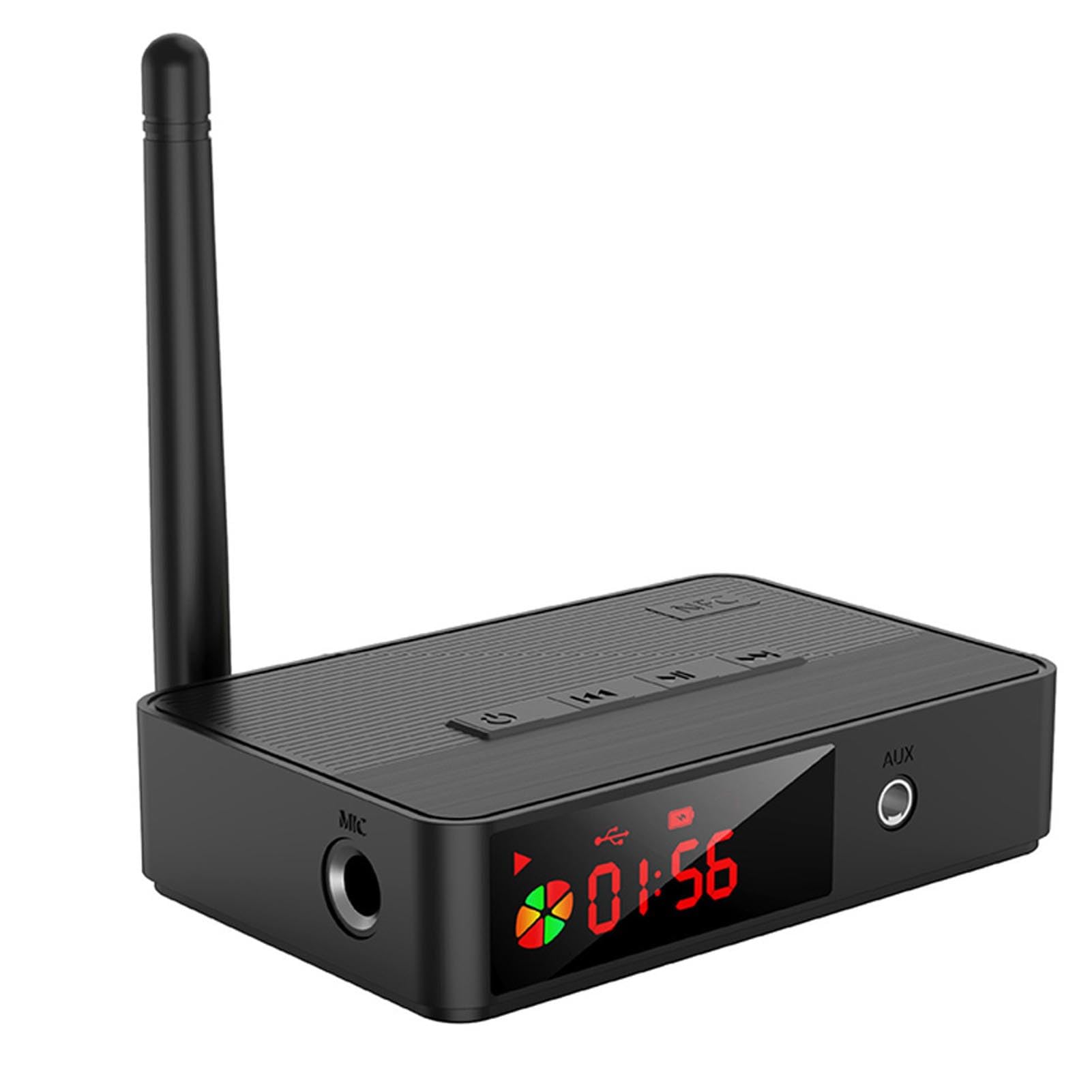
Image 1.1: VBESTLIFE D400 Bluetooth 5.3 HiFi Audio Receiver. This image shows the front view of the compact black audio receiver with various ports and controls visible.
2. Packungsinhalt
Bitte kreuzen Sie das Kästchen für die folgenden Elemente an:
- 1 x VBESTLIFE D400 Bluetooth Receiver
- 1 x Fernbedienung
- 1 x USB-C Ladekabel
- 1 x Audio Cable (e.g., RCA or 3.5mm)
- 1 x Auxiliary Cable (3.5mm to 3.5mm)
- 1 x Benutzerhandbuch
3. Spezifikationen
- Modell: D400 (VBESTLIFEtomd83pync)
- Bluetooth-Version: V5.3
- Audio-Decodierung: SBC
- Bluetooth-Protokollunterstützung: A2DP, AVRCP
- Unterstützt File Formate (USB/SD): MP3, WAV, WMA, FLAC, APE
- Frequenzbereich: 2400 MHz bis 2483.5 MHz
- Frequenzgang: 20 Hz bis 20 kHz
- Ausgangslast: 16 to 320 Ω Adaptive
- Übertragungsdistanz: Approx. 10-30m / 32.8-98.4ft (open area)
- Audioeingang: Bluetooth Audio, USB, Memory Card (up to 32GB, not included)
- Audioausgang: AUX (3.5mm), Optical Audio, Coaxial Audio
- Batteriekapazität: 500mAh Lithium Battery (built-in)
- Batterie der Fernbedienung: CR2025 x 1 (not included)
- Stromschnittstelle: USB-C 5V
- Kompatibilität: Android, iOS mobile phones, tablets, TVs, game consoles, and other Bluetooth devices, as well as audio equipment with audio input interface.
- Gewicht: 204 Gramm
- Anzahl der Kanäle: 2
- Material: ABS
4. Einrichtung
4.1. Stromanschluss
- Connect the provided USB-C charging cable to the "USB C 5V" port on the receiver.
- Plug the other end of the USB-C cable into a 5V USB power adapter (not included) or a compatible USB port on a computer or wall charger.
- Das Gerät schaltet sich automatisch ein oder kann über den Ein-/Ausschalter eingeschaltet werden.
4.2. Audioausgangsanschluss
Wählen Sie eine der folgenden Methoden, um den Empfänger mit Ihrem Audiosystem zu verbinden:
- AUX-Ausgang: Use the 3.5mm auxiliary cable to connect the receiver's AUX output port to the AUX input of your stereo system, active speakers, or headphones.
- Optischer Ausgang: Use an optical audio cable (not included) to connect the receiver's optical output port to the optical input of your ampLifier oder Soundsystem.
- Koaxialausgang: Use a coaxial audio cable (not included) to connect the receiver's coaxial output port to the coaxial input of your ampLifier oder Soundsystem.
5. Bedienungsanleitung
5.1. Bluetooth-Kopplung
- Stellen Sie sicher, dass der Empfänger eingeschaltet ist.
- The receiver will automatically enter Bluetooth pairing mode, indicated by a flashing LED indicator (if present).
- Gehen Sie auf Ihrem Bluetooth-fähigen Gerät (Smartphone, Tablet, Computer) zu den Bluetooth-Einstellungen.
- Suchen nach available devices and select "D400" (or similar name) from the list.
- Once connected, the LED indicator will become solid, and you can now stream audio wirelessly.
5.2. NFC-Kopplung (Nahfeldkommunikation)
For NFC-enabled mobile devices:
- Stellen Sie sicher, dass NFC auf Ihrem Mobilgerät aktiviert ist.
- Gently tap your NFC-enabled device on the NFC area of the D400 receiver.
- Your device will automatically connect to the receiver without manual pairing.
5.3. USB Drive / Memory Card Playback
- Insert a USB flash drive or a memory card (up to 32GB, formatted with supported file systems like FAT32) containing audio files (MP3, WAV, WMA, FLAC, APE) into the respective port on the receiver.
- The receiver should automatically detect the storage and begin playing audio.
- Use the remote control to navigate tracks, adjust volume, and control playback.
5.4. Fernbedienungsfunktionen
The included remote control allows for convenient operation of the receiver. Functions typically include:
- Ein-/Ausschalten
- Lautstärke erhöhen/verringern
- Abspielen/Pause
- Nächster/Vorheriger Titel
- Input Mode Selection (Bluetooth, USB, Memory Card)
Note: The remote control requires 1 x CR2025 battery (not included). Please insert the battery before use, observing polarity.
6. Wartung
- Reinigung: Reinigen Sie die Oberfläche des Empfängers mit einem weichen, trockenen Tuch. Verwenden Sie keine flüssigen Reiniger oder Scheuermittel.
- Lagerung: Bewahren Sie das Gerät bei längerer Nichtbenutzung an einem kühlen, trockenen Ort fern von direkter Sonneneinstrahlung und extremen Temperaturen auf.
- Batterie: If the remote control will not be used for a long time, remove the CR2025 battery to prevent leakage.
7. Fehlerbehebung
| Problem | Mögliche Lösung |
|---|---|
| Kein Strom | Ensure the USB-C power cable is securely connected to a working 5V power source. Check the power adapter. |
| Bluetooth-Kopplung nicht möglich | Ensure the receiver is in pairing mode (LED flashing). Turn off and on Bluetooth on your source device. Move closer to the receiver. Clear previous Bluetooth connections on your device. |
| Keine Tonausgabe | Verify the audio cable (AUX, Optical, Coaxial) is correctly connected to both the receiver and your audio system. Check the input selection on your audio system. Adjust volume on both the receiver and your source device. |
| NFC pairing not working | Ensure NFC is enabled on your mobile device. Make sure your device is tapping the correct NFC area on the receiver. |
| USB/Memory card not playing | Ensure the USB drive or memory card is inserted correctly. Check if the files are in a supported format (MP3, WAV, WMA, FLAC, APE). Ensure the memory card is not larger than 32GB and is formatted correctly. |
8. Garantie und Support
This VBESTLIFE D400 Bluetooth 5.3 HiFi Audio Receiver comes with a 1 Jahr Garantie gegen Herstellungsfehler ab Kaufdatum.
For technical support or warranty claims, please refer to the contact information provided by your retailer or the official VBESTLIFE support channels. Keep your purchase receipt as proof of purchase for warranty services.