
Ankilo WA113B&C-MA06US-HY
Ankilo Projektionswecker – Benutzerhandbuch
Model: WA113B&C-MA06US-HY
1. Einleitung
Vielen Dank für Ihren Einkauf.asing the Ankilo Projection Alarm Clock. This device is designed to provide convenient timekeeping with a unique projection feature, allowing you to view the time on your ceiling or wall. It also includes an alarm, temperature display, and USB charging capabilities. Please read this manual carefully to ensure proper use and maintenance of your new alarm clock.
2. Sicherheitshinweise
- Setzen Sie das Gerät keinen extremen Temperaturen, direkter Sonneneinstrahlung oder hoher Luftfeuchtigkeit aus.
- Halten Sie das Gerät von Wasser oder anderen Flüssigkeiten fern.
- Versuchen Sie nicht, das Gerät selbst zu zerlegen oder zu reparieren. Überlassen Sie alle Wartungsarbeiten qualifiziertem Fachpersonal.
- Verwenden Sie zur Stromversorgung ausschließlich das mitgelieferte USB-Kabel.
- The CR2032 battery is for backup only; the clock requires continuous USB power for full functionality.
3. Packungsinhalt

- 1 x Ankilo Projection Alarm Clock
- 1 x USB Power Cable (1.5m)
- 1 x CR2032 Memory Battery (pre-installed for backup)
- 1 x Benutzerhandbuch
The image above shows the complete contents included in your Ankilo Projection Alarm Clock package. Please verify all items are present upon unboxing.
4. Produktüberschreitungview

This diagram illustrates the various buttons and ports on your Ankilo Projection Alarm Clock for easy identification and operation.
| Komponente | Beschreibung |
|---|---|
| SNOOZE/LIGHT-Taste | Press to snooze alarm or adjust display brightness. |
| PROJECT Button | Press to adjust projection brightness. |
| Alarmknopf | Press to set or activate/deactivate alarm. |
| SET-Taste | Drücken Sie diese Taste, um in den Modus zur Einstellung von Uhrzeit und Datum zu gelangen. |
| UP-Taste | Increase values during setting, or switch 12/24H format. |
| DOWN-Taste | Decrease values during setting, or switch temperature unit. |
| Projektion Lamp | Emits time projection onto surface. |
| Stromanschluss | Connect USB power cable here. |
| CR2032-Batteriefach | Beherbergt die Notstrombatterie. |
| Lautsprecher | Outputs alarm sound. |
5. Einrichtung
5.1 Einschalten des Geräts
The Ankilo Projection Alarm Clock is primarily powered by a USB cable. Connect the provided USB cable to the power port on the back of the clock and plug the other end into a standard USB power adapter (not included) or a USB port.
Wichtiger Hinweis:
- The LED screen will only remain on when the USB power supply is connected.
- The included CR2032 battery serves as a backup to retain time and alarm settings during power outages, but it does not power the display or projection.
5.2 Erste Zeit- und Datumseinstellung
- Halten Sie die SATZ Halten Sie die Taste 3 Sekunden lang gedrückt, um in den Zeiteinstellungsmodus zu gelangen. Die Stundenziffern beginnen zu blinken.
- Verwenden Sie die UP or RUNTER Tasten zum Einstellen der Stunde.
- Drücken SATZ Um die Stunde erneut zu bestätigen, wechseln Sie zur Minuteneinstellung. Die Minutenziffern blinken.
- Verwenden Sie die UP or RUNTER Tasten zum Einstellen der Minuten.
- Drücken SATZ again to confirm the minute and move to year setting.
- Wiederholen Sie den Vorgang mit UP/RUNTER Und SATZ Jahr, Monat und Tag einstellen.
- Nachdem Sie den Tag eingestellt haben, drücken Sie SATZ Ein letztes Mal, um den Einstellungsmodus zu verlassen.
6. Bedienungsanleitung
6.1 Wecker stellen
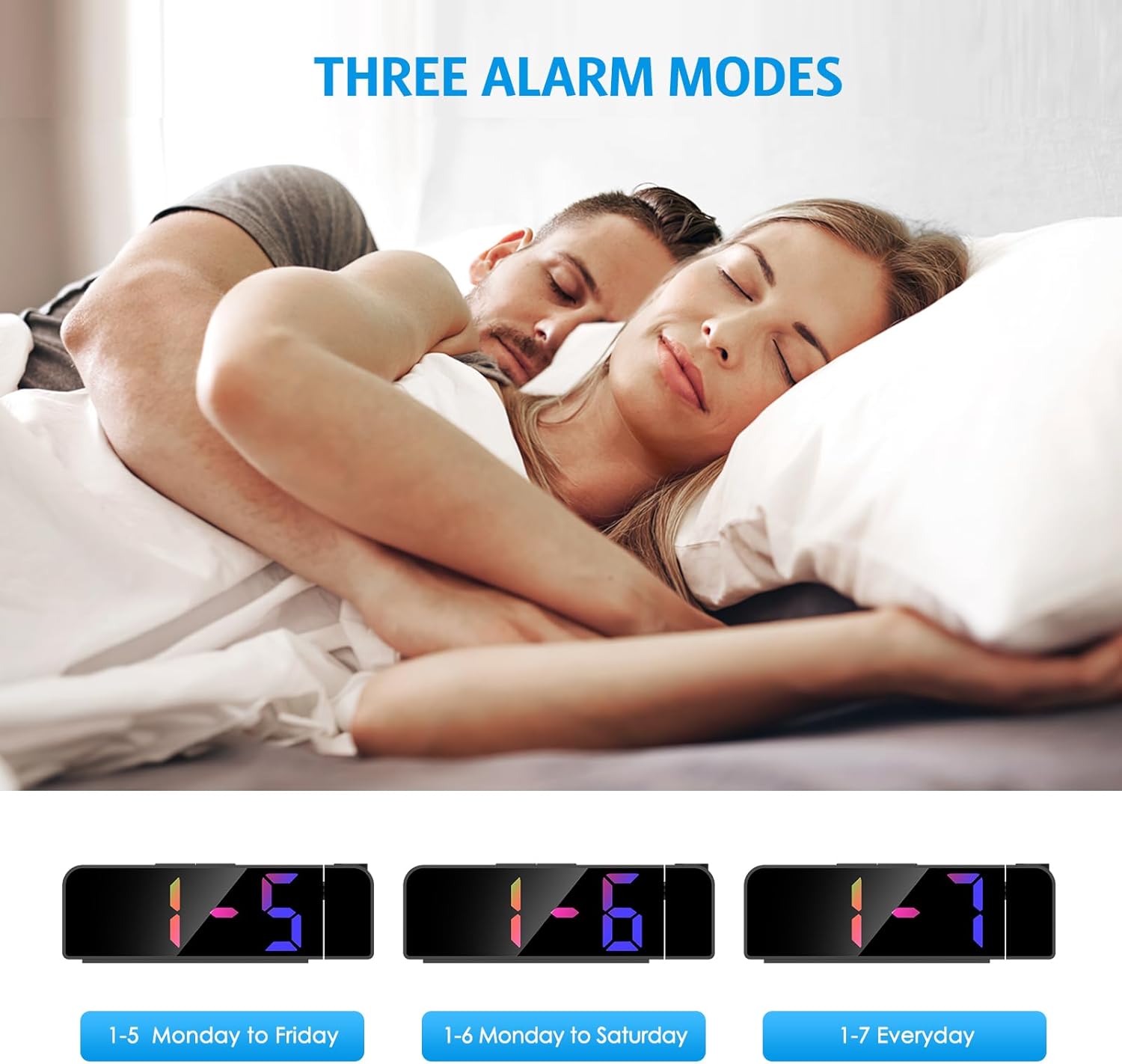
- Halten Sie die ALARM Die Taste 3 Sekunden lang gedrückt halten. Die Weckzeitanzeige blinkt.
- Verwenden Sie die UP or RUNTER Tasten zum Einstellen der gewünschten Weckzeit.
- Drücken ALARM Um die Stunde erneut zu bestätigen, wechseln Sie zur Minuteneinstellung.
- Verwenden Sie die UP or RUNTER Tasten zum Einstellen der gewünschten Alarmminute.
- Drücken ALARM Um erneut den Alarmmodus auszuwählen:
- 1-5: Der Alarm ertönt von Montag bis Freitag.
- 1-6: Der Wecker ertönt von Montag bis Samstag.
- 1-7: Alarm sounds Everyday.
- Drücken ALARM Ein letztes Mal zur Bestätigung und zum Verlassen des Alarmeinstellungsmodus.
The image above illustrates the three available alarm modes: weekdays, weekdays plus Saturday, and every day.
6.2 Schlummerfunktion

Wenn der Alarm ertönt, drücken Sie die große Taste. SNOOZE / LICHT button on the top of the clock to activate the snooze function. This will provide an additional 5 minutes of sleep before the alarm sounds again. You can repeat this process as needed.
The image highlights the prominent SNOOZE/LIGHT button, easily accessible for quick snooze activation.
6.3 Einstellen der Displayhelligkeit

Drücken Sie die SNOOZE / LICHT button (short press) to cycle through 4 levels of display brightness: Bright, Medium, Low, and Off. Select the brightness level that best suits your environment.
This image demonstrates the four distinct brightness settings for the main LED display, from bright to completely off.
6.4 Adjusting Projection Brightness and Orientation

Drücken Sie die PROJEKT button (short press) to cycle through 3 levels of projection brightness: Off, Dim, and Bright. The projection lamp can be rotated 180 degrees to project the time onto your ceiling or wall.
The image illustrates the projection feature, showing the clock projecting time onto a wall and the three available brightness levels for the projection.

Important Projection Orientation: The projection digits are only displayed correctly when the projection direction is towards the back of the alarm clock (away from the front display). If you project forward, the numbers will appear reversed. Ensure the projection is directed appropriately for correct readability.
This image clearly demonstrates the correct and incorrect projection orientations, emphasizing that projection should be directed backward for proper display.
6.5 Nachtmodus

The alarm clock features an automatic night mode. By default, the display brightness will automatically dim between 18:00 (6 PM) and 5:59 (5:59 AM). This time range can be adjusted to suit your preferences within the settings menu (refer to the full manual for advanced settings).
The image depicts the alarm clock operating in a low-light environment, showcasing the automatic dimming feature of the night mode.
6.6 12/24-Stunden-Format

Um zwischen 12-Stunden- und 24-Stunden-Zeitformat umzuschalten, drücken Sie kurz die UP button during normal time display. The display will toggle between AM/PM indication (12-hour) and military time (24-hour).
This image visually compares the appearance of the time display in both 12-hour and 24-hour formats.
7. Wartung
To maintain your Ankilo Projection Alarm Clock, gently wipe the surface with a soft, dry cloth. Avoid using abrasive cleaners or solvents, as these may damage the finish or electronic components. Keep the projection lens clean for clear time display.
8. Fehlerbehebung
| Problem | Mögliche Ursache | Lösung |
|---|---|---|
| Das Display ist ausgeschaltet oder schwach. | Not connected to USB power, or display brightness set to 'Off'. | Ensure USB cable is securely connected. Press SNOOZE / LICHT um die Helligkeit anzupassen. |
| Projection numbers are reversed. | Projektion lamp is facing forward. | Rotate the projection lamp 180 degrees so it projects towards the back of the clock. |
| Der Alarm ertönt nicht. | Der Alarm ist nicht eingestellt oder deaktiviert. | Drücken und halten ALARM to set the alarm time and mode. Ensure the alarm icon is visible on the display. |
| Zeit/Einstellungen werden nach Stromausfall zurückgesetzttage. | Die CR2032-Backup-Batterie ist leer oder fehlt. | Tauschen Sie die CR2032-Batterie im Batteriefach aus. |
| Die Projektion ist unscharf. | Projection lens is dirty or surface is too far/close. | Clean the projection lens with a soft cloth. Adjust the clock's distance from the projection surface (ideal 1.6ft-16ft). |
9. Spezifikationen
| Besonderheit | Detail |
|---|---|
| Marke | Ankilo |
| Modellnummer | WA113B&C-MA06US-HY |
| Anzeigetyp | Digitale LED |
| Anzeigegröße | 7.9 Zoll |
| Technische Daten | 1.7 Zoll B x 3.3 Zoll H |
| Stromquelle | Corded Electric (USB cable) |
| Pufferbatterie | 1 x CR2032 (im Lieferumfang enthalten) |
| Besondere Merkmale | 180° Projection, Adjustable Brightness (Display & Projection), USB Charging Port, Night Mode, Temperature Display, Snooze Function, Multiple Alarm Modes (1-5, 1-6, 1-7) |
| Material | Metall |
| Artikelgewicht | 6.7 Unzen |
10. Garantie und Support

- Rückgaberecht: Enjoy a 6-month return period from the date of purchase.
- Garantie: Your Ankilo Projection Alarm Clock is covered by a 24-month warranty against manufacturing defects.
- Lebenslanger Support: Ankilo is committed to providing lifetime technical support for this product.
The image above summarizes our commitment to customer satisfaction, including return policy, warranty, and ongoing support.
For any questions, troubleshooting assistance, or warranty claims, please contact Ankilo customer support through the platform where you purchased the product or visit our official webWebsite für Kontaktinformationen.
Ask a question about this manual
Ask about setup, troubleshooting, compatibility, parts, safety, or missing instructions. Manuals+ will review the question and use this page’s manual context to help answer it.