
1. Einleitung
The LAUNCH X431 Elite V2.0 BBA Bi-Directional OBD2 Scanner is a professional diagnostic tool designed for BMW, Mercedes-Benz, and Volkswagen Audi Group (V.A.G) vehicles. It offers comprehensive system diagnostics, advanced special functions, ECU coding, and bi-directional control capabilities. This manual provides detailed instructions for setting up, operating, and maintaining your device to ensure optimal performance and accurate vehicle diagnostics.
2. Produktüberschreitungview
The LAUNCH X431 Elite V2.0 BBA is an all-in-one diagnostic tool offering full system diagnostics, full bi-directional control, full OBDII modes, full special resets/relearn/calibration, ECU coding, and lifetime free updates. It is designed to provide dealership-level troubleshooting for a wide range of vehicle systems.
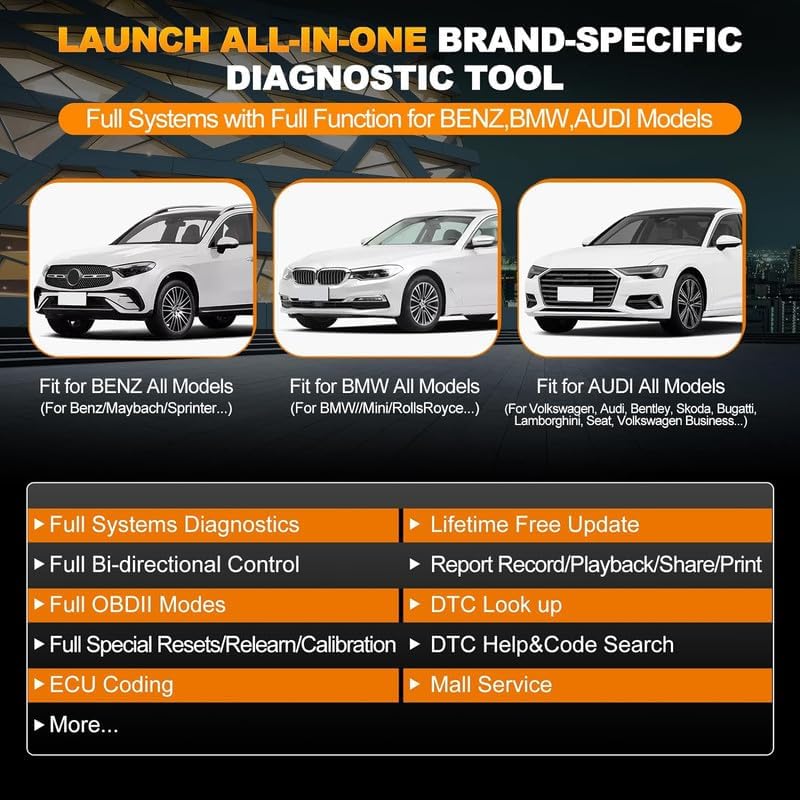
Image: LAUNCH X431 Elite V2.0 BBA Diagnostic Tool highlighting supported brands (Benz, BMW, Audi) and key features like Full Systems Diagnostics, Bi-directional Control, OBDII Modes, Resets, ECU Coding, and Lifetime Free Update.
2.1 Hauptmerkmale
- Vollständige Systemdiagnose: Access and diagnose all available electronic systems in supported vehicles.
- Bidirektionale Steuerung (aktiver Test): Perform active tests on various vehicle components to verify their functionality.
- Steuergerätecodierung: Modify vehicle settings, activate hidden functions, and adapt components.
- Spezialfunktionen: Includes Oil Reset, ABS Bleeding, Throttle Reset, Injector Coding, SAS Reset, EPB Reset, BMS Reset, DPF Reset, and more.
- OBDII Modes: Supports all 10 OBDII test modes for basic diagnostics.
- Battery Register: Perform battery registration for supported vehicles.
- Lebenslange kostenlose Updates: Ensures the device always has the latest software and vehicle coverage.
- 4-Zoll-Touchscreen: Provides an intuitive user interface.
- Mehrsprachige Unterstützung: Operates in English, French, Spanish, German, Italian, Portuguese, Japanese, Korean, and Chinese.
2.2 Supported Vehicle Groups
- BMW Group: BMW, Mini, Rolls-Royce.
- Mercedes-Benz Group: Mercedes-Benz, Maybach, Sprinter.
- V.A.G Group: Volkswagen, Audi, Bentley, Skoda, Bugatti, Lamborghini, Seat.

Image: Detailed list of coding and active test functions supported for BMW, Benz, and V.A.G Group vehicles by the LAUNCH X431 Elite BBA scanner.
3. Packungsinhalt
Prüfen Sie beim Öffnen des Pakets, ob alle Artikel vorhanden und in einwandfreiem Zustand sind:
- LAUNCH X431 Elite V2.0 BBA Main Unit
- OBDII-Diagnosekabel
- Bedienungsanleitung
- Tragetasche
Video: Unboxing the LAUNCH Creader BBA, showing the main unit, diagnostic cable, user manual, and carrying bag included in the package.
4. Einrichtung
Befolgen Sie diese Schritte für die Ersteinrichtung und Verbindung:
- Einschalten: Halten Sie den Netzschalter am Gerät gedrückt, um es einzuschalten.
- Mit dem Fahrzeug verbinden: Locate the vehicle's OBDII port (usually under the dashboard). Connect the diagnostic cable to the OBDII port and then to the LAUNCH X431 Elite V2.0 BBA unit.
- Anfangskonfiguration: The device will automatically detect the vehicle's VIN (Vehicle Identification Number) and establish communication. Follow any on-screen prompts for initial setup, such as language selection or time zone settings.

Image: The LAUNCH X431 Elite V2.0 BBA diagnostic tool connected to a vehicle's OBDII port, displaying its main menu.
5. Bedienungsanleitung
The LAUNCH X431 Elite V2.0 BBA offers various diagnostic and special functions. Navigate through the menu using the touchscreen or the physical buttons.
5.1 Basic Diagnostics (OBD II)
For standard OBDII functions applicable to all vehicles:
- Wählen Sie im Hauptmenü 'OBD II'.
- The device will perform a scan and display scan results, including readiness status and supported data streams.
- You can then choose to:
- Read I/M Readiness: Check if the vehicle is ready for emissions inspection.
- Live-Daten lesen: View real-time parameters from the vehicle's sensors. You can select multiple parameters and combine them into a graph for analysis.
- Standbild lesen: View a snapshot of sensor data when a fault code was set.
- Fehlercode lesen: Retrieve current, pending, and historic Diagnostic Trouble Codes (DTCs).
- Fehlercode löschen: Erase DTCs from the vehicle's ECU.
- Test Results: On-Board Monitoring Test: Check results of on-board diagnostic monitoring tests.
- Fahrzeuginformationen lesen: Access vehicle identification details (VIN, calibration IDs, etc.).

Image: The LAUNCH X431 Elite V2.0 BBA displaying its menu with options like Auto VIN, DTC Help & Code Search, One-Click Update, 4-in-1 Data Stream, Battery Register, Online Feedback, Diagnostic Report, and Mall Service.
5.2 Advanced Diagnostics (Diagnose)
For in-depth diagnostics specific to BMW, Mercedes-Benz, and V.A.G Group vehicles:
- Wählen Sie im Hauptmenü 'Diagnose'.
- Choose your vehicle's brand (e.g., BMW, Mercedes-Benz, Audi).
- The device will automatically detect the vehicle's information. Confirm the details.
- You will be presented with options such as:
- Gesundheitsbericht: Performs a comprehensive scan of all vehicle systems and generates a report of any detected fault codes.
- Systemscan: Scans all equipped modules in the vehicle to identify their presence and status.
- Systemauswahl: Allows you to manually select a specific system (e.g., Engine, Transmission, ABS) for detailed diagnostics.
5.3 Sonderfunktionen
The device supports various special functions for specific vehicle groups:
- Steuergerätecodierung: Reflash hidden functions, reset adaptive data, improve vehicle performance, recode changed modules, and more.
- Bidirektionale Steuerung (aktiver Test): Perform tests on components like radiator fan, mirrors, injectors, fuel pump, and more.
- Resets/Relearn/Calibration: Access functions such as Oil Reset, ABS Bleeding, Throttle Reset, Injector Coding, SAS Reset, Suspension Reset, Gearbox Reset, Tyre Learning, EPB Reset, BMS Reset, Clutch Reset, Crank Sensor Relearn, SCR Adblue Reset, Seat Matching, DPF Reset, Sun Reset, Coolant Learning, Cylinder Reset, TPMS Reset, and Transport Reset.
- Personalisierung: Fahrzeugeinstellungen anpassen.

Image: A visual representation of the ECU Coding function, showing a car's computer system.

Image: The LAUNCH X431 Elite V2.0 BBA demonstrating full-module active tests, including power seat, wipers, doors/windows, and interior lights.
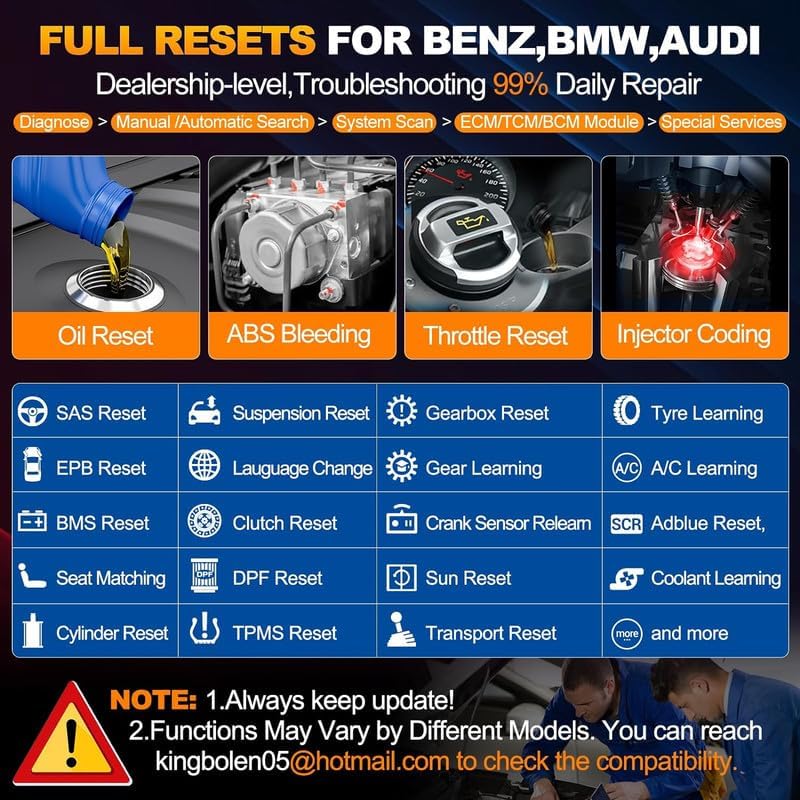
Image: The LAUNCH X431 Elite V2.0 BBA displaying a wide array of reset functions for Benz, BMW, and Audi vehicles, such as Oil Reset, ABS Bleeding, and Injector Coding.
Video: Demonstration of how to perform coding to stop headlight cleaning using the LAUNCH BBA diagnostic tool.
Video: Demonstration of how to perform coding for day lights on and off using the LAUNCH BBA diagnostic tool.
Video: Demonstration of how to perform coding for indicator lights using the LAUNCH BBA diagnostic tool.
5.4 Datenmanagement
- Backup/Restore Coding Data: Save and restore vehicle coding data to prevent data loss during operations.
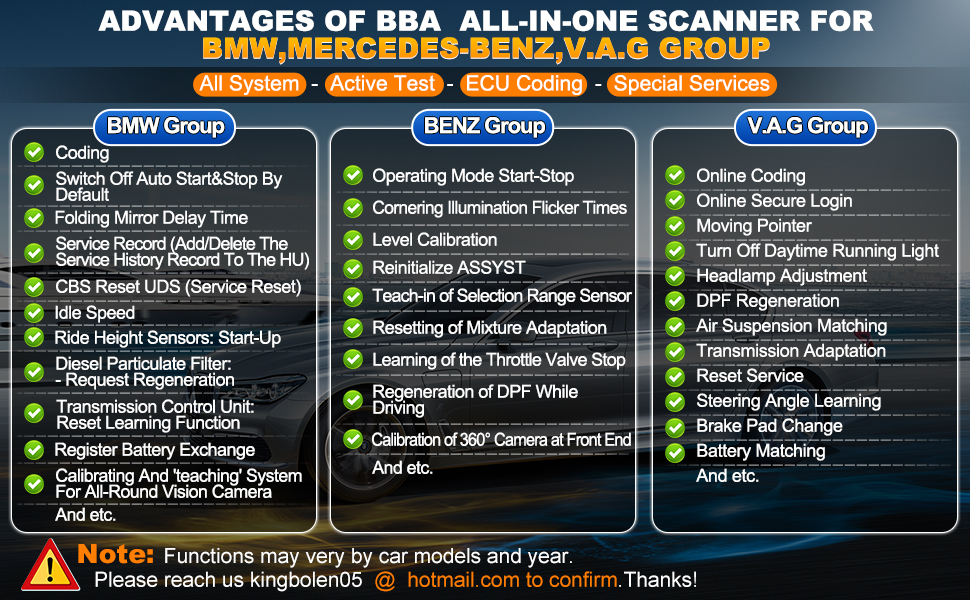
Image: The LAUNCH X431 Elite V2.0 BBA displaying additional functions like Auto Vin, DTC Help & Code Search, Lifetime Free WIFI Update, 4 in 1 Live Data Stream, Share/Print Diagnostic Report, and Timely Online Feedback.
6. Wartung
To ensure the longevity and optimal performance of your LAUNCH X431 Elite V2.0 BBA, follow these maintenance guidelines:
- Software-Updates: Regularly check for and install software updates to ensure compatibility with new vehicle models and access to the latest features. The device offers lifetime free updates.
- Reinigung: Verwenden Sie zum Reinigen des Geräts ein weiches, trockenes Tuch. Vermeiden Sie die Verwendung von Scheuermitteln oder Lösungsmitteln.
- Lagerung: Bewahren Sie das Gerät bei Nichtgebrauch in der Tragetasche an einem kühlen, trockenen Ort auf.
- Kabelpflege: Inspect the diagnostic cable regularly for any signs of wear or damage. Replace if necessary.
7. Fehlerbehebung
Sollten Sie Probleme mit Ihrem Gerät haben, beachten Sie bitte die folgenden gängigen Schritte zur Fehlerbehebung:
- Gerät lässt sich nicht einschalten: Ensure the device is properly connected to the vehicle's OBDII port. The device draws power from the vehicle.
- Kommunikationsfehler: Verify that the diagnostic cable is securely connected to both the device and the vehicle. Ensure the vehicle's ignition is in the ON position.
- Software Freezes: Restart the device. If the issue persists, perform a software update.
- Ungenaue Messwerte: Ensure the correct vehicle make, model, and year are selected (if not auto-detected). Check for any pending software updates.
For persistent issues, contact LAUNCH customer support.
8. Spezifikationen
| Spezifikation | Wert |
|---|---|
| Marke | START |
| Artikelmodellnummer | Launch Creader Elite 2.0 BBA |
| Artikelgewicht | 1.95 Pfund |
| Technische Daten | 9.84 x 7.08 x 3.14 Zoll |
| Stromquelle | Batteriebetrieben |
| Betriebssystem | Android 8.0/Full Systems with Full Function for Benz/Maybach/Sprinter/BMW/Mini/RollsRoyce/Audi/Bentley/Skoda/Bugatti/Lamborghini/Seat/Active Test/ECU Coding/Lifetime Free Update |
| Bildschirmgröße | 4 Zoll |
9. Garantie und Support
The LAUNCH X431 Elite V2.0 BBA comes with a 5-year warranty, ensuring reliability and peace of mind. It also includes lifetime free software updates, providing continuous access to the latest vehicle data and diagnostic functions.
For technical assistance, product inquiries, or warranty claims, please contact LAUNCH customer support through their official channels. You can also refer to the official LAUNCH webWeitere Ressourcen und FAQs finden Sie auf der Website.