
1. Produktüberschreitungview
The OSALO 82MS II is a scientific calculator designed for a wide range of mathematical and scientific computations. It features a 2-line display and 240 functions, making it suitable for students and professionals in various fields including mathematics, science, algebra, trigonometry, and statistics.
Zu den Hauptmerkmalen gehören:
- 240 functions for comprehensive calculations.
- 2-line large LCD display for simultaneous viewing of input and results.
- Support for basic, scientific, memory, and statistical calculations.
- Solar and battery dual power supply for reliable operation.
- Sensitive keys and an ergonomically designed hard sliding cover for protection.

Figure 1: OSALO 82MS II Scientific Calculator
2. Einrichtung und Erstgebrauch
2.1. Stromversorgung
The OSALO 82MS II calculator operates on a dual power system: solar energy and an LR44 battery. The solar panel provides power in well-lit environments, while the LR44 battery ensures continuous operation in low-light conditions or when solar power is insufficient. The battery is pre-installed.
2.2. Ein- und Ausschalten
- Um den Taschenrechner einzuschalten, drücken Sie die Taste ON Schlüssel.
- Um den Taschenrechner auszuschalten, drücken Sie SCHICHT gefolgt von AC Schlüssel.
2.3. Tastaturlayout
Familiarize yourself with the calculator's keypad layout. The main keys include numerical inputs, basic arithmetic operations, scientific functions, and mode selection keys.
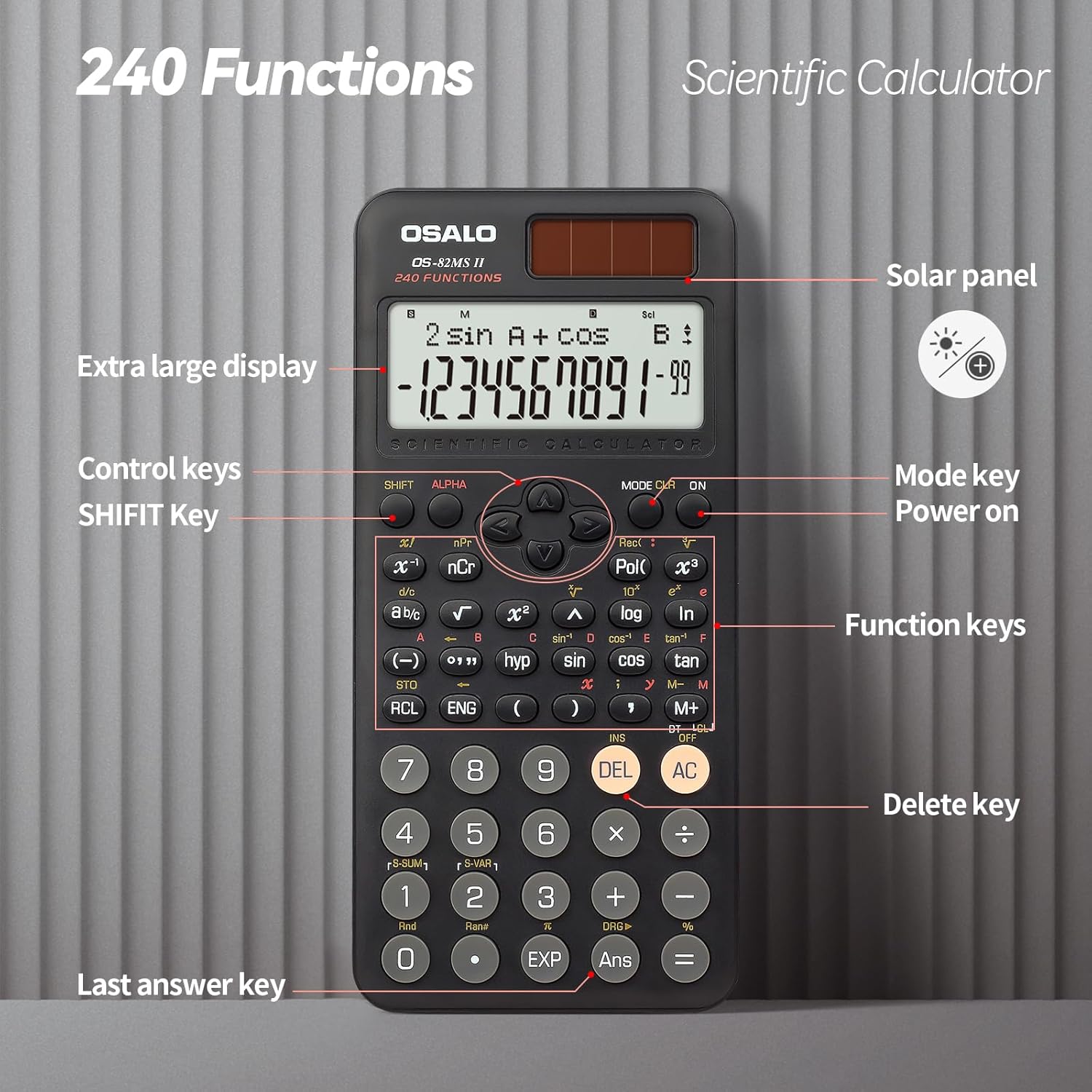
Figure 2: Keypad Layout and Components
3. Bedienungsanleitung
3.1. Grundlegende Berechnungen
To perform basic arithmetic operations, simply input the numbers and operators in sequence. Press = um das gewünschte Ergebnis zu erzielen.
- Zusatz: [Number] + [Number] =
- Subtraktion: [Number] - [Number] =
- Multiplikation: [Number] × [Number] =
- Division: [Number] ÷ [Number] =
3.2. Wissenschaftliche Funktionen
The calculator supports 240 scientific functions. Many functions are accessed by pressing the SCHICHT key before the desired function key (indicated by text above the key).
- Trigonometrische Funktionen: Verwenden Sünde, cos, bräunenFür Umkehrfunktionen drücken Sie SCHICHT then the respective key (e.g., SCHICHT + Sünde for sin-1).
- Logarithmische Funktionen: Verwenden Protokoll (Basis 10) und ln (natürlicher Logarithmus).
- Kräfte und Wurzeln: Verwenden x², x³, √ (square root). For other roots or powers, use SCHICHT with relevant keys.
- Winkeleinheiten: Drücken MODUS multiple times to cycle through angle units (Degrees, Radians, Gradians).

Figure 3: Displaying Input and Output
3.3. Memory Calculations
The calculator includes 9 variable memories (A-F, X, Y, M) for storing and recalling values.
- Speichern: Input a value, then press STO followed by the desired memory key (e.g., A).
- Abrufen: Drücken RCL followed by the desired memory key to recall the stored value.
- Memory Plus/Minus: Verwenden M+ to add the displayed value to memory M, and SCHICHT + M+ (M-) to subtract.
3.4. Statistical Calculations
Um in den Statistikmodus zu wechseln, drücken Sie MODUS and select the STAT option. Follow the on-screen prompts to input data and perform calculations such as standard deviation and regression analysis.
3.5. Anpassung der Anzeigehelligkeit
The calculator features a brightness adjustment function to optimize visibility in different lighting conditions and reduce eye strain.

Figure 4: Brightness Adjustment Function
Refer to the full instruction manual for specific key combinations to adjust display brightness.
4. Wartung
4.1. Reinigung
To clean the calculator, wipe it gently with a soft, dry cloth. Do not use abrasive cleaners, solvents, or spray directly onto the calculator, as this may damage the surface or internal components.
4.2. Speicherung
Store the calculator in a cool, dry place away from direct sunlight and extreme temperatures. Always use the provided hard sliding cover to protect the display and keys from scratches and impacts when not in use.

Figure 5: Calculator with Protective Cover
4.3. Batteriewechsel
When the display becomes dim or the calculator functions erratically, it may be time to replace the LR44 battery. Carefully open the battery compartment on the back of the calculator, replace the old battery with a new LR44 battery, ensuring correct polarity, and close the compartment securely.
5. Fehlerbehebung
- Der Taschenrechner lässt sich nicht einschalten:
- Stellen Sie sicher, dass ausreichend Licht für das Solarpanel vorhanden ist.
- Check if the LR44 battery needs replacement.
- Drücken Sie die ON key firmly.
- Das Display ist dunkel oder leer:
- Increase ambient light for solar power.
- Tauschen Sie die LR44-Batterie aus.
- Adjust display brightness settings (refer to section 3.5).
- Falsche Berechnungsergebnisse:
- Verify the input values and operators.
- Check the current calculation mode (e.g., DEG/RAD/GRA for angles).
- Clear all memory and reset the calculator by pressing SCHICHT + CLR (Modus 3).
- Die Tasten reagieren nicht:
- Achten Sie darauf, dass sich keine Fremdkörper unter den Tasten befinden.
- Clean the calculator surface.
6. Spezifikationen
| Marke | OSALO |
| Modell | OS-82MS II |
| Funktionen | 240 |
| Anzeigetyp | 2-zeiliges LCD |
| Bildschirmgröße | 6 Zentimeter |
| Stromquelle | Solar & Battery Supply (LR44) |
| Material | Plastik |
| Technische Daten | 16.4 x 8 x 0.1 cm |
| Artikelgewicht | 190 g |
7. Garantie und Support
For information regarding warranty coverage, technical support, or service, please contact OSALO customer service or refer to the official OSALO webBewahren Sie Ihren Kaufbeleg als Kaufnachweis auf.