
1. Sicherheitshinweise
Please read and understand all safety instructions before operating this device. Failure to follow these instructions may result in injury or damage to the product.
- Lasersicherheit: Avoid direct eye exposure to the laser beam. This product uses Class 3R lasers, which can cause eye injury if viewed direkt.
- Stromversorgung: Ensure the power supply matches the device's requirements (AC110-240V, 50/60Hz). Disconnect power before cleaning or servicing.
- Belüftung: Sorgen Sie für ausreichende Belüftung rund um das Gerät, um eine Überhitzung zu vermeiden. Blockieren Sie die Belüftungsöffnungen nicht.
- Platzierung: Place the unit on a stable, flat surface or mount securely. Avoid placing in damp oder staubigen Umgebungen.
- Kinder: Außerhalb der Reichweite von Kindern aufbewahren.
2. Packungsinhalt
Prüfen Sie, ob alle Artikel in Ihrem Paket enthalten sind:
- 21-Eyes RGB Laser & UV LED Strobe Party Light Unit
- Fernbedienung
- Netzkabel
- Bedienungsanleitung

Image: Contents of the product package, showing the main light unit, remote control, power cable, and user manual.
3. Produktüberschreitungview
The Flashback Events 21-Eyes RGB Laser & UV LED Strobe Party Light is a versatile stage lighting solution designed to create dynamic visual effects for various events. It combines multiple lighting technologies to produce a rich and immersive atmosphere.
Hauptmerkmale:
- 21-Lens Laser System: Projects vibrant red, green, and blue laser patterns.
- RGB & UV LED Strobe: Features bright RGB and UV (purple) LEDs for wash and strobe effects.
- Mehrere Steuerungsmodi: Supports Sound-Activated, DMX512, Auto, and Master/Slave modes.
- Langlebige Konstruktion: Made from aluminum and plastic for reliability.
Product Dimensions and Components:

Image: Diagram detailing the product's dimensions (7.87"L x 5.11"W x 3.95"H) and key specifications like power (15W) and control modes.
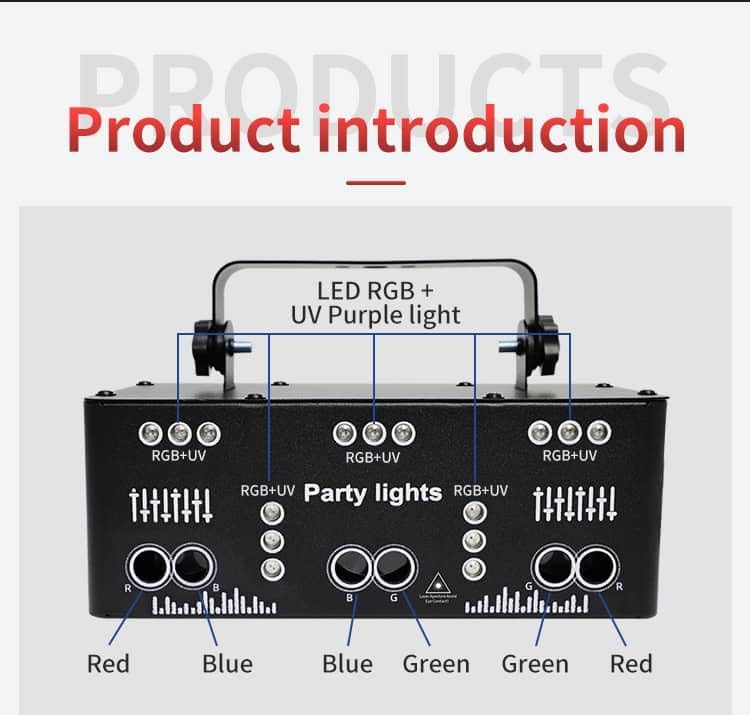
Image: Breakdown of the light's components, showing the arrangement of Red, Blue, Green, and UV LEDs and lasers.
4. Einrichtung
4.1 Montage der Einheit
The light can be placed on a flat surface or mounted using the adjustable bracket. Ensure the mounting location is stable and can support the weight of the unit.
- Tischplatzierung: Stellen Sie das Gerät auf eine stabile, ebene Fläche.
- Ceiling/Truss Mounting: Verwenden Sie geeignete clamps and safety cables (not included) to secure the unit to a ceiling or truss system. Adjust the bracket to direct the light as desired.
4.2 Stromanschluss
Connect the provided power cord to the unit's power input and then to a compatible power outlet (AC110-240V, 50/60Hz).
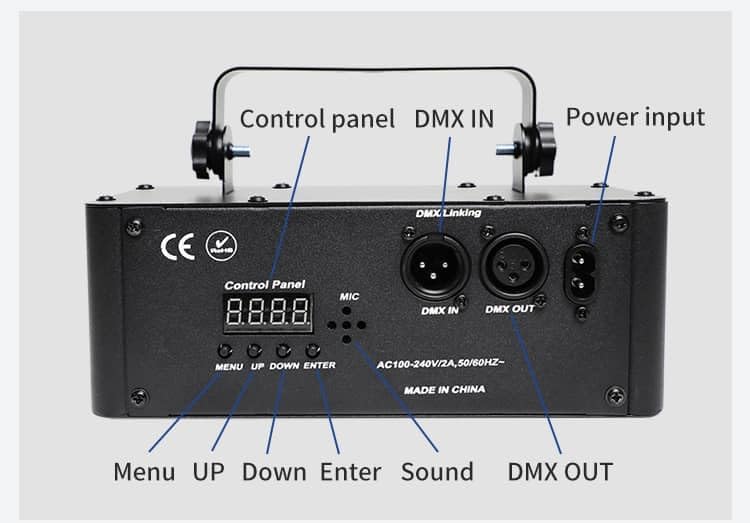
Image: Rear panel of the light, highlighting the power input and control buttons.
5. Betriebsarten
The light offers various operating modes, which can be selected via the control panel buttons or the remote control.
5.1 Bedienung des Bedienfelds
Use the MENU button to cycle through modes, UP/DOWN to adjust settings, and ENTER to confirm.
5.2 Fernbedienungsbetrieb
Die mitgelieferte Fernbedienung ermöglicht den bequemen Zugriff auf alle Funktionen:

Image: Detailed layout of the remote control with all button functions labeled.
- EIN/AUS: Gerät ein- oder ausschalten.
- Automatikmodus: Cycles through pre-programmed light patterns automatically.
- DJ Sound Mode: Activates sound-responsive lighting effects.
- Blitzmodus: Controls strobe effects.
- LED-Schalter: Toggles LED lights on/off.
- Pattern Switch: Changes laser patterns.
- Motor Speed +/-: Adjusts the rotation speed of patterns.
- Laser Color Buttons (R, G, B, RGB): Select individual or combined laser colors.
- LED Color Buttons (Red, Green, Blue, UV Purple): Select individual LED colors.
- Strobe Speed +/-: Adjusts the speed of the strobe effect.
5.3 Geräuschaktivierter Modus
In DJ Sound mode, the built-in microphone detects music and adjusts the light patterns and colors to the beat, creating a synchronized show.
5.4 DMX512 Control
For professional setups, connect a DMX controller to the DMX IN port. Use the DMX OUT port to daisy-chain multiple units. Refer to your DMX controller's manual for specific programming instructions. This unit typically uses 11 DMX channels for advanced control over patterns, colors, and movement.
5.5 Master/Slave-Modus
Link multiple units together using DMX cables. Set one unit as the Master and others as Slaves. The Slave units will mirror the Master's operation, creating a coordinated light show.
5.6 Visuelle Demonstrationen
Video: Demonstration of the Flashback Events 3-in-1 and 21-Eyes Party Lights operating together with haze, showcasing various laser and LED effects.
Video: A dynamic display of the 21-Eyes Rave Party Light's LED strobe and laser effects in action.
Video: The 21-Eyes Stage Lichtshowasing disco dance, DJ party, and strobe light effects.
Video: A comprehensive demonstration of the Flashback Events 21-Eyes LED Strobe Laser Party Light's features and effects.
Video: The 21-Eyes light in action within a large bedroom setting with haze, demonstrating its coverage and visual impact.
6. Wartung
Regular maintenance ensures optimal performance and longevity of your light unit.
- Reinigung: Reinigen Sie die Außenseite des Geräts mit einem weichen, trockenen Tuch. Verwenden Sie keine scharfen Chemikalien oder Scheuermittel.
- Linsenreinigung: Gently wipe the laser and LED lenses with a soft, lint-free cloth to maintain clear light output.
- Belüftung: Überprüfen Sie regelmäßig, ob die Lüftungsöffnungen frei von Staub und Schmutz sind.
- Lagerung: Bewahren Sie das Gerät bei Nichtgebrauch an einem kühlen, trockenen Ort fern von direkter Sonneneinstrahlung und extremen Temperaturen auf.
7. Fehlerbehebung
Sollten Sie Probleme mit Ihrer Lampe haben, beachten Sie bitte die folgenden häufigen Probleme und Lösungen:
| Problem | Mögliche Ursache | Lösung |
|---|---|---|
| Kein Strom | Netzkabel nicht angeschlossen; Steckdose defekt | Stellen Sie sicher, dass das Netzkabel fest angeschlossen ist. Testen Sie die Steckdose mit einem anderen Gerät. |
| Keine Lichtleistung | Unit is off; mode not selected; remote battery low | Turn unit on. Select an operating mode. Replace remote control battery (CR2032). |
| Lichter reagieren nicht auf Musik | Sound-activated mode not selected; music too quiet | Ensure DJ Sound mode is active. Increase music volume or move unit closer to sound source. |
| DMX-Steuerung funktioniert nicht | Incorrect DMX address; faulty DMX cable; DMX controller issue | Check DMX address settings. Test DMX cables. Verify DMX controller is functioning correctly. |
8. Spezifikationen
| Besonderheit | Detail |
|---|---|
| Modellnummer | YSH-503 |
| Farbe | Schwarz |
| Material | Aluminium, Kunststoff |
| Lichtquellentyp | Leuchtdiode (LED) |
| Stromquelle | Kabelgebundene Elektrik |
| Bandtage | 110 Volt (Wechselstrom) |
| Maximal kompatible Lichtquelle Wattage | 15 Watt |
| Montagetyp | Table / Ceiling / Truss |
| Lichtquelle – Besondere Merkmale | Strobe, Sound-Activated |
| Anzahl der Lichtquellen | 21 |
| Artikelabmessungen L x B x H | 7.87 Zoll L x 5.11 Zoll B x 3.95 Zoll H |
| Batterie der Fernbedienung | 1 CR2032-Batterie erforderlich (nicht im Lieferumfang enthalten) |
| Hersteller | Shenzhen Yushenghang Electronics Co., Ltd |
9. Garantie und Support
This Flashback Events product comes with a 1 Jahr Herstellergarantie.
For any questions or assistance, our support team is available to respond within 24 hours. Please refer to the contact information provided with your purchase or visit the official Flashback Events store on Amazon for further details.
Thank you for choosing Flashback Events!