
1. Einleitung
Thank you for choosing the Flyrivergo YZM-61 Digital Platform Scale. This manual provides essential information for the safe and efficient operation of your scale. Please read these instructions carefully before use and retain them for future reference. This industrial-grade digital platform scale is designed for accurate weighing in various settings, including industrial, commercial, and small business environments, with a maximum capacity of 660 lbs (300 kg) and an accuracy of 0.1 lbs (50g).
2. Sicherheitshinweise
Beachten Sie die folgenden Sicherheitsvorkehrungen, um Verletzungen oder Beschädigungen der Waage zu vermeiden:
- Die maximale Tragfähigkeit von 660 lbs (300 kg) darf nicht überschritten werden.
- Place the scale on a stable, level surface to ensure accurate readings.
- Avoid dropping or subjecting the scale to severe impacts.
- Keep the scale away from water and excessive moisture.
- Versuchen Sie nicht, die Waage selbst zu zerlegen oder zu reparieren. Wenden Sie sich zur Wartung an qualifiziertes Fachpersonal.
- Use only the provided AC adapter for charging and power.
- Ensure proper ventilation when charging the battery.
3. Packungsinhalt
Prüfen Sie beim Auspacken, ob alle Komponenten vorhanden sind:
- Digital Platform Scale (Platform and Display Unit with Stand)
- Netzteil
- Bedienungsanleitung
4. Montage und Einrichtung
Befolgen Sie diese Schritte, um Ihre Waage zusammenzubauen und für den ersten Gebrauch vorzubereiten:
- Auspacken: Nehmen Sie alle Komponenten vorsichtig aus der Verpackung. Prüfen Sie sie auf Beschädigungen.
- Montieren Sie den Ständer: Attach the display unit to the vertical stand, and then secure the stand to the weighing platform. Ensure all connections are firm. Some models may require screwing the stand to the platform from underneath.
- Stromanschluss: Connect the AC power adapter to the scale's power input and plug it into a standard electrical outlet. The scale can operate directly from AC power or use its internal rechargeable DC battery.
- Erstladung: For optimal battery life, fully charge the scale before its first use. The battery indicator on the display will show charging status. The scale can operate while charging.
- Platzierung: Place the assembled scale on a firm, level surface. Adjust the four adjustable feet at the base of the platform to ensure stability and prevent wobbling. This is crucial for accurate measurements.
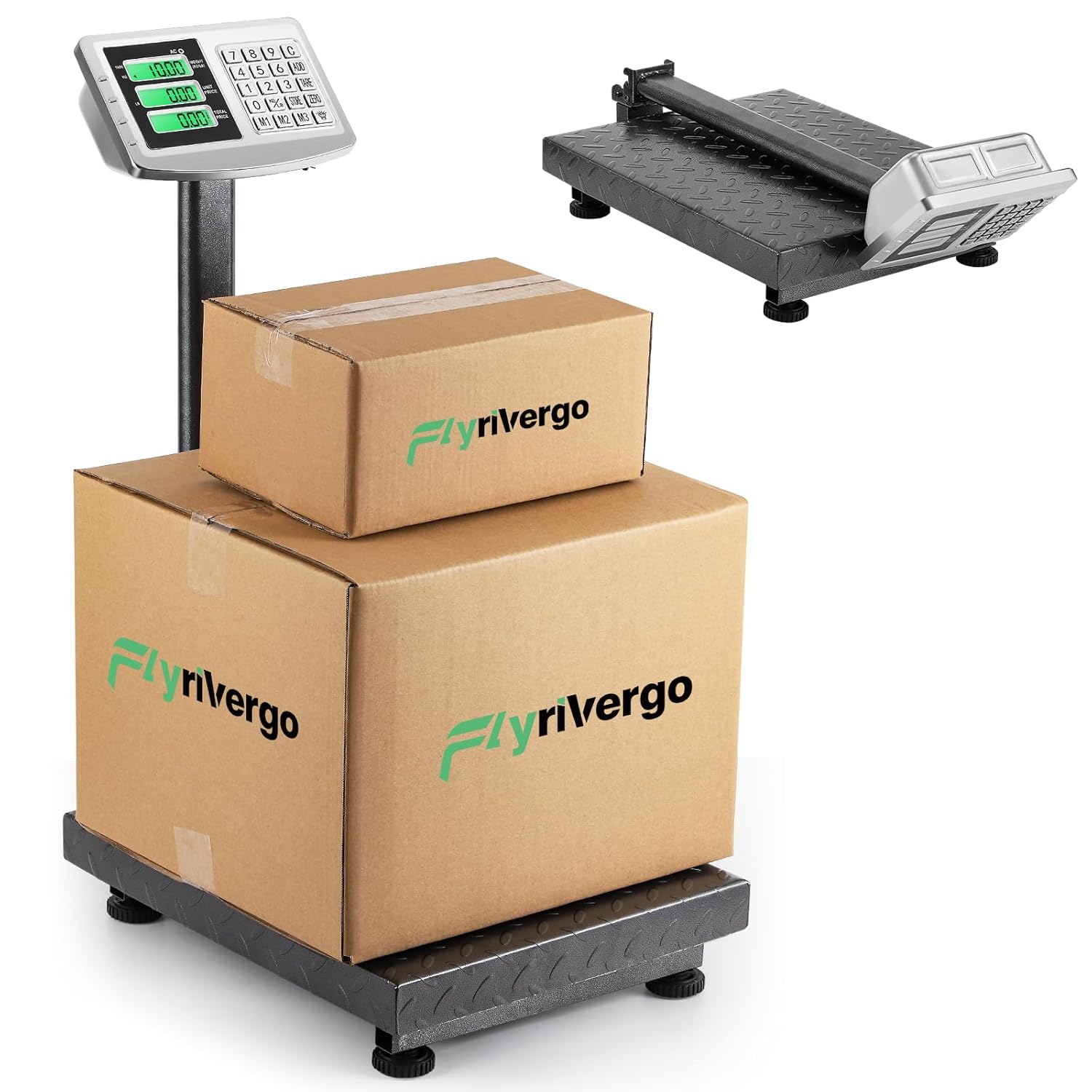
The Flyrivergo YZM-61 Digital Platform Scale, fully assembled, with two packages placed on its robust weighing platform. This image illustrates the scale's operational setup and capacity for handling various package sizes.

This image highlights the large platform of the Flyrivergo YZM-61 scale, showing the adjustable feet for stability and the textured carbon steel surface designed for secure weighing.
5. Bedienungsanleitung
Familiarize yourself with the scale's functions for accurate and efficient weighing.
5.1 Ein-/Ausschalten
- Drücken Sie die [EIN/AUS] Knopf zum Ein- und Ausschalten der Waage.
- The display will illuminate and perform a self-check before showing '0.00'.
5.2 Zeroing and Calibration
To ensure accuracy, zero the scale before each use or after placing an empty container.
- With nothing on the platform, press the [NULL] Drücken Sie die Taste. Die Anzeige wird auf „0.00“ zurückgesetzt.
- This function compensates for minor weight fluctuations or an empty container.
5.3 Wiegeverfahren
- Ensure the scale is zeroed.
- Carefully place the item to be weighed onto the center of the platform.
- Lesen Sie das auf dem Bildschirm angezeigte stabile Gewicht ab.
5.4 Unit Conversion (LB/KG)
The scale supports switching between pounds (LB) and kilograms (KG).
- Drücken Sie die [LB/KG] Taste zum Umschalten zwischen den beiden Einheiten.
- Die aktive Einheit (kg oder lb) wird auf dem Display angezeigt.

The display of the Flyrivergo YZM-61 scale illustrating the unit conversion feature, showing how the weight indication changes between kilograms (KG) and pounds (LB).
5.5 Tara-Funktion
Use the Tare function to subtract the weight of a container, allowing you to weigh only the contents.
- Stellen Sie einen leeren Behälter auf die Plattform.
- Drücken Sie die [TARA] button. The display will reset to '0.00', effectively removing the container's weight.
- Now, place the items to be weighed into the container. The display will show the net weight of the items.
5.6 Pricing Function
This scale includes a pricing function for calculating total cost based on weight and unit price.
- After weighing an item, enter the unit price using the numeric keypad.
- The scale will automatically calculate and display the total price.
- Use memory buttons [M1], [M2], [M3] to store and recall frequently used unit prices.
5.7 Akkumulationsfunktion
The accumulation function allows you to sum the weights or prices of multiple items.
- After weighing an item and, if applicable, setting its price, press the [HINZUFÜGEN] button. The weight/price will be added to the total.
- Repeat for subsequent items.
- Zu view the accumulated total, refer to the display.
5.8 Battery Display and Overweight Reminder
- The display includes an indicator for the current battery level. Recharge the scale when the battery is low.
- An overweight reminder will activate if the weight on the platform exceeds the maximum capacity, protecting the scale from damage.

A close-up of the Flyrivergo YZM-61 scale's control panel and display, detailing its versatile functionality. Icons represent features such as unit conversion (KG/LB), tare removal, pricing, accumulation, and battery level display, indicating a comprehensive tool for various weighing needs.
6. Wartung
Durch sachgemäße Wartung wird die Langlebigkeit und Genauigkeit Ihrer Waage gewährleistet.
- Reinigung: Wischen Sie die Waagenoberfläche mit einem weichen,amp Mit einem Tuch abwischen. Keine Scheuermittel verwenden und die Kalkablagerungen nicht in Wasser einweichen.
- Lagerung: When not in use, the scale's 90-degree folding design allows for convenient storage. Fold the display stand down to save space. Store in a dry, cool environment.
- Batteriepflege: Recharge the battery regularly, even if the scale is not in frequent use, to maintain battery health. Avoid completely draining the battery for extended periods.

This image illustrates the Flyrivergo YZM-61 scale's 90-degree folding design. It shows the scale in its upright, operational position and then transitioning to a compact, folded state, emphasizing its convenience for storage and transport.
7. Fehlerbehebung
Sollten Sie Probleme mit Ihrer Waage haben, beachten Sie bitte die folgenden häufig auftretenden Probleme und Lösungen:
| Problem | Mögliche Ursache | Lösung |
|---|---|---|
| Waage lässt sich nicht einschalten | Low battery or no power connection | Connect the AC adapter and charge the battery. Ensure the power outlet is functional. |
| Ungenaue Messwerte | Scale not level, unstable surface, or not zeroed | Place the scale on a firm, level surface. Adjust feet. Press [NULL] before weighing. Avoid drafts or vibrations. |
| Display shows 'OVERLOAD' | Weight exceeds maximum capacity | Überschüssiges Gewicht sofort entfernen, um Schäden zu vermeiden. |
| Cannot switch units (e.g., stuck on KG) | Incorrect operation or temporary software glitch | Ensure no weight is on the platform. Press [LB/KG] firmly. If issue persists, power cycle the scale (turn off, wait 10 seconds, turn on). |
| Das Display ist dunkel oder flackert | Schwache Batterie | Laden Sie den Akku der Waage auf. |
8. Spezifikationen
| Besonderheit | Detail |
|---|---|
| Modellnummer | YZM-61 |
| Marke | Flyrivergo |
| Gewichtskapazität | 660 kg |
| Genauigkeit | 0.1 lbs (50g) |
| Anzeigetyp | LCD |
| Stromversorgung | AC Adapter / DC Rechargeable Battery |
| Akkulaufzeit | Up to 10 continuous days (on full charge) |
| Material | All Stainless Steel body, Carbon Steel surface |
| Formfaktor | Faltbar |
| Farbe | Grau |
| Ungefähre Abmessungen (montiert) | Height: 31.5 inches (80 cm), Width: 15.7 inches (40 cm), Depth: 19.6 inches (50 cm) |
| Ungefähre Verpackungsabmessungen | 29.05 x 16.45 x 7.1 Zoll |
| Ungefähres Artikelgewicht | 21.75 Pfund |

The Flyrivergo YZM-61 scale is shown with its key dimensions labeled: 31.5 inches (80 cm) height, 15.7 inches (40 cm) width, and 19.6 inches (50 cm) depth. This provides a clear understanding of the scale's physical footprint and capacity for handling various item sizes.
9. Garantie und Support
For warranty information or technical support, please refer to the contact details provided with your purchase documentation or visit the official Flyrivergo webBewahren Sie Ihren Kaufbeleg als Kaufnachweis für eventuelle Garantieansprüche auf.