
1. Einleitung
Thank you for choosing the Gigaset Pure 100 Cordless Phone. This manual provides essential information for setting up, operating, and maintaining your new phone. Please read these instructions carefully to ensure optimal performance and longevity of your device.
The Gigaset Pure 100 is designed for ease of use, featuring a call blocking button, a 50-contact address book, hearing aid compatibility, and programmable function keys to enhance your communication experience.

Image: The Gigaset Pure 100 cordless phone positioned in a home environment, showcasing sein elegantes Design.
2. Lieferumfang
Before you begin, please check the contents of your package. Ensure all items listed below are present:
- 1 Mobilteil
- 1 Basisstation
- 2 wiederaufladbare AAA-Batterien
- 1 Batteriefachdeckel
- 1 Netzteil
- 1 Telefonanschlusskabel
- 1 Kurzanleitung
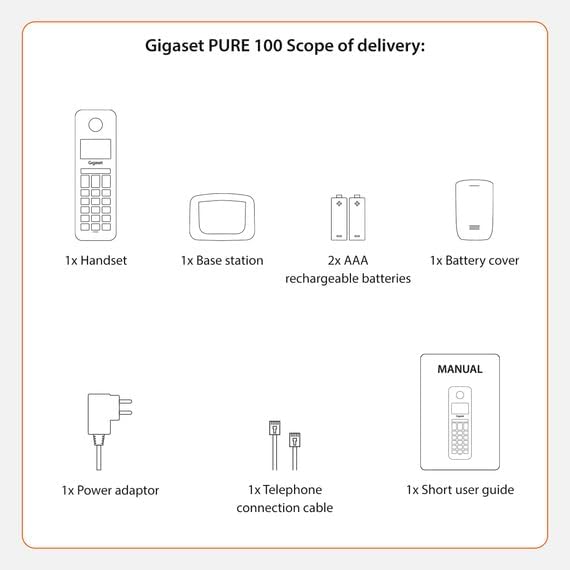
Image: A visual representation of the Gigaset Pure 100's scope of delivery, including handset, base, batteries, and cables.
3. Einrichtung
3.1. Einlegen der Batterie
- Remove the battery cover from the back of the handset.
- Legen Sie die beiden mitgelieferten AAA-Akkus unter Beachtung der richtigen Polarität (+/-) ein.
- Bringen Sie die Batterieabdeckung wieder an, bis sie einrastet.

Image: The rear side of the Gigaset Pure 100 handset, illustrating where the battery cover is located for installation.
3.2. Basisstationsverbindung
- Schließen Sie den Netzadapter an die Basisstation an und stecken Sie ihn in eine Steckdose.
- Connect the telephone connection cable to the base station and plug the other end into your telephone wall socket.
- Place the base station on a flat, stable surface.
3.3. Mobilteil-Registrierung
The handset is usually pre-registered to the base station. If not, or if you are registering an additional handset:
- Legen Sie das Mobilteil in die Basisstation.
- Press and hold the registration/paging button on the base station for approximately 3 seconds. The base station will enter registration mode.
- Follow the on-screen prompts on the handset to complete the registration process. You may need to enter a PIN (default is 0000).

Image: The Gigaset Pure 100 handset securely placed in its charging and communication base station.
4. Bedienungsanleitung
4.1. Anrufe tätigen
- Heben Sie den Hörer ab oder drücken Sie die Grüne Ruftaste.
- Wählen Sie die gewünschte Telefonnummer.
- Drücken Sie die Grüne Ruftaste erneut, um den Anruf zu initiieren.
- Um einen Anruf zu beenden, drücken Sie die Rote Anruftaste or place the handset back in the base station.
4.2. Anrufe entgegennehmen
Wenn das Telefon klingelt, drücken Sie die Taste Grüne Ruftaste um den Anruf anzunehmen.
4.3. Address Book
The Gigaset Pure 100 can store up to 50 contacts in its address book.
- To access the address book, press the Directory Key (usually an icon resembling an open book or person).
- Use the navigation keys to scroll through your contacts.
- To dial a contact, select their entry and press the Grüne Ruftaste.
- To add a new contact, navigate to an empty entry or select the 'New Entry' option and follow the on-screen instructions to enter the name and number.
4.4. Anrufblockierung
The Gigaset Pure 100 features a dedicated call blocking button to help manage unwanted calls.
- During an incoming call from an unwanted number, press the Call Blocking Button (often marked with a shield or 'Block' icon).
- The number will be added to your block list, and subsequent calls from this number will be rejected.
- Refer to the quick guide for detailed instructions on managing your block list.

Image: The Gigaset Pure 100 handset screen showing a 'Blocked Number' notification, highlighting its call blocking feature.
4.5. Programmierbare Funktionstasten
The phone includes programmable function keys that can be assigned to frequently used numbers or features. Consult your quick guide for instructions on how to program these keys to suit your needs.

Image: An illustration demonstrating the Gigaset Pure 100's effective range, allowing calls from various locations within a property.
5. Wartung
5.1. Reinigung
Wischen Sie Mobilteil und Basisstation mit einem weichen, fusselfreien Tuch ab.amp Mit einem Tuch abwischen. Keine Scheuermittel oder Lösungsmittel verwenden. Sicherstellen, dass keine Flüssigkeit in die Geräteöffnungen eindringt.
5.2. Batteriepflege
Verwenden Sie ausschließlich die empfohlenen wiederaufladbaren AAA-Batterien. Wenn das Telefon längere Zeit nicht benutzt wird, entfernen Sie die Batterien, um ein Auslaufen zu verhindern. Tauschen Sie die Batterien aus, sobald ihre Leistung deutlich nachlässt.
6. Fehlerbehebung
- Kein Wählton:
Check if the power adapter and telephone connection cable are securely plugged into the base station and wall outlets. Ensure the handset is registered to the base. - Kann keine Anrufe tätigen/empfangen:
Verify that the telephone line is active. Check if the handset batteries are charged. Ensure the handset is within range of the base station. - Schlechte Tonqualität:
Move closer to the base station. Check for interference from other electronic devices. - Das Display des Mobilteils ist leer:
Place the handset in the base station to charge the batteries. If the issue persists, replace the batteries.
7. Spezifikationen
| Besonderheit | Beschreibung |
|---|---|
| Marke | Gigaset |
| Modellnummer | PURE 100 |
| Farbe | Schwarz |
| Bildschirm | 1.5 Zoll |
| Leistungstyp | Batterie |
| Wählart | Einzelne Tastatur |
| Anruferidentifizierung | Ja |
| Material | Plastik |
| Systemtyp | Digitales |
8. Garantie und Support
For warranty information and technical support, please refer to the quick guide included in your package or visit the official Gigaset webBewahren Sie Ihren Kaufbeleg für Garantieansprüche auf.