
VOCOO 5285W
VOCOO Digitaler Küchentimer – Benutzerhandbuch
Model: 5285W | Brand: VOCOO
1. Produktüberschreitungview
The VOCOO Digital Kitchen Timer is a versatile and user-friendly device designed for precise time management in various settings, including kitchens, classrooms, home gyms, and offices. It features an extra-large LED display, multiple alarm options, adjustable volume and brightness, and convenient placement options.
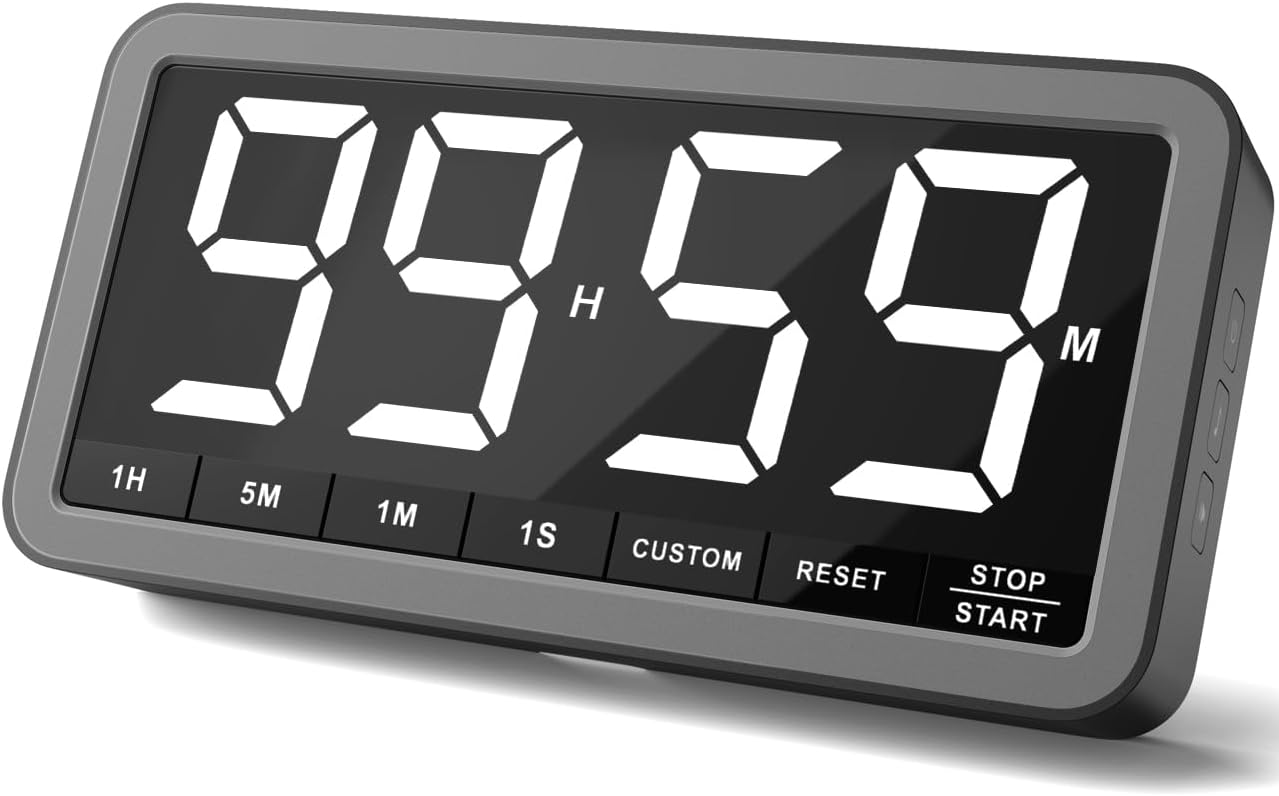
Abbildung 1: Vorderseite view of the VOCOO Digital Kitchen Timer displaying 99 hours and 59 minutes.
2. Hauptmerkmale
- Extra Large LED Display: A 7.8-inch digital white LED display with 2.3-inch tall numbers for easy readability from a distance.
- Einstellbare Helligkeit: Three levels of brightness (Dim/Medium/Bright) to suit different environments.
- Multiple Alarms & Volume Levels: Four distinct alarm options (Beep, Melody 1, Melody 2, Melody 3) and three volume settings (Loud: 80-95dB, Medium: 70-85dB, Soft: 60-75dB).
- Versatile Timing Modes: Supports both countdown (up to 99 hours 59 minutes) and count-up (stopwatch, up to 99 hours 59 minutes 59 seconds) functions. Includes Minute/Second and Hour/Minute modes.
- Wiederaufladbarer Akku: Powered by a rechargeable battery, reducing the need for frequent battery replacements. Features a low power indicator.
- Flexible Platzierung: Equipped with two strong, silicone-covered magnets for direct attachment to metal surfaces, a hanging hole, and a built-in stand for desktop use.
- Intuitive Steuerung: Dedicated buttons for setting time, reset, and start/pause, ensuring ease of use for all ages.

Figure 2: Visual representation of the extra-large display and extended timing capabilities.
3. Einrichtung
3.1. Auspacken und erste Aufladung
Upon unboxing, locate the VOCOO Digital Timer, USB-C plug, USB-C charging cable, and user manual. It is recommended to fully charge the device before first use.
- Connect the provided USB-C charging cable to the timer's USB-C port (located on the side).
- Plug the USB-C plug into a standard 5V (OUTPUT VOLTAGE) power outlet.
- The low power icon on the display will indicate charging status. Charge until the icon disappears or indicates full charge.
- NOTIZ: Using a power plug higher than 5V may lead to battery damage.
3.2. Platzierungsoptionen
The timer offers multiple convenient placement methods:
- Magnetische Befestigung: Utilize the two strong, silicone-covered magnets on the back to securely attach the timer to any metal surface, such as a refrigerator or whiteboard. The silicone covers prevent scratches.
- Integrierter Ständer: Flip out the integrated stand on the back to place the timer upright on a desktop, countertop, or any flat surface.
- Loch zum Aufhängen: Use the hanging hole on the back to suspend the timer from a hook or nail.

Figure 3: The three versatile ways to place the digital timer.
4. Bedienungsanleitung
4.1. Ein-/Ausschalten
Drücken Sie die Netztaste (⏻) located on the side of the timer to turn it on or off.
4.2. Zeit einstellen (Countdown-Modus)
The timer supports two main modes for setting time: Minute/Second and Hour/Minute.
- Minute/Second Mode:
- Drücken Sie die 1M button to add 1 minute.
- Drücken Sie die 5M button to add 5 minutes.
- Drücken Sie die 1S button to add 1 second.
- The maximum time in this mode is 59 minutes 59 seconds.
- Hour/Minute Mode:
- Drücken Sie die 1H button to add 1 hour.
- Drücken Sie die 5M button to add 5 minutes.
- The maximum time in this mode is 99 hours 59 minutes.
- Benutzerdefinierte Voreinstellungen: Verwenden Sie die BRAUCH button to quickly access pre-set countdown times.
- Zurücksetzen: Drücken Sie die ZURÜCKSETZEN button to clear the current time setting and return to 00:00.

Figure 4: Illustration of the timer's countdown capabilities in different time formats.
4.3. Starten und Stoppen des Timers
- Sobald die gewünschte Zeit eingestellt ist, drücken Sie die Taste STOP / START Knopf zum Starten des Countdowns.
- Um den Timer anzuhalten, drücken Sie die Taste STOP / START erneut die Taste.
- Um fortzufahren, drücken Sie STOP / START noch einmal.
- When the countdown reaches 00:00, the alarm will sound. The digits will turn red when the countdown passes 1 minute.
4.4. Stopwatch (Count-Up Mode)
Um den Timer als Stoppuhr zu verwenden:
- Ensure the timer is reset to 00:00.
- Drücken Sie die STOP / START button to begin counting up from zero.
- Drücken STOP / START to pause, and again to resume.
- The maximum count-up time is 99 hours 59 minutes 59 seconds.
4.5. Einstellen der Helligkeit
The display brightness can be adjusted to three levels:
- Drücken Sie die Netztaste (⏻) repeatedly to cycle through Dim, Medium, and Bright settings.

Figure 5: The three adjustable brightness levels and the low battery indicator.
4.6. Adjusting Alarm Sound and Volume
The timer offers 4 alarm sounds and 3 volume levels:
- Alarmton: Drücken Sie die Musiknoten-Taste (♫) on the side to cycle through the 4 alarm options (Beep, Melody 1, Melody 2, Melody 3).
- Lautstärke: Drücken Sie die Lautstärketaste (🔊) on the side to cycle through Loud (L03), Medium (L02), and Soft (L01) volume levels.

Abbildung 6: Überview of the available alarm sounds and volume settings.
5. Wartung
5.1. Aufladen
The timer is powered by a rechargeable battery. When the low power icon appears on the display, connect the USB-C charging cable to recharge. The timer can be used while charging.
5.2. Reinigung
Wischen Sie den Timer mit einem weichen, trockenen Tuch ab. Verwenden Sie keine Scheuermittel und tauchen Sie das Gerät nicht in Wasser.
6. Fehlerbehebung
6.1. Display leuchtet nicht auf
- Ensure the timer is powered on by pressing the Power button.
- Check if the battery is low. Connect the USB-C charging cable and allow it to charge.
6.2. Alarm Not Audible Enough
- Press the Volume button (🔊) on the side to cycle through the three volume levels (L01, L02, L03) until the desired loudness is achieved.
6.3. Timer Not Responding to Button Presses
- Try resetting the timer by pressing the ZURÜCKSETZEN Taste.
- Ensure the battery is not completely drained. Charge the device if necessary.
7. Spezifikationen
| Besonderheit | Detail |
|---|---|
| Modellnummer | 5285 W |
| Anzeigetyp | 7.8-inch LED Digital Display |
| Helligkeitsstufen | 3 (Dim, Medium, Bright) |
| Alarmoptionen | 4 (Beep, Melody 1, Melody 2, Melody 3) |
| Lautstärkepegel | 3 (Loud: 80-95dB, Medium: 70-85dB, Soft: 60-75dB) |
| Max Countdown Time | 99 Stunden 59 Minuten |
| Max Count-Up Time | 99 Hours 59 Minutes 59 Seconds |
| Stromquelle | Wiederaufladbarer Akku (USB-C) |
| Material | Silicone (for magnet covers) |
| Abmessungen (T x B x H) | 1.38" x 8.27" x 4.13" |
| Artikelgewicht | 9.8 Unzen (278 Gramm) |

Figure 7: Detailed dimensions of the VOCOO Digital Kitchen Timer.
8. Garantie und Support
For any questions or support regarding your VOCOO Digital Kitchen Timer, please contact us directly:
- E-Mail: support@vocoo.vip
Please refer to the original product packaging or purchase documentation for specific warranty details.