
1. Einleitung
The NVX XDSP28 is an advanced 8-channel Digital Signal Processor (DSP) designed to enhance your car audio system. It features a 15-band parametric equalizer, adjustable high and low-pass filters, and various crossover types for precise sound customization. With 2 RCA inputs and 8 RCA outputs, built-in Bluetooth for audio streaming, and a remote level controller, the XDSP28 provides comprehensive control over your vehicle's sound environment. This manual provides detailed instructions for installation, operation, and troubleshooting to ensure optimal performance of your device.
2. Sicherheitshinweise
- Lesen Sie alle Anweisungen vor der Installation und Verwendung sorgfältig durch.
- Disconnect the vehicle's negative battery terminal before making any electrical connections.
- Sorgen Sie für eine ordnungsgemäße Erdung, um elektrische Gefahren zu vermeiden.
- Das Gerät darf keiner Feuchtigkeit oder extremen Temperaturen ausgesetzt werden.
- Mount the unit securely to prevent movement during vehicle operation.
- Wenn Sie sich bei einzelnen Installationsschritten unsicher sind, wenden Sie sich an einen professionellen Car-Audio-Einbauer.
3. Packungsinhalt
Überprüfen Sie, ob alle Artikel im Paket vorhanden sind:
- NVX XDSP28 Digital Signal Processor Unit
- Remote Level Controller with Cable
- Bedienungsanleitung
- Befestigungsmaterial (Schrauben usw.)
4. Produktüberschreitungview
Familiarize yourself with the components and controls of the NVX XDSP28.

Figure 4.1: NVX XDSP28 Front Panel with Labeled Components
- Remote Out Sequencer: Activates other devices in sequence through a remote connection.
- Remote-Eingang (REM IN): Schaltet den amplifier on automatically with the radio or player.
- Ground Connector (GND): Connect to the battery's negative terminal.
- Positive Power Connector (+BAT): Connect to the battery's positive terminal.
- LCD Anzeige: Displays information and allows interaction with the processor.
- Hauptsteuerung: A rotating knob to adjust processor system settings and navigate menus.
- Input LED Indicator: Shows when the channel's limiter is active or output is saturated.
- Remote Level Input: Connects the external remote level controller. Controls all eight outputs simultaneously.
- Audio Input (Inputs A, B): Independent RCA connectors for channels A and B.
- Audio Output (Outputs 1-8): RCA connectors for outputting processed audio.
- Ausgangs-LED-Anzeige: Signals when the input signal is at maximum level.
- Output Select: Quickly press to adjust output channels or hold to mute.

Abbildung 4.2: Oben view of the NVX XDSP28 unit, showing the main control knob, LCD display, and input/output connections.

Abbildung 4.3: Rückseite view of the NVX XDSP28, highlighting the power and remote connections.
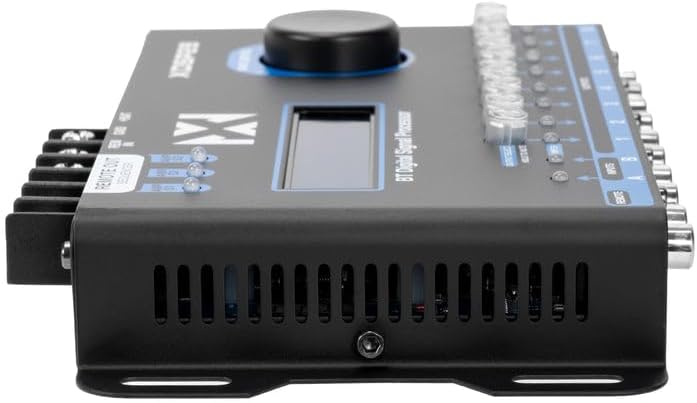
Figure 4.4: The remote level controller for the NVX XDSP28, used for simultaneous output control.
5. Einrichtung und Installation
Eine fachgerechte Installation ist für eine optimale Leistung unerlässlich. Befolgen Sie diese Schritte sorgfältig:
- Montage: Select a secure, dry location in your vehicle, away from heat sources and moisture. Use the provided mounting hardware to firmly attach the DSP unit.
- Stromanschlüsse:
- Verbinden Sie +BAT terminal to the vehicle's positive battery terminal (or a constant 12V source) using appropriate gauge wire and an inline fuse (not included).
- Verbinden Sie Masse terminal to a clean, unpainted metal surface on the vehicle chassis, ensuring a solid ground connection.
- Verbinden Sie REM IN terminal to the remote turn-on output of your head unit or ignition switch.
- Audioeingangsanschlüsse: Verbinden Sie die RCA-Ausgänge Ihres Autoradios mit dem/der/dem Inputs A Und B on the XDSP28.
- Audio-Ausgangsanschlüsse: Verbinden Sie Ausgänge 1-8 of the XDSP28 to the RCA inputs of your amplifiers. Ensure correct channel assignment for your speaker configuration.
- Remote Level Controller: Plug the remote level controller cable into the FERNBEDIENUNG port on the DSP unit. Mount the controller in an accessible location for easy adjustment.
- Erstes Einschalten: Reconnect the vehicle's negative battery terminal. The DSP should power on, and the LCD display will illuminate.
6. Bedienung
The NVX XDSP28 offers extensive control over your audio system. All settings are adjusted via the Main Control knob and the LCD display.
6.1 Menünavigation
- Drehen Sie den Hauptkontrolle Drehknopf zum Durchblättern der Menüoptionen.
- Drücken Sie die Hauptkontrolle knob to select an option or confirm a setting.
- Halten Sie die Hauptkontrolle knob to exit a menu or return to the previous screen.
6.2 Entzerrung (EQ)
The XDSP28 features a 15-band parametric equalizer for precise frequency adjustments.
- Graphic EQ Presets: Select from 12 pre-defined graphic equalization presets such as Rock, Hip Hop, Pop, Vocal, and more.
- Parametrischer EQ: Manually adjust gain, frequency, and Q-factor for each of the 15 bands on both input and output channels.
6.3 Crossover Function
Configure high-pass and low-pass filters for each output channel to optimize speaker performance.
- Adjust cut frequencies for high-pass and low-pass filters.
- Select various crossover types and filter slopes (e.g., Butterworth, Linkwitz-Riley).
6.4 Time Alignment and Phase
Achieve perfect sound staging by adjusting the delay for each output channel.
- Adjust time delays in 0.02 ms increments.
- Set phase adjustments to 0° or 180° for each output.
6.5 Independent Gain and Limiter
- Independent Gain: Adjust the gain level for each output channel individually.
- Begrenzer: The integrated Limiter with Dynamic Attack-Release system protects your amplifiers and speakers from over-excursion and clipping.
6.6 Audiogenerator
Utilize the built-in audio tone generator for precise tuning and system diagnostics.
- Generate frequency sweeps.
- Generate pink noise for RTA (Real-Time Analyzer) measurements.
6.7 Bluetooth-Konnektivität
The XDSP28 features built-in Bluetooth for wireless audio streaming from your mobile device.
- Pair your device with the XDSP28 via Bluetooth settings on your phone.
- Bluetooth is for audio playback only; it does not support app-based control of DSP settings.
6.8 Remote Level Controller
The external remote level controller allows for convenient, simultaneous adjustment of all eight output levels.
7. Wartung
- Keep the unit clean and free of dust. Use a soft, dry cloth for cleaning.
- Vermeiden Sie die Verwendung aggressiver Chemikalien oder Scheuermittel.
- Stellen Sie sicher, dass alle Verbindungen fest sitzen. Überprüfen Sie die Verkabelung regelmäßig auf Anzeichen von Verschleiß oder Beschädigung.
8. Fehlerbehebung
| Problem | Mögliche Ursache | Lösung |
|---|---|---|
| No power to the DSP. | Incorrect power wiring; Blown fuse; Loose ground connection. | Check +BAT, GND, and REM IN connections. Verify fuse integrity. Ensure a solid ground connection. |
| Keine Tonausgabe. | Incorrect input/output connections; DSP muted; Amplifier not powered on; Incorrect source selection. | Verify all RCA connections. Check DSP mute status (Output Select button). Ensure amplifiers are receiving remote turn-on signal. Confirm correct input source (A, B, or A+B). |
| Verzerrte oder schlechte Klangqualität. | Incorrect EQ settings; Improper crossover settings; Input signal too high/low; Limiter engaged excessively. | Adjust EQ settings. Review crossover frequencies and slopes. Check input gain levels. Monitor Input LED indicators for clipping. |
| Probleme mit der Bluetooth-Verbindung. | Gerät nicht im Kopplungsmodus; Störungen; Bereits mit einem anderen Gerät verbunden. | Ensure Bluetooth is enabled on your device and the DSP. Disconnect from other Bluetooth devices. Move closer to the DSP. |
| Main Control knob is overly sensitive. | Characteristic of the control mechanism. | Exercise caution and precision when rotating and pressing the knob for menu navigation and setting adjustments. |
| Remote Level Controller causes input glitches. | Potential unit-specific issue or interference. | Ensure the remote cable is securely connected and not damaged. If issues persist, try operating without the remote controller to isolate the problem. Contact support if necessary. |
9. Spezifikationen
| Besonderheit | Spezifikation |
|---|---|
| Modell | NVX XDSP28 |
| Anzahl der Kanäle | 8 (Ausgabe) |
| Eingangskanäle | 2 Cinch-Buchsen |
| Ausgabekanäle | 8 RCA (up to 2 Volts output) |
| Equalizer | Parametrischer 15-Band-EQ |
| Signal-Rausch-Verhältnis | > 94 dB |
| Gesamte harmonische Verzerrung (THD) | 0.01 % |
| Time Adjustment Increments | 0.02 ms |
| Phaseneinstellung | 0° oder 180° |
| Graphic EQ Presets | 12 (Rock, Hip Hop, Pop, Vocal, etc.) |
| Mindestvorrat Voltage | 10 Volt (DC) |
| Maximales Versorgungsvolumentage | 16 Volt (DC) |
| Abmessungen (L x B x H) | 7.87" x 3.98" x 1.46" (200 mm x 101 mm x 37 mm) |
| Artikelgewicht | 0.7 Kilogramm |
| Bluetooth | Built-in (for audio streaming) |
| Remote Level Controller | Included, for simultaneous output control |
10. Garantie und Support
NVX products are designed for reliability and performance. For specific warranty details, please refer to the warranty card included with your product or contact the retailer where the product was purchased. Keep your proof of purchase for warranty claims.
For technical assistance, troubleshooting beyond this manual, or service inquiries, please contact NVX customer support or the authorized dealer. Contact information can typically be found on the manufacturer's official webWebsite oder über Ihren Händler.