
IXITAB FS8233Pro
FS8233Pro Touch Smart Digital Multimeter User Manual
Model: FS8233Pro | Brand: IXITAB
1. Einleitung
The IXITAB FS8233Pro is an advanced, automatic smart digital multimeter designed for professional electricians and DIY enthusiasts. Featuring an intelligent sensing touch screen, this device offers convenient operation and clear display for various electrical measurements. Its rechargeable lithium battery ensures long-lasting performance without the need for frequent battery replacements. The FS8233Pro is equipped with intelligent anti-burning fuse protection and a durable silicone protective case, enhancing both safety and hardware longevity. This manual provides comprehensive instructions for safe and effective use of your multimeter.
2. Sicherheitshinweise
Always adhere to safety precautions when operating electrical testing equipment. Failure to do so may result in injury or damage to the device.
- Die für jeden Messbereich angegebenen maximalen Eingangswerte dürfen nicht überschritten werden.
- Vor der Messung sicherstellen, dass die Messleitungen in gutem Zustand und ordnungsgemäß angeschlossen sind.
- Vermeiden Sie die Benutzung des Multimeters in feuchter Umgebung oder mit nassen Händen.
- Versuchen Sie nicht, das Volumen zu messentage or current on circuits exceeding the device's rated capacity.
- Vor der Messung von Widerstand, Kapazität oder Durchgang muss immer die Stromzufuhr zum Stromkreis unterbrochen werden.
- Beim Arbeiten an unter Spannung stehenden Stromkreisen ist Vorsicht geboten.
- Refer to local electrical codes and safety standards.
3. Packungsinhalt
Überprüfen Sie, ob alle Artikel in Ihrem Paket vorhanden sind:
- 1 x FS8233Pro Digital Multimeter
- 1 x Bedienungsanleitung (evtl. nicht in deutscher Sprache).
- 1 x Ladekabel (USB)
- 1 x Paar Messleitungen

Image: The FS8233Pro multimeter shown with its standard accessories, including the red and black test leads and a USB charging cable.
4. Produktüberschreitungview
The FS8233Pro features a large, clear LCD display and intuitive touch controls for ease of use.

Bild: Eine Nahaufnahme view of the FS8233Pro's front panel, highlighting its large digital display and touch-sensitive buttons for various functions like HOLD, AUTO, NCV, Live, and input jacks.
4.1 Hauptmerkmale:
- Intelligent Sensing Touch Screen: For convenient operation and clear display.
- Wiederaufladbarer Lithium-Akku: Long life, USB charging.
- Automatische Erkennung: Eliminates the need for manual gear shifting.
- Intelligent Anti-Burning Fuse: Enhanced safety protection.
- Silikon-Schutzhülle: Prevents shock and protects hardware.
- Hintergrundbeleuchtung: Allows clear viewArbeiten bei Dunkelheit.
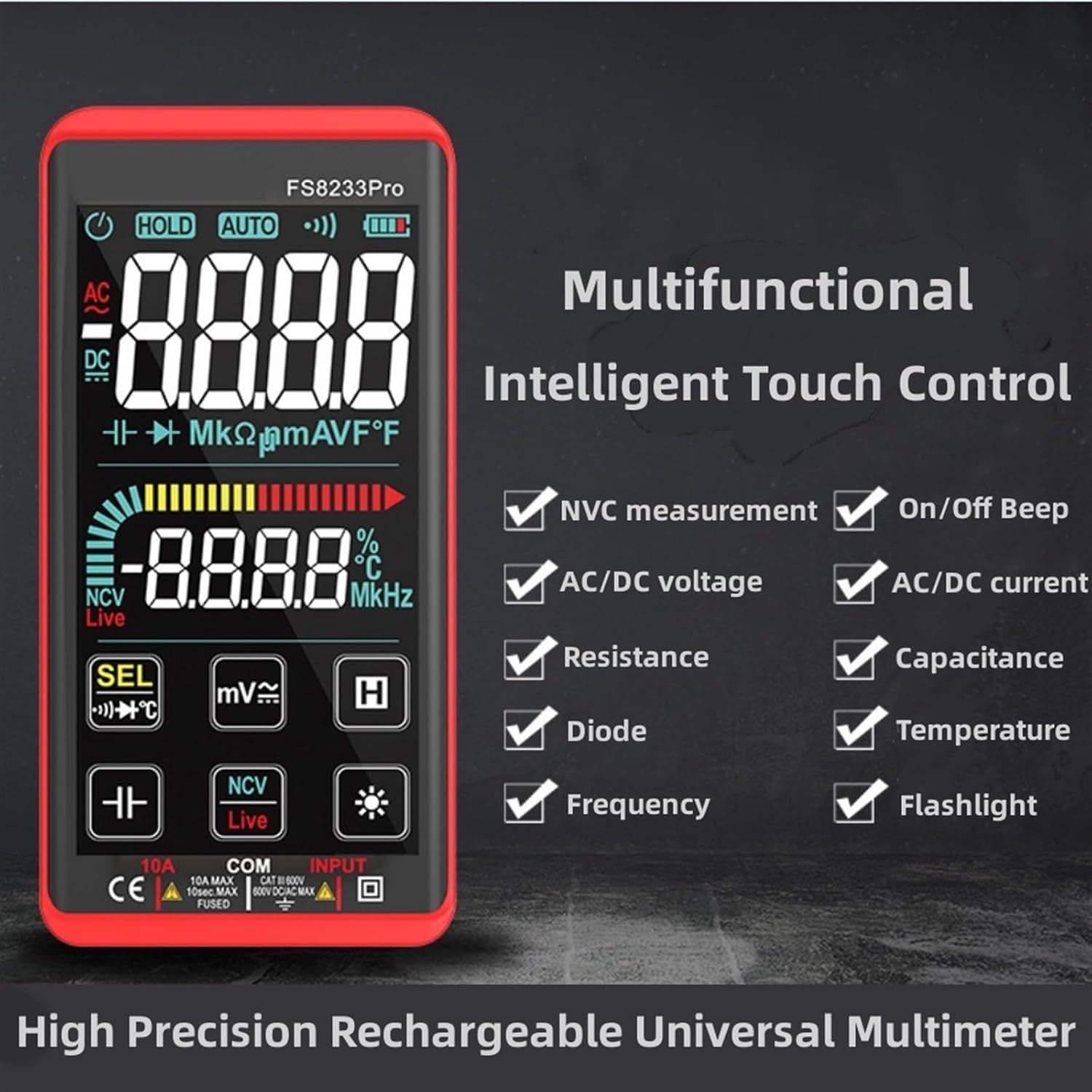
Abbildung: Ein Werbebild zeigtasing the multifunctional intelligent touch control features of the FS8233Pro, including NVC measurement, AC/DC voltage, resistance, diode, frequency, on/off beep, AC/DC current, capacitance, temperature, and flashlight.
5. Einrichtung
5.1 Erstaufladung
Before first use, fully charge the multimeter's internal lithium battery. Connect the provided USB charging cable to the multimeter's charging port and to a standard USB power adapter (not included) or a computer USB port. The battery indicator on the display will show charging status.
5.2 Anschließen der Testleitungen
Insert the red test lead into the "INPUT" jack and the black test lead into the "COM" (common) jack. Ensure they are securely inserted.
6. Bedienungsanleitung
The FS8233Pro features automatic detection, simplifying measurement selection. Simply turn on the device and it will automatically identify the measurement type for most common functions.

Image: A hand interacting with the touch-sensitive display of the FS8233Pro multimeter, demonstrating its "Intelligent Movement Touch Sensing" for sensitive and fast measurements.
6.1 Ein-/Ausschalten
Press the power button (usually indicated by a power symbol) to turn the multimeter on or off. The device will automatically shut down after approximately 15 minutes of inactivity to conserve battery life.
6.2 AC-Voltage (ACV) Messung
- Schließen Sie die Messleitungen parallel an die Wechselstromspannung an.tagDie Quelle.
- Das Multimeter erkennt automatisch die Wechselspannung.tage.
- Range: 0.5V-750V (Accuracy: 1%+5)
6.3 DC-Voltage (DCV) Messung
- Schließen Sie die Messleitungen parallel an die Gleichspannung an.tage Quelle, Beobachtung der Polarität.
- Das Multimeter erkennt automatisch die Gleichspannung.tage.
- Range: 0.5V-1000V (Accuracy: 0.5%+3)
6.4 Widerstandsmessung
- Vor der Widerstandsmessung muss sichergestellt werden, dass der Stromkreis spannungsfrei ist.
- Schließen Sie die Messleitungen an das zu messende Bauteil an.
- Range: 0.1Ω-99.999MΩ (Accuracy: 1%+3)
6.5 Frequenzmessung
- Schließen Sie die Testleitungen an die Signalquelle an.
- Range: 40Hz-10000Hz (Accuracy: 0.5%+3)
6.6 Kapazitätsmessung
- Stellen Sie sicher, dass der Kondensator vor der Messung entladen ist.
- Schließen Sie die Messleitungen an die Kondensatoranschlüsse an.
- Range: 10nF-60000μF (Accuracy: 4.5%+5)
6.7 Temperaturmessung
- Use the appropriate temperature probe (if included, or purchased separately) and connect it to the multimeter.
- Range: -40°C to 1000°C (Accuracy: 2%+5)
6.8 On & Off Beep (Continuity)
- Schließen Sie die Messleitungen an den Stromkreis oder das Bauteil an.
- If the resistance of the tested circuit is less than 50Ω, the auxiliary buzzer will sound, indicating continuity.
6.9 Diodentest
- Connect the test leads across the diode.
- The display will show the approximate diode forward voltage-Wert.
6.10 NCV (Nicht-Kontakt-Volumen)tage) Erkennung
- Wählen Sie die NCV-Funktion.
- Bring the top of the multimeter close to the AC voltagDie Quelle.
- There are three alarm modes (visual and audible) according to the detected voltage Stärke.
6.11 Live Line Identification
- Select the Live function.
- Insert the red test lead into the suspected live line.
- If it is a live line, "Live" will appear on the screen, and an alarm sound will be emitted.
7. Wartung
7.1 Reinigung
Wischen Sie die Kontaktfläche des Multimeters ab.asing mit Adamp Mit einem Tuch abwischen. Keine Scheuermittel oder Lösungsmittel verwenden. Vor der Reinigung sicherstellen, dass das Gerät ausgeschaltet und von der Stromversorgung getrennt ist.
7.2 Speicherung
Store the multimeter in a cool, dry place, away from direct sunlight and extreme temperatures. If storing for extended periods, ensure the battery is partially charged (around 50%) to prolong its lifespan.
7.3 Batteriepflege
The built-in lithium battery is designed for long life. Avoid fully discharging the battery frequently. Recharge as needed. If the device will not be used for a long time, charge it every 3 months to maintain battery health.
8. Fehlerbehebung
| Problem | Mögliche Ursache | Lösung |
|---|---|---|
| Das Multimeter lässt sich nicht einschalten. | Batterie ist leer. | Laden Sie das Multimeter mit dem mitgelieferten USB-Kabel auf. |
| Ungenaue Messwerte. | Incorrect measurement mode; Damaged test leads; Environmental interference. | Ensure correct mode is selected (though often automatic); Check test leads for damage; Move away from strong electromagnetic fields. |
| Kein Durchgangssignal. | Resistance is too high; Test leads not making good contact. | Ensure resistance is below 50Ω; Re-seat test leads firmly. |
| Die automatische Abschaltung erfolgt zu schnell. | Inactivity timer. | The device is designed to shut down after approximately 15 minutes of inactivity. This is normal operation. |
9. Spezifikationen
| Parameter | Bereich / Wert | Genauigkeit |
|---|---|---|
| AC-Lautstärketage (ACV) | 0.5 V bis 750 V | (1% + 5) |
| DC-Voltage (DCV) | 0.5 V bis 1000 V | (0.5% + 3) |
| Widerstand | 0.1 Ω-99.999 MΩ | (1% + 3) |
| Frequenz | 40 Hz bis 10000 Hz | (0.5% + 3) |
| Kapazität | 10 nF-60000 μF | (4.5% + 5) |
| Temperatur | -40°C bis 1000°C | (2% + 5) |
| Continuity Beep Threshold | < 50Ω | N / A |
| Automatisches Herunterfahren | Ca. 15 Minuten Inaktivität | N / A |
| Stromquelle | Wiederaufladbare Lithiumbatterie | N / A |
| Hersteller | IXITAB | N / A |
| Modell | FS8233Pro | N / A |
10. Garantie und Support
For warranty information and technical support, please refer to the contact details provided by your retailer or visit the official IXITAB webBewahren Sie Ihren Kaufbeleg als Kaufnachweis für Garantieansprüche auf.
Für weitere Unterstützung können Sie sich direkt über die Plattform, auf der das Produkt gekauft wurde, an den Verkäufer wenden.
Ask a question about this manual
Ask about setup, troubleshooting, compatibility, parts, safety, or missing instructions. Manuals+ will review the question and use this page’s manual context to help answer it.