
1. Einleitung
This manual provides essential information for the safe and effective operation of your TASI TA500 series digital tachometer. The TA500 series includes models TA500A, TA500B, and TA500C, designed for accurate measurement of rotational and linear speeds. This device features both non-contact (photoelectric) and contact measurement capabilities, automatic ranging, and a clear digital display. It is suitable for a wide range of applications in various industries, including electric motors, fans, washing machines, automobiles, and more.
Bitte lesen Sie diese Bedienungsanleitung vor der Benutzung des Geräts sorgfältig durch und bewahren Sie sie zum späteren Nachschlagen auf.
2. Produktüberschreitungview
The TASI TA500 series tachometer is a portable, handheld instrument engineered for precision. Its compact and lightweight design ensures ease of use and portability. Key features include a large LCD screen for clear readings, a memory function to store measurement data, and a dual-purpose design allowing for both non-contact and contact measurements.
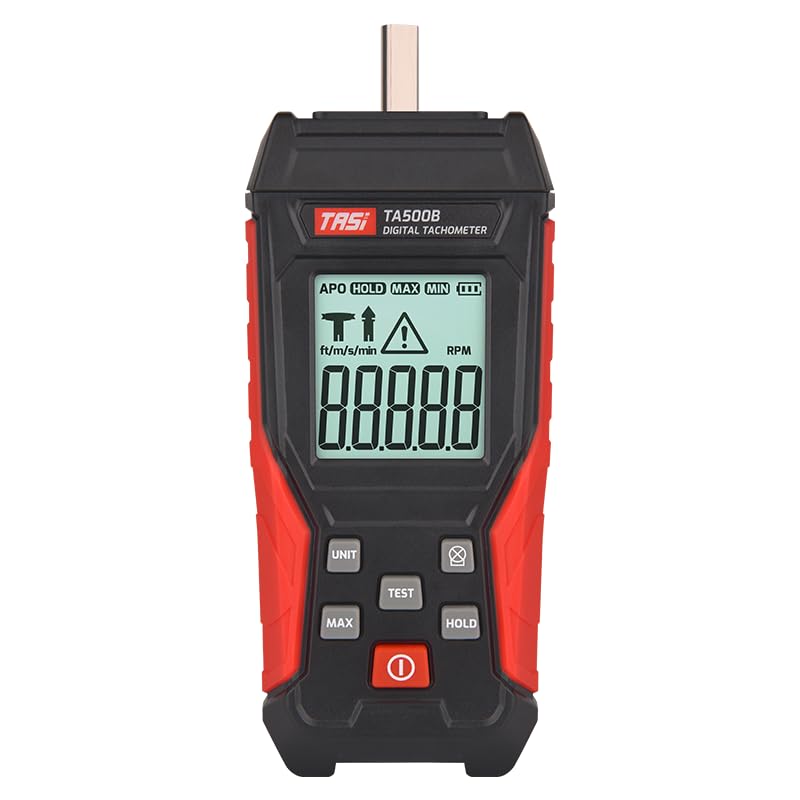
Abbildung 2.1: Vorderseite view of the TASI TA500B Digital Tachometer, showing the display and control buttons.
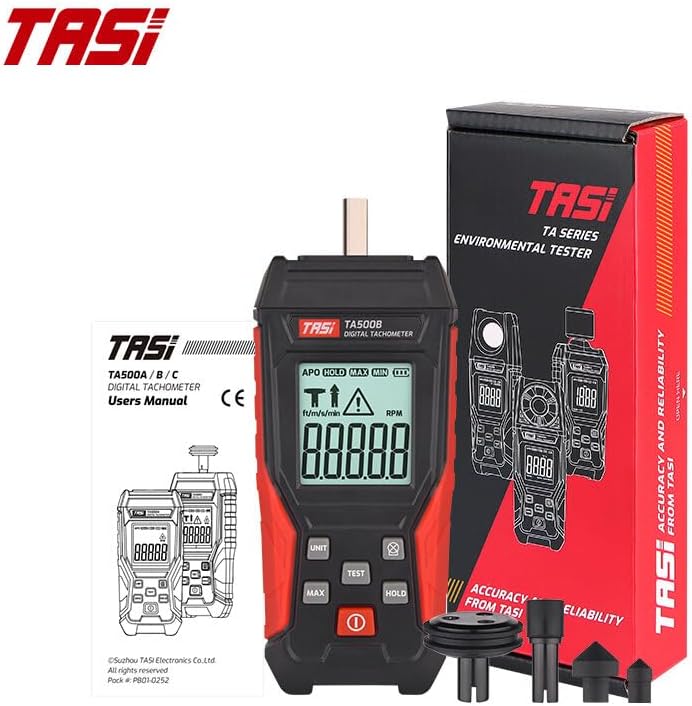
Figure 2.2: The TASI TA500B Digital Tachometer shown with its retail packaging and various contact measurement accessories.
3. Einrichtung
3.1 Einlegen der Batterie
The TA500 series tachometer requires two AA batteries for operation. Batteries are not included with the device.
- Suchen Sie die Abdeckung des Batteriefachs auf der Rückseite des Geräts.
- Schieben oder lösen Sie den Deckel, um das Fach zu öffnen.
- Legen Sie zwei AA-Batterien ein und achten Sie dabei auf die richtige Polarität (+ und -), wie im Batteriefach angegeben.
- Schließen Sie den Batteriefachdeckel fest.

Abbildung 3.1: Rückseite view of the tachometer, highlighting the battery compartment for installation of two AA batteries.
3.2 Attaching Contact Accessories (for TA500B/TA500C models)
For contact measurements, attach the appropriate contact wheel or cone to the shaft at the top of the tachometer. Ensure it is firmly seated to prevent inaccurate readings.
4. Bedienungsanleitung
4.1 Ein-/Ausschalten
Drücken Sie den roten Netzschalter (O) to turn the device on. Press and hold the power button to turn it off.
4.2 Selecting Measurement Mode and Units
The TA500 series supports different measurement modes and units. Press the "UNIT" button to cycle through available units and modes (e.g., RPM, ft/m/s, m/min). The selected mode will be displayed on the LCD screen.
4.3 Non-Contact (Photoelectric) Measurement (TA500A/TA500C)
This mode uses a semiconductor laser sensor to measure rotational speed without physical contact.
- Ensure the tachometer is in a non-contact RPM mode (indicated by a specific icon on the display, typically a target symbol).
- Attach a reflective tape (not included, but commonly used with such devices) to the rotating object.
- Point the laser beam from the tachometer at the reflective tape on the rotating object. The effective measurement distance is 50-500 mm.
- Press the "TEST" button. The measurement symbol on the display will flash, and the RPM reading will appear.
- Release the "TEST" button to stop measurement.

Figure 4.1: Detail of the semiconductor laser sensor used for non-contact RPM measurements. The effective distance for measurement is between 50mm and 500mm.
4.4 Contact Measurement (TA500B/TA500C)
This mode uses physical contact with the rotating object via an attached accessory.
- Attach the appropriate contact accessory (e.g., cone or wheel) to the tachometer's shaft.
- Ensure the tachometer is in a contact measurement mode (indicated by a contact icon on the display, typically a 'T' or similar).
- Gently press the contact accessory against the center of the rotating object or surface.
- Press the "TEST" button. The measurement symbol on the display will flash, and the RPM or linear speed reading will appear.
- Release the "TEST" button to stop measurement.

Figure 4.2: The TASI TA500C tachometer demonstrating a contact measurement on a fan blade. The display shows the measured RPM.

Figure 4.3: A user holding the TASI TA500B tachometer, performing a contact measurement. The digital display shows a reading of 798.5 RPM.
4.5 MAX/MIN/HOLD Functions
- HALT: Press the "HOLD" button to freeze the current reading on the display. Press it again to resume live measurement.
- MAX MIN: During measurement, press the "MAX" button to display the maximum recorded value. Press "MAX" again to display the minimum recorded value. Press a third time to return to live measurement.

Figure 4.4: The tachometer display indicating the MAX/MIN function is active, showing the maximum recorded RPM value.
5. Wartung
5.1 Reinigung
Wipe the device with a soft, dry cloth. Do not use abrasive cleaners or solvents. Keep the sensor lens clean for accurate non-contact measurements.
5.2 Speicherung
When not in use for extended periods, remove the batteries to prevent leakage. Store the tachometer in a cool, dry place, away from direct sunlight and extreme temperatures. The included cloth bag can be used for protection during storage and transport.
5.3 Batteriewechsel
Tauschen Sie die Batterien aus, sobald die Anzeige für niedrigen Batteriestand erscheint, um einen weiterhin präzisen Betrieb zu gewährleisten.
6. Fehlerbehebung
- Das Gerät lässt sich nicht einschalten: Überprüfen Sie den Batterieeinbau und stellen Sie sicher, dass die Batterien nicht entladen sind. Tauschen Sie sie gegebenenfalls aus.
- Ungenaue Messwerte:
- For non-contact measurement, ensure the reflective tape is properly applied and the laser is aimed correctly. Verify the measurement distance is within 50-500 mm.
- For contact measurement, ensure the contact accessory is firmly attached and making proper contact with the rotating object.
- Ensure the correct measurement mode and units are selected.
- Der Bildschirm ist leer oder flackert: Low battery power may be the cause. Replace batteries.
7. Spezifikationen
| Besonderheit | Spezifikation |
|---|---|
| Modell | TA500A / TA500B / TA500C |
| Farbe | Schwarz |
| Material | ABS |
| Test Range (Photoelectric - TA500A/TA500C) | 3-100000 U/min |
| Test Range (Contact RPM - TA500B/TA500C) | 0.5-19999 U/min |
| Test Range (Contact Surface Speed - TA500B/TA500C) | 0.05-1999.9 m/min |
| Genauigkeit | ±(0.05%FS + 1 RPM) |
| Bereichsauswahl | Automatischer Schalter |
| Sampling Zeit | 0.8 seconds (for measurements > 60 RPM) |
| Effective Distance (Photoelectric) | 50-500 mm |
| Stromversorgung | 2 * AA-Batterien (nicht im Lieferumfang enthalten) |
| Tachometer Size (TA500A) | 130 × 59 × 29 mm |
| Tachometer Size (TA500B/TA500C) | 146 × 59 × 29 mm |
8. Garantie und Support
Informationen zur Garantie und zum technischen Support finden Sie in der mitgelieferten Dokumentation oder wenden Sie sich an Ihren Händler. Bewahren Sie Ihren Kaufbeleg als Kaufnachweis auf.