
Kuephom W15
Kuephom Portable CD Player Boombox - Model W15
Bedienungsanleitung
Einführung
Welcome to the Kuephom Portable CD Player Boombox. This versatile device offers multiple audio playback options including CD, MP3, FM radio, Bluetooth, USB, and TF card support. Designed for both home and portable use, it features stereo speakers and a rechargeable battery for extended listening enjoyment. Please read this manual thoroughly to ensure proper operation and care of your new device.
Wichtige Sicherheitsinformationen
- Warnung: Setzen Sie dieses Gerät weder Regen noch Feuchtigkeit aus.
- Vorsicht: Um einen Stromschlag zu vermeiden, öffnen Sie nicht das Kabel.asing. Alle Wartungsarbeiten sind qualifiziertem Personal zu überlassen.
- Vermeiden Sie es, das Gerät in der Nähe von Wärmequellen wie Heizkörpern, Heizlüftern, Öfen oder anderen Geräten aufzustellen, die Wärme erzeugen.
- Verwenden Sie nur vom Hersteller angegebene Anbaugeräte/Zubehör.
- Schützen Sie das Netzkabel vor dem Betreten oder Einklemmen, insbesondere an Steckern, Steckdosen und an der Stelle, an der sie aus dem Gerät austreten.
- Ziehen Sie bei Gewitter oder längerer Nichtbenutzung den Stecker aus der Steckdose.
- Die Lüftungsöffnungen dürfen nicht blockiert werden. Die Installation muss gemäß den Anweisungen des Herstellers erfolgen.
- Sorgen Sie beim Betrieb des Geräts für ausreichende Belüftung.
- Führen Sie keine Fremdkörper in das Gerät ein.
- Halten Sie das Gerät von starken Magnetfeldern fern.
- Entsorgen Sie Batterien ordnungsgemäß entsprechend den örtlichen Vorschriften.
Packungsinhalt
Bitte überprüfen Sie, ob alle Artikel vorhanden sind:
- Kuephom Portable CD Player Boombox (Model W15)
- USB-Ladekabel
- Netzteil
- Bedienungsanleitung
Produkt überview
Familiarize yourself with the main components and controls of your CD player boombox.

Abbildung 1: Vorderseite View - This image displays the main unit with its top-loading CD compartment open, revealing a CD. The front panel features control buttons for playback (play/pause, skip), a mode button, an LCD screen showing track time, and a large rotary volume knob. Two speaker grilles are visible at the bottom.

Abbildung 2: Rückseite View - The rear of the boombox is shown, highlighting the extendable FM antenna. Below the antenna, from left to right, are the USB port, TF (Micro SD) card slot, DC 5V IN power input, and a headphone jack. The speaker grilles are also visible from this angle.
Bedienelemente und Anschlüsse:
- Wiedergabe-/Pause-Taste (►▮▮): Drücken Sie diese Taste, um die Audiowiedergabe zu starten oder anzuhalten.
- Previous/Rewind Button (◀◀): Press to go to the previous track or rewind the current track.
- Next/Fast Forward Button (►►): Press to go to the next track or fast forward the current track.
- Modus-Taste (M): Press to switch between CD, FM Radio, Bluetooth, USB, and TF card modes.
- Repeat/Random Button (↺): Press to cycle through repeat modes (repeat one, repeat all) or enable random playback (shuffle).
- Volume Knob (MIN-MAX): Rotate to adjust the volume level. Also serves as the power on/off switch.
- LCD Anzeige: Zeigt den aktuellen Modus, die Titelnummer, die Uhrzeit und die FM-Frequenz an.
- CD-Fach: Top-loading tray for inserting audio CDs.
- FM-Antenne: Ausziehbare Antenne für verbesserten FM-Radioempfang.
- USB-Anschluss: Zum Abspielen von MP3/WMA-Dateien files von einem USB-Stick (bis zu 32 GB).
- TF-Karten-Slot: Zum Abspielen von MP3/WMA-Dateien files from a TF (Micro SD) card (up to 32GB).
- DC 5V IN-Anschluss: Power input for charging the internal battery or operating the unit via the included power adapter.
- Headphone Jack (🎧): Für ungestörtes Musikhören mit kabelgebundenen Kopfhörern.
Aufstellen
1. Stromversorgung des Geräts
Your Kuephom CD player boombox comes with a built-in rechargeable Lithium Ion battery. Before first use, it is recommended to fully charge the battery.
- Connect the provided USB charging cable to the DC 5V IN port on the back of the unit.
- Connect the other end of the USB cable to the power adapter, and plug the adapter into a standard wall outlet.
- The LCD display will indicate charging status. Charging typically takes 3-4 hours for a full charge.
- Alternatively, the unit can be powered directly from the wall adapter without battery charge.

Abbildung 3: Ladeoptionen - This image illustrates the versatility of charging the boombox. It can be charged using a standard wall charger, a car charger (via a USB car adapter, not included), or a portable power bank, making it convenient for both indoor and outdoor use.
2. Ein-/Ausschalten
To turn the unit on, rotate the Volume Knob clockwise from the MIN position. To turn off, rotate the Volume Knob counter-clockwise to the MIN position until it clicks.
Betriebsarten
Drücken Sie die Modus (M) button repeatedly to cycle through the available playback modes: CD, FM Radio, Bluetooth, USB, and TF Card.

Figure 4: 5 Play Modes - This graphic highlights the five primary playback modes of the Kuephom boombox: CD Player, Bluetooth, FM Radio, TF Card, and USB Input, emphasizing its multi-functional capabilities.
1. CD-Wiedergabe
- Den Deckel des CD-Fachs durch vorsichtiges Anheben öffnen.
- Place an audio CD or MP3 CD onto the spindle, label side up.
- Schließen Sie den Deckel des CD-Fachs fest.
- Drücken Sie die Modus (M) Drücken Sie die Taste so lange, bis „CD“ auf dem LCD-Display erscheint.
- Die CD-Wiedergabe startet automatisch. Falls nicht, drücken Sie die Taste Wiedergabe/Pause (►▮▮) Taste.
- Verwenden Sie die Vorherige (◀◀) Und Next (►►) Tasten zum Überspringen von Titeln.
- Halten Sie die Vorherige (◀◀) or Next (►►) Tasten zum Vor- und Zurückspulen.
- Drücken Sie die Repeat/Random (↺) button to cycle through repeat modes (Repeat One, Repeat All) or enable random (shuffle) playback.
2. Bluetooth-Wiedergabe
- Drücken Sie die Modus (M) button until "BT" appears on the LCD display. The unit will enter Bluetooth pairing mode, indicated by a flashing "BT".
- Schalten Sie auf Ihrem Bluetooth-fähigen Gerät (z. B. Smartphone, Tablet) Bluetooth ein und suchen Sie nach verfügbaren Geräten.
- Select "Kuephom W15" from the list of devices.
- Once paired, "BT" will stop flashing and remain solid. You can now play audio from your device through the boombox.
- Use the playback controls on your connected device or the boombox's Wiedergabe/Pause (►▮▮), Vorherige (◀◀), Und Next (►►) Tasten zur Steuerung der Wiedergabe.

Figure 5: CD Player & Bluetooth Speaker Functionality - This image demonstrates the dual functionality of the device, showing it first as a standalone CD player and then as a Bluetooth speaker, with a smartphone successfully paired to it. This highlights its versatility for different audio sources.
3. FM-Radiobetrieb
- Für optimalen Empfang ziehen Sie die FM-Antenne auf der Rückseite des Geräts aus.
- Drücken Sie die Modus (M) Drücken Sie die Taste so lange, bis „FM“ auf dem LCD-Display erscheint.
- Zum automatischen Scannen und Speichern von Sendern: Halten Sie die Taste gedrückt Wiedergabe/Pause (►▮▮) button. The unit will automatically scan for available FM stations and save them as presets (up to 30 stations).
- To tune to a saved preset station: Use the Vorherige (◀◀) Und Next (►►) buttons to navigate through the saved presets.
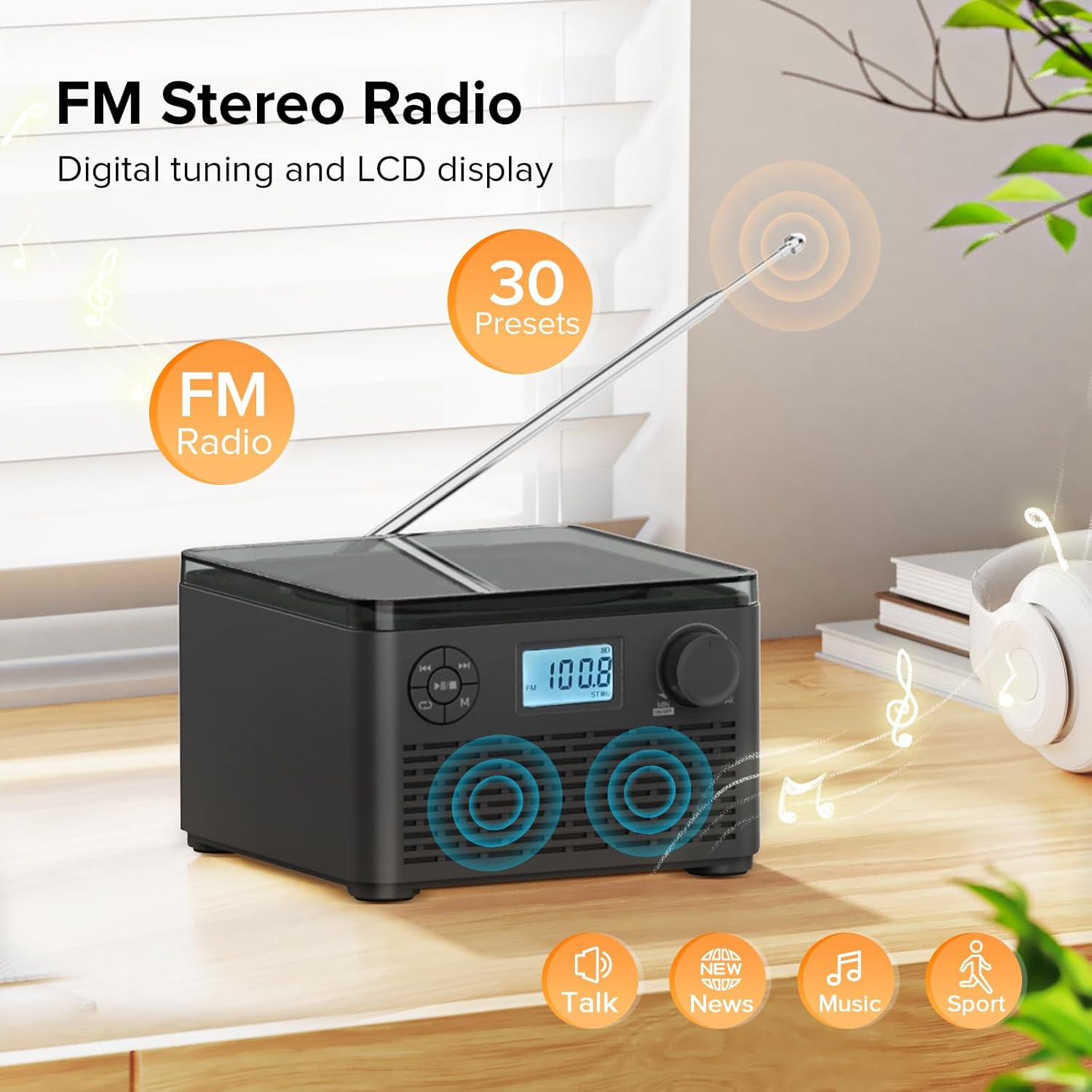
Figure 6: FM Stereo Radio - This image focuses on the FM radio feature, showing the digital display tuned to a frequency and indicating the availability of 30 presets. The extendable antenna is also visible, emphasizing its radio capabilities.
4. Wiedergabe von USB-/TF-Karten
The unit supports MP3 and WMA audio formats from USB flash drives and TF (Micro SD) cards up to 32GB.
- Insert a USB flash drive into the USB port or a TF card into the TF card slot on the back of the unit. Ensure the antenna is moved out of the way if necessary.
- Drücken Sie die Modus (M) button until "USB" or "TF" appears on the LCD display.
- Das Gerät erkennt automatisch die Audioausgabe und beginnt mit der Wiedergabe. files vom eingelegten Speichergerät.
- Verwenden Sie die Wiedergabe/Pause (►▮▮), Vorherige (◀◀), Und Next (►►) Tasten zur Steuerung der Wiedergabe.
- Drücken Sie die Repeat/Random (↺) button to cycle through repeat modes or enable random playback.
5. Kopfhörernutzung
For private listening, connect standard 3.5mm headphones to the headphone jack on the back of the unit. The internal speakers will automatically mute when headphones are connected.
Wartung und Pflege
- Reinigung: Reinigen Sie die Außenseite des Geräts mit einem weichen, trockenen Tuch. Verwenden Sie keine Scheuermittel oder Lösungsmittel.
- CD-Pflege: Fassen Sie CDs an den Kanten an. Halten Sie sie sauber und kratzfrei. Wischen Sie CDs mit einem weichen, fusselfreien Tuch von der Mitte nach außen ab.
- Lagerung: Bei längerer Nichtbenutzung sollte das Gerät an einem kühlen, trockenen Ort, geschützt vor direkter Sonneneinstrahlung und extremen Temperaturen, aufbewahrt werden.
- Batteriepflege: To prolong battery life, avoid fully discharging the battery frequently. Recharge the unit regularly, even if not in constant use.
Fehlerbehebung
| Problem | Mögliche Ursache | Lösung |
|---|---|---|
| Gerät lässt sich nicht einschalten. | Der Akku ist leer oder das Netzteil ist nicht richtig angeschlossen. | Ensure the volume knob is rotated clockwise to turn on. Connect the power adapter and charge the unit. |
| CD is skipping or not playing. | Die CD ist verschmutzt, zerkratzt oder falsch eingelegt. | Clean the CD with a soft cloth. Ensure the CD is placed correctly in the compartment. Try a different CD. |
| Schlechter FM-Radioempfang. | Antenne nicht ausgefahren oder schwaches Signal. | Fully extend the FM antenna. Try repositioning the unit for better signal. |
| Das Bluetooth-Gerät konnte nicht gekoppelt werden. | Das Gerät befindet sich nicht im Kopplungsmodus oder ist zu weit entfernt. | Ensure the unit is in "BT" mode and flashing. Move your Bluetooth device closer to the boombox. Disconnect other Bluetooth devices. |
| USB-/TF-Karte wird nicht erkannt. | Nicht unterstützt file format or card capacity. | Sicherstellen files are MP3 or WMA format. Check that the card capacity is 32GB or less. Reinsert the card/drive. |
Technische Daten
- Modell: W15
- Marke: Kuephom
- Produktabmessungen (L x B x H): 6.3 x 6.3 x 4.2 Zoll
- Artikelgewicht: 1.9 Pfund
- Leistungsaufnahme: Gleichstrom 5 V
- Batterie: 1 Lithium-Ionen-Akku (im Lieferumfang enthalten)
- Akku-Spielzeit: 6-10 hours (approx., varies with usage)
- Unterstützte Disc-Formate: CD, CD-R, CD-RW, MP3-CD
- Supported USB/TF Card Formats: MP3, WMA (up to 32GB)
- FM-Radio-Frequenzbereich: 87.5 - 108 MHz
- Lautsprechertyp: Eingebaute Stereolautsprecher
- Kopfhöreranschluss: 3.5 mm
Garantie und Support
Kuephom products are designed and manufactured to the highest quality standards. For any questions, technical support, or warranty claims, please contact Kuephom customer service through the retailer where you purchased the product or visit the official Kuephom webWebsite für weitere Informationen.
Bitte bewahren Sie Ihren Kaufbeleg für Garantiezwecke auf.
Ask a question about this manual
Ask about setup, troubleshooting, compatibility, parts, safety, or missing instructions. Manuals+ will review the question and use this page’s manual context to help answer it.