
JIGUUN 2000W
JIGUUN 2000 Watt Pure Sine Wave Power Inverter User Manual
Modell: 2000W
1. Einleitung
This manual provides essential information for the safe and efficient operation of your JIGUUN 2000 Watt Pure Sine Wave Power Inverter. Please read it thoroughly before use and retain it for future reference.
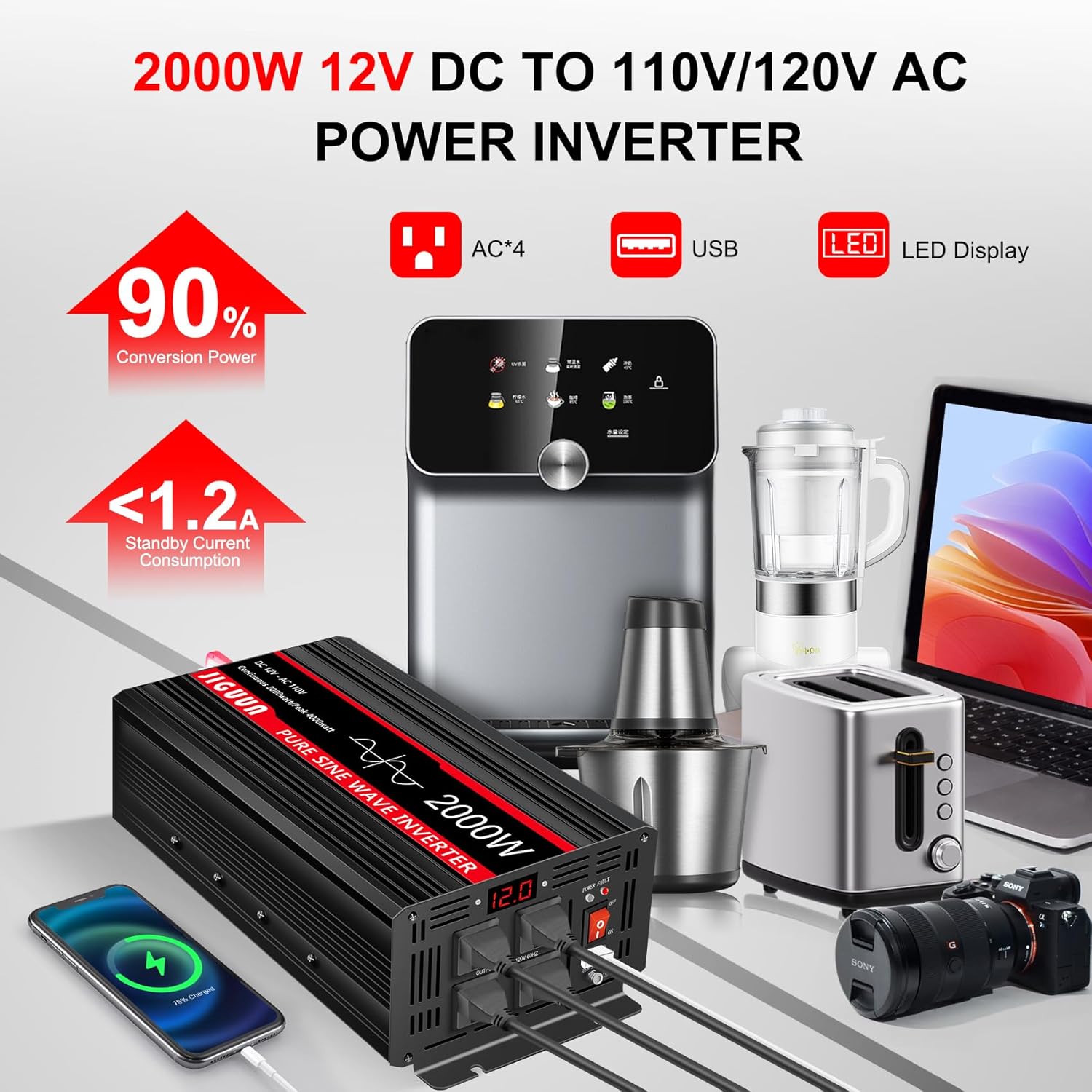
The JIGUUN Pure Sine Wave Power Inverter converts 12V DC battery power to 110/120V AC household power, providing clean and stable electricity suitable for sensitive electronics. It features multiple AC outlets, a USB charging port, and an LCD display for real-time monitoring.
2. Sicherheitshinweise
WARNUNG: Die Nichtbeachtung dieser Sicherheitshinweise kann zu Stromschlag, Brand, schweren Verletzungen oder Tod führen.
- Richtige Belüftung: Stellen Sie sicher, dass der Wechselrichter in einem gut belüfteten Bereich aufgestellt wird. Blockieren Sie keine Lüftungsöffnungen.
- Trockene Umgebung: Der Wechselrichter darf weder Wasser, Regen noch übermäßiger Feuchtigkeit ausgesetzt werden.
- Richtig Voltage: Connect the inverter only to a 12V DC power source. Ensure the AC output voltage matches your appliances' requirements.
- Sichere Verbindungen: Always ensure all DC and AC connections are tight and secure to prevent arcing and overheating.
- Überlastschutz: Die Nenndauerleistung (2000 W) und die Nennspitzenleistung (4000 W) des Wechselrichters dürfen nicht überschritten werden.
- Erdung: Der Wechselrichter muss gemäß den örtlichen Elektrovorschriften ordnungsgemäß geerdet werden.
- Temperatur: The inverter has a fan cooling system that activates when the temperature exceeds 45℃. Ensure adequate airflow.
- Brennbare Materialien: Betreiben Sie den Wechselrichter nicht in der Nähe von brennbaren Flüssigkeiten, Gasen oder anderen brennbaren Stoffen.
- Kinder und Haustiere: Bewahren Sie den Wechselrichter außerhalb der Reichweite von Kindern und Haustieren auf.
3. Packungsinhalt
Überprüfen Sie, ob alle Artikel in Ihrem Paket vorhanden sind:
- 1x JIGUUN DC 12V to AC 110V 2000W Pure Sine Inverter
- 1x Benutzerhandbuch
- 2 Sets of Battery Cables (2x Red, 2x Black)
- 1x Fernbedienung
- 10x 30A Fuses (Built-in fuse, no need to install)
- 1x Grounding Cable
- 2x Terminal Covers (Red, Black)

4. Produktmerkmale
The JIGUUN 2000 Watt Pure Sine Wave Power Inverter is designed with advanced features for reliable and safe power conversion:
- Reine Sinuswellenausgabe: Provides clean, stable power (conversion efficiency >90%) suitable for sensitive electronics, similar to household AC power.
- Hohe Ausgangsleistung: True rated continuous 2000W, with a peak power of 4000W.
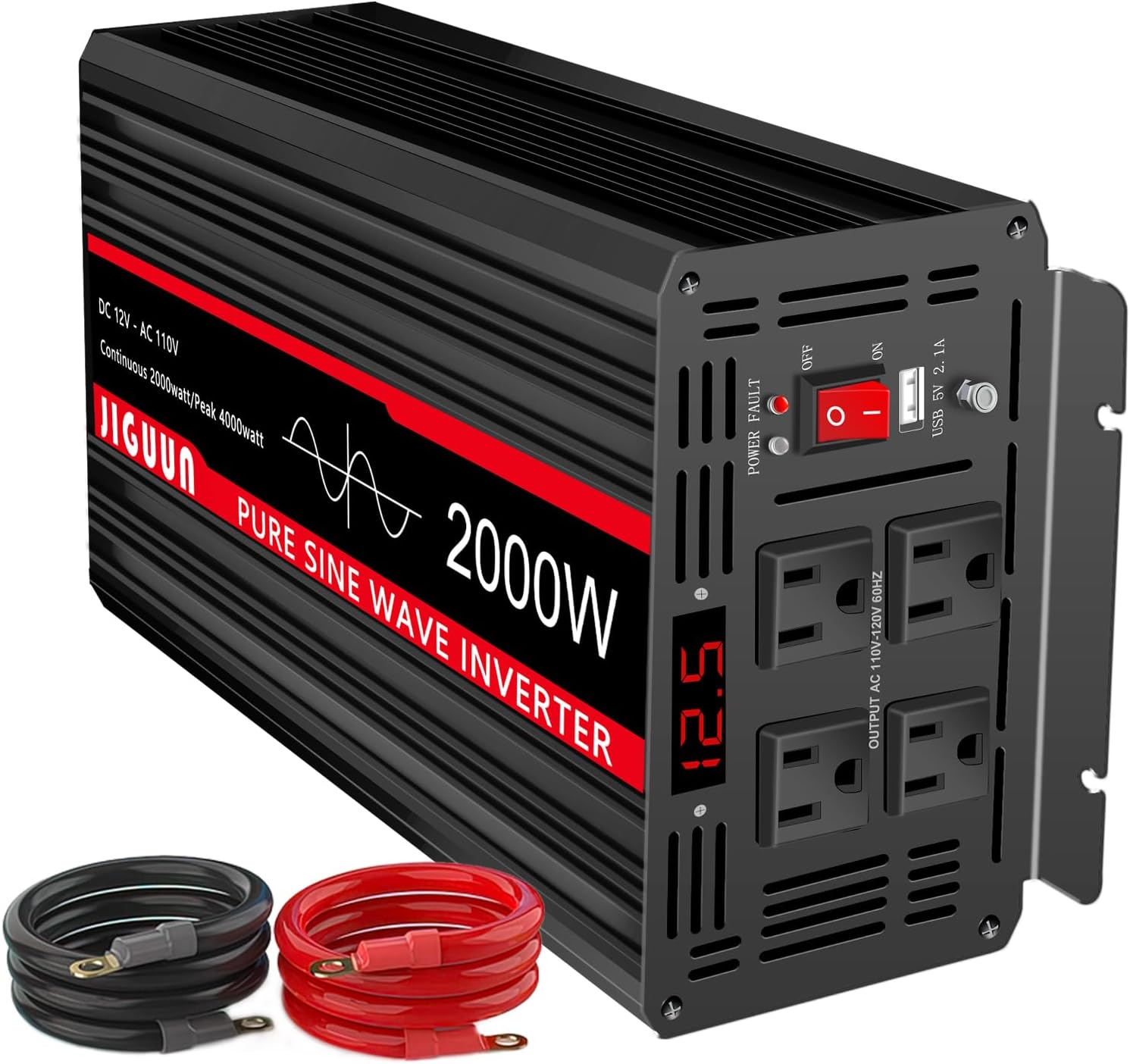
- Mehrere Ausgänge: Equipped with 4 AC outlets and one 2.1A USB charging port.
- LED-Anzeige: Digital display shows input voltage, Ausgangsvolumentage, and output frequency for real-time monitoring.
- Umfassendes Schutzsystem: Includes under voltage, über voltage, overload, over temperature, short circuit, AC ground terminal, and reverse connection protection.
- Effiziente Kühlung: Features 2 high-speed heat dissipation silent fans that activate when the temperature exceeds 45℃.
- Langlebige Konstruktion: Aluminum alloy shell provides lasting protection.
- Fernbedienung: Allows for convenient power control from a distance.


5. Einrichtung und Installation
Follow these steps to properly set up and install your JIGUUN Pure Sine Wave Power Inverter:
- Wählen Sie einen Standort: Wählen Sie einen trockenen, gut belüfteten Ort, der vor direkter Sonneneinstrahlung, Wärmequellen und brennbaren Materialien geschützt ist. Achten Sie auf ausreichend Platz um den Wechselrichter herum, um eine gute Luftzirkulation zu gewährleisten.
- Montage (Optional): The inverter can be mounted using its integrated mounting brackets. Ensure it is securely fastened to a stable surface.
- Gleichstromkabel anschließen:
- Connect the red (positive) battery cable to the positive (+) terminal on the inverter.
- Connect the black (negative) battery cable to the negative (-) terminal on the inverter.
- Connect the other end of the red cable to the positive (+) terminal of your 12V DC battery.
- Connect the other end of the black cable to the negative (-) terminal of your 12V DC battery.
- Ensure all connections are tight and secure. Use the provided terminal covers for safety.
- Erdung: Connect the provided grounding cable to the inverter's ground terminal and to a proper earth ground point (e.g., vehicle chassis, ground rod).
- Erstes Einschalten: Before connecting any AC appliances, switch the inverter's ON/OFF button to the "ON" position. The LED display should light up, indicating the input voltage.


6. Bedienungsanleitung
Once the inverter is properly installed and powered on, you can connect your AC appliances:
- Geräte anschließen: Plug your AC appliances into the 110V AC outlets on the front of the inverter. For USB charging, use the 2.1A USB port.
- Monitoranzeige: The LED display will show real-time information such as input DC voltage, Ausgangs-Wechselstromspannungtage, and output frequency. This helps you monitor the inverter's performance and ensure stable power delivery.
- Ein-/Ausschalten: Use the ON/OFF switch on the inverter or the remote control to turn the inverter on or off as needed.
- Lastmanagement: Avoid connecting appliances that collectively exceed the inverter's continuous power rating. High surge loads (e.g., motors, compressors) should be considered against the peak power rating.
7. Wartung
Regelmäßige Wartung gewährleistet die Langlebigkeit und optimale Leistung Ihres Wechselrichters:
- Reinigung: Halten Sie den Wechselrichter sauber und frei von Staub und Schmutz. Wischen Sie die Außenseite mit einem trockenen Tuch ab. Verwenden Sie keine flüssigen Reinigungsmittel.
- Verbindungen prüfen: Periodically inspect all DC and AC connections to ensure they are tight and free from corrosion. Loose connections can cause overheating and damage.
- Belüftung: Ensure the cooling fans and ventilation openings are not obstructed. Clean any dust buildup on the fans.
- Lagerung: Wenn Sie den Wechselrichter über einen längeren Zeitraum lagern, trennen Sie ihn von der Batterie und lagern Sie ihn an einem kühlen, trockenen Ort.
8. Fehlerbehebung
If you encounter issues with your JIGUUN inverter, refer to the following common troubleshooting steps:
| Problem | Mögliche Ursache | Lösung |
|---|---|---|
| Keine Stromausgabe / Wechselrichter schaltet sich nicht ein | Lose Batterieanschlüsse; niedriger Batteriestandtage; Blown fuse; Inverter switch OFF. | Check and tighten all battery cable connections; Recharge or replace battery; Check and replace internal fuses (if applicable); Ensure ON/OFF switch is in "ON" position. |
| Overload Alarm / Shutdown | Das angeschlossene Gerät überschreitet die Nennleistung des Wechselrichters. | Reduce the load by disconnecting some appliances. Ensure total wattage is within continuous rating. |
| Over-temperature Alarm / Shutdown | Poor ventilation; High ambient temperature; Overload. | Ensure inverter is in a well-ventilated area; Clear any obstructions from cooling fans; Reduce load. Allow inverter to cool down before restarting. |
| Niedrige Lautstärketage Alarm / Abschaltung | Akku voltage ist zu niedrig. | Laden Sie die Batterie auf oder ersetzen Sie sie. |
| Hohe Lautstärketage Alarm / Abschaltung | Eingangsvolumentage ist zu hoch. | Überprüfen Sie die Eingabelautstärketage from the battery is within the specified range (12V DC). |

9. Spezifikationen
- Modellname: 2000 W
- Wastage: 2000 Watt (Dauerleistung), 4000 Watt (Spitzenleistung)
- Eingangslautstärketage: 12 V Gleichstrom
- Ausgangsvolumentage: 110 V Wechselstrom / 120 V Wechselstrom
- Ausgabefrequenz: 60 Hz
- Ausgabe Wellenform: Rein Sinus
- Umwandlungseffizienz: >90 %
- USB-Ausgang: 2.1 A
- Produktabmessungen: 15.8 x 6.2 x 4.2 Zoll
- Artikelgewicht: 5.08 Pfund
- Kühlung: 2 High-speed silent fans (activates >45℃)
- Schutz: Unter voltage, über voltage, overload, over temperature, short circuit, AC ground terminal, reverse connection.
10. Garantie und Support
JIGUUN offers a 1 Jahr Garantie with free replacement for this product. If you have any questions or require assistance, please feel free to contact the JIGUUN team via email. They are committed to providing excellent customer service and will assist you promptly.
For further support, please refer to the contact information provided in your user manual or on the official JIGUUN webWebsite.