
1. Einleitung
This manual provides essential information for the safe and efficient operation of your Sharp GX-BT190 Portable Bluetooth Speaker. Please read it thoroughly before using the device and retain it for future reference.
2. Sicherheitshinweise
- Setzen Sie den Lautsprecher keinen extremen Temperaturen, direkter Sonneneinstrahlung oder hoher Luftfeuchtigkeit aus.
- Der Lautsprecher darf nicht zerlegt, repariert oder verändert werden. Dies kann zum Erlöschen der Garantie und zu Sicherheitsrisiken führen.
- Ensure the charging port cover is securely closed when using the speaker near water to maintain its IP67 rating.
- Verwenden Sie ausschließlich das mitgelieferte Ladekabel oder ein zertifiziertes gleichwertiges Kabel.
- Halten Sie den Lautsprecher von Kindern und Haustieren fern.
- Vermeiden Sie es, längere Zeit bei hoher Lautstärke zu hören, um Gehörschäden vorzubeugen.
3. Packungsinhalt
- Sharp GX-BT190 Portable Bluetooth Speaker
- USB-Ladekabel
- Schlüsselband
- Bedienungsanleitung
4. Produktüberschreitungview

Front view of the Sharp GX-BT190 speaker, showing the central speaker grille with the Sharp logo and the LED light ring.

Seite view of the Sharp GX-BT190 speaker, highlighting the textured speaker grille and the integrated lanyard.
Hinteren view of the Sharp GX-BT190 speaker, showing the control buttons and the sealed charging port cover.
Bedienelemente und Anzeigen:
- Netzschalter: Zum Ein-/Ausschalten gedrückt halten.
- Lautstärke erhöhen / Nächster Titel Taste (+): Kurz drücken für Lautstärke erhöhen, lang drücken für nächsten Titel.
- Lautstärke verringern / Vorheriger Titel (-): Kurzes Drücken verringert die Lautstärke, langes Drücken springt zum vorherigen Titel.
- Play/Pause / Call Button (►||): Short press to play/pause, answer/end calls. Long press to reject calls.
- Mode / Light Button (M): Short press to cycle through LED light modes. Long press to turn off LED lights.
- USB-C-Ladeanschluss: For charging the speaker. Ensure the rubber cover is sealed when not charging.
- LED-Anzeige: Zeigt den Ladestatus und den Bluetooth-Kopplungsstatus an.
5. Einrichtung
5.1 Aufladen des Lautsprechers
- Open the rubber cover on the back of the speaker to access the USB-C charging port.
- Connect the provided USB charging cable to the speaker's USB-C port.
- Verbinden Sie das andere Ende des USB-Kabels mit einem USB-Netzteil (nicht im Lieferumfang enthalten) oder einem USB-Anschluss Ihres Computers.
- The LED indicator will illuminate during charging and turn off once fully charged.
- Close the rubber cover securely after charging to maintain the speaker's waterproof rating.
5.2 Ein-/Ausschalten
- So schalten Sie das Gerät ein: Press and hold the Power button for approximately 3 seconds. You will hear an audible prompt, and the LED indicator will flash.
- So schalten Sie das Gerät aus: Press and hold the Power button for approximately 3 seconds. You will hear an audible prompt, and the LED indicator will turn off.
5.3 Bluetooth-Kopplung
- Ensure the speaker is powered on and the LED indicator is flashing, indicating it is in pairing mode.
- Aktivieren Sie auf Ihrem Mobilgerät Bluetooth und suchen Sie nach verfügbaren Geräten.
- Select "GX-BT190" from the list of devices.
- Sobald die Kopplung abgeschlossen ist, hört die LED-Anzeige auf zu blinken und leuchtet dauerhaft, und Sie hören einen Bestätigungston.
- Der Lautsprecher verbindet sich beim Einschalten automatisch wieder mit dem zuletzt gekoppelten Gerät, sofern sich das Gerät in Reichweite befindet und Bluetooth aktiviert ist.
5.4 True Wireless Stereo (TWS) Kopplung
TWS allows you to pair two GX-BT190 speakers together for a stereo audio experience.

Two Sharp GX-BT190 speakers, one red and one blue, positioned together, illustrating the True Wireless Stereo (TWS) pairing feature.
- Ensure both GX-BT190 speakers are powered on and not connected to any Bluetooth device.
- Drücken Sie an einem der Lautsprecher (dies ist der Hauptlautsprecher) zweimal die Ein-/Aus-Taste. Der Lautsprecher wechselt in den TWS-Kopplungsmodus.
- The two speakers will automatically search for and connect to each other. You will hear a confirmation tone once TWS pairing is successful.
- Once TWS paired, connect your mobile device to the primary speaker via Bluetooth as described in section 5.3.
- To disconnect TWS, double-press the Power button on either speaker.
6. Betrieb
6.1 Audio wiedergeben
- Abspielen/Pause: Drücken Sie kurz die Play/Pause-Taste.
- Lautstärke erhöhen: Drücken Sie kurz die Taste „+“.
- Lautstärke runter: Drücken Sie kurz die Taste „-“.
- Nächster Titel: Die Taste „+“ lange drücken.
- Vorheriges Lied: Die Taste „-“ lange drücken.
6.2 Freisprechfunktion
- Anruf annehmen: Drücken Sie kurz die Wiedergabe-/Pause-Taste, wenn ein Anruf eingeht.
- Anruf beenden: Drücken Sie während eines Anrufs kurz die Wiedergabe-/Pause-Taste.
- Anruf ablehnen: Halten Sie die Wiedergabe-/Pause-Taste gedrückt, wenn ein Anruf eingeht.
6.3 LED Mood Lights
- Short press the 'M' (Mode/Light) button to cycle through the 6 available LED mood light modes.
- Long press the 'M' button to turn off the LED lights.
6.4 Waterproof and Dustproof Usage (IP67)

The Sharp GX-BT190 speaker partially submerged in water, demonstrating its IP67 waterproof and dustproof capabilities.
The GX-BT190 speaker is rated IP67, meaning it is protected from dust ingress and can withstand immersion in water up to 1 meter for 30 minutes. To ensure this protection:
- Always ensure the rubber cover for the charging port is fully and securely sealed before exposing the speaker to water or dust.
- Der Lautsprecher darf nicht absichtlich über längere Zeiträume oder über die angegebene Tiefe hinaus unter Wasser getaucht werden.
- After exposure to water, wipe the speaker dry with a soft cloth before charging.
7. Wartung
7.1 Reinigung
- Wischen Sie den Lautsprecher mit einem weichen, damp Tuch.
- Verwenden Sie keine Scheuermittel, Alkohol oder chemische Lösungsmittel.
- Ensure the speaker is dry before charging or storing.
7.2 Speicherung
- Bewahren Sie den Lautsprecher an einem kühlen, trockenen Ort fern von direkter Sonneneinstrahlung und extremen Temperaturen auf.
- Bei längerer Lagerung sollte der Akku regelmäßig (z. B. alle 3 Monate) aufgeladen werden, um seine Funktionstüchtigkeit zu erhalten.
8. Fehlerbehebung
| Problem | Lösung |
|---|---|
| Der Lautsprecher lässt sich nicht einschalten. | Stellen Sie sicher, dass der Akku geladen ist. Verbinden Sie den Lautsprecher mithilfe des USB-Kabels mit einer Stromquelle. |
| Kopplung via Bluetooth nicht möglich. | Ensure the speaker is in pairing mode (LED flashing). Turn off and on Bluetooth on your device. Move the speaker closer to your device. Clear previous Bluetooth connections on your device. |
| Kein Ton oder geringe Lautstärke. | Erhöhen Sie die Lautstärke sowohl am Lautsprecher als auch an Ihrem angeschlossenen Gerät. Stellen Sie sicher, dass der Lautsprecher ordnungsgemäß gekoppelt ist. |
| Schlechte Tonqualität. | Move the speaker closer to your device. Ensure there are no obstructions between the speaker and your device. Try playing a different audio source. |
| TWS-Kopplung fehlgeschlagen. | Ensure both speakers are GX-BT190 models and are not connected to any other Bluetooth device. Try powering both speakers off and on, then re-attempt TWS pairing. |
9. Spezifikationen

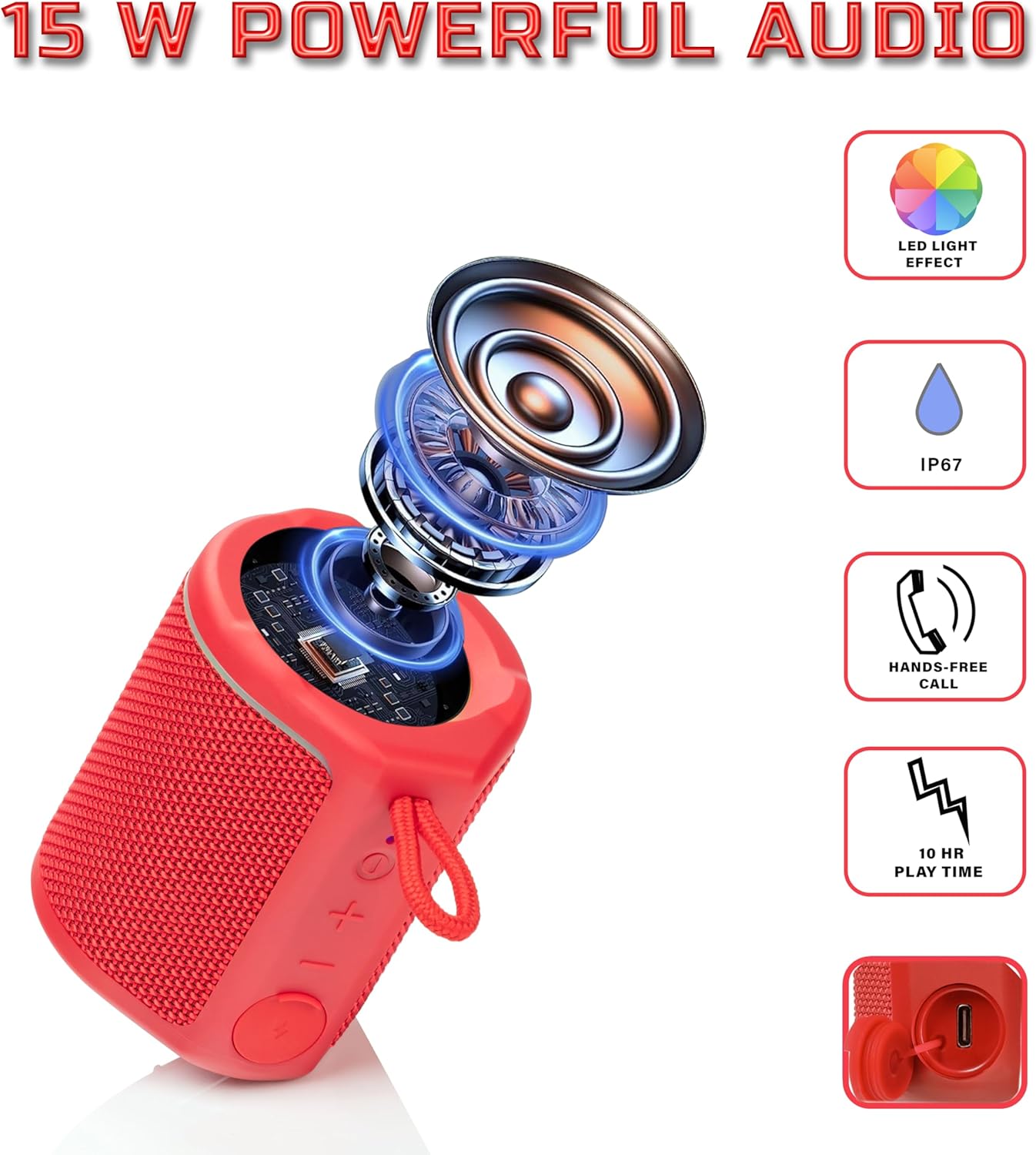
Diagram illustrating the internal components of the Sharp GX-BT190 speaker, including the speaker driver, and highlighting features like LED light effect, IP67 rating, hands-free call function, and battery life.
| Besonderheit | Detail |
|---|---|
| Modellnummer | GX-BT190 |
| Konnektivitätstechnologie | Bluetooth |
| Maximale Lautsprecherausgangsleistung | 10 Watt |
| Wasserdichtigkeit | IP67 |
| Akkulaufzeit | Bis zu 15 Stunden |
| Akku-Typ | 1 Lithium-Ionen (im Lieferumfang enthalten) |
| Batteriekapazität | 1200 mAh |
| Produktabmessungen (T x B x H) | 7.5 x 7.5 x 7.5 cm (ca.) |
| Artikelgewicht | 226.8 g (8 Unzen) |
| Drahtlose Reichweite | Bis zu 33 Fuß |
| Zusätzliche Merkmale | LED Light, True Wireless Stereo (TWS), Hands-Free Calling |
10. Gewährleistung
The Sharp GX-BT190 Portable Bluetooth Speaker comes with a 1-Year Limited Warranty from the date of purchase. This warranty covers manufacturing defects under normal use. It does not cover damage caused by misuse, accidents, unauthorized modifications, or normal wear and tear. Please retain your proof of purchase for warranty claims.
11. Unterstützung
For technical assistance, warranty inquiries, or further information regarding your Sharp GX-BT190 speaker, please contact Sharp Inc. customer support:
- Herstellerkontakt: Sharp Inc
- Telefon: 1-800-BE-SHARP