
1. Einleitung
The Minolta MND60V VLOG Camera Kit is designed for capturing high-quality photos and videos. This kit includes a 64MP camera capable of 4K Ultra HD video at 60 frames per second, along with essential accessories such as a tripod, external microphone, LED light, and wide-angle/macro lenses. This manual provides instructions for setting up, operating, and maintaining your camera kit to ensure optimal performance.

Image 1.1: The Minolta MND60V VLOG Camera Kit, showcasing its core capabilities for high-resolution photography and video recording.
2. Packungsinhalt
Bevor Sie beginnen, überprüfen Sie bitte, ob alle unten aufgeführten Artikel in Ihrem Paket enthalten sind:
- Minolta MND60V Camera
- Accessory Mount Arms
- LED-Videoleuchte
- Tragetasche
- Tripod Pouch
- Stereo-Mikrofon
- Schulterriemen
- 32GB-Speicherkarte
- Stativ mit Fernbedienung
- Lithium-Ionen-Akku
- Netzteil
- Wide-angle + Macro Lens
- USB-Kabel
- Benutzerhandbuch (dieses Dokument)
- Garantiekarte

Image 2.1: All components included in the Minolta MND60V VLOG Camera Kit.
3. Einrichtung
3.1 Laden des Akkus
- Insert the Lithium-Ion Battery into the camera.
- Connect the AC Adaptor to the camera's USB port and plug it into a power outlet.
- Die Ladeanzeige leuchtet auf. Sobald der Akku vollständig geladen ist, ändert sich die Farbe der Anzeige oder sie erlischt.
3.2 Einsetzen der Speicherkarte
The camera supports Micro SD cards. A 32GB card is included.
- Locate the memory card slot on the camera (refer to the camera diagram).
- Setzen Sie die Micro-SD-Karte mit den goldenen Kontakten nach unten ein, bis sie einrastet.
- Zum Herausnehmen die Karte vorsichtig drücken, bis sie herausspringt.
3.3 Anbringen von Zubehör
The kit includes various accessories to enhance your recording experience.

Image 3.1: Minolta MND60V camera with all accessories mounted.
- Stativ: Attach the camera to the tripod's mounting screw. The tripod can be used as a stand, a selfie stick, or a power source with its built-in 2,500mAh battery.
- Externes Mikrofon: Mount the stereo microphone onto one of the accessory mount arms and plug its cable into the camera's microphone input jack.
- LED-Videoleuchte: Mount the LED light onto another accessory mount arm. Ensure it is charged or has fresh batteries if applicable.
- Wide-angle + Macro Lens: Screw the desired lens onto the front of the camera's main lens.
4. Bedienung der Kamera
4.1 Ein-/Ausschalten
Press and hold the power button located on the camera body to turn the camera on or off.
4.2 Basic Photo and Video Recording
- Modusauswahl: Use the mode dial or menu to select between photo and video modes.
- Rahmung: Use the 3-inch LCD screen to compose your shot. The screen can be flipped for self-recording.
- Aufnahme/Verschluss: Press the dedicated record button for video or the shutter button for photos.
4.3 Verwendung des LCD-Bildschirms
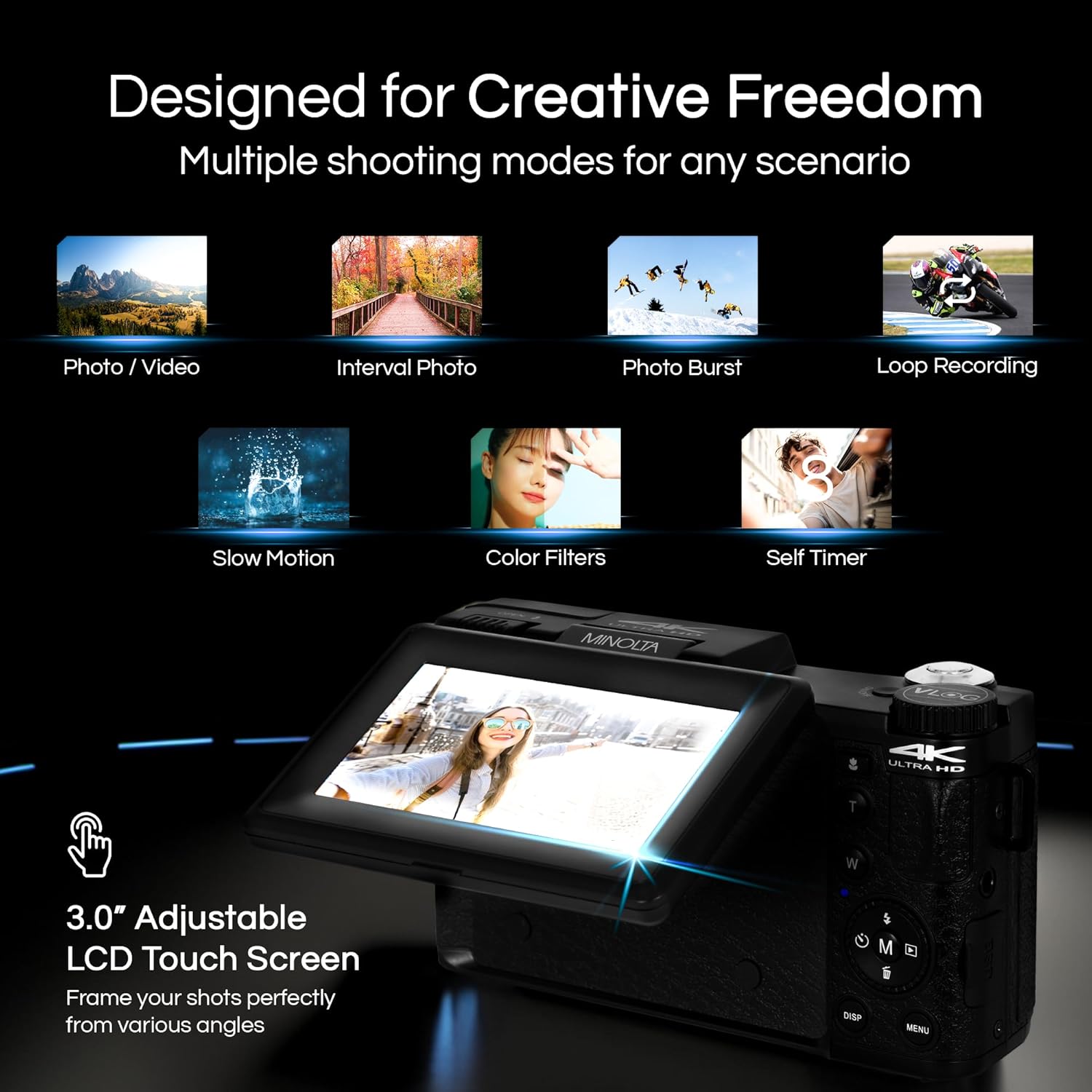
Image 4.1: The adjustable LCD screen showing various shooting modes.
The 3-inch LCD screen provides a live view, access to menus, and playback options. It can be rotated and flipped, making it suitable for vlogging and shooting from various angles. Navigate menus using the touch screen or physical buttons.
4.4 Zoomfunktion
The camera features 16x digital zoom. Use the zoom lever (often marked 'W' for Wide and 'T' for Telephoto) to adjust the focal length. Note that digital zoom may reduce image quality compared to optical zoom.

Abbildung 4.2: Beispielample of using digital zoom to capture distant details.
4.5 Special Features and Modes

Image 4.3: Icons illustrating the camera's creative modes.
The MND60V offers several creative modes:
- Zeitlupe: Zeichnet Videos mit einer höheren Bildrate für die Zeitlupenwiedergabe auf.
- Loop-Aufnahme: Zeichnet kontinuierlich Videos auf und überschreibt dabei die älteste Aufnahme. files wenn die Speicherkarte voll ist.
- Zeitraffer: Captures a series of photos at set intervals and combines them into a video.
- Szenenauswahl: Pre-set modes optimized for specific shooting conditions (e.g., portrait, landscape).
- Selbstauslöser: Delays the shutter release for a few seconds, allowing you to get into the shot.
4.6 Verwenden der Fernbedienung
The included tripod features a built-in wireless remote. This allows you to start/stop recording or take photos from a distance, ideal for group shots or vlogging.
4.7 Übertragung Files
Connect the camera to a computer using the provided USB cable. The camera will appear as a removable drive, allowing you to copy photos and videos to your computer.
5. Wartung
5.1 Reinigung der Kamera
- Verwenden Sie ein weiches, trockenes Tuch, um das Kameragehäuse zu reinigen.
- Verwenden Sie für die Reinigung der Linse ein spezielles Linsenreinigungstuch und eine entsprechende Reinigungslösung. Vermeiden Sie es, die Linsenoberfläche mit den Fingern zu berühren.
- Verwenden Sie keine aggressiven Chemikalien oder scheuernden Materialien.
5.2 Batteriepflege
- Laden Sie den Akku vor dem ersten Gebrauch vollständig auf.
- Bewahren Sie den Akku bei Nichtgebrauch an einem kühlen, trockenen Ort auf.
- Setzen Sie den Akku keinen extremen Temperaturen aus.
5.3 Speicherung
When not in use, store the camera and its accessories in the provided carrying case to protect them from dust, moisture, and physical damage.
6. Fehlerbehebung
If you encounter issues with your Minolta MND60V camera, refer to the following common problems and solutions:
| Problem | Mögliche Ursache | Lösung |
|---|---|---|
| Die Kamera lässt sich nicht einschalten. | Die Batterie ist leer oder falsch eingesetzt. | Stellen Sie sicher, dass der Akku vollständig geladen und korrekt eingesetzt ist. |
| Photos/Videos are blurry. | Autofocus issue, insufficient light, or camera shake. | Ensure proper lighting. Allow camera to focus before capturing. Use the tripod for stability. Avoid excessive digital zoom in low light. |
| Der Akku entlädt sich schnell. | Frequent use of screen/LED light, cold environment, or aging battery. | Reduce screen brightness. Turn off LED light when not needed. Keep battery warm in cold conditions. Consider a replacement battery if performance significantly degrades. |
| Speicherkartenfehler. | Die Karte ist voll, beschädigt oder inkompatibel. | Format the memory card (this will erase all data). Try a different compatible Micro SD card. |
| No audio in video recordings. | External microphone not connected or faulty. | Ensure the external microphone is securely plugged into the camera's microphone input. Check microphone settings in the camera menu. |
7. Spezifikationen
Key technical specifications for the Minolta MND60V VLOG Camera Kit:
| Besonderheit | Spezifikation |
|---|---|
| Modellnummer | MND60V |
| Effektive Standbildauflösung | 64 Megapixel |
| Videoauflösung | 4K (3840 Pixels Effective Video Resolution) |
| Videobildrate | 60 FPS (for 4K) |
| Fotosensor-Technologie | CMOS (2/3-inch Photo Sensor Size) |
| Anzeige | 3 Zoll LCD-Bildschirm |
| Fokustyp | Autofokus |
| Digital Zoom | 16x |
| Objektivtyp | Wide Angle (Minimum/Maximum Focal Length: 3.95 mm) |
| Maximale Blendenöffnung | 1.8 f |
| Bildstabilisierung | Digitales |
| Flash-Speichertyp | Micro SD |
| Konnektivitätstechnologie | USB |
| Videoaufnahmeformat | MP4 |
| Unterstütztes Audioformat | Unterstützte Kommunikation |
| Unterstütztes Bildformat | JPEG |
| Stromquelle | Lithium-Ion Battery (1 AAA battery required for remote, included) |
| Artikelgewicht | 3.5 Pfund |
| Farbe | Schwarz |
| Merkmale | Anti-Shake, Built-In Flash, Microphone Input, Remote Control, Slow Motion, Time Lapse, Timer |
8. Garantieinformationen
The Minolta MND60V VLOG Camera Kit comes with a Eingeschränkte 1-jährige Herstellergarantie. Please refer to the included Warranty Card for detailed terms and conditions, including coverage, limitations, and how to make a claim.
9. Kundendienst
For further assistance, technical support, or inquiries regarding your Minolta MND60V VLOG Camera Kit, please visit the official Minolta webSie können die Website besuchen oder sich an den Kundendienst wenden. Die Kontaktdaten finden Sie in der Regel auf der Garantiekarte oder der Herstellerverpackung. webWebsite.