
1. Einleitung
The Signal Fire AI-20 Fusion Splicer is a fourth-generation optical fiber fusion splicer designed for high-precision fiber optic work. It integrates an electric one-step fiber cleaver, a fusion splicer, and a 3-in-1 fiber holder, along with built-in VFL (Visual Fault Locator) and OPM (Optical Power Meter) functions. This manual provides essential information for the safe and efficient operation and maintenance of your AI-20 Fusion Splicer.

Figure 1: Signal Fire AI-20 Fusion Splicer overview mit Hauptmerkmalen.
2. Sicherheitsvorkehrungen
Beachten Sie stets die folgenden Sicherheitsvorkehrungen, um Verletzungen und Schäden am Gerät zu vermeiden:
- Augenschutz: Always wear appropriate eye protection when working with fiber optics, especially when using the VFL, as laser light can cause eye damage.
- Fiber Shards: Handle cleaved fiber ends with extreme care. Fiber shards are very sharp and can cause serious injury. Dispose of all fiber scraps properly in a designated container.
- Elektrische Sicherheit: Ensure the device is powered off and unplugged before performing any maintenance or cleaning. Do not operate the device in wet conditions.
- Cleaver Maintenance: Keep the fiber cleaver clean to ensure accurate cuts. Refer to the maintenance section for cleaning instructions.
- Batteriehandhabung: Use only the specified charger and battery. Do not expose the battery to extreme temperatures or physical damage.
3. Einrichtung
3.1 Auspacken und Prüfen
Carefully unpack all components from the carrying case. Verify that all items listed in the packing list are present and undamaged. The carrying case also functions as a workbench and work stool for convenience.
Video 1: Unboxing and initial setup of the Signal Fire AI-20/AI-30 Fiber Fusion Splicer, demonstrating how to access components from the case.
3.2 Laden des Akkus
The AI-20 is equipped with a 7800 mAh lithium battery. Ensure the battery is fully charged before initial use. The device supports multiple charging methods.
- Connect the power adapter to the charging port on the splicer or directly to the battery.
- Eine vollständige Aufladung dauert in der Regel etwa 3.5 Stunden.
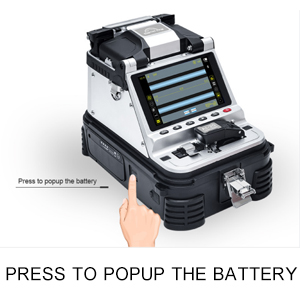
Figure 2: Illustration of how to access and remove the battery for charging or replacement.
3.3 Installing the Fiber Stripper
The AI-20 comes with a 9-in-1 multifunctional signal fire stripper. This tool is essential for preparing the fiber before cleaving and splicing.
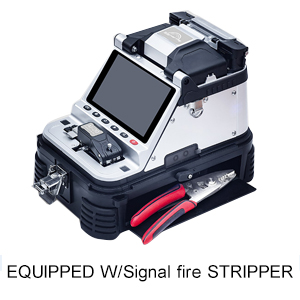
Figure 3: The Signal Fire stripper, a key accessory for fiber preparation.
4. Bedienungsanleitung
4.1 Fiber Preparation and Cleaving
- Use the provided fiber stripper to remove the protective coating from the fiber, exposing the bare fiber.
- Clean the bare fiber with an alcohol wipe to remove any residue.
- Place the prepared fiber into the electric one-step fiber cleaver. Ensure the fiber passes the far right of the cutter.
- Close the cleaver lid. The fiber will be automatically cut. The factory standard delay time for the cleaver return is 0.5 seconds, adjustable from 0.2 to 2 seconds via the mobile app.
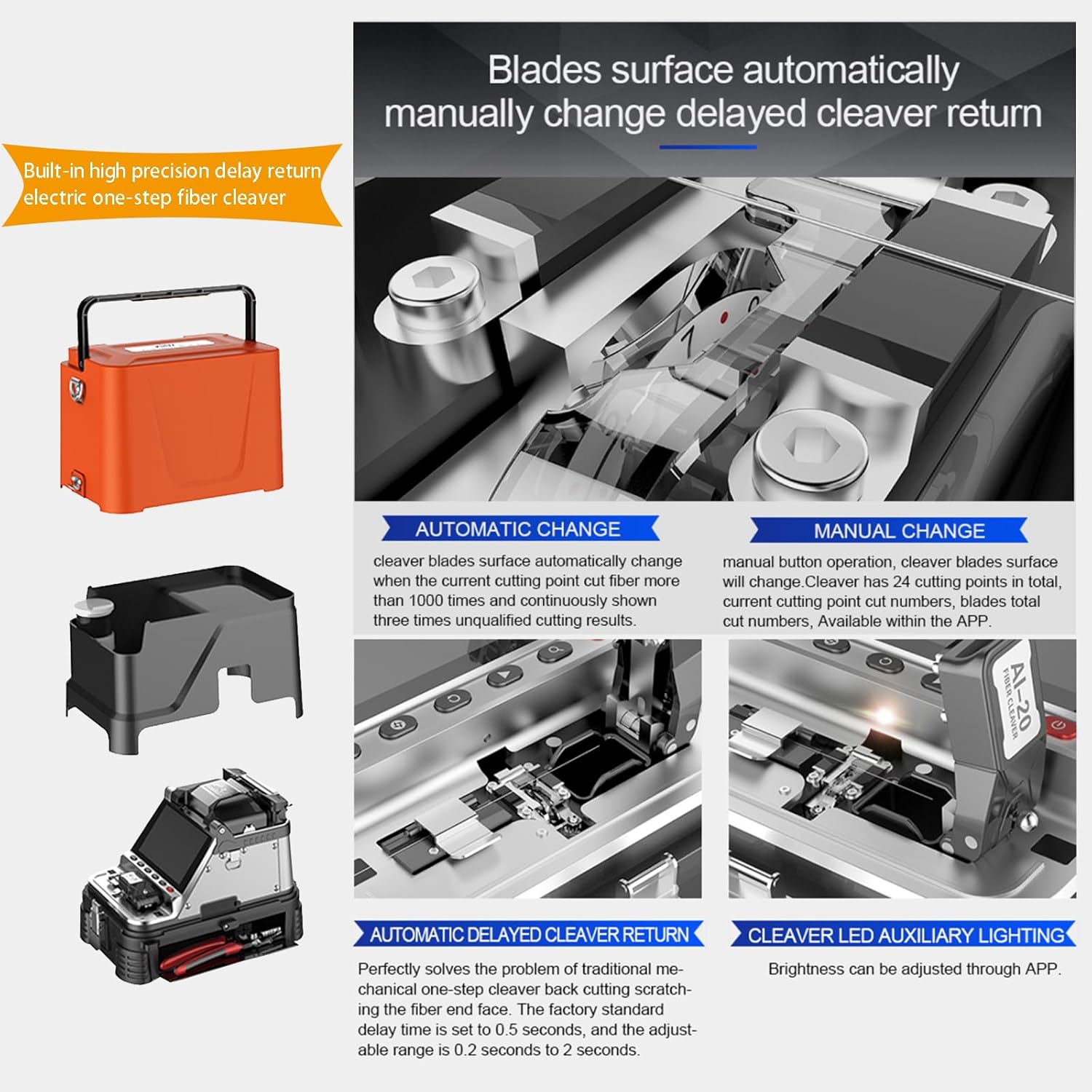
Abbildung 4: Ausführlich view of the automatic delayed return electric one-step fiber cleaver.
4.2 Fiber Splicing
- Open the splicer's lid and place the cleaved fibers into the V-grooves, ensuring they are properly seated in the 3-in-1 fiber holder.
- Close the splicer's lid. The AI-20 uses core alignment technology with six motors to automatically align the fibers.
- The splicing process will begin automatically. The splicing time is approximately 6 seconds.
- After splicing, the heater will automatically close, and the heat shrink sleeve will be heated in approximately 15 seconds.
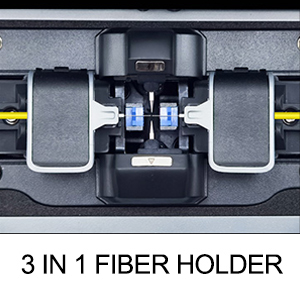
Figure 5: The 3-in-1 fiber holder for various fiber types.
4.3 Using the Built-in OPM and VFL
The AI-20 features integrated Optical Power Meter (OPM) and Visual Fault Locator (VFL) functions.
- OPM: The OPM can measure connection losses and verify continuity. It supports wavelengths of 850nm, 1300nm, 1310nm, 1490nm, 1550nm, 1625nm, 980nm, 1270nm, 1577nm, and 1650nm.
- VFL: The VFL helps evaluate fiber link transmission quality. It can be switched between three power states: 15mW, 2Hz flashing, and steady on mode.
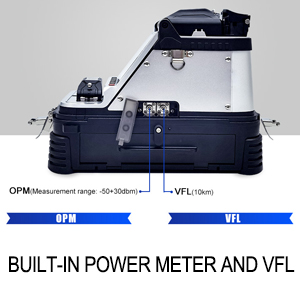
Figure 6: Location of the built-in Optical Power Meter (OPM) and Visual Fault Locator (VFL) ports.
4.4 Konnektivität mit mobilen Apps
The splicer can connect to a mobile app for intelligent interaction. This allows users to:
- Check splicing data.
- Download or output data at any time.
- Store splicing records indefinitely.
- Adjust cleaver settings, including delay time and LED brightness.
- Switch between ten different languages.
5. Wartung
5.1 Cleaver Blade Maintenance
The electric one-step cleaver features an automatic blade change mechanism. If three consecutive unqualified cuts occur, the cutter will automatically change the cleaver blade surface to a new cutting point. You can also manually change the blade surface via the app or by pressing the button on the device.
Wichtig: Keep the cleaver clean when using it; otherwise, it will affect the accuracy of the cuts.
Figure 7: The cleaver's automatic and manual blade surface change mechanism.
5.2 Cooling Tray
The splicer includes a cooling tray that can be folded and expanded to accommodate heat-shrink sleeves after heating.
5.3 Allgemeine Reinigung
Regularly clean the splicer's V-grooves, electrodes, and display screen with appropriate cleaning tools and solutions (e.g., lint-free wipes and isopropyl alcohol) to ensure optimal performance.
6. Fehlerbehebung
If you encounter issues with your Signal Fire AI-20 Fusion Splicer, refer to the following common problems and solutions:
| Problem | Mögliche Ursache | Lösung |
|---|---|---|
| Poor splice loss / High attenuation | Dirty fiber ends, incorrect cleave angle, worn electrodes, dirty V-grooves. | Clean fiber ends thoroughly. Inspect and clean the cleaver. Replace electrodes if worn. Clean V-grooves. Perform arc calibration. |
| Cleaver not cutting cleanly | Dirty cleaver blade, worn blade surface, incorrect fiber placement. | Clean the cleaver blade. Manually or automatically change to a new cutting point on the blade. Ensure fiber is correctly positioned. |
| Gerät lässt sich nicht einschalten | Low battery, faulty battery, power adapter issue. | Charge the battery. Check battery connection. Test with a different power source or battery if available. |
| Error Codes (e.g., E11, E20, E22) | System malfunction, calibration required, sensor issue. | Perform a factory reset and recalibration. Clean all optical components. If the issue persists, contact customer support. |
For further assistance, please refer to the support section or contact Signal Fire customer service.
7. Spezifikationen
Key technical specifications for the Signal Fire AI-20 Fusion Splicer:
| Besonderheit | Detail |
|---|---|
| Marke | Signal fire |
| Modell | AI-20 |
| Stromquelle | Batteriebetrieben (7800 mAh Lithium-Batterie) |
| Spleißzeit | 6 Sekunden |
| Aufheizzeit | 15 Sekunden |
| Anzeige | 5-inch High-Resolution LCD Screen |
| Vergrößerung | Up to 320x (X/Y axis separately), 200x (X and Y axis dual display) |
| Faser-Cleaver | Electric One-Step Fiber Cleaver with automatic delayed return |
| VFL-Ausgangsleistung | 15mW (3 states: 15mW, 2Hz flashing, steady on) |
| OPM Wavelengths | 850 nm, 1300 nm, 1310 nm, 1490 nm, 1550 nm, 1625 nm, 980 nm, 1270 nm, 1577 nm, 1650 nm |
| OPM Measurement Range | -50 bis +30 dBm |
| Artikelgewicht | 7.06 Ounces (Splicer unit only) |
| Artikelabmessungen | 6.5 x 9.06 x 10.04 Zoll |
| Zertifizierungen | CE, NIST, RoHS, UL |
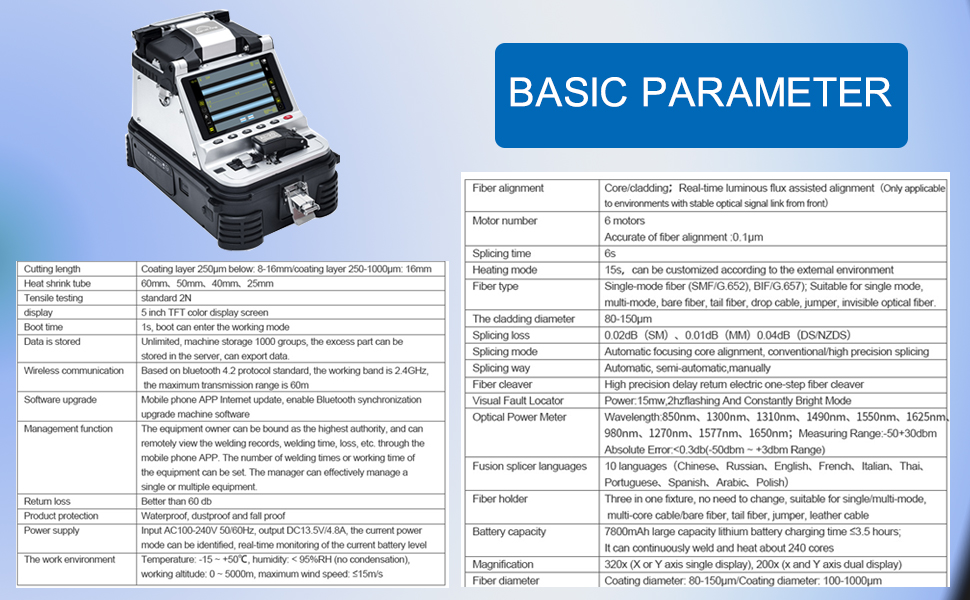
Figure 8: Detailed basic parameters and specifications for the Signal Fire AI-20.
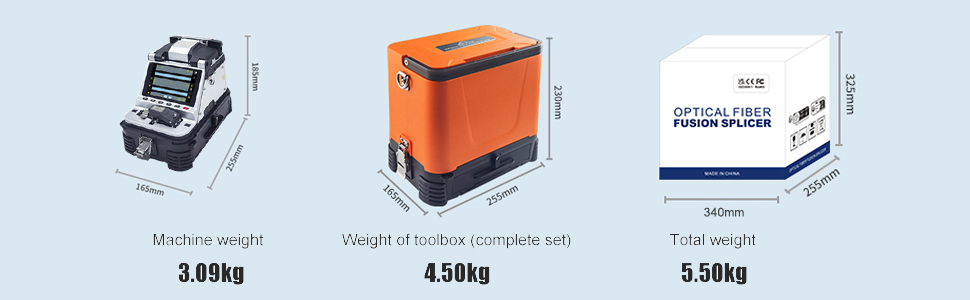
Figure 9: Weight and dimensions of the Signal Fire AI-20 splicer and its toolbox.
8. Garantie und Support
8.1 Produktgarantie
The Signal Fire AI-20 Fusion Splicer is designed for durability and performance. For specific warranty details, please refer to the warranty card included with your product or contact Signal Fire customer service. Optional protection plans, such as a 4-Year Protection Plan, may be available for extended coverage.
8.2 Rückgabe und Umtausch
A 30-day return/replacement policy is typically offered. Please check your purchase documentation for the exact terms and conditions.
8.3 Kundendienst
For technical assistance, troubleshooting, or inquiries regarding your Signal Fire AI-20 Fusion Splicer, please visit the official Signal Fire Store on Amazon oder kontaktieren Sie direkt deren Kundenservice.