
1. Einleitung
This manual provides detailed instructions for the installation, operation, and maintenance of your Active Pixel A9 Triple Lens WiFi Outdoor Security Camera. Please read this manual thoroughly before using the product to ensure proper function and safety. This camera is designed for outdoor surveillance, offering a wide field of view, advanced detection features, and robust weather resistance.
2. Packungsinhalt
Überprüfen Sie, ob alle Artikel in Ihrem Paket vorhanden sind:
- 1x Active Pixel A9 Camera
- 1x Montageständer
- 1x Netzteil
- 1x Benutzerhandbuch (dieses Dokument)
- 1x Screw Kit for installation
3. Produktmerkmale überview
The Active Pixel A9 camera offers a range of features for comprehensive outdoor security:
- Triple Lens Ultra-Wide 4MP Clarity: Three lenses provide a dramatically wider area coverage with sharper details and expanded angle monitoring.
- Vollfarb-Nachtsicht: Equipped with 8 high-power LEDs for clear, full-color video even in complete darkness.
- 360° PTZ Surveillance: Remotely pan, tilt, and zoom the camera to monitor every corner without blind spots.
- Smart Motion Tracking & Human Detection: AI-powered detection identifies human movement accurately and automatically tracks moving subjects.
- WiFi Enabled with Two-Way Audio: Stable 2.4GHz WiFi connectivity with a built-in microphone and speaker for remote communication.
- Waterproof Outdoor Build (IP66): Designed to withstand rain, dust, heat, and harsh outdoor conditions.
- Duale Speicheroptionen: Supports local SD card storage (up to 128GB) and secure cloud backup.
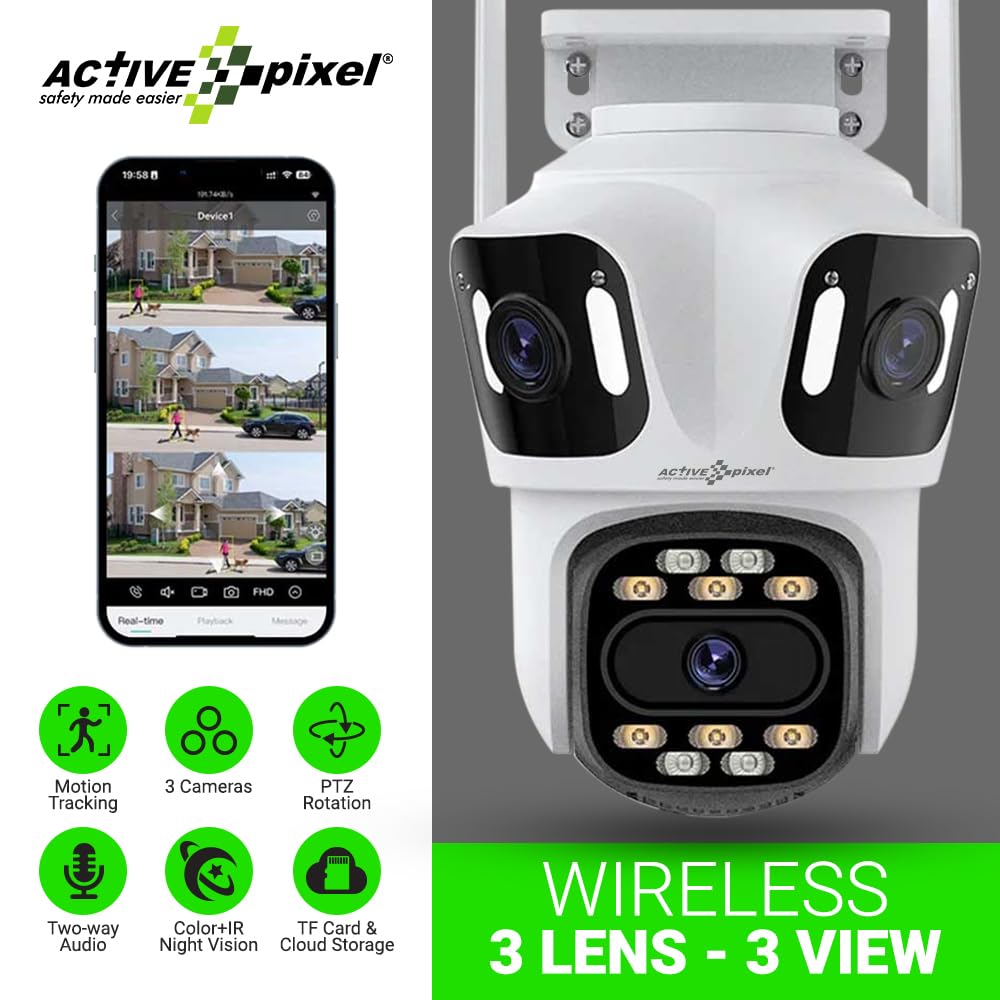
Figure 3.1: Active Pixel A9 Camera highlighting key features and mobile app view.

Figure 3.2: Illustration of the 3-Lens, 3-Screen panoramic viewing-Fähigkeit.

Figure 3.3: The camera's weatherproof design ensures durability in various conditions.
4. Einrichtungsanweisungen
4.1 Physische Installation
- Wählen Sie einen Standort: Wählen Sie einen Standort im Freien, der die gewünschten Bedingungen bietet. viewing angle and is within range of your WiFi network. Ensure the camera is mounted securely and has access to a power outlet.
- Montieren Sie die Kamera: Use the provided screw kit to securely attach the mounting stand to a wall or ceiling. Attach the camera to the stand. Refer to the camera dimensions for proper placement.
- Strom anschließen: Plug the power adapter into the camera and then into a suitable power outlet. The camera will power on and initiate its startup sequence.

Figure 4.1: Camera dimensions for installation planning.
4.2 App-Download und Kontoerstellung
- Laden Sie die App herunter: Suchen nach the recommended mobile application (e.g., "ICSEE" or as specified in the camera packaging) on your smartphone's app store (Google Play Store or Apple App Store).
- Benutzerkonto erstellen: Öffnen Sie die App und folgen Sie den Anweisungen auf dem Bildschirm, um ein neues Konto zu registrieren.
4.3 Kamerakopplung
The camera supports both wireless (WiFi) and wired connections:
- Drahtlose Verbindung:
- Stellen Sie sicher, dass Ihr Telefon mit einem 2.4-GHz-WLAN-Netzwerk verbunden ist.
- In the app, select "Add Device" and choose the wireless connection option.
- Follow the app's prompts to connect the camera to your WiFi network. This usually involves scanning a QR code displayed on your phone with the camera or entering WiFi credentials.
- Kabelverbindung (optional):
- Verbinden Sie Ihren Router mit einem Ethernet-Kabel mit dem LAN-Anschluss der Kamera.
- In the app, select "Add Device" and choose the wired connection option. The camera should be automatically detected.

Figure 4.2: Connection methods for the Active Pixel A9 camera.
5. Bedienungsanleitung
5.1 Live View und Multi-Screen-Überwachung
Sobald die Verbindung hergestellt ist, öffnen Sie die App. view lebe footage from your camera. The triple-lens design allows for multi-screen viewing within the app, providing a comprehensive panoramic perspective.
Figure 5.1: Multi-screen live view from the triple-lens camera.
5.2 PTZ-Steuerung
Use the directional controls within the app to remotely pan (horizontal rotation), tilt (vertical rotation), and zoom the camera to adjust your viewing area. This allows for dynamic monitoring of your surroundings.
5.3 Zwei-Wege-Audio
Tap the microphone icon in the app to speak through the camera's speaker, and listen to audio from the camera's microphone. This feature enables real-time communication with visitors or deterrence of intruders.
5.4 Nachtsichtmodi
The camera automatically switches to night vision in low-light conditions. The 8 high-power LEDs provide full-color night vision, ensuring clear visibility after dark.
5.5 Bewegungserkennung und -verfolgung
Enable motion detection in the app settings. The camera will send alerts to your phone when motion is detected. With human detection enabled, the camera can distinguish human shapes from other movements, reducing false alarms. The smart tracking feature will automatically follow detected human subjects.

Figure 5.2: Human detection and automatic tracking in action.
5.6 Aufnahme und Wiedergabe
Die Kamera unterstützt zwei Aufnahmemethoden:
- SD-Kartenspeicher: Insert a Micro SD card (up to 128GB, not included) into the designated slot on the camera. Recordings will be saved locally.
- Cloud-Speicher: Abonnieren Sie den Cloud-Speicherdienst über die App, um Ihre Aufnahmen sicher extern zu sichern.
Auf aufgezeichnetes Foo zugreifentage via the playback function in the mobile app.

Figure 5.3: Dual storage options: TF card and cloud.
6. Wartung
6.1 Reinigung der Kamera
Reinigen Sie das Kameraobjektiv und das Gehäuse regelmäßig mit einem weichen Tuch.amp cloth. Do not use harsh chemicals or abrasive cleaners, as these can damage the lens or finish. Ensure the camera is powered off before cleaning.
6.2 Firmware-Updates
Check the mobile app regularly for available firmware updates. Keeping your camera's firmware up-to-date ensures optimal performance, security, and access to new features. Follow the in-app instructions for firmware updates.
6.3 SD-Kartenverwaltung
If using an SD card, it is recommended to format it periodically through the camera's settings in the app to maintain optimal recording performance. Replace the SD card if it shows signs of corruption or failure.
7. Fehlerbehebung
- Kamera verbindet sich nicht mit WLAN:
- Stellen Sie sicher, dass Ihr WLAN-Netzwerk mit 2.4 GHz arbeitet. Die Kamera unterstützt keine 5-GHz-Netzwerke.
- Überprüfen Sie die WLAN-Signalstärke am Standort der Kamera.
- Überprüfen Sie, ob das in der App eingegebene WLAN-Passwort korrekt ist.
- Starten Sie Ihren Router und die Kamera neu.
- Schlechte Bildqualität:
- Reinigen Sie das Kameraobjektiv.
- Ensure adequate lighting, especially for night vision.
- Überprüfen Sie Ihre Internetverbindungsgeschwindigkeit.
- Bewegungserkennung funktioniert nicht oder es gibt zu viele Fehlalarme:
- Passen Sie die Empfindlichkeit der Bewegungserkennung in der App an.
- Ensure human detection is enabled if you wish to filter out non-human movements.
- Define specific detection zones to exclude areas with constant, irrelevant movement (e.g., busy roads).
- Probleme mit der Zwei-Wege-Audioübertragung:
- Überprüfen Sie die Mikrofon- und Lautsprecherberechtigungen der App auf Ihrem Telefon.
- Ensure volume levels are adjusted correctly on both the app and your phone.
- Netzwerkstabilität überprüfen.
8. Spezifikationen
| Besonderheit | Detail |
|---|---|
| Marke | Active Pixel |
| Modellname | WIFI Triple LENS |
| Modellnummer | A9 |
| Empfohlene Verwendung | Sicherheit im Außenbereich |
| Nutzungsumgebung | Im Freien |
| Konnektivitätstechnologie | Drahtlos (Wi-Fi 2.4 GHz) |
| Besondere Merkmale | Triple Lens, Full-Color Night Vision, 360° PTZ, Motion Tracking, Human Detection, Two-Way Audio |
| Montagetyp | Überstehend |
| Auflösung der Videoaufnahme | 1536P |
| Videoaufnahmeformat | 4 Megapixel |
| Stromquelle | Adapter (No Batteries Required) |
| Artikelabmessungen (L x B x H) | 15 x 10 x 8 Zentimeter |
| Artikelgewicht | 400 Gramm |
| Packungsinhalt | 1x Camera, 1x Stand, 1x Adapter, 1x Manual, 1x Screw Kit |
9. Garantie und Support
9.1 Garantieinformationen
This product may be eligible for an extended warranty. For details on warranty coverage and terms, please refer to any warranty cards included in your package or contact customer support. An optional 1-Year Extended Warranty by Onsitego may be available for purchase.
9.2 Kundendienst
For technical assistance, troubleshooting, or any product-related inquiries, please contact Active Pixel customer care:
- Telefon: 9321367328
- Hersteller / Importeur: Glorious Digital Solution Pvt Ltd, Mumbai, India.