
1. Einleitung
This user manual provides detailed instructions for the assembly, operation, and maintenance of your FLEXISPOT Lite Electric Standing Desk. Please read this manual thoroughly before installation and use to ensure proper function and safety. Keep this manual for future reference.
2. Wichtige Sicherheitshinweise
Die Nichtbeachtung dieser Sicherheitshinweise kann zu Verletzungen oder Schäden am Produkt führen.
- The desk has a maximum load capacity of 70 kgDieses Gewichtslimit darf nicht überschritten werden.
- Die Montage muss von einem Erwachsenen durchgeführt werden.
- Stellen Sie vor der Verwendung sicher, dass alle Schrauben und Bolzen fest angezogen sind.
- Halten Sie Kinder und Haustiere während des Betriebs vom Schreibtisch fern, um Verletzungen durch bewegliche Teile zu vermeiden.
- Do not place hands or other objects near the lifting mechanism while the desk is in motion.
- Vor der Reinigung oder Durchführung von Wartungsarbeiten die Stromzufuhr unterbrechen.
- Use only the power adapter supplied with the desk.
- Vermeiden Sie es, Flüssigkeiten auf das Bedienfeld oder auf Motorkomponenten zu verschütten.
3. Produktüberschreitungview und Funktionen
The FLEXISPOT Lite Electric Standing Desk is designed to promote a healthy work environment by allowing seamless transitions between sitting and standing positions. It features a robust motor, memory presets, and an anti-collision system.

Figure 3.1: FLEXISPOT Lite Electric Standing Desk setup with accessories.
Hauptmerkmale:
- Ergonomisches Design: Facilitates alternating between sitting and standing to reduce physical strain.
- Quiet and Durable Motor: Operates at less than 50 dB, ensuring a quiet workspace.
- Electric Height Adjustment with Memory: Easily adjust height with a control panel and save up to four preferred height settings.
- Robuste Konstruktion: Steel frame with a T-foot design provides stability and supports up to 70 kg.
- Geräumiger Desktop: 140x60 cm maple tabletop with rounded corners and integrated wire holes.
- Antikollisions-Rückprallfunktion: Das Fahrzeug stoppt und kehrt die Fahrt automatisch um, wenn während der Fahrt ein Hindernis erkannt wird.
- Integriertes Zubehör: Includes two hooks and a cup holder for convenience.
4. Aufbau und Montage
This section outlines the general steps for assembling your FLEXISPOT Lite Electric Standing Desk. Refer to the separate assembly guide included in your package for detailed, step-by-step instructions and diagrams.
4.1 Auspacken
- Öffnen Sie die Verpackung vorsichtig und entnehmen Sie alle Komponenten.
- Place all parts on a clean, flat, and soft surface (e.g., a carpet) to prevent scratches.
- Verify that all parts listed in the assembly guide are present.
4.2 Komponentenidentifikation
Machen Sie sich mit den Hauptkomponenten vertraut:
- Desktop-Bereiche
- Leg columns (lifting columns)
- Fußstützen
- Kontrollkästchen
- Bedienfeld
- Netzteil und Kabel
- Hardware (screws, bolts, tools)
- Accessories (hooks, cup holder)
4.3 Montageschritte (Allgemein)
- Befestigen Sie die Hubsäulen am Tischrahmen.
- Befestigen Sie die Fußstützen an der Unterseite der Hebesäulen.
- Mount the control box and control panel to the underside of the desktop.
- Connect all cables from the motors to the control box, and then connect the power adapter.
- Attach the desktop sections together (if applicable) and secure them to the frame.
- Install the cup holder and hooks as desired.
Note: Refer to the detailed assembly manual for specific screw types, torque requirements, and visual aids for each step.
5. Bedienung Ihres Schreibtisches
This section explains how to use the control panel to adjust your desk height and utilize its features.

Figure 5.1: Smart Control Panel.
5.1 Funktionen des Bedienfelds
- LED-Anzeige: Zeigt die aktuelle Schreibtischhöhe in Zentimetern an.
- Auf-/Ab-Tasten (▲ / ▼): Durch Gedrückthalten der Taste lässt sich die Schreibtischhöhe stufenlos nach oben oder unten verstellen. Lassen Sie die Taste los, um die gewünschte Höhe einzustellen.
- Sit/Stand Button (i): This button may function as a quick switch between a default sitting and standing height, or as a general indicator. Refer to your specific control panel model for exact functionality.
- Memory Preset Buttons (1, 2, 3, 4): Mithilfe dieser Tasten können Sie bis zu vier bevorzugte Höheneinstellungen speichern und wieder aufrufen.
5.2 Einstellen von Speichervoreinstellungen
- Stellen Sie den Schreibtisch mithilfe der Auf-/Ab-Tasten auf die gewünschte Höhe ein.
- Press the 'M' or 'Set' button (if available, otherwise proceed to step 3). The display may flash.
- Immediately press one of the number buttons (1, 2, 3, or 4) to save the current height to that preset. The display will show 'S-' followed by the number, confirming the setting.
5.3 Abrufen von Speichervoreinstellungen
Drücken Sie einfach die gewünschte Zifferntaste (1, 2, 3 oder 4). Der Schreibtisch fährt automatisch auf die gespeicherte Höhe.
5.4 Anti-Collision Rebound Function
The desk is equipped with an anti-collision system. If the desk encounters an obstruction while moving up or down, it will automatically stop and reverse slightly to prevent damage or injury.
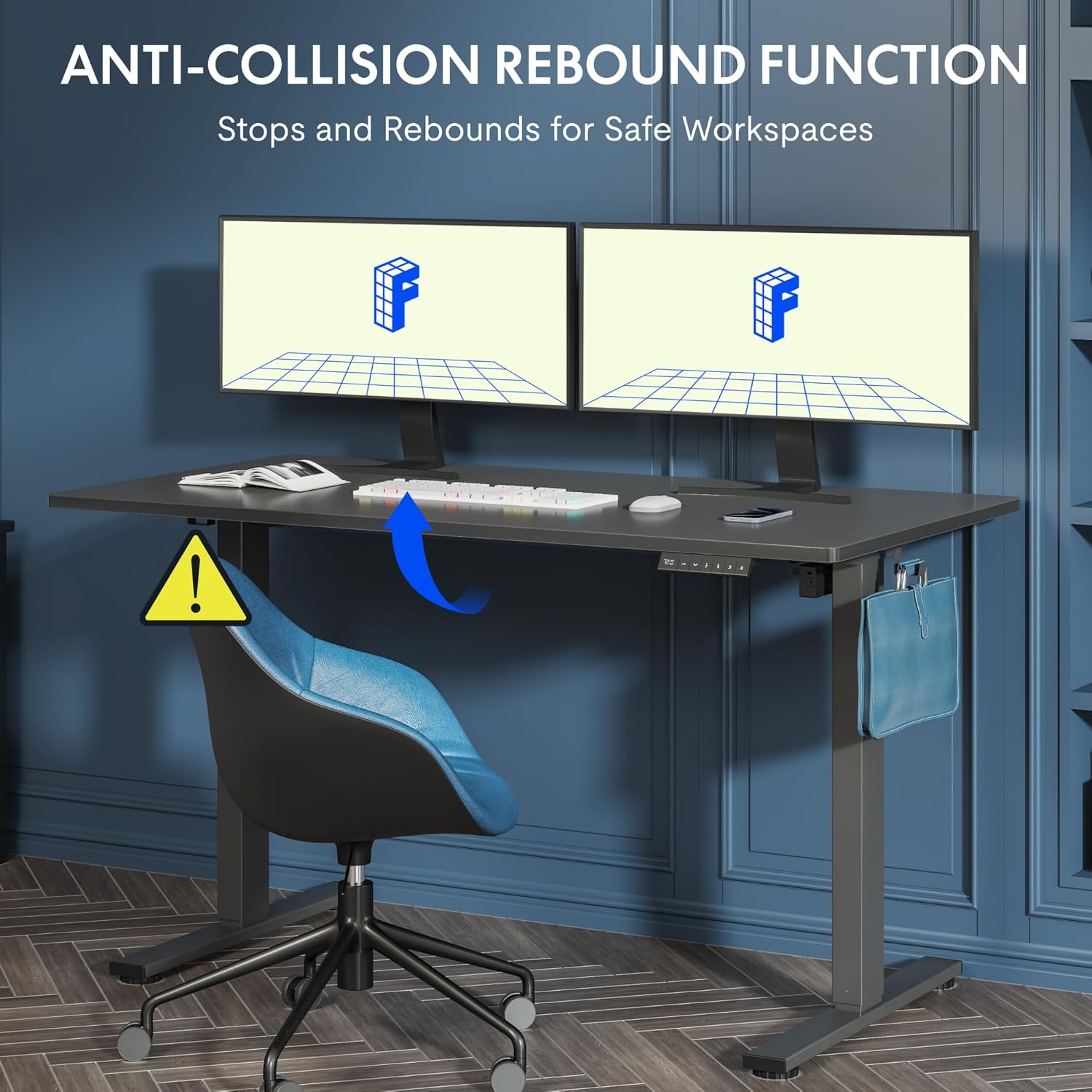
Figure 5.2: Anti-Collision Rebound Function in action.
6. Wartung und Pflege
Regelmäßige Wartung gewährleistet die Langlebigkeit und optimale Leistung Ihres Stehtisches.
- Reinigung: Wischen Sie die Tischplatte und den Rahmen mit einem weichen, fusselfreien Tuch ab.amp Tuch. Vermeiden Sie Scheuermittel oder aggressive Chemikalien.
- Inspektion: Überprüfen Sie regelmäßig alle Schrauben und Bolzen auf festen Sitz. Ziehen Sie sie gegebenenfalls nach.
- Kabelmanagement: Ensure all cables are neatly routed and not pinched or tangled, which could affect operation.
- Tragfähigkeit: Do not overload the desk beyond its 70 kg capacity.
7. Anleitung zur Fehlerbehebung
Sollten Sie Probleme mit Ihrem Schreibtisch haben, beachten Sie bitte die folgenden häufig auftretenden Probleme und Lösungen:
| Problem | Mögliche Ursache | Lösung |
|---|---|---|
| Der Schreibtisch bewegt sich nicht und reagiert nicht auf die Bedienelemente. | Power cable disconnected; control box cable loose; motor cable loose. | Check all cable connections. Ensure the power cable is securely plugged into the wall outlet and the control box. |
| Der Schreibtisch wackelt ungleichmäßig oder macht ungewöhnliche Geräusche. | Overload; loose screws; obstruction. | Reduce weight on the desk. Check and tighten all assembly screws. Ensure no obstructions are in the path of the lifting columns. |
| Der Schreibtisch hört unerwartet auf, sich zu bewegen. | Anti-collision system activated; motor overheating. | Check for obstructions and remove them. If no obstruction, allow the motor to cool down for 20 minutes before attempting operation again. |
| Im Bedienfeld wird ein Fehlercode angezeigt. | Spezifischer Systemfehler. | Refer to the detailed assembly manual for specific error code meanings and troubleshooting steps. If the issue persists, contact customer support. |
8. Technische Daten

Figure 8.1: Desk Dimensions and Performance Metrics.
| Spezifikation | Detail |
|---|---|
| Marke | FLEXISPOT |
| Modellnummer | QS1M-1460-IE |
| Farbe | White Frame + Maple Top |
| Abmessungen der Tischplatte (L x B) | 140 cm x 60 cm |
| Höhenverstellbereich | 73.5 cm - 118 cm |
| Material | Wood (Maple Top), Metal (Alloy Steel Frame) |
| Maximale Tragfähigkeit | 70 kg |
| Artikelgewicht | 26.9 kg |
| Geräuschpegel | < 50 dB |
| Anpassungsgeschwindigkeit | 20 mm/s |
| Besondere Merkmale | Ergonomic, Adjustable, Anti-Collision, Memory Presets |
9. Garantie und Kundendienst
For warranty information, specific troubleshooting not covered in this manual, or to purchase replacement parts, please contact FLEXISPOT customer support directly. Refer to the product packaging or the official FLEXISPOT webWebsite für Kontaktdaten.