
1. Produktüberschreitungview
The Superfire G12 Workshop Flashlight is a versatile and durable lighting tool designed for various tasks. It integrates two powerful light sources, a high-capacity rechargeable battery, and practical features like a digital display and power bank functionality. Its robust construction and adaptable mounting options make it an essential tool for workshops, outdoor activities, and emergency situations.
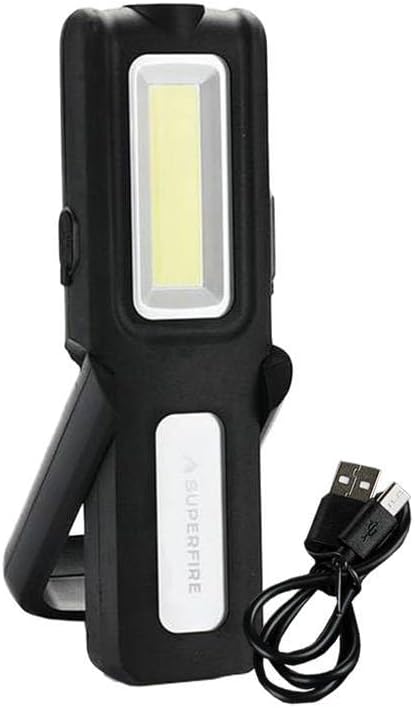
Image 1.1: The Superfire G12 Workshop Flashlight shown with its included USB charging cable. The flashlight features a main rectangular COB LED light panel and a smaller top LED spotlight. It has a black body with a white panel displaying the 'SUPERFIRE' logo and a foldable stand/handle.
2. Hauptmerkmale
- Duale Lichtquellen: Equipped with a main COB LED panel for wide area illumination and a top LED spotlight for focused, long-range lighting.
- Einstellbare Helligkeit: Easily control light intensity using dedicated '+' and '-' buttons.
- Hochleistungsbatterie: Features a 1200mAh battery for extended operation.
- Powerbank-Funktion: Can be used to charge other devices via its USB output.
- Digitale Batterieanzeige: A clear digital screen indicates the remaining battery percentage.
- Langlebige Konstruktion: Made from robust TPR plastic with structural reinforcements for wear resistance.
- Vielseitige Montage: Includes a 180° rotating handle, a 360° hanging hook, and strong magnetic elements for hands-free use on metal surfaces.
3. Packungsinhalt
Bitte prüfen Sie das Paket auf folgende Artikel:
- 1 x Superfire G12 Workshop Flashlight
- 1 x USB-Ladekabel
4. Einrichtung
4.1 Erstaufladung
Before using your Superfire G12 flashlight for the first time, it is recommended to fully charge the battery. Connect the smaller end of the provided USB charging cable to the flashlight's micro USB port and the larger end to a standard USB power adapter (not included) or a computer's USB port. The digital display will show the charging status and battery percentage. Charging is complete when the display shows 100%.
5. Bedienungsanleitung
5.1 Ein-/Ausschalten und Modusauswahl
- To turn on the flashlight, press the power button located on the side of the device.
- Subsequent presses of the power button will cycle through the different lighting modes: Main COB LED → Top LED Spotlight → Off.
5.2 Helligkeitseinstellung
While the flashlight is on, use the '+' and '-' buttons to adjust the brightness level of the active light source. Pressing '+' will increase brightness, and pressing '-' will decrease it. The digital display may show the current brightness level or battery percentage depending on the model's specific implementation.
5.3 Using the Mounting Features
- Drehbarer Griff: Adjust the integrated handle to your desired angle for comfortable handheld use or to position the light. The handle rotates 180 degrees.
- Aufhängehaken: Extend the 360-degree rotating hook from the top of the flashlight to hang it from ropes, branches, or other fixtures.
- Magnetfuß: The strong magnets on the base allow you to securely attach the flashlight to any ferrous metal surface for hands-free operation.
6. Lade- und Powerbankfunktion
6.1 Recharging the Flashlight
When the battery level is low, as indicated by the digital display, recharge the flashlight using the provided USB cable. Connect the micro USB end to the flashlight and the USB-A end to a compatible power source (e.g., computer USB port, wall adapter, car charger). The digital display will show the charging progress.
6.2 Verwendung als Powerbank
The Superfire G12 can serve as an emergency power bank for small electronic devices. Connect your device's charging cable to the USB output port on the G12 flashlight. The flashlight's battery will then begin to charge your connected device. Monitor the G12's digital display to keep track of its remaining battery percentage.
7. Wartung
- Reinigung: Wipe the flashlight's exterior with a soft, slightly damp Mit einem Tuch abwischen. Verwenden Sie keine scharfen Chemikalien oder Scheuermittel und tauchen Sie das Gerät nicht in Wasser.
- Lagerung: Store the flashlight in a cool, dry place away from direct sunlight and extreme temperatures. If storing for extended periods, charge the battery every 3-6 months to maintain its lifespan.
- Batteriepflege: Avoid fully depleting the battery frequently. Recharge it when the battery indicator shows low levels.
8. Fehlerbehebung
| Problem | Mögliche Ursache | Lösung |
|---|---|---|
| Die Taschenlampe lässt sich nicht einschalten. | Batterie ist leer. | Charge the flashlight fully using the provided USB cable. |
| Das Licht ist schwach oder flackert. | Niedriger Batteriestand. | Laden Sie die Taschenlampe auf. |
| Cannot charge external device (power bank function). | Die Batterie der Taschenlampe ist zu schwach oder das Kabel ist defekt. | Ensure the flashlight is sufficiently charged. Try a different USB cable. |
9. Spezifikationen
| Attribut | Wert |
|---|---|
| Marke | Superfire |
| Modellreferenz | G12 |
| Lumenleistung | 566 lm |
| Batteriekapazität | 1200 mAh |
| Ladeanschluss | Micro USB |
| Material | TPR Plastic |
| ASIN | B0CWS6YMHY |
| Erstes verfügbares Datum | 29. Februar 2024 |
10. Garantie und Support
For detailed warranty information, product registration, or technical support, please refer to the warranty card included with your purchase or visit the official Superfire webWebsite. Sie können sich auch an Ihre Verkaufsstelle wenden, um Unterstützung zu erhalten.
Bitte bewahren Sie Ihren Kaufbeleg für eventuelle Garantieansprüche auf.