
1. Wichtige Sicherheitshinweise
Please read and understand all instructions before installing or operating this fixture. Failure to follow these instructions may result in electric shock, fire, or other hazards that could cause personal injury or property damage.
- WARNUNG: Stromschlaggefahr. Vor Installation oder Wartung die Stromzufuhr an der Sicherung oder dem Leitungsschutzschalter unterbrechen.
- WARNUNG: Risk of fire. Keep combustible materials away from the lamp.
- This fixture is intended for indoor use only. Do not use in wet locations or where directly exposed to water.
- Sicherstellung der Versorgungsvoltage is compatible with the fixture's requirements (120V-277V).
- Alle elektrischen Anschlüsse müssen gemäß den örtlichen und nationalen Elektrovorschriften erfolgen. Wenn Sie sich bezüglich der Verkabelung unsicher sind, wenden Sie sich bitte an einen qualifizierten Elektriker.
- Versuchen Sie nicht, die Vorrichtung zu verändern oder zu zerlegen. Sie enthält keine vom Benutzer wartbaren Teile.
2. Lieferumfang
Vergewissern Sie sich vor Beginn der Installation, dass alle Komponenten vorhanden sind:
- LED Shop Light Fixture(s)
- Montagezubehör (Schrauben, Dübel)
- Linking Cables (1.5" and 8" for daisy-chaining)
- Drahtmuttern
3. Spezifikationen
| Besonderheit | Spezifikation |
|---|---|
| Marke | Sunco Beleuchtung |
| Modellname | LED Shop Light, 4ft Wraparound, Prismatic Lens, 8.5 Inch |
| Abmessungen (L x B x H) | 48 Zoll L x 8.58 Zoll B x 2.56 Zoll H |
| Wastage | 60 Watt |
| Helligkeit | 7200 Lumen |
| Effizienz | 120 LM / W. |
| Farbtemperatur (CCT) | Wählbar: 4000K, 5000K, 6000K |
| Bandtage | 120 V bis 277 V |
| Dimmbar | Nein (nicht dimmbar) |
| Material | Alloy Steel, Polycarbonate |
| Montagetyp | Deckenmontage (Einbaumontage) |
| Besondere Merkmale | Linkable, Wide Beam Angle (110°) |
| Zertifizierungen | ETL, FCC, RoHS |
| Durchschnittliches Leben | 50,000 Stunden |
The fixture features a durable build with an impact-resistant prismatic lens for wide and consistent light dispersion.

This image illustrates key features including impact resistance, the prismatic lens design, non-dimmable functionality, and the wide voltage compatibility of 120-277V.
4. Einrichtung und Installation
Befolgen Sie diese Schritte für eine ordnungsgemäße Installation. Stellen Sie sicher, dass die Stromzufuhr unterbrochen ist, bevor Sie beginnen.
4.1. Bereiten Sie die Installation vor
- Strom ausschalten: Locate the circuit breaker controlling the installation area and turn off the power.
- Diffusor entfernen: Gently remove the prismatic diffuser from the lamp base to access the internal components.
- Farbtemperatur (CCT) auswählen: Before mounting, locate the CCT switch inside the fixture. Select your desired color temperature (4000K, 5000K, or 6000K). This setting cannot be changed easily after installation.

This image shows the internal CCT switch, allowing selection between 4000K, 5000K, and 6000K before installation.
4.2. Montage der Vorrichtung
The fixture is designed for flush mounting to a ceiling or surface. It includes keyhole slots for easy installation.
- Montagepunkte markieren: Hold the fixture in the desired mounting location and mark the positions for the mounting screws. Ensure these align with a junction box or suitable support structure.
- Montagezubehör installieren: Drill pilot holes if necessary and install the provided mounting screws, leaving a small gap for the fixture to slide onto.
- Verkabelung vorbereiten: If connecting to a junction box, knock out the appropriate punch hole on the fixture's housing.

This diagram illustrates the three main steps for installation: securing the housing, connecting electrical wires, and attaching the light fixture.
4.3. Elektrische Verbindung
- Kabel anschließen: Using the provided wire nuts, connect the fixture's wires to the supply wires: Live (black) to Live, Neutral (white) to Neutral, and Ground (yellow/green) to Ground. Ensure all connections are secure.
- Drähte einstecken: Carefully tuck all wires and wire nuts into the junction box or fixture housing.
4.4. Linking Multiple Fixtures (Daisy Chain)
This fixture supports daisy-chaining to extend lighting coverage. Use the provided linking cables.
- Connect Linking Cable: Insert one end of a linking cable into the designated port on the first fixture and the other end into the port on the next fixture.
- Sichere Verbindungen: Ensure linking cables are securely connected and properly routed.
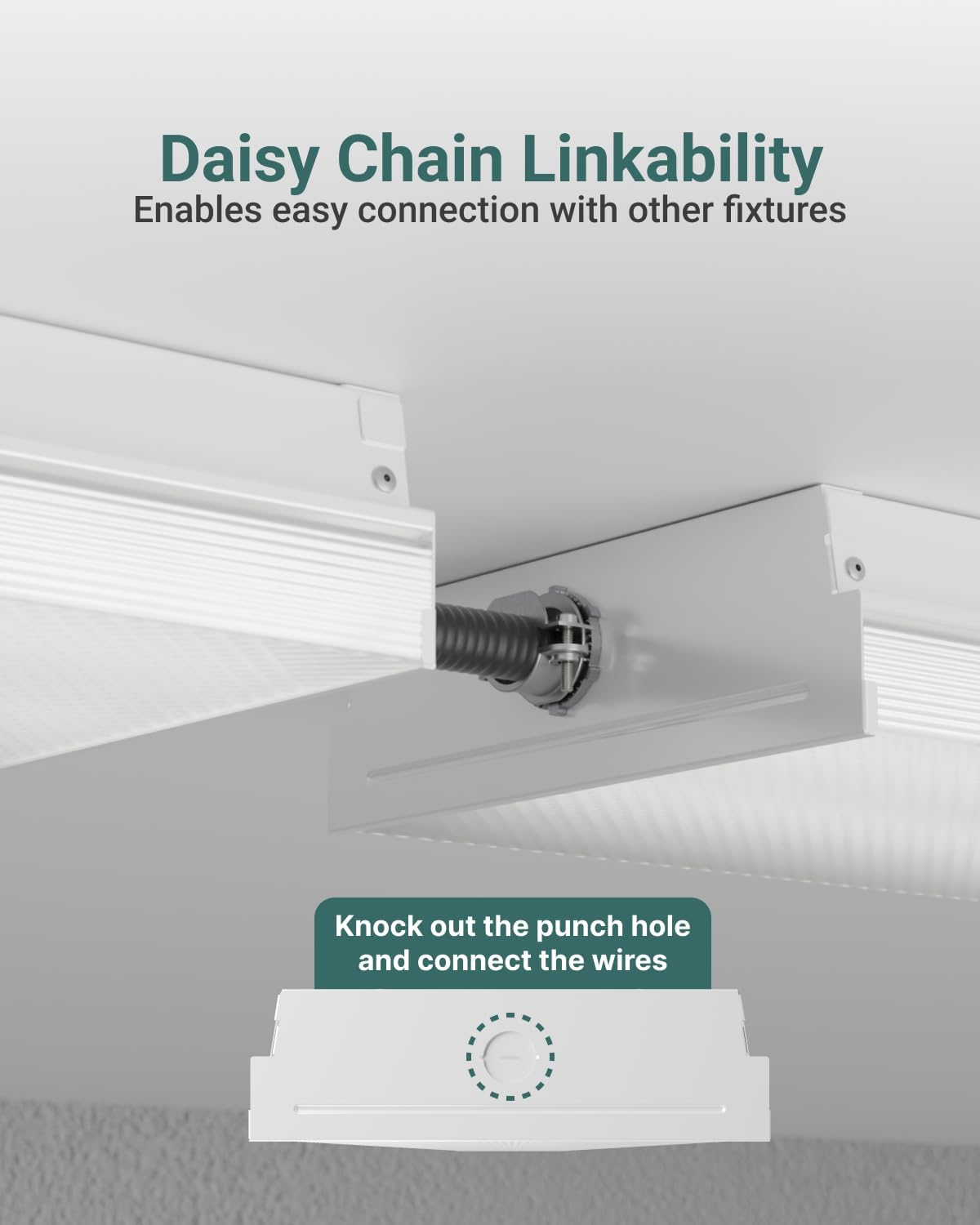
This image demonstrates how to daisy-chain multiple fixtures using the linking cables and highlights the knockout punch hole for electrical connections.
4.5. Letzte Schritte
- Reattach Diffuser: Align one end of the diffuser with the aluminum base and push it into place until it snaps securely.
- Strom wiederherstellen: Turn the circuit breaker back on to restore power to the fixture.
5. Bedienungsanleitung
The Sunco Lighting LED Shop Light is designed for straightforward operation once installed.
5.1. Color Temperature Selection (CCT)
This fixture features a selectable color temperature (CCT) switch, allowing you to choose between 4000K (Cool White), 5000K (Daylight), and 6000K (Bright White) to suit your preference or application. The CCT switch is located inside the fixture and must be set during installation before the diffuser is reattached.
- 4000K: Provides a neutral white light, suitable for offices or general workspaces.
- 5000K: Offers a bright, crisp daylight-like illumination, ideal for tasks requiring high visibility.
- 6000K: Delivers a very bright, cool white light, often preferred for industrial settings or areas needing maximum brightness.

This image displays the internal components and wiring, emphasizing the high efficiency of the LED fixture operating within a 120-277V range.
5.2. Ein-/Ausschalten
The fixture is non-dimmable and operates via a standard wall switch connected to its power supply. Simply toggle the wall switch to turn the light on or off.
6. Wartung
The Sunco Lighting LED Shop Light requires minimal maintenance. Always ensure power is disconnected before performing any maintenance.
- Reinigung: Wischen Sie die Außenseite der Leuchte mit einem weichen, trockenen oder leicht feuchten Tuch ab.amp cloth. Do not use harsh chemicals or abrasive cleaners, as these can damage the finish or lens.
- Inspektion: Periodically inspect the fixture for any signs of damage, loose wiring, or wear. If any issues are found, disconnect power and consult a qualified electrician.
- Kein Glühbirnenwechsel: This fixture uses integrated LEDs, meaning there are no bulbs to replace. The LEDs are designed for a long lifespan of 50,000 hours.
7. Fehlerbehebung
If you experience issues with your LED Shop Light, refer to the following common troubleshooting steps:
- Licht geht nicht an:
- Überprüfen Sie den Leistungsschalter, um sicherzustellen, dass der Strom eingeschaltet ist.
- Verify all wire connections are secure and correct.
- Stellen Sie sicher, dass sich der Wandschalter in der Position EIN befindet.
- Licht flackert:
- Confirm the fixture is not connected to a dimmer switch, as it is non-dimmable.
- Überprüfen Sie, ob die Kabelverbindungen lose sind.
- Sicherstellung der Versorgungsvoltage ist stabil und liegt innerhalb des vorgegebenen Bereichs.
- Falsche Farbtemperatur:
- The CCT switch must be set before installation. If the diffuser is already installed, carefully remove it to access and adjust the switch.
If these steps do not resolve the issue, contact Sunco Lighting customer support for assistance.
8. Garantie und Support
Sunco Lighting stands behind the quality of its products.
- Garantie: This product is backed by a 3-Year Warranty. Please refer to the official Sunco Lighting website or your purchase documentation for full warranty details and terms.
- Kundendienst: For technical assistance, troubleshooting, or warranty claims, please contact Sunco Lighting customer support.