
1. Einleitung
This manual provides detailed instructions for the DUSONLAP Smartwatch P66E. Please read this manual thoroughly before using the device to ensure proper operation and to maximize its features. Keep this manual for future reference.
2. Sicherheitshinweise
- Versuchen Sie nicht, das Gerät zu zerlegen, zu reparieren oder zu verändern. Dies kann zu Schäden, Stromschlägen oder Bränden führen.
- Das Gerät sollte vor extremen Temperaturen, direkter Sonneneinstrahlung und hoher Luftfeuchtigkeit geschützt werden.
- Setzen Sie das Gerät keinen starken Stößen oder Stürzen aus.
- Consult a medical professional before starting any new exercise regimen, especially if you have pre-existing health conditions. The health data provided by this device is for reference only and should not be used for medical diagnosis or treatment.
- Bewahren Sie das Gerät und sein Zubehör außerhalb der Reichweite von Kindern auf.
- Entsorgen Sie das Gerät und den Akku gemäß den örtlichen Vorschriften. Werfen Sie es nicht in den Hausmüll.
3. Packungsinhalt
Bitte prüfen Sie das Paket auf folgende Artikel:
- DUSONLAP Smartwatch P66E (1 unit)
- Magnetisches Ladekabel (1 Stück)
- Benutzerhandbuch (1 Stück)
4. Produktüberschreitungview
Familiarize yourself with the components and display of your DUSONLAP Smartwatch P66E.

Image 4.1: Smartwatch Main Display and Call Interface. This image illustrates the primary watch face displaying essential information such as time, date, weather, heart rate, calories burned, distance covered, and step count. It also shows the interface for incoming calls, including options to accept or reject, and a dialer keypad.
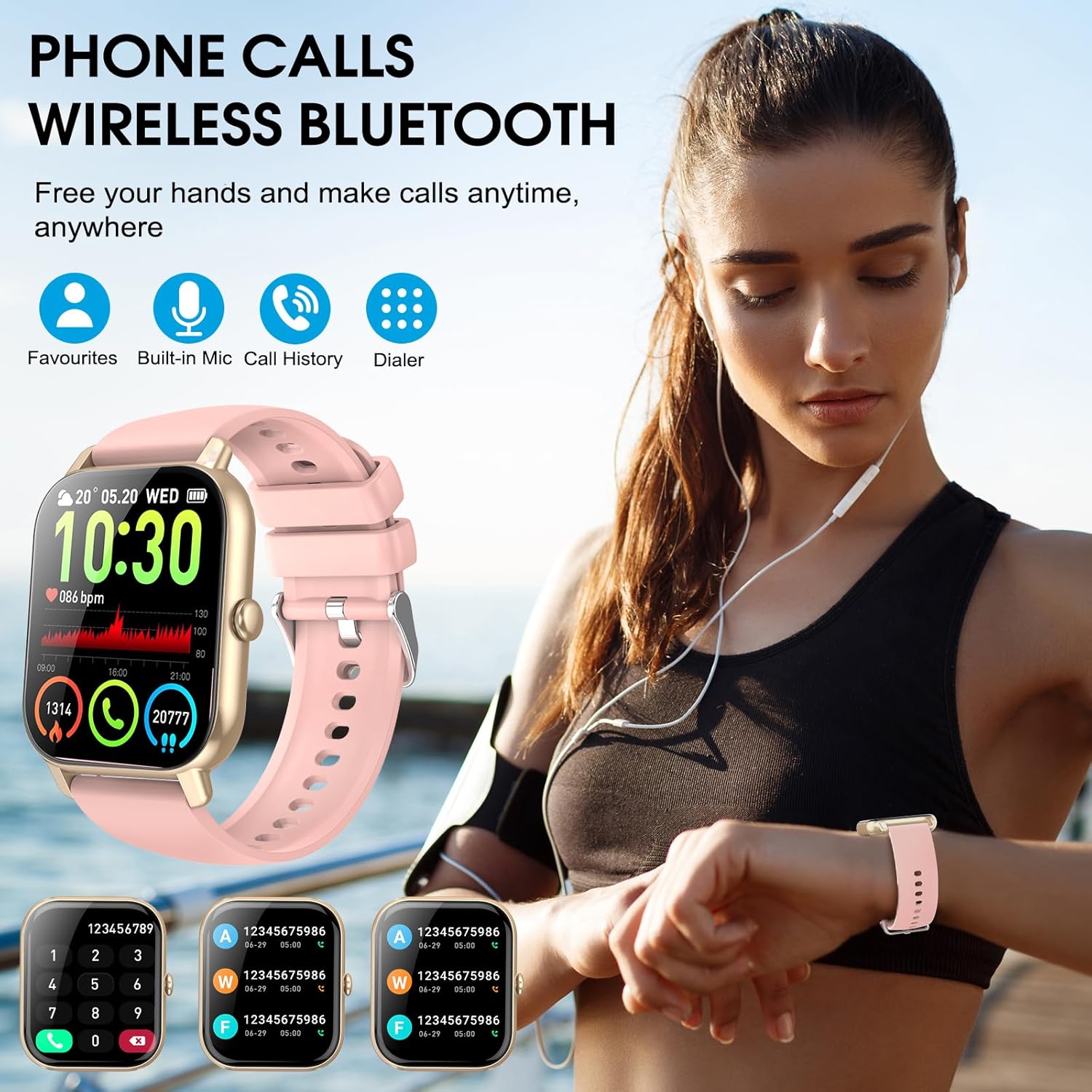
Image 4.2: Bluetooth Call Feature. This image shows a user wearing the DUSONLAP Smartwatch P66E, highlighting its Bluetooth call capability. The watch face displays call-related information, and the surrounding graphics indicate features like favorites, built-in mic, call history, and dialer, emphasizing hands-free communication.
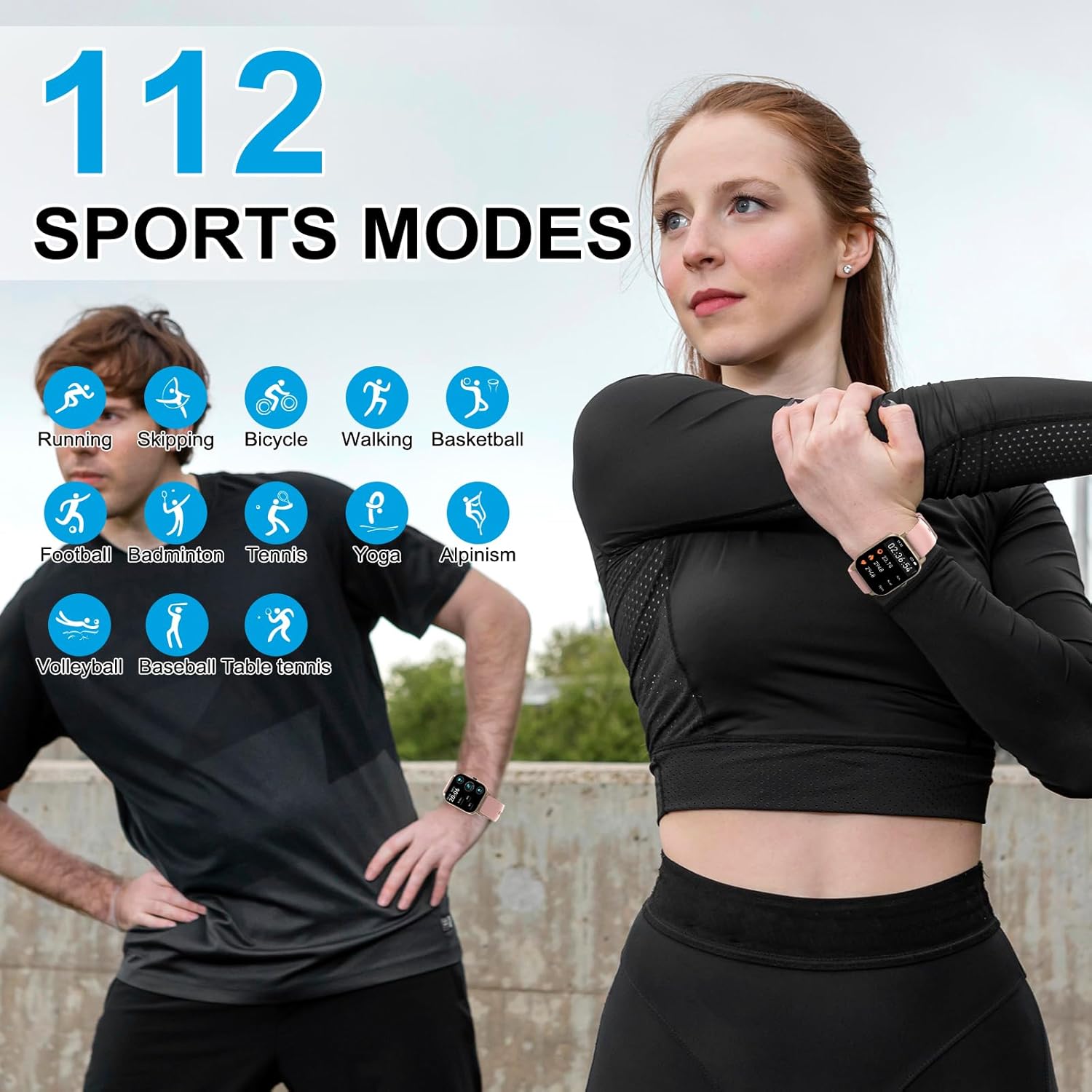
Image 4.3: 112 Sports Modes. This image depicts two people engaged in physical activity, illustrating the versatility of the DUSONLAP Smartwatch P66E with its extensive range of over 112 sports modes. Icons for various activities like running, skipping, cycling, walking, basketball, football, badminton, tennis, yoga, alpinism, volleyball, baseball, and table tennis are displayed.

Abbildung 4.4: IP68 Wasserdichtigkeit. This image shows the DUSONLAP Smartwatch P66E being exposed to water splashes, visually confirming its IP68 life water-resistant capability. The text indicates that the watch can withstand daily water exposure like hand washing and rain.

Image 4.5: Heart Rate and Sleep Monitoring. This image is divided into two sections. The top section shows individuals running, with the watch and a smartphone app displaying real-time heart rate data. The bottom section shows a person sleeping, with the watch and app illustrating automatic sleep monitoring, including sleep stages, to help assess sleep quality.

Image 4.6: Battery Life, Display, and Special Features. This image highlights the DUSONLAP Smartwatch P66E's battery performance (2 hours charging for 7 days use, 30 days standby) and its 1.85-inch HD display with customizable watch faces. It also showcases additional features such as weather forecast, music player control, alarm clock, camera remote control, sedentary reminder, and time display options.
5. Einrichtung
5.1 Aufladen der Smartwatch
Before initial use, fully charge your smartwatch. Connect the magnetic charging cable to the charging contacts on the back of the watch and plug the USB end into a power adapter (not included) or a computer's USB port. A full charge typically takes approximately 2 hours.
5.2 App-Installation
To unlock the full potential of your DUSONLAP Smartwatch P66E, download and install the companion application on your smartphone. Suchen nach "Fitness Tracker" (or the specific app name if known, otherwise use generic) in your smartphone's app store (Google Play Store for Android or Apple App Store for iOS).
- Scan the QR code provided in the quick start guide (if available) or search for "Fitness Tracker" in your app store.
- Laden Sie die Anwendung herunter und installieren Sie sie.
- Öffnen Sie die App und folgen Sie den Anweisungen auf dem Bildschirm, um ein Konto zu erstellen und Ihr Pro-Konto einzurichten.file.
5.3 Koppeln mit Ihrem Smartphone
Ensure your smartwatch is charged and your smartphone's Bluetooth is enabled.
- Open the "Fitness Tracker" app on your smartphone.
- Navigate to the device pairing section (usually found under "Device" or "Profile").
- The app will search for available devices. Select "DUSONLAP P66E" from the list.
- Bestätigen Sie die Kopplungsanfrage gegebenenfalls sowohl auf Ihrem Smartphone als auch auf der Smartwatch.
- Nach der Kopplung synchronisiert die Uhr die Daten mit der App.
Notiz: For Bluetooth call functionality, you may need to pair the watch a second time through your phone's native Bluetooth settings. Look for a device named "P66E_CALL" or similar and connect to it.
6. Bedienungsanleitung
6.1 Grundlegende Navigation
- Touch-Screen: Wischen Sie nach links/rechts, um zwischen den Hauptbildschirmen (z. B. Aktivitätsdaten, Herzfrequenz, Wetter) zu wechseln. Wischen Sie nach oben/unten, um auf die Schnelleinstellungen oder Benachrichtigungen zuzugreifen.
- Seitentaste: Press once to return to the main watch face or to wake the screen. Press and hold to power on/off or access system options.
6.2 Bluetooth-Anrufe und Benachrichtigungen
- Anrufe tätigen: Once paired for calls, access the dialer or contact list on your watch to initiate a call.
- Anrufe entgegennehmen: When an incoming call is received, the watch will ring and vibrate. You can answer or reject the call directly from the watch screen.
- Nachrichtenbenachrichtigungen: Ensure app notifications are enabled in your smartphone's settings and the "Fitness Tracker" app. The watch will display notifications from various apps like Facebook, InstagRAM und Twitter.
6.3 Sportmodi
The DUSONLAP P66E supports over 112 sports modes. To access:
- Swipe on the watch face to find the "Sports" or "Workout" icon.
- Tap to enter and browse the list of available activities.
- Select your desired sport to start tracking. The watch will record duration, calories, heart rate, and other relevant metrics.
- Swipe right or press the side button to pause or end a workout.
6.4 Gesundheitsüberwachung
- Herzfrequenzmesser: Die Uhr überwacht kontinuierlich Ihre Herzfrequenz. View real-time data on the watch or detailed historical data in the app. The watch can alert you to abnormal heart rate readings.
- Schlafmonitor: Wear the watch to bed for automatic sleep tracking. The app provides a comprehensive analysis of your sleep patterns, including deep sleep, light sleep, and awake times.
- Schrittzähler: Die Uhr zeichnet automatisch Ihre täglichen Schritte, die zurückgelegte Strecke und den Kalorienverbrauch auf.
6.5-Anpassung
- Gesichter ansehen: The "Fitness Tracker" app offers over 200 watch faces. You can also upload a custom photo from your phone to set as your watch face.
- Weitere Eigenschaften: Explore the app and watch settings for features like alarm clock, sedentary reminders, water intake reminders, weather forecasts, and music control.
7. Wartung
7.1 Reinigung
Reinigen Sie Ihre Smartwatch und das Armband regelmäßig, um Hautirritationen vorzubeugen und die Gerätefunktion zu erhalten. Verwenden Sie dazu ein weiches, fusselfreies Tuch. Falls nötig, wischen Sie die Oberfläche leicht ab.ampBefeuchten Sie das Tuch mit Wasser. Verwenden Sie keine scharfen Chemikalien oder Scheuermittel.
7.2 Wasserdichtigkeit (IP68)
The DUSONLAP P66E Smartwatch has an IP68 water resistance rating. This means it is resistant to dust and can withstand immersion in fresh water up to 1.5 meters for up to 30 minutes. It is suitable for daily use, such as washing hands, sweating, and exposure to rain.
- Nicht Die Uhr kann in heißem Wasser, Saunen oder Dampfbädern verwendet werden.
- Nicht Knöpfe unter Wasser drücken.
- Avoid prolonged exposure to salt water or chemicals. If exposed, rinse with fresh water and dry thoroughly.
- Die Wasserbeständigkeit ist kein dauerhafter Zustand und kann sich im Laufe der Zeit durch normale Abnutzung verringern.
8. Fehlerbehebung
| Ausgabe | Mögliche Lösung |
|---|---|
| Die Uhr lässt sich nicht einschalten | Stellen Sie sicher, dass die Uhr vollständig aufgeladen ist. Schließen Sie sie mindestens 10 Minuten lang an das magnetische Ladegerät an. |
| Kopplung mit Smartphone nicht möglich |
|
| Keine Benachrichtigungen erhalten |
|
| Ungenaue Gesundheitsdaten |
|
| Kurze Akkulaufzeit |
|
9. Spezifikationen
| Marke | DUSONLAP |
| Modellnummer | P66E |
| Bildschirmgröße | 1.85 Zoll |
| Konnektivitätstechnologie | Bluetooth 5.3 |
| Wasserbeständigkeit | IP68 |
| Akku-Typ | Lithium-Polymer |
| Ladezeit | Ca. 2 Stunden |
| Akkulaufzeit (typische Nutzung) | Bis zu 7 Tage |
| Standby-Zeit | Bis zu 30 Tage |
| Kompatible Geräte | Smartphones (Android, iOS) |
| Besondere Merkmale | Heart Rate Monitor, Sleep Monitor, Pedometer, Bluetooth Calls, 112 Sports Modes, Customizable Watch Faces |
10. Garantie und Support
DUSONLAP is committed to providing quality products. If you encounter any issues with your DUSONLAP Smartwatch P66E that cannot be resolved through this manual or standard return processes, please contact our customer support directly. We will work to resolve your problem promptly and ensure your rights and interests are protected.
For support, please refer to the contact information provided with your purchase or on the official DUSONLAP webWebsite.