
Einführung
This manual provides detailed instructions for setting up and operating your Majority Frameo Snap10 WiFi Digital Picture Frame. This 10.1-inch digital frame allows you to display photos and videos shared via the Frameo app, offering a convenient way to share memories with family and friends. It features a touchscreen, 32GB of internal storage, auto-rotate functionality, and a motion sensor for efficient use.

The Majority Frameo Snap10 Digital Picture Frame, showcasing a family photo on its 10.1-inch screen.
Lieferumfang
Bitte überprüfen Sie den Packungsinhalt, um sicherzustellen, dass alle Artikel vorhanden sind:
- Majority Frameo Snap10 Digital Picture Frame
- Ständer
- Netzteil
- Fernbedienung
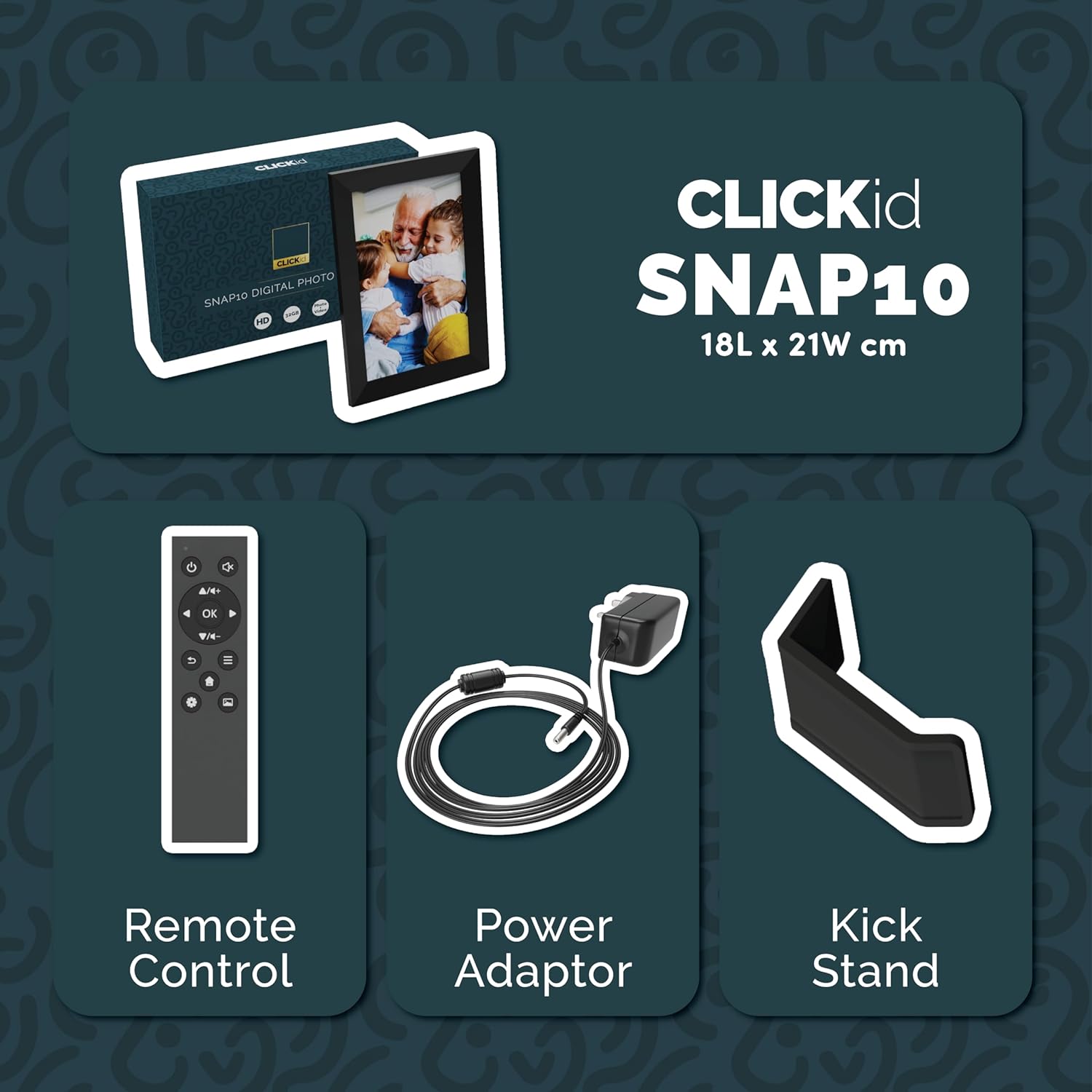
Included accessories: Remote Control, Power Adapter, and Kickstand.
Installationshandbuch
- Rahmen auspacken: Carefully remove the digital picture frame and all accessories from the packaging.
- Attach the Kickstand: Insert the kickstand into the designated slot on the back of the frame. The frame supports both horizontal and vertical orientations.
- Strom anschließen: Plug the power adapter into the DC port on the back of the frame, then connect it to a power outlet. The frame will automatically power on.
- Ersteinrichtung: Follow the on-screen instructions to select your language, time zone, and connect to a Wi-Fi network.
- Installieren Sie die Frameo-App: Download the "Frameo" app from your smartphone's app store (available for iOS and Android).
- Frame mit App verbinden: Open the Frameo app and create an account. On your digital frame, tap "Add Friend" to get a unique code. Enter this code into the Frameo app on your smartphone to link the devices.

The back of the frame features essential ports for power, USB, and Micro SD card.
Bedienungsanleitung
Fotos und Videos senden
Once your frame is connected to the Frameo app, you can easily send photos and short videos from your smartphone.
- Öffne die Frameo-App auf deinem Smartphone.
- Wählen Sie die Fotos oder Videos aus, die Sie senden möchten.
- Choose the connected digital frame as the recipient.
- Add a caption if desired, then tap "Send."

The Frameo app simplifies photo and video uploads from your smartphone.
Verwenden des Touchscreens
The 10.1-inch LCD touchscreen allows for intuitive navigation. Swipe left or right to browse photos, tap to view options, and pinch to zoom.
Fernbedienungsfunktionen
The included remote control provides convenient access to various frame functions from a distance.
- Navigation: Use arrow keys to move through menus and photos.
- OK/Eingabe: Auswahl bestätigen.
- Zurück: Kehren Sie zum vorherigen Bildschirm zurück.
- Abspielen/Pause: Control slideshows or video playback.
- Volumen: Adjust audio for videos.

The included remote control for convenient operation.
Bewegungssensor
The integrated motion sensor can be enabled to automatically turn the display on when movement is detected and off when the area is vacant, conserving energy. This setting can be adjusted in the frame's system settings.
Auto-Rotate-Funktion
The frame automatically adjusts the photo orientation (portrait or landscape) based on how the frame is positioned. Ensure the auto-rotate feature is enabled in the settings for optimal display.

The auto-rotate feature adjusts display based on frame orientation.
Funktionen überview
- 10.1-Zoll-LCD-Touchscreen: Provides a clear display and interactive control.
- 32 GB interner Speicher: Ample Speicherplatz für Tausende von Fotos und Videos.
- Wi-Fi-Konnektivität: Enables seamless photo and video sharing from anywhere via the Frameo app.
- Frameo-App-Integration: Manage your frame, send media, and invite friends/family to share their moments.
- Bewegungssensor: Automatically turns the screen on/off to save energy.
- Automatisch drehen: Adjusts photo orientation automatically.
- Weather and Calendar Display: Integrated widgets provide current weather and calendar information.
- Speicherkartensteckplatz: Supports Micro SD cards for additional storage or direct media import.
Wartung
- Reinigung: Reinigen Sie Bildschirm und Rahmen mit einem weichen, trockenen Tuch. Vermeiden Sie scheuernde Reinigungsmittel oder Sprays, die direkt auf den Bildschirm gelangen.
- Software-Updates: The frame may receive automatic software updates via Wi-Fi. Ensure your frame is connected to the internet to receive the latest features and improvements.
- Speicherverwaltung: In regelmäßigen Abständenview your stored photos and videos. You can delete unwanted media directly from the frame or through the Frameo app to free up space.
Fehlerbehebung
- Rahmen lässt sich nicht einschalten:
- Stellen Sie sicher, dass das Netzteil sowohl mit dem Rahmen als auch mit einer funktionierenden Steckdose fest verbunden ist.
- Es kann keine WLAN-Verbindung hergestellt werden:
- Verify your Wi-Fi password. Ensure the frame is within range of your Wi-Fi router. Try restarting your router and the frame.
- Fotos, die nicht im Rahmen angezeigt werden:
- Confirm that the frame is connected to Wi-Fi and linked to your Frameo app account. Check the Frameo app to ensure photos were successfully sent. Allow some time for photos to download, especially large batches.
- Frame is stuck on a white screen with a loading bar:
- This may indicate a software issue. Try performing a soft reset by disconnecting the power for 30 seconds and then reconnecting. If the issue persists, a factory reset might be necessary (refer to the frame's settings for this option, noting it will erase all data).
- Fernbedienung funktioniert nicht:
- Check if the batteries in the remote control need replacement. Ensure there are no obstructions between the remote and the frame's IR receiver.
Technische Daten
| Marke | Mehrheitlich |
| Modellnummer | Snap10 |
| Farbe | Schwarz |
| Bildschirmgröße | 10.1 Zoll |
| Auflösung | 800*1280 |
| Seitenverhältnis | 2.10:1 |
| Speicherkapazität | 32 GB |
| Konnektivitätstechnologie | W-lan |
| Kontrollmethode | App, Touchscreen, Remote |
| Stromquelle | Kabelgebundene Elektrik |
| Artikelgewicht | 491 Gramm |
| Artikelabmessungen (L x B) | 7.08 Zoll L x 8.26 Zoll B |
Garantie und Support
The Majority Frameo Snap10 Digital Picture Frame comes with a 2 Jahre erweiterte Garantie. Registration is required to activate the extended warranty. Please refer to the product packaging or the manufacturer's website for details on how to register your product.
For technical support, troubleshooting assistance, or warranty claims, please contact Majority customer service through their official webWebsite oder die in Ihrer Produktdokumentation angegebenen Kontaktinformationen.
Produktvideo
This video demonstrates the ease of sharing photos and videos with the Frameo app and viewing them on the digital picture frame, highlighting its use for connecting family members.