
Einführung
This manual provides detailed instructions for the setup, operation, and maintenance of your MageGee SKY 87 75% Mechanical Gaming Keyboard. Designed for both gaming and office use, this compact 87-key keyboard features tactile brown switches, ice blue LED backlighting, and broad compatibility.
1. Einrichtung
1.1 Packungsinhalt
- MageGee SKY 87 Mechanical Gaming Keyboard
- USB-A Cable (Wired Connection)
- Keycap Puller (for maintenance)
1.2 Anschließen der Tastatur
The MageGee SKY 87 keyboard uses a wired USB-A connection. To connect:
- Plug the USB-A cable into the USB port on the keyboard.
- Connect the other end of the USB-A cable to an available USB port on your computer (PC, Mac, or laptop).
- Die Tastatur ist Plug-and-Play-fähig und sollte von Ihrem Betriebssystem automatisch erkannt werden.
2. Bedienungsanleitung
2.1 Backlighting Control
The keyboard features ice blue LED backlighting with multiple modes and adjustable settings.
- Change Backlighting Mode: Drücken Fn + PrtSc to cycle through 20 preset ice blue backlighting modes.
- Helligkeit anpassen: Drücken Fn + ↑ (Pfeil nach oben) um die Helligkeit zu erhöhen, und Fn + ↓ (Pfeil nach unten) um die Helligkeit zu verringern.
- Adjust Flowing Speed: Drücken Fn + - to decrease flowing speed, and Fn+= to increase flowing speed (for dynamic modes).

Image: The MageGee SKY 87 keyboard showcasing its vibrant ice blue LED backlighting and customizable light effects.
2.2 Tactile Brown Switches
The keyboard is equipped with tactile brown switches, offering a balanced typing experience with a noticeable bump without a loud click, suitable for both typing and gaming.

Bild: Eine Nahaufnahme view of the keyboard demonstrating the tactile brown switches and a keycap puller for easy removal.
2.3 Ergonomic Design and Side Lighting
The keyboard features stepped keycaps and a two-stage adjustable stand for ergonomic comfort. Additionally, an ice blue LED light strip on the bottom provides enhanced visual effects.

Image: The keyboard highlighting its distinctive ice blue side lighting, which enhances the aesthetic in low-light conditions.

Image: An illustration detailing the two-step adjustable keyboard feet, allowing users to set the keyboard at high or low angles for personalized comfort.
2.4 Compact TKL Layout (87 Keys)
The 75% Tenkeyless (TKL) design provides a compact footprint with 87 keys, including independent arrow keys, saving desk space while retaining essential functionality.
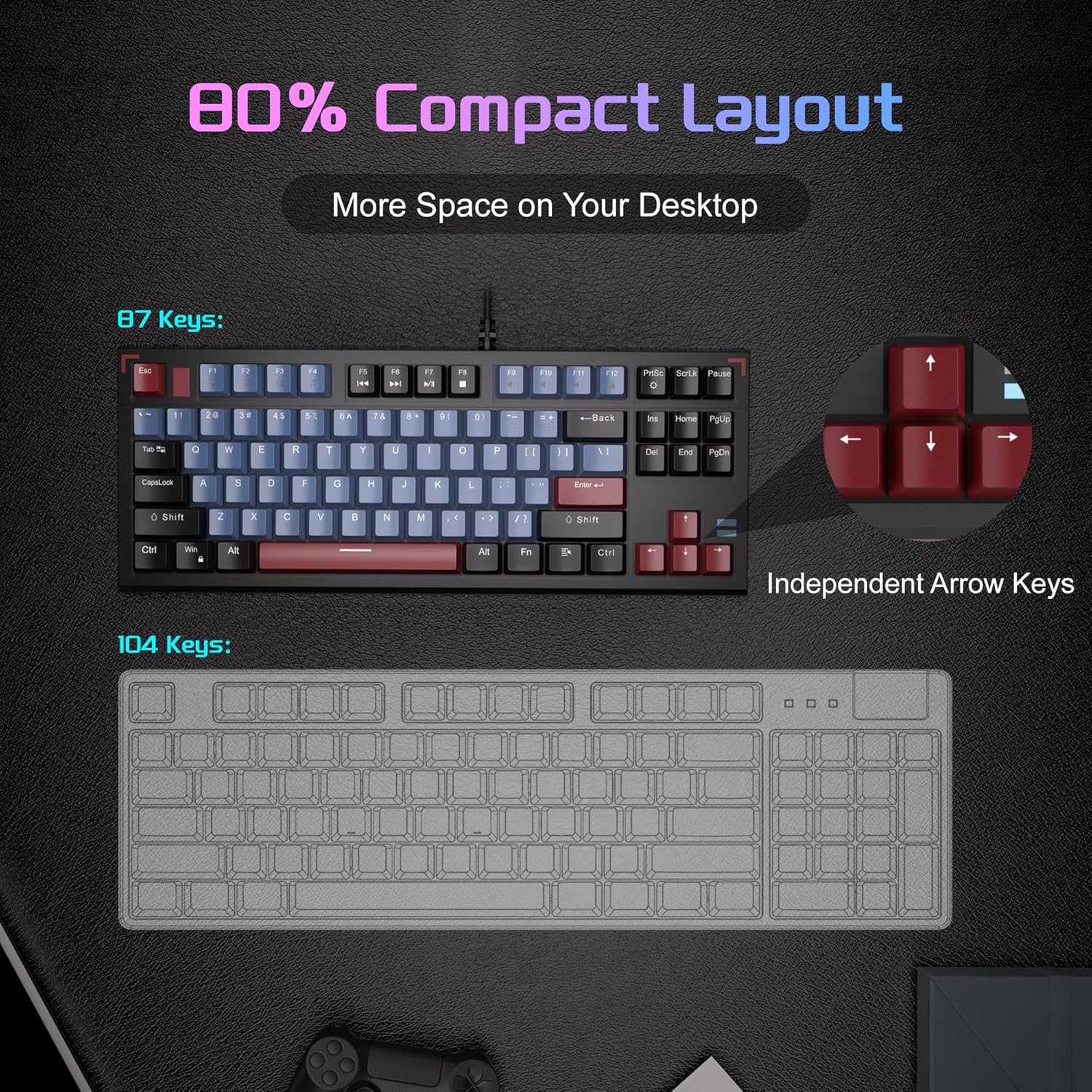
Image: A visual comparison illustrating the compact 87-key layout of the MageGee SKY 87 keyboard next to a standard 104-key keyboard, emphasizing space-saving benefits.
2.5 N-Key-Rollover (Anti-Ghosting)
The keyboard supports 100% N-key rollover, meaning all keys can be pressed simultaneously without conflict, ensuring every keystroke is registered accurately during intense gaming or fast typing.

Image: A diagram showing how multiple key presses are registered simultaneously without ghosting, highlighting the N-key rollover feature.
2.6 Multimedia-Kurzbefehle
Access various multimedia functions using the Fn key in combination with the F-keys.
| Funktionstastenkombination | Beschreibung |
|---|---|
| Fn + F1 | Mein Computer |
| Fn + F2 | Suche |
| Fn + F3 | Kalkulator |
| Fn + F4 | Media Player |
| Fn + F5 | Vorheriger Titel |
| Fn + F6 | Nächster Titel |
| Fn + F7 | Abspielen/Pause |
| Fn + F8 | Stoppen |
| Fn + F9 | Stumm |
| Fn + F10 | Lautstärke verringern |
| Fn + F11 | Lautstärke erhöhen |
| Fn + F12 | Sperrbildschirm |

Image: The keyboard layout highlighting the F-keys and their corresponding multimedia functions when used with the Fn key.
3. Wartung
3.1 Reinigung der Tastatur
To ensure optimal performance and longevity, regular cleaning is recommended.
- Trennen Sie die Tastatur vor der Reinigung vom Computer.
- Verwenden Sie eine weiche Bürste oder Druckluft, um Staub und Schmutz zwischen den Tastenkappen zu entfernen.
- Hartnäckigen Schmutz entfernen Sie mit einem leicht feuchten Tuch, indem Sie die Tastenkappen und die Tastaturoberfläche vorsichtig abwischen.amp, fusselfreies Tuch. Übermäßige Feuchtigkeit vermeiden.
- Verwenden Sie keine aggressiven Chemikalien oder Scheuermittel.
3.2 Entfernen und Ersetzen der Tastenkappen
The included keycap puller can be used to remove and replace keycaps for cleaning or customization.
- Setzen Sie den Tastenkappenabzieher vorsichtig an die Tastenkappe an, die Sie entfernen möchten.
- Pull straight up with even pressure until the keycap detaches from the switch.
- Zum Austauschen die Tastenkappe am Schalterschaft ausrichten und fest nach unten drücken, bis sie einrastet.

Image: The keyboard with some keycaps removed, illustrating the possibility of customization or deep cleaning.
4. Fehlerbehebung
If you encounter issues with your MageGee SKY 87 keyboard, refer to the following common solutions:
- Tastatur reagiert nicht:
- Stellen Sie sicher, dass das USB-Kabel sowohl mit der Tastatur als auch mit dem Computer fest verbunden ist.
- Versuchen Sie, die Tastatur an einen anderen USB-Anschluss Ihres Computers anzuschließen.
- Starten Sie Ihren Computer neu.
- Hintergrundbeleuchtung funktioniert nicht oder ist fehlerhaft:
- Check if the brightness is set too low (Fn + ↑/↓).
- Cycle through lighting modes using Fn + PrtSc.
- Bestimmte Tasten funktionieren nicht:
- Remove the keycap and check for any obstructions or debris around the switch.
- Wenn das Problem weiterhin besteht, wenden Sie sich an den Kundendienst.
5. Spezifikationen
| Besonderheit | Detail |
|---|---|
| Marke | MageGee |
| Modellnummer | SKY 87 |
| Konnektivitätstechnologie | USB-A (kabelgebunden) |
| Tastaturbeschreibung | Mechanisch |
| Schaltertyp | Tactile Brown Switches |
| Anzahl der Schlüssel | 87 |
| Tastaturlayout | QWERTY |
| Hintergrundbeleuchtung | Ice Blue LED (Single Color) |
| Besondere Merkmale | Backlit, Ergonomic, Multimedia Keys, Portable |
| Kompatible Geräte | Laptop, PC (Windows, Mac) |
| Produktabmessungen (L x B x H) | 14.37" x 5.51" x 1.69" |
| Material | Acrylnitril-Butadien-Styrol (ABS) |
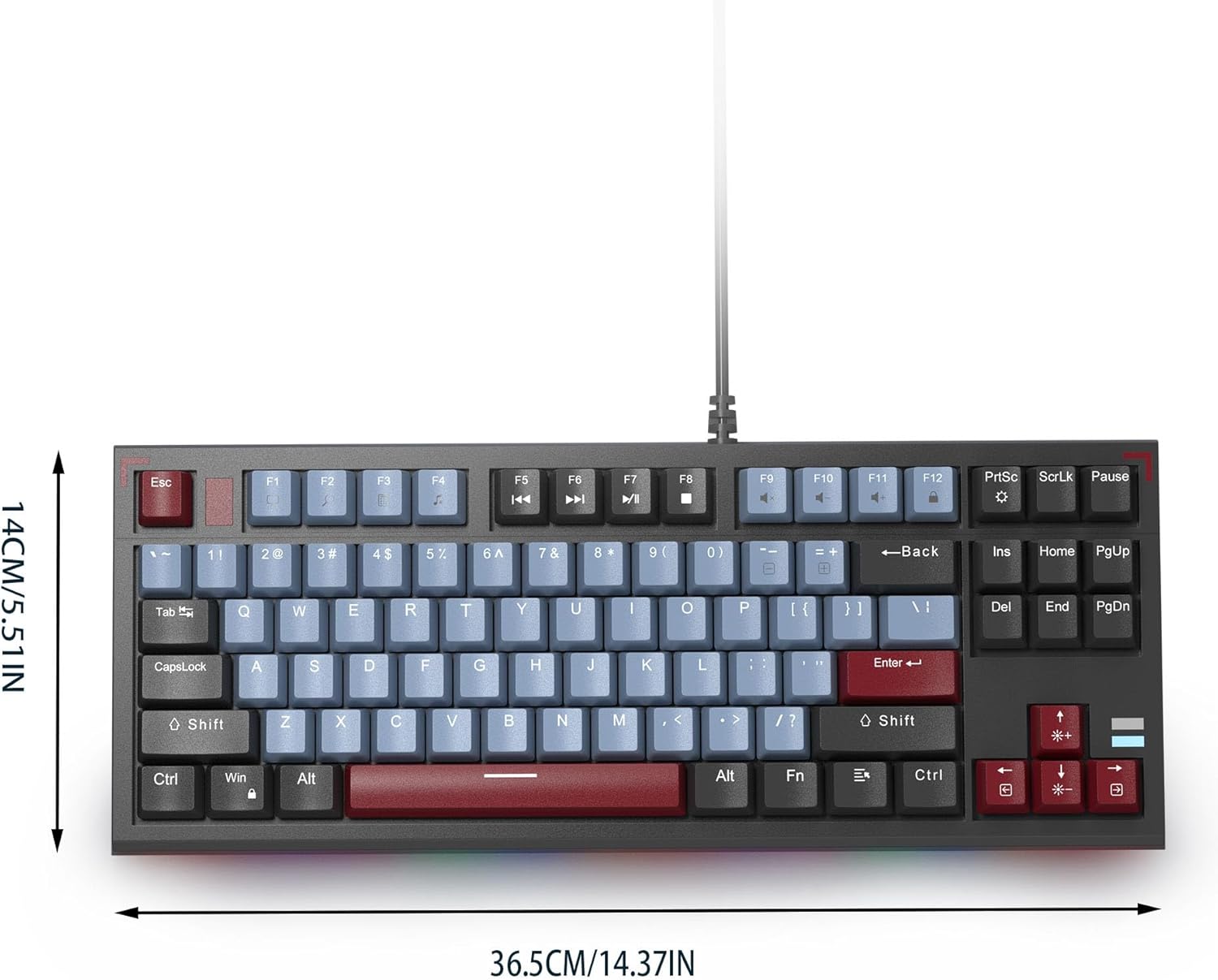
Image: The MageGee SKY 87 keyboard with its physical dimensions clearly indicated.
6. Garantie und Support
Informationen zur Garantie und zum technischen Support finden Sie auf der offiziellen MageGee-Website. webBesuchen Sie die Website oder kontaktieren Sie direkt den Kundenservice. Bewahren Sie Ihren Kaufbeleg für Garantieansprüche auf.