
Einführung
This manual provides detailed instructions for the installation, operation, and maintenance of your DELLA 6000 BTU Window Air Conditioner. Please read this manual thoroughly before using the appliance and retain it for future reference.
Sicherheitshinweise
Beachten Sie beim Gebrauch elektrischer Geräte stets die grundlegenden Sicherheitsvorkehrungen, um das Risiko von Bränden, Stromschlägen und Verletzungen zu verringern.
- Stellen Sie sicher, dass das Gerät ordnungsgemäß geerdet ist.
- Betreiben Sie das Gerät nicht mit beschädigtem Kabel oder Stecker.
- Finger oder Fremdkörper dürfen nicht in den Lufteinlass/Luftauslass eingeführt werden.
- Ziehen Sie den Stecker aus der Steckdose, bevor Sie das Gerät reinigen oder Wartungsarbeiten durchführen.
- Halten Sie brennbare Materialien vom Gerät fern.
Produkt überview
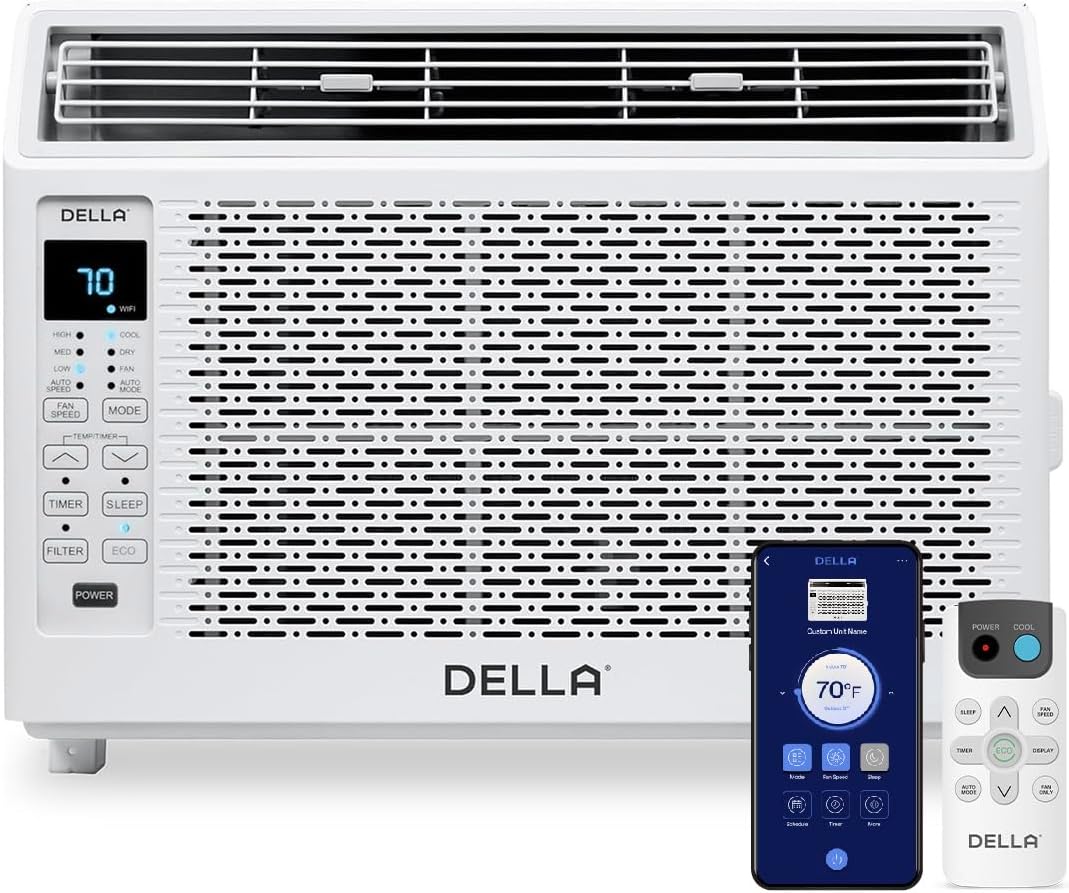
Figure 1: DELLA 6000 BTU Window Air Conditioner Unit, Remote Control, and Smartphone App Interface.
Bedienfeld
The unit features an intuitive control panel with various buttons and indicator lights for easy operation.
- Netzschalter: Schaltet das Gerät ein oder aus.
- Modus-Taste: Cycles through Cool, Dry (Dehumidifier), Fan, Auto Mode, and ECO Mode.
- Lüftergeschwindigkeitstaste: Adjusts fan speed (High, Med, Low, Auto Speed).
- Temp/Timer Buttons: Adjusts temperature settings or sets timer.
- Sleep-Taste: Aktiviert den Schlafmodus für einen leisen und energieeffizienten Betrieb über Nacht.
- Filter-Schaltfläche: Zeigt an, wann der Filter gereinigt werden muss.
- WiFi-Anzeige: Zeigt den WLAN-Verbindungsstatus an.
Fernbedienung

Figure 2: Remote Control for the DELLA Air Conditioner.
The remote control allows for convenient operation of all unit functions from a distance. Ensure batteries are correctly installed.
Installation
The DELLA 6000 BTU Window Air Conditioner features a T-design for simplified installation.
Installationsschritte

Figure 3: T-design installation allows for flexible window opening.

Figure 4: Simplified 3-step installation process.
- Step 1: Secure into window frame. Place the unit into the window opening, ensuring it is securely seated.
- Step 2: Mount with four screws. Fasten the unit to the window frame using the provided screws for stability.
- Step 3: Extend side panels into wall. Extend the accordion side panels to fill the gap between the unit and the window frame, providing insulation and reducing air leaks.
Komponenten des Installationskits

Abbildung 5: Im Installationskit enthaltene Komponenten.
The installation kit includes filler panels, insulation strips, lock frame & sash lock, screws, window sash seal, and a top mounting rail to ensure a secure and efficient installation.
Technische Daten

Figure 6: Unit dimensions and recommended window opening.
The unit dimensions are approximately 15.94"D x 16.02"W x 12.05"H. It is designed for window widths between 23"-34" and requires at least 14.5" vertical clearance.
Bedienungsanleitung
Modes and Fan Speeds

Figure 7: Available operating modes and fan speeds.
The unit offers 5 operating modes (Cool, Auto, Dehumidify, Fan Only, ECO Mode) and 4 fan speeds (Auto, Low, Mid, High) to suit various comfort needs. Use the 'Mode' and 'Fan Speed' buttons on the control panel or remote to select your desired settings.
Temperaturregelung
Use the up and down arrow buttons on the control panel or remote to set your desired temperature. The digital display will show the current setting.
Smart Features (Wi-Fi Control)

Figure 8: Control your unit wirelessly with the Della+ APP.

Figure 9: Della+ app supports Google Assistant and Alexa for voice control.
Download the free Della+ app to control your unit from anywhere. The app allows for remote control, scheduling, and integration with smart home systems like Google Assistant and Alexa.
Geo Location Function

Figure 10: Smart Geo Location feature for automatic operation.
The Geo Location feature allows the unit to automatically turn on or off based on your proximity to your home. This feature can be configured via the Della+ app.
Video 1: Demonstration of the Geo Location Function setup and customization within the Della+ app.
Schlafmodus

Figure 11: Intelligent sleep mode adjusts temperature for optimal comfort.
Intelligent sleep mode automatically adjusts the temperature overnight to maintain comfort and save energy. Activate it using the 'Sleep' button.
Timerfunktion
The 24-hour auto on/off timer allows you to program the unit to turn on or off at specific times, enhancing convenience and energy efficiency.
Wartung
Wiederverwendbare Filterreinigung

Figure 12: The unit features a washable and reusable filter.
The unit is equipped with a washable and reusable filter. A clean filter helps maintain optimal cooling performance and air quality. When the 'Filter' indicator light illuminates, it's time to clean the filter.
- Schalten Sie die Klimaanlage aus und ziehen Sie den Netzstecker.
- Die Frontblende abnehmen und den Luftfilter herausziehen.
- Waschen Sie den Filter mit warmem Seifenwasser. Spülen Sie ihn gründlich aus.
- Lassen Sie den Filter vollständig trocknen, bevor Sie ihn wieder einsetzen.
- Ersetzen Sie die Frontplatte.
Allgemeine Pflege
- Reinigen Sie das Äußere des Geräts mit einem weichen, damp Tuch.
- Verwenden Sie keine aggressiven Chemikalien oder Scheuermittel.
- Stellen Sie sicher, dass der Abflussbereich frei von Hindernissen ist.
Fehlerbehebung
Sollten Sie Probleme mit Ihrer Klimaanlage haben, beachten Sie bitte die folgenden häufigen Probleme und Lösungen:
| Problem | Mögliche Ursache | Lösung |
|---|---|---|
| Das Gerät lässt sich nicht einschalten | Kein Strom; Schutzschalter ausgelöst; Gerät vom Stromnetz getrennt. | Stromversorgung prüfen; Sicherungsautomat zurücksetzen; sicherstellen, dass der Stecker vollständig eingesteckt ist. |
| Gerät kühlt nicht effektiv | Verschmutzter Luftfilter; blockierte Lufteinlässe/Luftauslässe; zu großer Raum; Fenster/Türen offen. | Clean air filter; clear obstructions; ensure unit is sized correctly for room; close windows/doors. |
| Lauter Betrieb | Lose Teile; Gerät nicht waagerecht; Lüfter blockiert. | Check for loose components; ensure unit is level; remove any fan obstructions. |
| Draußen tropft Wasser | Normalbetrieb (Kondensation). | This is normal during cooling. Ensure proper drainage. |
Technische Daten
| Besonderheit | Detail |
|---|---|
| Markenname | Della |
| Modellinformationen | 048-TL-W6KWD |
| Technische Daten | 15.94 x 16.02 x 12.05 Zoll |
| Artikelmodellnummer | 048-TL-W6KWD |
| Effizienz | Energieeffizient |
| Kapazität | 0.5 Tonnen |
| Lärm | 51 dB |
| Installationstyp | Fenster |
| Teilenummer | 048-TL-W6KW_2 |
| Formfaktor | Fensterklimaanlage |
| Besondere Merkmale | Fernbedienung |
| Bandtage | 115 Volt (Wechselstrom) |
| Wastage | 517.5 Watt |
| Batterien enthalten? | NEIN |
| Wohnfläche | 250 Quadratfuß |
| Kühlleistung | 6000 britische Wärmeeinheiten |
| BEE-Sternebewertung | Ja |
| Saisonales Energieeffizienzverhältnis (SEER) | 11 |
| Stromquelle | Kabelgebundene Elektrik |
Garantie und Support
Your DELLA 6000 BTU Window Air Conditioner comes with a 1 Jahr Garantie. For any inquiries or technical assistance, Della provides 24/7 Kundensupport.
Bitte besuchen Sie die Della Store auf Amazon Für weitere Informationen oder zur Kontaktaufnahme mit dem Support.