
CYCPLUS L7
CYCPLUS L7 Bike Radar Tail Light User Manual
Model: L7 | Brand: CYCPLUS
1. Einleitung
The CYCPLUS L7 Bike Radar Tail Light is an advanced safety device designed to enhance cycling visibility and awareness. It features precise radar sensing to detect approaching vehicles, intelligent brake sensing, and multiple light modes. With a long-lasting rechargeable battery and IPX6 waterproof rating, it is suitable for various cycling conditions and scenarios, ensuring a safer riding experience.
2. Packungsinhalt
Bitte stellen Sie vor der Installation sicher, dass alle Komponenten vorhanden sind:
- CYCPLUS L7 Radar Tail Light Main Unit
- Schlüsselband
- Kurzes Gummiband
- Langes Gummiband
- Ladekabel (USB-C)
- Seat Tube Mount
- Sattelhalterung
- Sattelstützen-Gummipolster 1
- Sattelstützen-Gummipolster 2
- Screwdriver (Hex Key)

Figure 2.1: All components included in the CYCPLUS L7 Radar Tail Light package.
3. Installation
The CYCPLUS L7 offers two primary installation methods: mounting to the seat rail or to the seat post. Ensure the tail light is mounted vertically to the ground for optimal radar performance.
3.1. Mounting to the Seat Rail
- Match the slope of the seat rail mounting bracket base plate to the slope of your bicycle's seat rail.
- Raise one end of the seat rail mounting bracket panel and attach it to the seat rail.
- Interchange the left and right screws, then insert them into the slots. For carbon fiber seat rails, tighten to approximately 4N-m. Over-tightening may damage the seat rail.
- Stellen Sie den Winkel der Halterung ein und ziehen Sie die Schrauben fest an.
- Install the tail light main unit onto the mount. It is recommended to install the lanyard to prevent the tail light from being lost.
- Ensure the base of the tail light remains perpendicular to the ground (90-degree angle) to avoid the radar detecting objects too close or inaccurately.

Figure 3.1: Attaching the seat rail mount.

Figure 3.2: Installing the tail light main unit onto the seat rail mount.
3.2. Mounting to the Seat Post
- Select the appropriate rubber pad (Pad 1 or Pad 2) based on the shape of your bicycle's seat post (e.g., round, aero).
- Attach the selected rubber pad to the seat post mount.
- Secure the rubber strap tightly on one side of the mount and then wrap it around the seat post, securing the other end.
- Install the tail light main unit onto the mount. It is recommended to install the lanyard to prevent the tail light from being lost.
- Ensure the base of the tail light remains perpendicular to the ground (90-degree angle) to avoid the radar detecting objects too close or inaccurately.
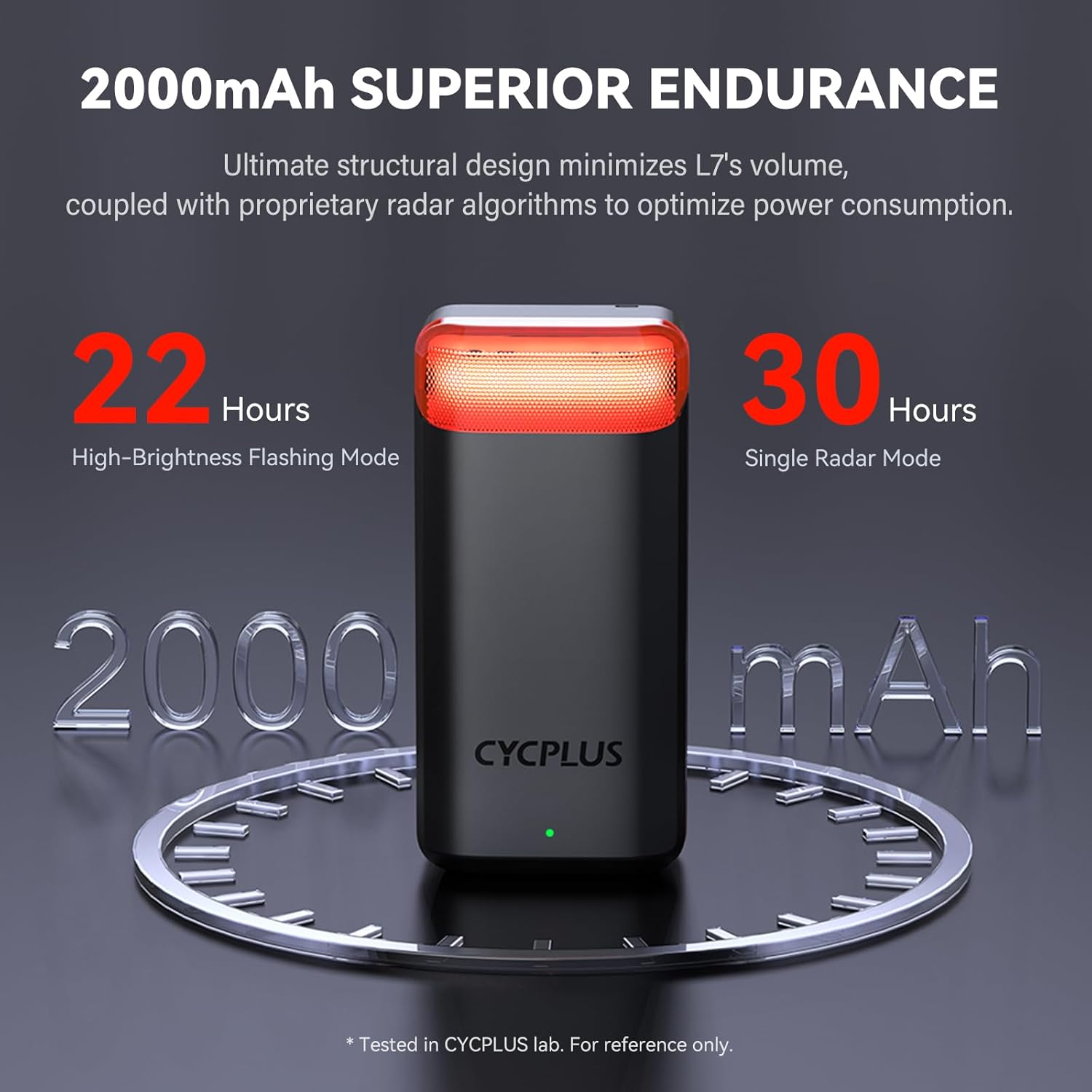
Figure 3.3: Choosing the correct seat post pad.

Figure 3.4: Securing the seat post mount.

Figure 3.5: Installing the tail light main unit onto the seat post mount.
4. Bedienungsanleitung
4.1. Ein-/Ausschalten und Modusumschaltung
To power on the device, long press the button located on the tail light. To switch between light modes, short press the button. The available modes include:
- Constant Mode 1
- Constant Mode 2
- Blinkmodus
- Atemmodus
- Radar Only Mode (via App)
- Off Mode (short press after cycling through all modes)
The device will automatically enter sleep mode after 3 minutes of inactivity and wake up upon movement, conserving battery life.

Figure 4.1: CYCPLUS L7 Tail Light overview with indicator and button.

Figure 4.2: Various light modes available on the L7.
4.2. Connecting to Bike Computer / App
The CYCPLUS L7 supports ANT+ and Bluetooth 5.0 protocols, allowing connection to compatible smartphones, bike computers, and smartwatches that support tail light functions.
- Bike Computer Connection: Refer to your bike computer's manual for sensor pairing. Typically, you will navigate to the 'Sensors' or 'Add Device' menu and select 'Radar' or 'Lights'. The L7 should appear as a discoverable device.
- CYCPLUS APP Connection: Download the official CYCPLUS APP. Open the app and search for the L7 device. Once connected, you can adjust light brightness, switch modes, and enable/disable the radar function. The indicator light on the L7 will show its status: constant on when radar is enabled, slow flash when radar is disabled.

Abbildung 4.3: Weitgehende Kompatibilität mit verschiedenen Geräten.
Video 4.1: This video demonstrates the unboxing, installation process for both seat rail and seat post mounts, how to switch between light modes, and how to connect the L7 to a bike computer and the CYCPLUS mobile application for advanced settings. It provides a comprehensive visual guide for initial setup and operation.
5. Hauptmerkmale
- Excellent Distance & Velocity Monitoring: Detects rear vehicles up to 175 yards (160 meters) at a relative velocity of 6-160 km/h in real-time. Automatically flashes to warn rapidly approaching vehicles.
- Superior Visibility & 40° Detection Angle: Maximizes visibility up to a 270° angle. The 40° detection angle helps detect vehicles at corners or blind spots, providing early alerts.
- Verlängerte Akkulaufzeit: Equipped with a 2000mAh rechargeable battery, offering up to 36 hours of usage on a full charge. A built-in power indicator lights up red when battery capacity is below 30%.
- 4 Preset Light Modes & IPX6 Waterproof: Features Constant Mode (x2), Blinking Mode, and Breathing Mode. Settings can be modified via the CYCPLUS APP. IPX6 waterproof rating ensures durability in various weather conditions.
- Intelligent Brake Detection & Auto On/Off: Triggers a brake light to notify trailing vehicles during deceleration or sudden braking, reducing collision risk. Enters sleep mode after 3 minutes of inactivity and automatically wakes up upon movement.
- Support ANT+ & Bluetooth 5.0 Protocols: Compatible with smartphones, bike computers, and smartwatches that support tail light functions.

Figure 5.1: The CYCPLUS L7 Radar Tail Light.
Figure 5.2: Visibility and detection range of the L7.
Figure 5.3: Automatic sleep and wake-up feature.
6. Wartung
- Reinigung: Wischen Sie das Gerät mit einem weichen, damp Tuch. Keine Scheuer- oder Lösungsmittel verwenden.
- Laden: Charge the device using the provided USB-C cable. Ensure the charging port is dry before connecting the cable. Avoid overcharging.
- Lagerung: Store the device in a cool, dry place when not in use. If storing for an extended period, charge the battery to approximately 50% every few months to maintain battery health.
- Wasserbeständigkeit: The device has an IPX6 waterproof rating, meaning it is protected against high-pressure water jets from any direction. However, it is not designed for submersion. Ensure the charging port cover is securely closed during use in wet conditions.
7. Fehlerbehebung
| Problem | Mögliche Ursache | Lösung |
|---|---|---|
| Gerät lässt sich nicht einschalten. | Niedriger Batteriestand; Gerätefehlfunktion. | Laden Sie das Gerät vollständig auf. Sollte es weiterhin nicht reagieren, wenden Sie sich bitte an den Support. |
| Radar not detecting vehicles or inaccurate readings. | Incorrect mounting angle; obstruction; environmental factors (heavy rain, fog). | Ensure the tail light is mounted vertically (90 degrees to the ground). Check for obstructions. Radar performance may be affected by extreme weather. |
| Cannot connect to bike computer or app. | Bluetooth/ANT+ off; device not in pairing mode; interference. | Ensure Bluetooth/ANT+ is enabled on your device. Restart the tail light and try pairing again. Move closer to the tail light. Check for firmware updates for your bike computer/app. |
| Light modes not switching. | Button malfunction; software glitch. | Try long pressing to power off and then on again. If the issue persists, contact support. |
| Die Akkulaufzeit ist kürzer als erwartet. | Frequent use of high-brightness modes; aging battery. | Adjust brightness settings via the app. Ensure full charge cycles. Battery capacity naturally degrades over time. |
8. Spezifikationen
| Besonderheit | Detail |
|---|---|
| Produktname | Radar-Rücklicht L7 |
| Produktgröße | 76.5 x 37 x 25 mm |
| Produktgewicht | 67 Gramm |
| Erkennungsentfernung | Bis zu 160 Meter (175 Yards) |
| Erfassungswinkel | Horizontal ±20°, Vertikal ±5° |
| Detectable Relative Velocity | 3-160 km/h |
| Wireless-Protokoll | ANT+ / BLE 5.0 |
| Wasserdichtigkeit | IPX6 |
| Batterie | 2000mAh 3.7V 7.4Wh Lithium Battery |
| Ladeanschluss | Typ C 5 V 1 A |
| Betriebstemperatur | 0-50°C |
| Lagertemperatur | -10-75°C |
| Akkulaufzeit (Max.) | Bis zu 36 Stunden |

Figure 8.1: Detailed specifications of the L7 Radar Tail Light.
9. Garantie und Support
The CYCPLUS L7 Radar Tail Light comes with a 1 Jahr eingeschränkte Garantie Diese Garantie gilt ab Kaufdatum und deckt Herstellungsfehler und Materialmängel bei normalem Gebrauch ab.
For technical support, warranty claims, or any inquiries regarding your product, please contact CYCPLUS customer service through the official website or the contact information provided in your product packaging. Please have your purchase receipt and product model number (L7) ready when contacting support.
Ask a question about this manual
Ask about setup, troubleshooting, compatibility, parts, safety, or missing instructions. Manuals+ will review the question and use this page’s manual context to help answer it.