
CYCPLUS M2B
CYCPLUS M2B GPS-Fahrradcomputer – Benutzerhandbuch
Modell: M2B
Marke: CYCPLUS
1. Einleitung
Thank you for choosing the CYCPLUS M2B GPS Bicycle Computer. This device is designed to provide cyclists with comprehensive and accurate data for an enhanced riding experience. Featuring a large, clear display, robust GPS capabilities, and extensive sensor compatibility, the M2B is an essential tool for both casual riders and serious athletes.
This manual provides detailed instructions on how to set up, operate, and maintain your CYCPLUS M2B bicycle computer to ensure optimal performance and longevity.
2. Produktüberschreitungview
The CYCPLUS M2B is a high-performance wireless GPS bicycle computer offering a wide range of features to track and analyze your rides.
Hauptmerkmale:
- Large 2.5" Anti-Glare LED Screen: Provides clear, easy-to-read data even in bright sunlight.
- Wasserdichtigkeitsklasse IPX67: Ensures reliable performance in various weather conditions, including rain.
- Verlängerte Akkulaufzeit: Built-in 1100 mAh lithium battery offers up to 70 hours of continuous operation on a single charge.
- Unterstützung mehrerer GNSS-Systeme: Utilizes GPS, GLONASS, GALILEO, and BEIDOU for fast and accurate positioning.
- Umfassende Datendarstellung: Tracks up to 13 different data types, including speed (current, max, average), distance, time, cadence, heart rate, power, altitude, gradient, and more.
- ANT+ & Bluetooth 5.0 Konnektivität: Seamlessly connects with external sensors (cadence, heart rate, power meters) and syncs data to your smartphone via the XOSS APP for analysis and sharing on platforms like Strava.
- Automatic Backlight & Awakening: Enhances visibility and conserves battery.
Produktkomponenten:

The package includes the CYCPLUS M2B unit, a standard bike mount, and a USB-C charging cable. Additional sensors (cadence, heart rate, power) are sold separately.

3. Einrichtung
3.1 Gerät montieren
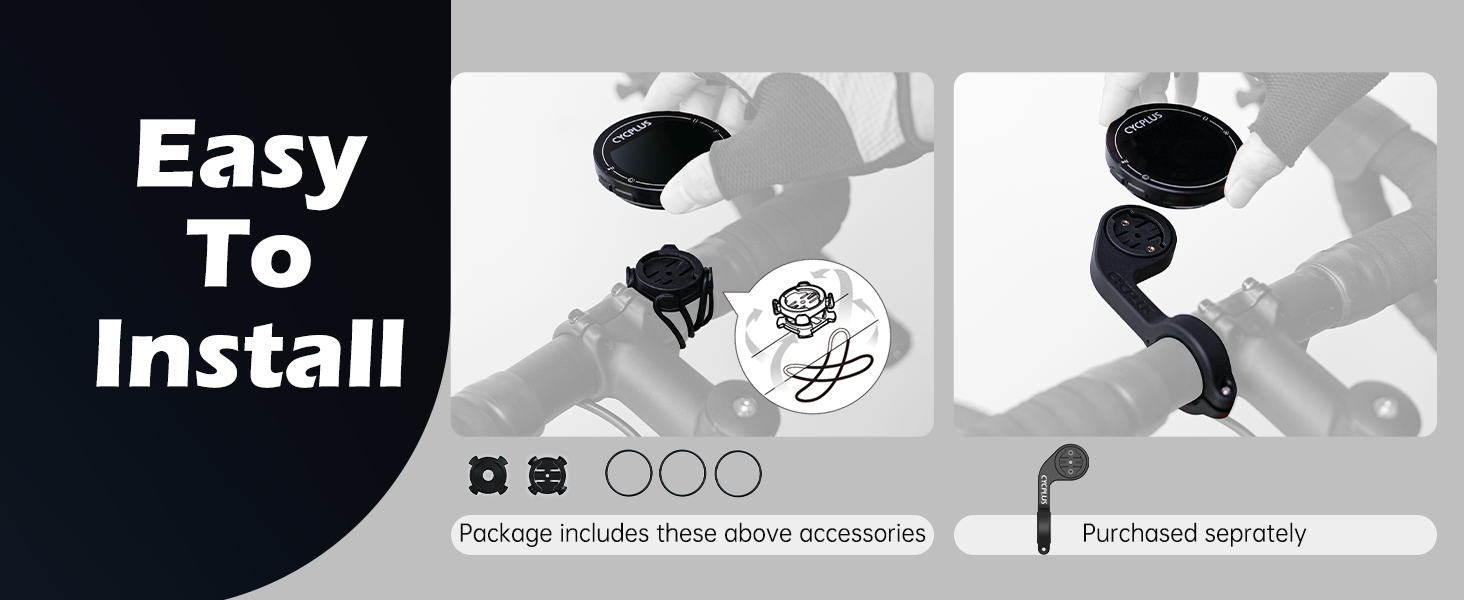
The CYCPLUS M2B comes with a standard bike mount for easy installation on your handlebars or stem.
- Attach the mount to your bicycle's handlebars or stem using the provided rubber bands or zip ties. Ensure it is securely fastened and does not obstruct your view oder Kontrollen.
- Align the back of the M2B unit with the mount's grooves.
- Twist the M2B unit clockwise until it clicks securely into place.

3.2 Erstes Einschalten und GPS-Empfang
Upon first power-on, the device will search for GPS signals. For accurate positioning, ensure you are in an open, unobstructed environment.

The M2B supports multiple global navigation satellite systems (GNSS) including GPS, GLONASS, GALILEO, and BEIDOU for enhanced accuracy.
4. Bedienungsanleitung
4.1 Displaying Ride Data
The M2B can display up to 13 different data types across 3 switchable screens. Press the left button to cycle through the data screens.

4.2 Sensor Compatibility and Connection
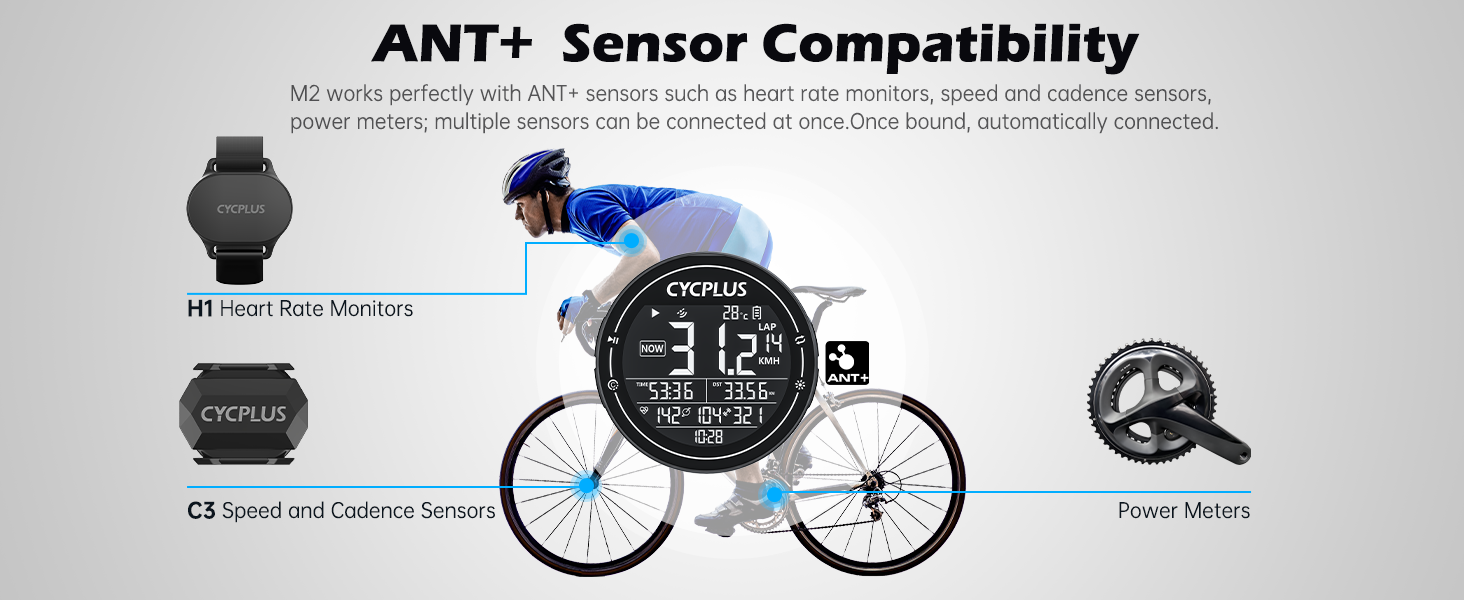
The M2B is compatible with ANT+ sensors such as heart rate monitors, speed sensors, cadence sensors, and power meters. Once paired, sensors will automatically connect when in range.

To connect ANT+ sensors:
- Press the L1 button (left button) to start searching for ANT+ sensors.
- Data from the sensor will appear on the screen once connected.
- To unpair sensors, switch to the C9 page (refer to device interface for navigation) and press the left button to unpair all paired sensors.
4.3 Time Zone and Speed Unit Settings
Zeitzoneneinstellung:
- Press the L1 button to start time zone setting.
- Press the R1 button (right button) to modify the time zone.
- Press the L1 button again to finish setting.
Speed Unit Setting:
- Press the L1 button to start speed unit setting.
- Press the R1 button to switch between KM/H and MPH.
- Press the L1 button again to finish setting.
4.4 Automatische Hintergrundbeleuchtung und Aufweckfunktion
The M2B features an automatic backlight that adjusts based on ambient light conditions. It also has an auto-awakening function: after 10 minutes of no displacement or vibration, the device hibernates and will wake up automatically when movement is detected.

4.5 Data Synchronization with XOSS APP and Strava/TrainingPeaks
The M2B can sync your ride data to your smartphone via Bluetooth 5.0 using the XOSS APP. From the XOSS APP, you can then upload your data to popular platforms like Strava and TrainingPeaks for detailed analysis and sharing.


Steps to Sync Data:
- Download the "XOSS" app from Google Play (Android) or App Store (iOS).
- Sign in with your email.
- Click your avatar and then select CYCPLUS M2.
- Scan and select your bike computer (M2).
- Once connected, you can synchronize your ride data.
5. Wartung
5.1 Reinigung und Pflege
The M2B is IPX67 waterproof, meaning it can withstand splashes and rain. However, it is not designed for submersion. To clean the device, wipe it with a soft, damp Tuch. Vermeiden Sie die Verwendung aggressiver Chemikalien oder scheuernder Materialien.
5.2 Laden der Batterie
The M2B is equipped with a built-in 1100 mAh rechargeable lithium battery, providing up to 70 hours of continuous use. Charge the device using the provided USB-C cable connected to a standard USB power adapter (not included) or a computer USB port.

Stellen Sie sicher, dass der Ladeanschluss trocken ist, bevor Sie das Kabel anschließen.
6. Fehlerbehebung
| Problem | Mögliche Ursache | Lösung |
|---|---|---|
| Gerät lässt sich nicht einschalten. | Schwache Batterie. | Charge the device for at least 2 hours using the USB-C cable. |
| GPS-Signal nicht empfangen oder ungenau. | Versperrt view of the sky (indoors, dense forest, tall buildings). | Begeben Sie sich in einen offenen Bereich mit freiem Blick view of the sky. Allow a few minutes for signal acquisition. |
| ANT+ sensor not connecting. | Sensor is off, battery low, or too far from the M2B. Sensor already paired with another device. | Ensure sensor is on and has sufficient battery. Bring sensor closer to the M2B. Try unpairing and re-pairing the sensor. |
| Data not syncing to XOSS APP/Strava. | Bluetooth is off on phone/M2B. XOSS APP not open or connected. Internet connection issues. | Ensure Bluetooth is enabled on both devices. Open the XOSS APP and ensure the M2B is connected. Check your internet connection. |
| Screen difficult to read. | Backlight off or insufficient. | Manually activate backlight if needed. Ensure auto-backlight is enabled. |
7. Spezifikationen
| Besonderheit | Detail |
|---|---|
| Modellnummer | M2B |
| Maße | 6.9 x 6.9 x 2.2 cm (2.75 x 2.75 x 0.84 Zoll) |
| Gewicht | 68 Gramm (0.15 Pfund) |
| Bildschirmgröße | 2.5 Zoll |
| Anzeigetyp | LCD |
| Akku-Typ | 1 x Lithium-Polymer (im Lieferumfang enthalten) |
| Batteriekapazität | 1100 mAh |
| Akkulaufzeit | Up to 70 hours (Note: Product features also state 30+ hours) |
| Wasserdichtigkeit | IPX67 |
| Konnektivität | ANT+, Bluetooth 5.0 |
| GNSS-Unterstützung | GPS, GLONASS, GALILEO, BEIDOU |
| Material | Plastik |
| Im Lieferumfang enthalten | M2B Unit, Mounting Kit, USB-C Cable |
8. Garantie und Support
CYCPLUS provides professional technical support for its products. Your CYCPLUS M2B GPS Bicycle Computer comes with a ein Jahr Garantie ab Kaufdatum.
For any technical assistance, questions, or concerns, please contact CYCPLUS customer support. Our team is available 24/7 to provide quick and efficient assistance.
Please refer to the official CYCPLUS webDie genauen Kontaktdaten finden Sie auf der Website oder in Ihren Kaufunterlagen.
Ask a question about this manual
Ask about setup, troubleshooting, compatibility, parts, safety, or missing instructions. Manuals+ will review the question and use this page’s manual context to help answer it.