
1. Einleitung
The Keenetic Buddy 5 is a Wi-Fi 5 AC1200 Mesh Range Extender designed to expand and strengthen your existing wireless network coverage. It helps eliminate Wi-Fi dead zones and provides seamless, high-speed internet access throughout your home or office. This device supports dual-band Wi-Fi (2.4 GHz and 5 GHz) and features an Ethernet port for stable wired connections. Its compact design allows for flexible placement, and management is convenient via the Keenetic mobile application.
2. Produktüberschreitungview
2.1 Hauptmerkmale
- Dual-Band AC1200 Wi-Fi: Delivers speeds up to 300 Mbps on 2.4 GHz and 867 Mbps on 5 GHz for smooth streaming and online activities.
- Seamless Roaming (802.11k/r/v): Ensures uninterrupted connectivity as you move around your home within a Keenetic Mesh Wi-Fi system.
- 100 Mbps Ethernet Port: Provides a stable wired connection for devices like gaming consoles or smart TVs.
- Advanced Wi-Fi Technologies: Includes MU-MIMO, Airtime Fairness, and Beamforming for efficient and reliable network performance with multiple devices.
- Universelle Kompatibilität: Works with any standard Wi-Fi router to extend coverage.
- Mobile App-Verwaltung: Control and monitor your network from anywhere using the Keenetic app for Android and iOS.
- Verbesserte Sicherheit: Supports WPA3, multiple SSIDs, and guest access for a secure network environment.
2.2 Packungsinhalt
- 1 x Keenetic Buddy 5 AC1200 Mesh Wi-Fi 5 Range Extender
2.3 Physikalische Beschreibung
The Keenetic Buddy 5 features a compact and minimalist design, typically in a white casing with two external antennas. An LED indicator on the front provides status information. The device is designed to plug directly into a wall outlet, minimizing clutter.

Bild: Vorderseite view of the Keenetic Buddy 5 Wi-Fi Range Extender, showing its compact design and antennas.
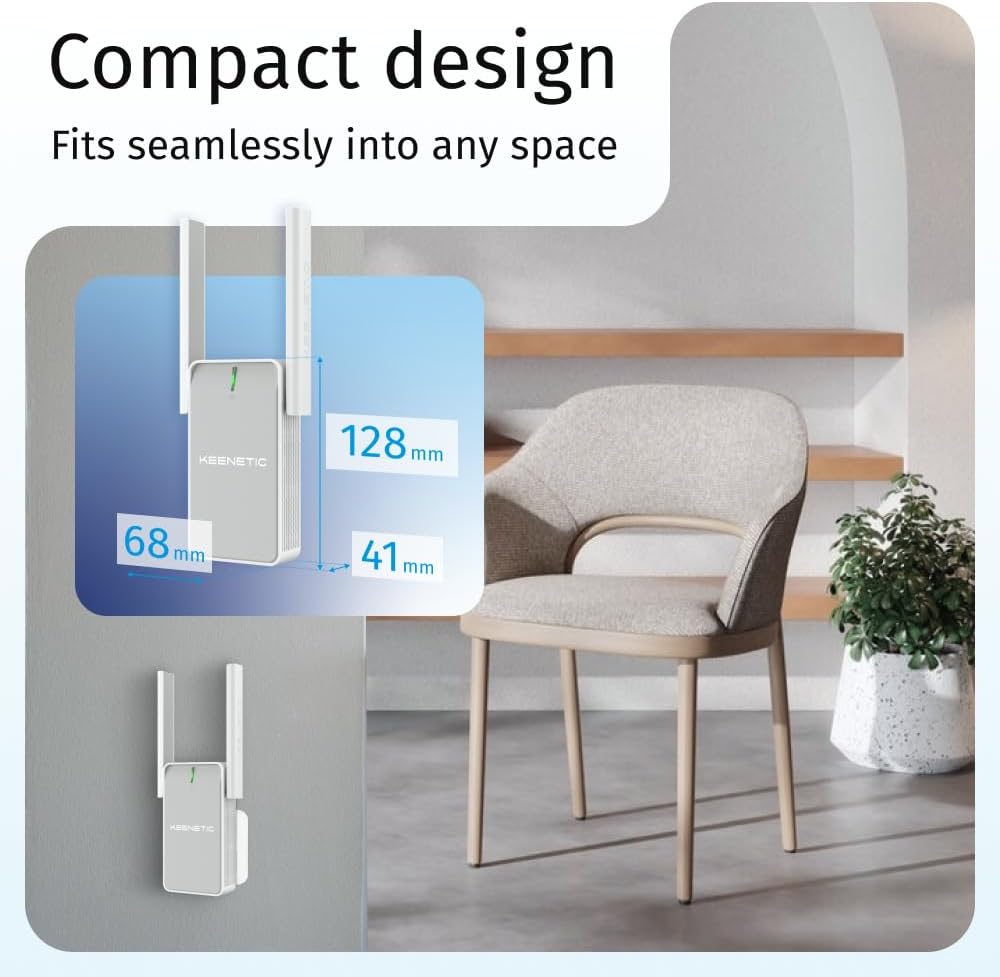
Image: Diagram illustrating the compact dimensions (68mm x 128mm x 41mm) of the Keenetic Buddy 5, highlighting its ability to fit discreetly into various spaces.
3. Installationsanleitung
Setting up your Keenetic Buddy 5 is a straightforward process, often referred to as plug-and-play. Follow these steps for initial configuration:
- Einschalten: Plug the Keenetic Buddy 5 into a power outlet in a location where you want to extend your Wi-Fi coverage. Ensure it is within range of your main router's Wi-Fi signal.
- Mit dem Gerät verbinden: Wait for the device to power on and its indicator light to stabilize. Connect your smartphone or computer to the Keenetic Buddy 5's default Wi-Fi network (SSID and password usually found on a label on the device).
- Configure via App or Web Schnittstelle: Open the Keenetic mobile app (available for Android and iOS) or a web browser and navigate to the device's default IP address (e.g.,
192.168.1.1ormy.keenetic.net). Follow the on-screen instructions to connect the Buddy 5 to your existing Wi-Fi network. - Platzierungsoptimierung: Once configured, you can relocate the Buddy 5 to an optimal position between your router and the area needing extended coverage. The indicator light will often change color or pattern to show signal strength.

Image: Visual guide showing the three simple steps for setting up the Keenetic Buddy 5 using the intuitive mobile app: plug into power, configure in the app, and control from anywhere.
4. Bedienungsanleitung
Once set up, the Keenetic Buddy 5 operates as a seamless extension of your Wi-Fi network. It automatically extends both 2.4 GHz and 5 GHz bands, providing optimal performance for various devices.
4.1 Wi-Fi Extension
- The Buddy 5 extends your Wi-Fi signal, allowing devices to connect to the strongest available signal as they move within your home, especially when part of a Keenetic Mesh system.
- The 2.4 GHz band offers wider coverage, suitable for general browsing and smart home devices.
- The 5 GHz band provides faster speeds, ideal for high-bandwidth activities like HD streaming and online gaming.

Image: Infographic detailing the Wi-Fi 5 AC1200 capabilities of the Keenetic Buddy 5, including Whole Home & Mesh Wi-Fi, Hardware offloading, Wired & Wireless Backhaul, Gigabit Port (note: product has 100Mbps Ethernet port), and 802.11k/r/v Seamless Roaming.

Image: Graphic displaying the performance capabilities of the Keenetic Buddy 5, showing 867 Mbps on the 5 GHz band and 300 Mbps on the 2.4 GHz band.
4.2 Nutzung des Ethernet-Anschlusses
The 100 Mbps Ethernet port on the Keenetic Buddy 5 allows you to connect a wired device, such as a desktop computer, smart TV, or gaming console, to your network. This provides a stable and reliable connection, bypassing potential wireless interference.
5. Keenetic App Management
The Keenetic mobile application (available for Android and iOS) provides comprehensive control over your network, even when you are away from home.
- Netzwerküberwachung: View connected devices, real-time traffic, and network status.
- Gastnetzwerke: Easily create separate Wi-Fi networks for guests, keeping your main network secure.
- Inhaltsfilterung: Implement parental controls and content restrictions.
- Konfigurationsänderungen: Adjust Wi-Fi settings, passwords, and other network parameters.

Image: Screenshot of the Keenetic mobile app interface on a smartphone, demonstrating remote control capabilities for network management, alongside a Keenetic Buddy 5 and a Keenetic router.
6. Mesh Wi-Fi Configuration
The Keenetic Buddy 5 is designed to integrate seamlessly into a Keenetic Mesh Wi-Fi system, providing a unified network experience. It is also compatible with routers from other brands.
6.1 Integrating into a Keenetic Mesh Network
If you have a Keenetic main router, the Buddy 5 can be added as a mesh node. This creates a single Wi-Fi network name (SSID) across your entire home, allowing your devices to automatically connect to the strongest signal without manual switching.

Image: Diagram illustrating how the Keenetic Buddy 5 extends reliable and seamless Wi-Fi coverage throughout a multi-story home, showing the main router and the extender working together.
6.2 Compatibility with Other Routers
The Keenetic Buddy 5 can function as a universal range extender with any standard Wi-Fi router. While mesh features like seamless roaming might be limited to Keenetic systems, it will still amplify your existing Wi-Fi signal.

Image: Illustration showing the Keenetic Buddy 5 centrally positioned, indicating its compatibility with various router models from different brands for uninterrupted networking.
7. Fehlerbehebung
If you encounter issues with your Keenetic Buddy 5, consider the following troubleshooting steps:
- Keine Verbindung/Schwaches Signal:
- Ensure the Buddy 5 is plugged into a working power outlet.
- Relocate the Buddy 5 closer to your main router to ensure it receives a strong signal to extend.
- Check the indicator light on the device; refer to the device's LED guide for status interpretation.
- Verify that your main router's Wi-Fi is operational.
- Einrichtungsprobleme:
- Ensure you are following the setup steps precisely, either through the Keenetic app or the web Schnittstelle.
- Temporarily disable any VPN or firewall on your setup device if it interferes with the configuration process.
- Reset the Buddy 5 to factory defaults (usually by pressing a reset button for a few seconds) and attempt setup again.
- Langsame Geschwindigkeiten:
- Ensure the Buddy 5 is placed optimally, not too far from the main router and not too far from the devices it serves.
- Prüfen Sie, ob Störquellen vorhanden sind (z. B. Mikrowellen, schnurlose Telefone, dicke Wände).
- Update the firmware of your Keenetic Buddy 5 via the Keenetic app or web Schnittstelle.
- Ethernet-Anschluss funktioniert nicht:
- Ensure the Ethernet cable is securely connected to both the Buddy 5 and the wired device.
- Testen Sie es mit einem anderen Ethernet-Kabel.
- Verify the wired device's network settings.
For more detailed troubleshooting or specific issues, consult the Keenetic support website or the Keenetic mobile application's help section.
8. Spezifikationen
| Besonderheit | Spezifikation |
|---|---|
| Modellname | Keenetic Buddy 5 |
| Modellnummer | KN-3311-01-EU |
| Abmessungen (L x B x H) | 7 x 13 x 18 cm |
| Gewicht | 160 g |
| Betriebssystem | KeeneticOS |
| Wireless-Standard | 802.11ac (WLAN 5) |
| Datenübertragungsrate | Bis zu 1200 Mbit/s (300 Mbit/s bei 2.4 GHz, 867 Mbit/s bei 5 GHz) |
| Frequenzbänder | Dualband (2.4 GHz, 5 GHz) |
| Ethernet-Anschluss | 1 x 100 Mbps Ethernet Port |
| Besondere Merkmale | Wi-Fi Mesh, MU-MIMO, Airtime Fairness, Beamforming, Seamless Roaming (802.11k/r/v) |
| Kompatible Geräte | Routers of different brands and models |
9. Sicherheitshinweise
Bitte lesen und befolgen Sie diese Sicherheitsrichtlinien, um einen ordnungsgemäßen Betrieb zu gewährleisten und Schäden am Gerät oder Verletzungen zu vermeiden:
- Das Gerät darf weder Wasser, Feuchtigkeit noch extremen Temperaturen ausgesetzt werden.
- Vermeiden Sie, das Gerät in der Nähe von Wärmequellen oder in direktem Sonnenlicht aufzustellen.
- Verwenden Sie nur das mit dem Gerät mitgelieferte Netzteil.
- Versuchen Sie nicht, das Gerät selbst zu öffnen oder zu reparieren. Überlassen Sie alle Wartungsarbeiten qualifiziertem Fachpersonal.
- Bewahren Sie das Gerät außerhalb der Reichweite von Kindern und Haustieren auf.
- Sorgen Sie für ausreichende Belüftung rund um das Gerät, um eine Überhitzung zu vermeiden.
10. Garantie und Support
For warranty information, please refer to the documentation included with your product or visit the official Keenetic website. If you require technical assistance or have questions about your Keenetic Buddy 5, please contact Keenetic customer support through their official channels. Support resources, including FAQs and firmware updates, are typically available on the Keenetic webWebsite.