
Produkt überview
The JTEMAN 360 Rotating Cell Phone Stand with Wireless Bluetooth Speaker with Light is a versatile device designed to enhance your mobile experience. It integrates a rotatable phone stand, a Bluetooth speaker, and an atmosphere light into a single unit. This manual provides detailed instructions for its setup, operation, and maintenance.
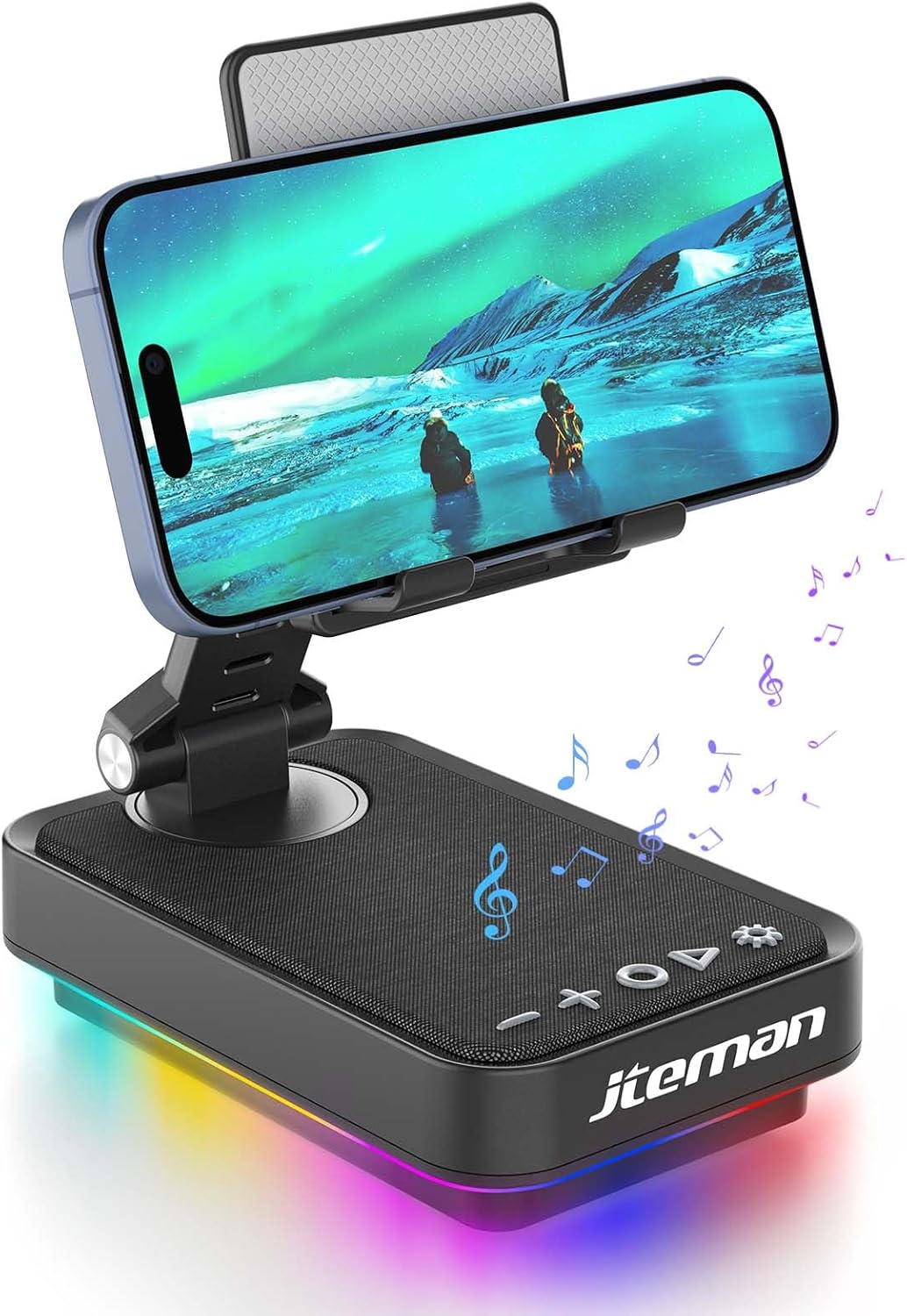
Figure 1: JTEMAN 360 Rotating Cell Phone Stand with Wireless Bluetooth Speaker with Light.
Enthaltene Komponenten:
- Bluetooth Speaker (with integrated phone stand and light)
- Typ-C-Kabel
- Bedienungsanleitung
Installationshandbuch
1. Auspacken und erste Inspektion:
Carefully remove all components from the packaging. Inspect the device and accessories for any signs of damage. Ensure all listed components are present.
Video 1: Unboxing and initial setup of the JTEMAN phone stand and Bluetooth speaker.
2. Preparing the Phone Stand:
Before first use, locate and remove the silicone protective patch from the device's base. This patch protects the surface during shipping.
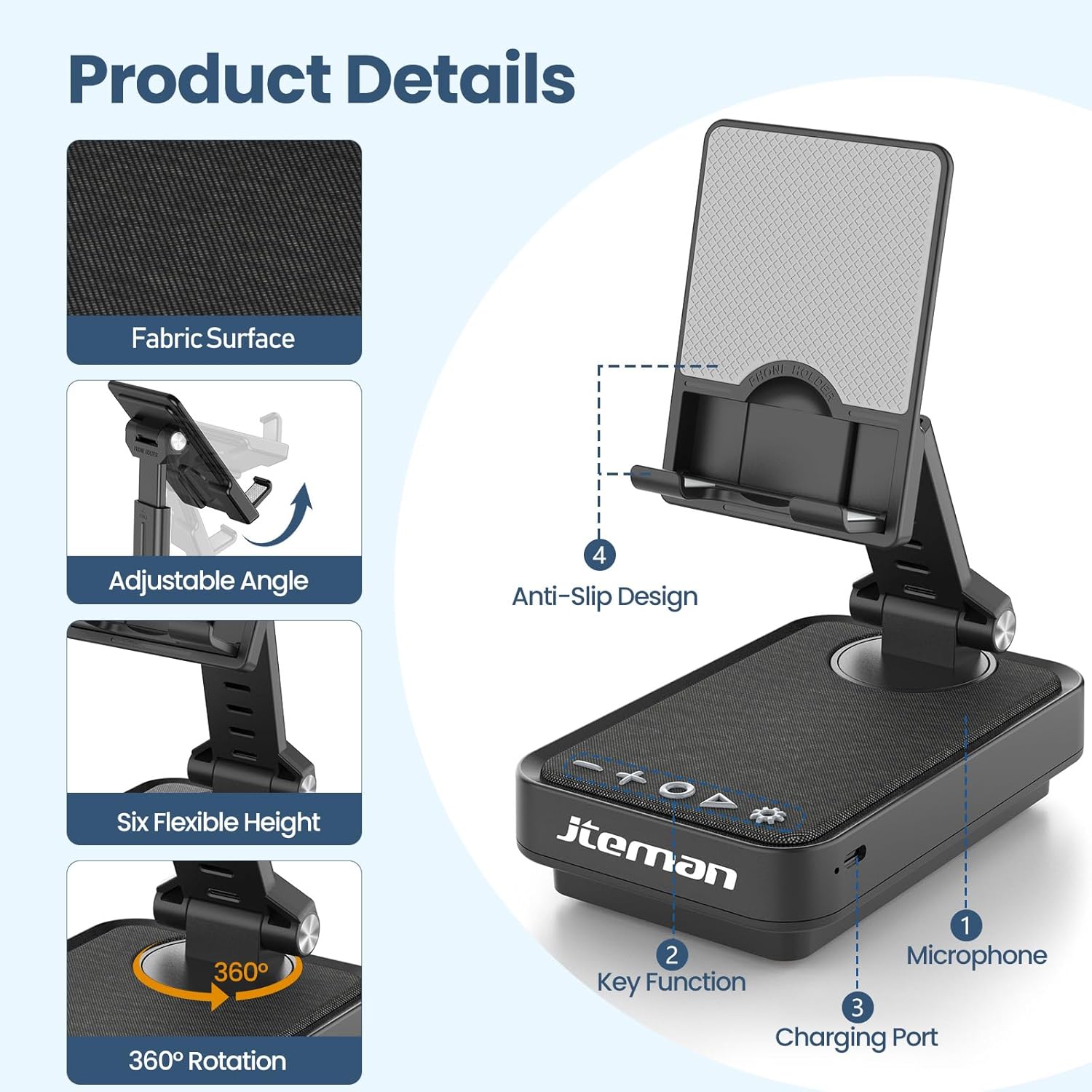
Figure 2: Product details and components. Note the anti-slip design and key functions.
3. Laden des Geräts:
Connect the provided Type-C cable to the charging port on the device and the other end to a compatible USB power adapter (not included). The power indicator light will show red during charging and turn green when fully charged.
- Rotlicht: Der Akku wird geladen.
- Grünes Licht: Der Akku ist vollständig geladen.

Abbildung 3: Batteriekapazität und geschätzte Nutzungsdauer.
4. Bluetooth-Kopplung:
- Long press the Power ON/OFF button (3) for 3 seconds to turn on the speaker. The speaker will enter pairing mode, indicated by a flashing blue light.
- Öffnen Sie auf Ihrem Smartphone oder Tablet die Bluetooth-Einstellungen.
- Select "L39-1" from the list of available devices.
- Once connected, the blue light will become solid.

Figure 4: Bluetooth connection with a laptop, demonstrating wireless audio playback.
Bedienungsanleitung
Systemsteuerung überview:

Abbildung 5: Ausführlich view des Bedienfelds und seiner Funktionen.
- VOL- (1): Drücken Sie , um die Lautstärke zu verringern.
- VOL+ (2): Drücken Sie, um die Lautstärke zu erhöhen.
- Answer/Hang up/Play/Pause/Next (4):
- Kurz drücken, um Musik abzuspielen/anzuhalten.
- Short press to answer/hang up calls.
- Lange drücken, um zum nächsten Titel zu springen.
- Power ON/OFF (3):
- Halten Sie die Taste 3 Sekunden lang gedrückt, um den Lautsprecher ein-/auszuschalten.
- Double press to switch between Bluetooth and AUX modes.
- Short press to adjust the brightness of the atmosphere lights (4 levels).
- Atmosphere Light (5):
- Long press for 3 seconds to turn on/off the light.
- Short press to switch lighting mode (11 modes available, 3 modes sync with music).
- Mikrofon (6): Für Freisprechanrufe.
- Ladeanschluss (7): Type-C input for charging.
- Power Indicator Light (8): Shows charging status and Bluetooth connection status.
Phone Stand Adjustment:
The phone stand features 360° rotation and adjustable height and angle to suit various viewing needs. The anti-slip silicone pads ensure device stability.

Figure 6: The phone stand supports a wide range of devices, including smartphones and tablets (4-13 inches).
The stand is foldable for easy portability.

Figure 7: The foldable design allows for easy storage and transport.
Wartung
Reinigung:
Wipe the device with a soft, dry cloth. Do not use abrasive cleaners, solvents, or harsh chemicals, as these may damage the surface or internal components. Avoid exposing the device to excessive moisture.
Lagerung:
When not in use for extended periods, store the device in a cool, dry place away from direct sunlight and extreme temperatures. Ensure the device is fully charged before storing to prolong battery life.
Batteriepflege:
To maximize battery lifespan, avoid fully discharging the battery frequently. Charge the device regularly, even if not in constant use. Do not expose the battery to high temperatures.
Fehlerbehebung
| Problem | Mögliche Ursache | Lösung |
|---|---|---|
| Gerät lässt sich nicht einschalten. | Schwache Batterie. | Laden Sie das Gerät mit dem mitgelieferten USB-C-Kabel auf. |
| Verbindung via Bluetooth nicht möglich. | Bluetooth not enabled on device; speaker not in pairing mode; too far from speaker. | Ensure Bluetooth is enabled on your phone/tablet. Long press Power ON/OFF button to enter pairing mode (flashing blue light). Move device closer to the speaker. |
| Aus dem Lautsprecher kommt kein Ton. | Volume too low; device not connected; AUX mode active. | Increase volume on both the speaker and your connected device. Verify Bluetooth connection. Double press Power ON/OFF button to switch to Bluetooth mode if in AUX mode. |
| Atmosphere lights not working. | Licht aus; Batterie schwach. | Long press the Atmosphere Light button (5) to turn on. Charge the device. |
Technische Daten
| Besonderheit | Detail |
|---|---|
| Modellname | L39-1 |
| Montagetyp | Tischhalterung |
| Lautsprechertyp | Surround-Sound |
| Besonderheit | LED-Licht |
| Empfohlene Verwendung | Für Smartphones oder Tablets |
| Kompatible Geräte | Smartphone, Tablet (4-13 inches) |
| Controllertyp | Knopf, Berührung |
| Surround-Sound-Kanal | 2.0 |
| Technische Daten | 5.3"T x 3.5"B x 2.3"H |
| Ist wasserdicht | FALSCH |
| Stromquelle | Batteriebetrieben |
| Akku-Typ | 1 Lithium-Ionen (im Lieferumfang enthalten) |
| Audiotreibertyp | Dynamischer Treiber |
| Kabellose Konnektivität | Bluetooth 5.3 |
| Maximale Lautsprecherausgangsleistung | 5 Watt |
| Frequenzgang | 1 KHz |
| Artikelgewicht | 15.5 Unzen |
Garantieinformationen
This JTEMAN product comes with a Ein Jahr Garantie Diese Garantie gilt ab Kaufdatum und deckt Herstellungsfehler und Funktionsstörungen bei normalem Gebrauch ab. Sie deckt keine Schäden ab, die durch Missbrauch, Unfälle, unbefugte Änderungen oder normale Abnutzung verursacht wurden.
Please retain your proof of purchase for warranty claims. For detailed warranty terms and conditions, refer to the official JTEMAN webWebsite oder wenden Sie sich an den Kundendienst.
Kundenservice
If you encounter any issues or have questions not covered in this manual, please contact JTEMAN customer support. Provide your product model number (L39-1) and a detailed description of the issue to assist our support team.
For the most up-to-date contact information, please visit the official JTEMAN webWebsite: JTEMAN Store on Amazon