
1. Einleitung
This manual provides detailed instructions for the installation, operation, and maintenance of your Dosilkc UltraHD 4K POE Outdoor Bullet Security Camera (Model DS-T461). This 8MP IP network camera offers advanced surveillance features including human/vehicle detection, color night vision, and two-way audio. Please read this manual thoroughly before use to ensure proper setup and optimal performance.

Figure 1: Application Scenarios for the Dosilkc 4K POE Bullet Camera. The camera is suitable for various indoor and outdoor environments such as garages, warehouses, corridors, and courtyards.
2. Sicherheitshinweise
Beachten Sie die folgenden Sicherheitsvorkehrungen, um Schäden am Produkt zu vermeiden und die Sicherheit des Benutzers zu gewährleisten:
- Ensure the power supply meets the camera's requirements (PoE).
- Versuchen Sie nicht, die Kamera zu zerlegen oder zu verändern. Dadurch erlischt die Garantie.
- Install the camera in a secure location to prevent unauthorized removal.
- Vermeiden Sie es, die Kamera über längere Zeiträume direkt auf starke Lichtquellen zu richten.
- Halten Sie die Kamera von starken elektromagnetischen Störungen fern.
- Verwenden Sie nur vom Hersteller zugelassenes Zubehör.
3. Packungsinhalt
Überprüfen Sie, ob alle Artikel im Paket vorhanden sind:
- Dosilkc UltraHD 4K POE Outdoor Bullet Security Camera
- Benutzerhandbuch (dieses Dokument)
- Install Screw Bag
- Waterproof Cable Cover
4. Produktüberschreitungview
Familiarize yourself with the components of your security camera.

Figure 2: Camera Components and Dimensions. This diagram labels the lens, microphone, IR LEDs, speaker, SD card slot, and mounting bracket, along with the camera's physical dimensions.
- Linse: Nimmt Videoaufnahmen auftage.
- Mikrofon: Eingebautes Mikrofon für Audioeingang.
- IR-LEDs: Infrared LEDs for night vision in low-light conditions.
- Lautsprecher: Built-in speaker for two-way audio output.
- SD-Kartensteckplatz: Supports Micro SD cards up to 512GB for local storage.
- Klammer: Adjustable mounting bracket for installation.
5. Einrichtung und Installation
5.1 Physische Installation
The camera is designed for both indoor and outdoor use with an IP66 weatherproof housing.

Figure 3: IP66 Weatherproof Housing. The camera's robust design ensures protection against various weather conditions including rain, snow, and high temperatures.
- Wählen Sie einen Standort: Select a suitable location for optimal surveillance coverage. Consider the camera's 105° diagonal field of view.
- Montieren Sie die Kamera: Use the provided screw bag to securely mount the camera to a wall or ceiling.
- Connect POE Cable: Connect a single Ethernet cable to the camera's POE port. This cable will provide both power and data transmission. Use the waterproof cable cover for outdoor installations to protect the connection.
5.2 Erstkonfiguration
The camera supports Plug & Play with Hikvision NVRs and is compatible with other NVRs (e.g., Da-hua) via Open Network Video Interface protocol. It also works with third-party software like Blue Iris and iSpy.

Figure 4: Multiple Storage and Compatibility Options. The camera offers flexible storage solutions including NVRs, FTP, NAS, and local SD card, and integrates with various surveillance software.
- NVR-Anschluss:
- For Hikvision NVRs: Connect the camera directly to the NVR's POE port. The camera should be automatically detected.
- For other NVRs: Refer to your NVR's manual for adding ONVIF-compatible IP cameras.
- Softwareintegration: If using third-party software (e.g., Blue Iris, iSpy), follow their respective guides for adding an ONVIF IP camera.
- Einrichtung der mobilen App: Download the recommended mobile application (refer to packaging or quick start guide for app name). Follow the in-app instructions to add your camera and access live view und Einstellungen.
Video 1: Camera Setup Guide
This video demonstrates the basic setup process for the Dosilkc 4K POE Bullet Security Camera, including physical installation and initial connection steps.
6. Bedienung
6.1 Live View und Aufzeichnung
Greifen Sie auf das Live zu view through your NVR or mobile application. Recordings can be stored on an NVR, FTP server, NAS server, or a local Micro SD card (up to 512GB, not included).

Figure 5: Superior 4K UHD Image Quality. This image illustrates the enhanced detail provided by the 8MP (3840x2160) resolution compared to lower resolutions.
6.2 Nachtsichtmodi
The camera features dual-light full-color technology with three smart night vision modes, selectable via the mobile app:
- IR Night Vision Mode: Standard black-and-white infrared vision.
- Vollfarb-Nachtsichtmodus: Utilizes white light to provide full-color images in darkness.
- Intelligente Nachtsicht: Automatically switches between IR and full-color based on detected motion or alarm settings.
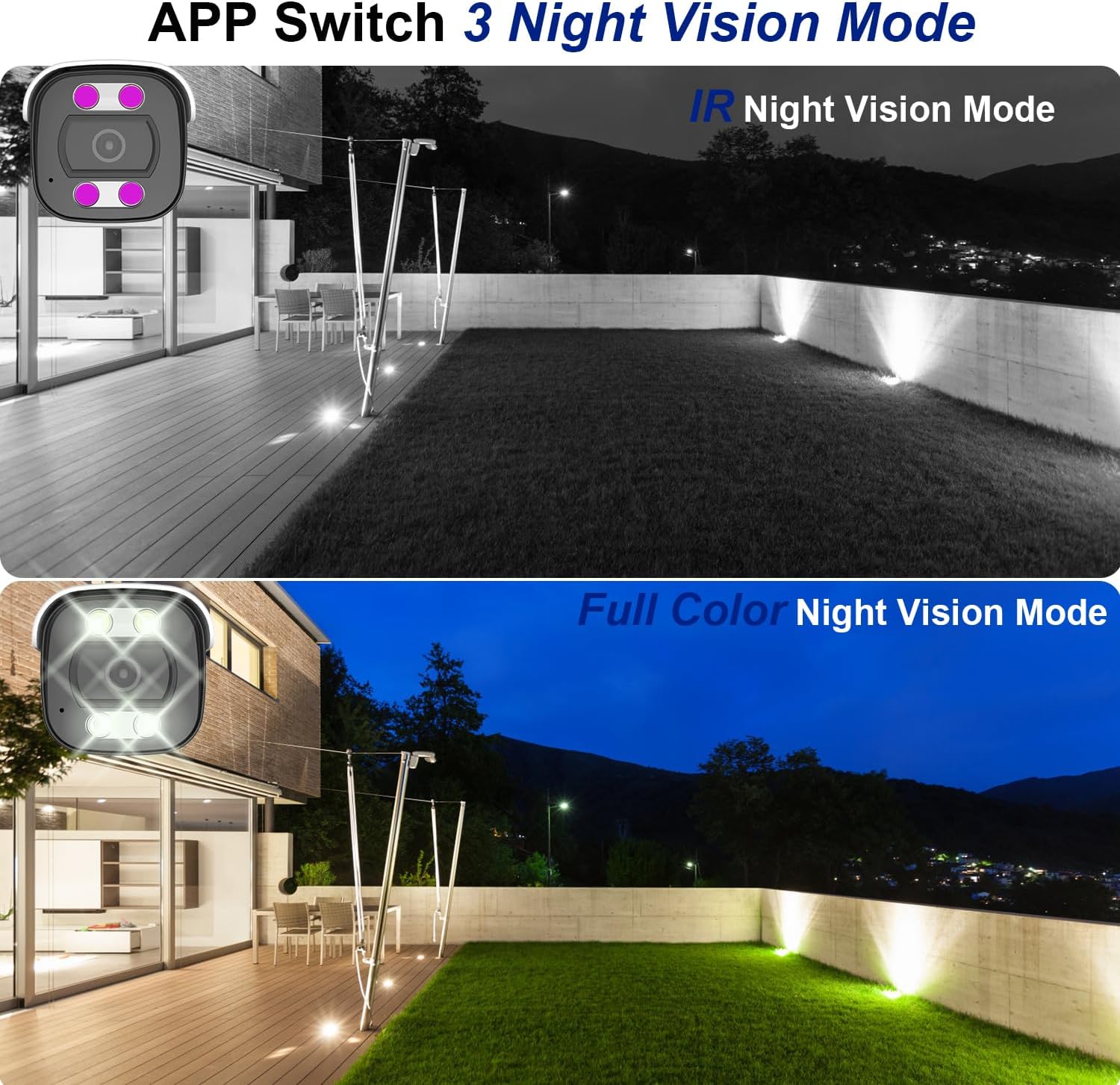
Figure 6: Night Vision Modes. This image demonstrates the difference between traditional IR (black and white) and full-color night vision capabilities.
6.3 Person/Vehicle Detection
The camera is equipped with professional human/vehicle detection functions to reduce false alarms. When a person or vehicle enters the configured detection area, the camera will automatically send real-time video or snapshots to your mobile phone.
- Erkennungsbereich: Configure specific zones within the camera's view zur Erkennung.
- Empfindlichkeit: Adjust the detection sensitivity to optimize performance and minimize unwanted alerts.

Figure 7: Smart Human/Vehicle Detection. The camera identifies human presence and sends an immediate alert to a connected mobile device.
Video 2: Smart Detection Features
This video demonstrates the human and vehicle detection capabilities of the camera, showing how it identifies subjects and triggers alerts.
6.4 Zwei-Wege-Audio
The built-in microphone and speaker allow for two-way communication. You can listen to audio from the camera's location and speak through the camera using the mobile app or NVR interface.

Figure 8: Two-Way Audio Functionality. The camera enables real-time communication, allowing users to speak and listen remotely.
Video 3: Two-Way Audio Demonstration
This video illustrates the two-way audio feature, demonstrating how users can communicate through the camera.
7. Wartung
Regelmäßige Wartung gewährleistet die Langlebigkeit und optimale Leistung Ihrer Kamera:
- Reinigung: Wischen Sie die Kameralinse und das Gehäuse vorsichtig mit einem weichen Tuch ab.amp Tuch. Verwenden Sie keine scharfen Chemikalien oder Scheuermittel.
- Firmware-Updates: Periodically check for firmware updates through the mobile app or manufacturer's webUm sicherzustellen, dass die neuesten Funktionen und Sicherheitspatches von dieser Website verfügbar sind, besuchen Sie bitte unsere Website.
- Kabelinspektion: Regularly inspect the Ethernet cable and waterproof cover for any signs of wear or damage, especially in outdoor installations.
- Speicherverwaltung: Bei Verwendung einer SD-Karte sollten Sie diese regelmäßig neu laden.view und verwaltet aufgezeichnetetage, um zu verhindern, dass die Karte voll wird.
8. Fehlerbehebung
Hier finden Sie Lösungen für häufig auftretende Probleme:
| Problem | Mögliche Ursache | Lösung |
|---|---|---|
| Die Kamera lässt sich nicht einschalten. | No power from PoE switch/NVR; faulty Ethernet cable. | Ensure PoE switch/NVR is powered on. Check Ethernet cable connection and integrity. Try a different PoE port or cable. |
| No video feed. | Network connectivity issue; incorrect NVR/app settings. | Verify network connection. Ensure camera is properly added to NVR/app. Check IP address settings. |
| Schlechte Nachtsicht. | IR LEDs obstructed; incorrect night vision mode. | Entfernen Sie alle Hindernisse aus dem Sichtfeld der Kamera. view. Switch night vision mode in the app (IR, Full Color, Smart). |
| False alarms from detection. | Detection sensitivity too high; detection area too broad. | Adjust detection sensitivity and refine the detection area in the camera settings via the app or NVR. |
| Zwei-Wege-Audio funktioniert nicht. | Microphone/speaker disabled; volume too low; network latency. | Check audio settings in the app/NVR. Ensure volume is up. Verify stable network connection. |
Video 4: Advanced Troubleshooting Tips
This video provides additional tips and solutions for common operational issues with the Dosilkc security camera.
9. Spezifikationen
| Besonderheit | Detail |
|---|---|
| Modellnummer | DS-T461 |
| Auflösung der Videoaufnahme | 4K (3840*2160@20fps) |
| Bildsensor | 1/3" Progressive Scan CMOS |
| Linse | 2.8 mm |
| Viewing Angle (FoV) | 105 Degrees (diagonal) |
| Nachtsichtbereich | 88 Fuß (Farbnachtsicht verfügbar) |
| Audio | Built-in 2-way audio (microphone & speaker) |
| Erkennung | Personen-/Fahrzeugerkennung |
| Lagerung | Micro SD Card Slot (up to 512GB), NVR, FTP, NAS |
| Kompression | H.265/H.264 |
| Konnektivität | Wired (PoE - Power over Ethernet) |
| Wetterbeständigkeit | IP66 Wasserdicht |
| Abmessungen (L x B x H) | 17.98 x 6.99 x 6.99 cm (ca. 7.08 x 2.75 x 2.75 Zoll) |
| Gewicht | 481 g |
| Montagetyp | Ceiling Mount, Screw In |
| Kompatible Geräte | Digital Video Recorder (NVR), Blue Iris, iSpy |
10. Garantie und Support
For warranty information and technical support, please refer to the official Dosilkc webBesuchen Sie die Website oder kontaktieren Sie direkt den Kundenservice. Bewahren Sie Ihren Kaufbeleg als Kaufnachweis für Garantieansprüche auf.
Online-Hilfe: Visit the Dosilkc official webWebsite mit häufig gestellten Fragen, Software-Downloads und Support-Ressourcen.
Kontaktieren Sie den Support: Beachten Sie die Angaben auf Ihrer Produktverpackung oder die offizielle Kennzeichnung. webWebseite mit Kontaktdaten des Kundendienstes.