
1. Einleitung
Welcome to the LongPlus X83 2K Wireless Outdoor Security Camera System. This manual provides detailed instructions for setting up, operating, and maintaining your new security cameras. Please read this manual thoroughly before use to ensure proper functionality and safety.

Image 1.1: LongPlus X83 2K Wireless Outdoor Security Camera System
This image shows three LongPlus X83 cameras, sleek and black, positioned in the foreground. In the background, a hand holds a smartphone displaying a live feed from one of the cameras, showing a clear view of a house and its driveway.
2. Lieferumfang
Bitte überprüfen Sie den Inhalt Ihres Pakets. Sollten Artikel fehlen oder beschädigt sein, kontaktieren Sie bitte unseren Kundenservice.
- Security Camera(s) with Bracket
- Packung Schrauben
- Nadel zurücksetzen
- USB-Kabel
- Kurzanleitung
3. Einrichtung
3.1 Aufladen der Kamera
Before initial use, fully charge the camera using the provided USB cable. The charging indicator light will show the charging status.
3.2 App-Installation und Kontoerstellung
Your LongPlus X83 camera operates with the VicoHome app. Download the VicoHome app from the App Store (for iOS devices) or Google Play Store (for Android devices).
- Suchen nach "VicoHome" in your device's app store.
- Laden Sie die App herunter und installieren Sie sie.
- Öffnen Sie die App und befolgen Sie die Anweisungen auf dem Bildschirm, um ein Konto zu erstellen und sich anzumelden.
3.3 Kamerakopplung
Follow these steps to pair your camera with the VicoHome app:
- Stellen Sie sicher, dass Ihre Kamera vollständig aufgeladen und eingeschaltet ist.
- Open the VicoHome app and tap the "+" icon to add a new device.
- Wählen Sie Ihr Kameramodell aus der Liste aus.
- Follow the in-app instructions, which typically involve scanning a QR code displayed on your phone with the camera lens, or connecting to the camera's temporary Wi-Fi hotspot.
- Connect the camera to your home 2.4GHz Wi-Fi network.
3.4 Montageanleitung
The LongPlus X83 cameras are designed for versatile installation, including ceiling mount, wall mount, or freestanding placement. Choose a location that provides optimal viewing coverage and a strong Wi-Fi signal.

Image 3.1: Flexible Mounting Options
This image illustrates the flexible mounting options for the LongPlus X83 camera. It shows the camera securely mounted to a wall, inverted from a ceiling, and placed freestanding on a flat surface, demonstrating its adaptability for different installation needs.
Wand-/Deckenmontage:
- Mark the desired drilling spots using the camera bracket as a template.
- Bohren Sie Löcher und setzen Sie bei Bedarf Dübel ein.
- Secure the bracket to the wall or ceiling using the provided screws.
- Bringen Sie die Kamera an der Halterung an und stellen Sie die ein viewWinkel nach Bedarf.
Freistehend:
- Stellen Sie die Kamera auf eine stabile, ebene Fläche.
- Ensure the camera is not easily knocked over and has a clear line of sight.
4. Bedienungsanleitung
4.1 Live View und Wiedergabe
Zugriff auf Echtzeit-Footage und review recorded events through the VicoHome app.

Bild 4.1: Live View and Playback Interface
This image shows a smartphone held against a scenic beach background, displaying the VicoHome app interface. The screen illustrates both live video streaming and a timeline for reviewing recorded events, emphasizing the ability to monitor from anywhere.
- Live View: Open the VicoHome app and select the desired camera to view sein Live-Feed.
- Wiedergabe: Navigate to the playback section within the app to review Auf der Micro-SD-Karte oder im Cloud-Speicher wurden aufgezeichnete Ereignisse gespeichert.
4.2 KI-Bewegungserkennung und Warnmeldungen
The camera utilizes advanced AI algorithms to distinguish between people, pets, vehicles, and packages, reducing false alarms.

Image 4.2: AI Detection Analysis
This image visually explains the AI detection analysis feature. It shows various objects such as a person, a package, a dog, and a car being identified and categorized by the camera's AI, with corresponding event notifications displayed on a smartphone screen.
- Echtzeitwarnungen: Erhalten Sie sofortige Benachrichtigungen auf Ihr Smartphone, sobald eine Bewegung erkannt wird.
- Siren and Strobe Light: The camera can automatically trigger an audible siren and strobe light to deter intruders upon detecting humanoid motion.
- Aktivitätszonen: Passen Sie bestimmte Bereiche innerhalb des Sichtfelds der Kamera an. view Bei der Bewegungserkennung werden irrelevante Bereiche ignoriert.
- Einstellbare Empfindlichkeit: Modify the detection sensitivity (High, Medium, Low) to suit your environment and reduce unwanted alerts.
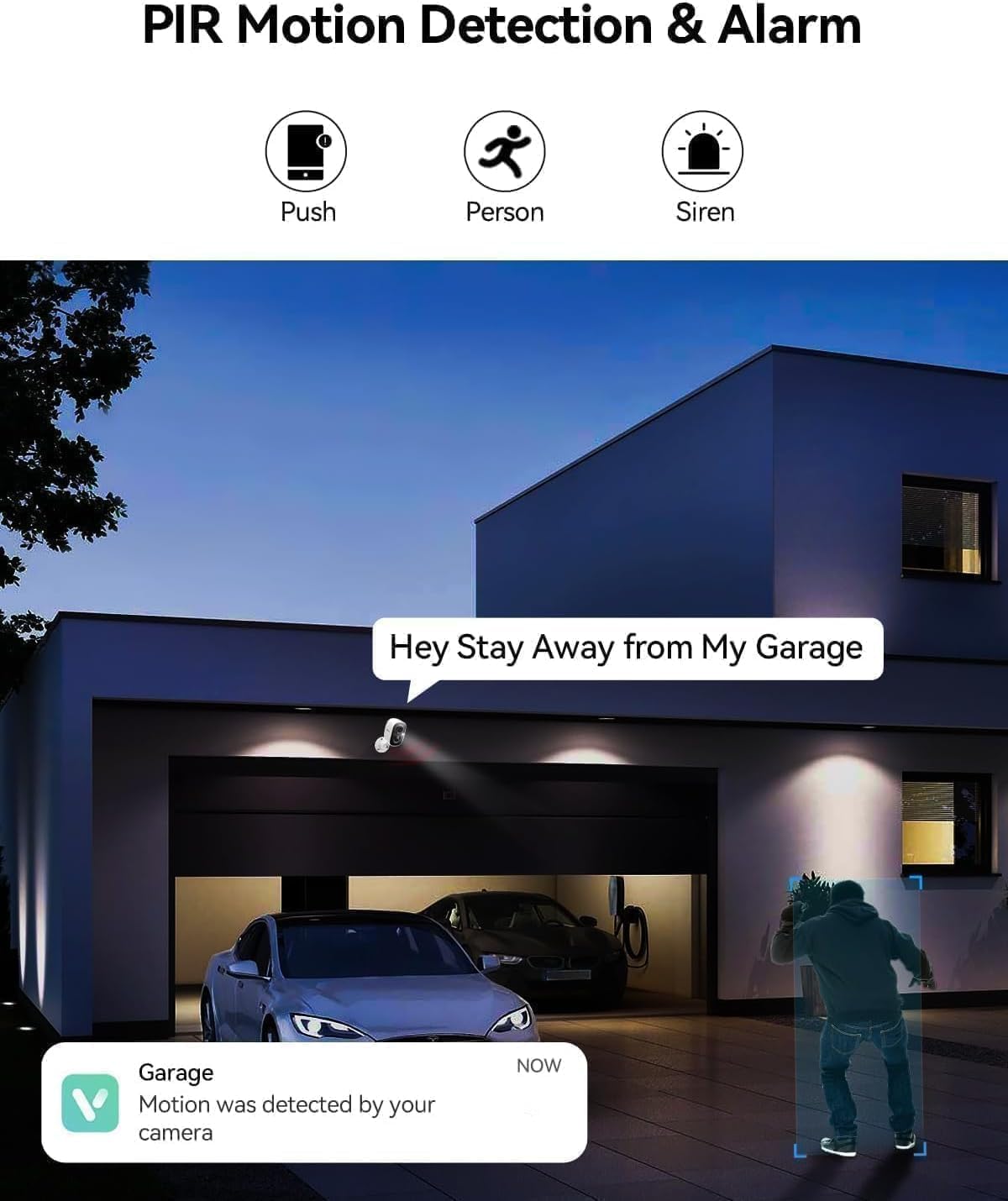
Image 4.3: PIR Motion Detection and Siren Alarm
This image depicts a LongPlus camera mounted above a garage, detecting a person. An on-screen notification reads "Hey Stay Away from My Garage," indicating the camera's ability to trigger an alarm and send alerts upon detecting suspicious activity.
4.3 Zwei-Wege-Audio
Kommunizieren Sie mit Besuchern oder schrecken Sie unerwünschte Gäste mit dem eingebauten Mikrofon und Lautsprecher ab.
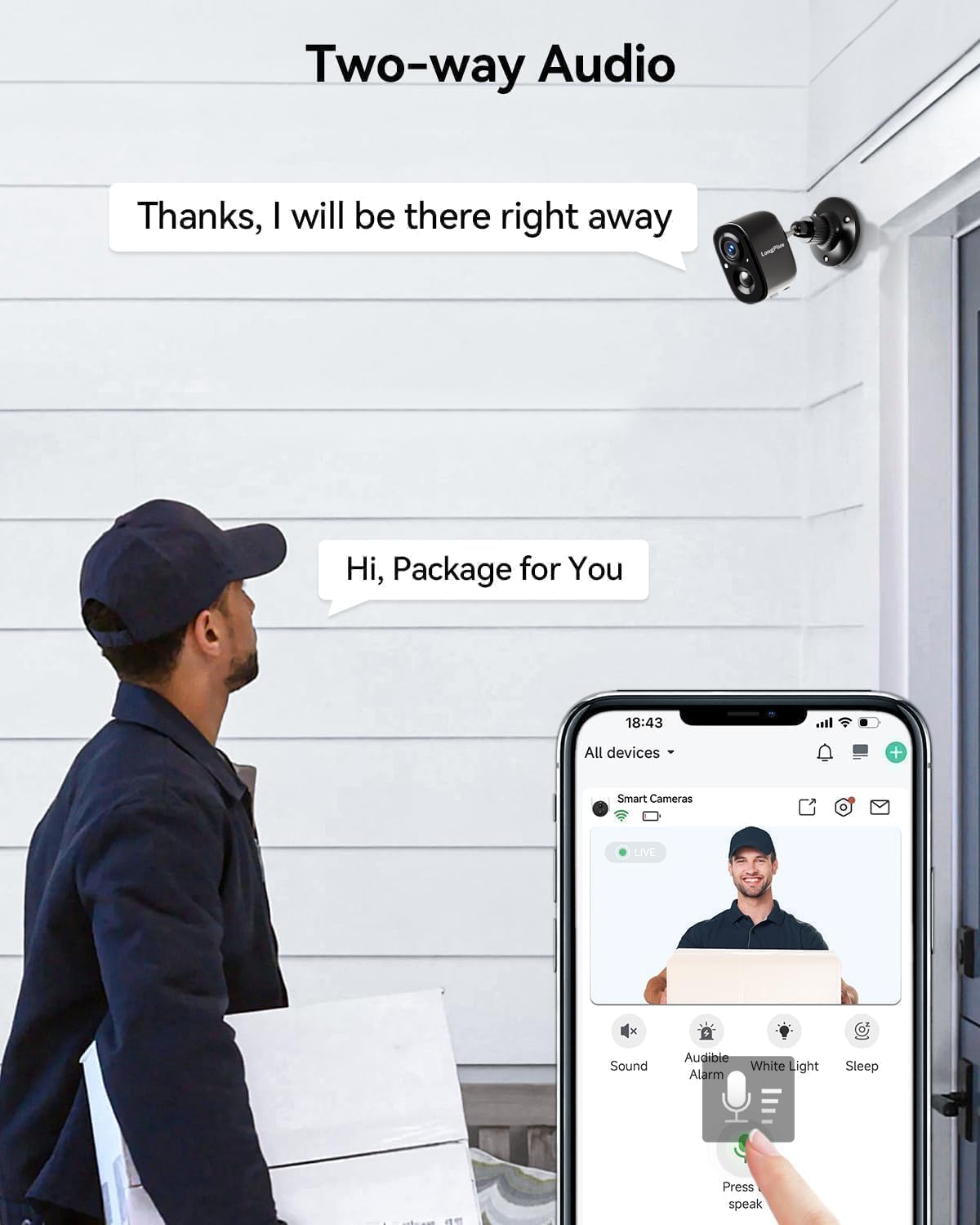
Abbildung 4.4: Zwei-Wege-Audiokommunikation
This image shows a delivery person at a front door, holding a package. A LongPlus camera is mounted above the door. A speech bubble from the camera says, "Hi, Package for You," and another from the app interface says, "Thanks, I will be there right away," illustrating the two-way audio feature.
- Tap the microphone icon in the VicoHome app to speak through the camera.
- Listen to audio from the camera's location through the app.
4.4 Farbnachtsicht
The camera provides clear, vivid color images even in low-light conditions, extending up to 33 feet.
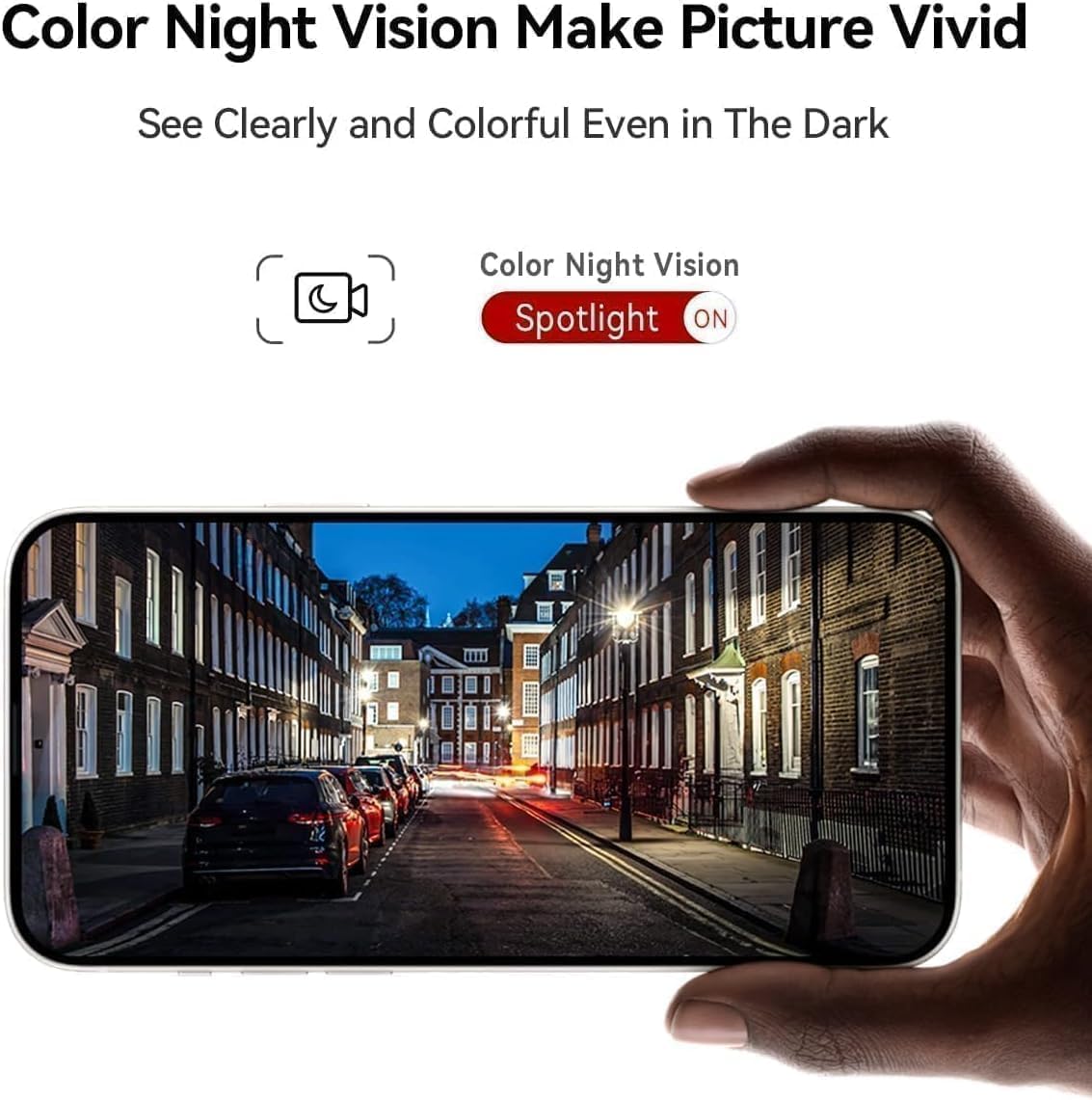
Image 4.5: Color Night Vision in Action
This image shows a smartphone held up, displaying a clear and vivid color night vision view of a street scene at night. The image highlights the camera's ability to capture detailed and colorful footage even in dark environments, with a 'Spotlight ON' indicator for color night vision.
- The camera automatically switches to color night vision mode when ambient light is low.
- Ensure the spotlight feature is enabled in the app for optimal color night vision performance.
4.5 Alexa-Integration
Integrate your LongPlus X83 camera with Amazon Alexa for convenient voice control.

Abbildung 4.6: Alexa-Kompatibilität
This image shows a LongPlus camera positioned next to an Amazon Echo Show device. The Echo Show displays live footage of a person at a front door, illustrating how users can command Alexa, "Alexa, show me in front of the door," to view Kamerabilder.
- Enable the VicoHome skill in the Alexa app.
- Link your VicoHome account with Alexa.
- Use voice commands such as "Alexa, show me the [camera name]" to view Live-Feeds auf kompatiblen Alexa-Geräten.
4.6 Gerätefreigabe
Gewähren Sie Familienmitgliedern oder vertrauenswürdigen Personen Zugriff auf Ihre Kamera.

Image 4.7: Family Sharing Feature
This image illustrates the device sharing capability, showing multiple family members (an elderly couple, a woman on a laptop, a man on a tablet) connected to the camera feed, which is displayed on a smartphone held by another person, watching a child playing in a pool. This highlights multi-user access for shared security.
- In the VicoHome app, navigate to the camera settings and find the "Share Device" option.
- Invite other users by entering their VicoHome account details.
- Shared users will have access to live view und aufgenommenes Essentage.
5. Wartung
5.1 Laden der Batterie
The LongPlus X83 camera is battery-powered. Monitor the battery level in the VicoHome app and recharge as needed using the provided USB cable.

Image 5.1: Sleep Setting for Battery Optimization
This image shows a man working on a laptop, with a graphic overlay illustrating a customizable sleep schedule for the camera. This feature allows users to set specific activation dates and times (e.g., 09:00 to 18:00 on weekdays) to conserve battery life.
- To prolong battery life, utilize the "Sleep Setting" feature in the app to customize the camera's activation schedule.
5.2 Speicherverwaltung
Your camera supports both Micro SD card storage (up to 128GB, not included) and optional cloud storage.
- Micro SD Karte: Insert a Micro SD card into the designated slot on the camera. The camera will automatically begin recording events to the card.
- Cloud-Speicher: Explore the VicoHome app for cloud storage options. A 30-day free trial is typically available.
5.3 Reinigung
Reinigen Sie das Kameraobjektiv und das Gehäuse regelmäßig, um eine optimale Leistung zu gewährleisten.
- Verwenden Sie ein weiches,amp Tuch zum Abwischen des Kameragehäuses.
- Verwenden Sie für die Linse ein Linsenreinigungstuch und eine Linsenreinigungslösung, um Kratzer zu vermeiden.
- Verwenden Sie keine aggressiven Chemikalien oder scheuernden Materialien.
6. Fehlerbehebung
If you encounter issues with your LongPlus X83 camera, refer to the following common problems and solutions:
| Problem | Mögliche Lösung |
|---|---|
| Die Kamera lässt sich nicht einschalten | Ensure the battery is fully charged. Check the USB cable and power adapter. |
| Keine Verbindung zum WLAN möglich | Verify your Wi-Fi network is 2.4GHz. Check Wi-Fi password. Move camera closer to router. Reset camera and try pairing again. |
| Keine Bewegungserkennungswarnungen | Check app notification settings. Adjust motion detection sensitivity. Ensure Activity Zones are correctly configured. |
| Schlechte Bildqualität | Clean the camera lens. Ensure there is sufficient lighting. Check Wi-Fi signal strength. |
| Zwei-Wege-Audio funktioniert nicht | Check microphone and speaker permissions in your phone's app settings. Ensure camera's microphone/speaker are not obstructed. |
If these solutions do not resolve the issue, please contact LongPlus customer support.
7. Spezifikationen
| Besonderheit | Spezifikation |
|---|---|
| Modellname | X83 |
| Auflösung der Videoaufnahme | 2K |
| Effektive Standbildauflösung | 3 Megapixel |
| Konnektivitätstechnologie | Kabellos (Wi-Fi) |
| Stromquelle | Batteriebetrieben (2 Lithium-Polymer-Batterien im Lieferumfang enthalten) |
| Verwendung im Innen- und Außenbereich | Innenbereich, Außenbereich |
| Wasserbeständigkeit | Wasserdicht (IP65) |
| Nachtsichtbereich | 33 Fuß |
| Viewing-Winkel | 130 Grad |
| Speicheroptionen | Micro-SD-Karte (bis zu 128 GB), Cloud-Speicher |
| Besondere Merkmale | 2-Way Audio, AI Motion Detection, Color Night Vision, Siren Alarm, Alexa Compatible |
| Abmessungen (L x B x H) | 8.3 x 2.45 x 6.2 Zoll |
| Artikelgewicht | 2.4 Pfund |
8. Sicherheitshinweise
- Setzen Sie die Kamera keinen extremen Temperaturen außerhalb ihres Betriebstemperaturbereichs (-20 °C bis +60 °C) aus.
- Vermeiden Sie es, die Kamera in der Nähe starker Magnetfelder oder Störquellen aufzustellen.
- Use only the manufacturer-recommended charging accessories.
- Bewahren Sie die Kamera und ihre Bestandteile außerhalb der Reichweite von Kindern auf.
- Sorgen Sie für eine ordnungsgemäße Installation, um zu verhindern, dass die Kamera herunterfällt.

Image 8.1: Outdoor Design and IP65 Rating
This image highlights the LongPlus camera's robust design for outdoor use, featuring an IP65 waterproof rating. It also displays the operational temperature range from -20°C to +60°C, indicating its resilience to various weather conditions.

Image 8.2: Privacy Protection
This image features a prominent shield icon with the 'LongPlus' logo, positioned in front of a house. It visually represents the commitment to privacy protection, indicating that AES-256 data encryption is used to secure footage during transmission and storage.
9. Garantie und Support
LongPlus products are designed for reliability and performance. For warranty information, please refer to the documentation included with your purchase or visit the official LongPlus webWebsite.
For technical support, troubleshooting assistance, or any questions regarding your LongPlus X83 camera, please contact LongPlus customer service through the VicoHome app or the official LongPlus support channels.