
1. Einleitung
Welcome to the Askar 71F Flat-Field Telescope instruction manual. This guide provides detailed information on the assembly, operation, and maintenance of your new 71mm aperture F6.9 ED Glass Refractor. Designed for both deep sky astrophotography and visual astronomy, the Askar 71F offers a quadruplet air-spaced APO optical design for excellent image quality and a flat field across the entire view.
2. Packungsinhalt
Upon unpacking your Askar 71F Flat-Field Telescope, please verify that all the following components are present:
- Askar F Series Telescope (Main Tube)
- Objektivdeckel
- Tau-Schild
- Tauschutz-Feststellschraube
- Rohrringe
- Vixen Style 230mm Dovetail Plate
- Multifunctional Handle Bar
- Finder Base
- Feinjustierungsknopf
- Grobeinstellungsknopf
- 2" to 1.25" Adapter
- M64 to 2" Adapter
- 360° Rotator Locking Screw
- 360° Rotator
- 1.25" 45° Erecting Prism
- 1.25" 8mm Eyepiece
- 1.25" 20mm Eyepiece
- M64-M54/M54-M48 Photographic Adapters
- Inspection Check List
- Produktkarte
- Benutzerhandbuch (dieses Dokument)
- Zertifikatskarte
- Karton

3. Produktüberschreitungview
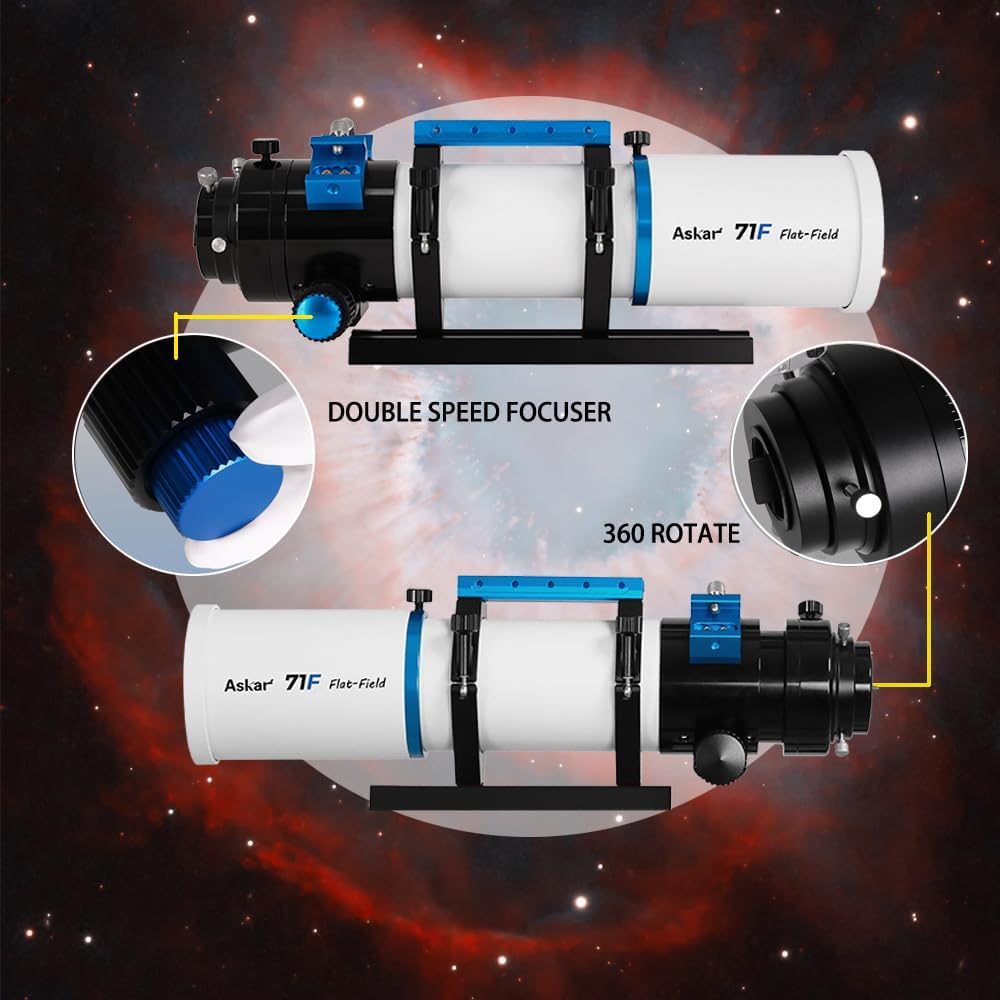
Familiarize yourself with the main components of the Askar 71F Flat-Field Telescope using the diagrams below.


4. Einrichtung
4.1. Mounting the Telescope
The Askar 71F is equipped with a Vixen-style dovetail plate for secure attachment to compatible equatorial or altazimuth mounts.
- Securely attach the dovetail plate to your telescope mount's saddle.
- Ensure the tube rings are properly tightened around the main tube to hold the telescope firmly.
- Adjust the balance of the telescope on the mount for stable tracking and movement.
4.2. Attaching Eyepieces and Accessories
Depending on your intended use, attach the appropriate accessories to the focuser.
- For Visual Observation: Insert the desired eyepiece (e.g., 8mm or 20mm) into the 1.25-inch visual adapter. For terrestrial viewing, use the 1.25-inch 45-degree erecting prism to achieve an upright, non-inverted image.
- For Astrophotography: Attach your camera using the M64-M54/M54-M48 photographic adapters. Ensure all connections are secure to prevent light leaks and maintain optical alignment.

5. Bedienungsanleitung
5.1. Fokussieren
The Askar 71F features a dual-speed focuser for precise adjustments, crucial for achieving sharp images.
- Use the larger coarse adjustment knob for initial, rapid focus changes to bring the object into approximate focus.
- Utilize the smaller fine adjustment knob (with a 1:10 ratio) for minute, precise focusing. This is especially important for critical focus in astrophotography.
5.2. 360-Degree Rotator
The focuser assembly can be rotated 360 degrees, allowing for optimal photographic composition or comfortable visual observation without repositioning the entire telescope.
- Loosen the 360° rotator locking screw.
- Carefully rotate the focuser assembly to the desired orientation.
- Tighten the 360° rotator locking screw to secure the position.
5.3. Visual Observation
For visual use, insert either the 8mm or 20mm eyepiece into the 1.25-inch adapter. For observing terrestrial objects, the 45-degree erecting prism will correct the image orientation, providing an upright view.
5.4. Astrophotography
The Askar 71F is optimized for astrophotography with its flat-field optical design. Connect your camera using the appropriate M64-M54/M54-M48 adapters. Achieving precise focus with the fine adjustment knob is paramount for capturing sharp, detailed astronomical images.
6. Wartung
6.1. Cleaning the Optics
To maintain optimal performance, keep the optical surfaces clean. Use a soft, lint-free cloth specifically designed for optics and a specialized optical cleaning solution. Avoid touching lens surfaces with bare hands, as oils can leave residues.
6.2. Allgemeine Pflege und Lagerung
Store the telescope in a dry, dust-free environment when not in use. Always keep the lens cap on the objective lens to protect it from dust and accidental damage. Avoid exposing the telescope to extreme temperatures or sudden temperature changes.
7. Fehlerbehebung
- Verschwommene Bilder: Ensure the focuser is precisely adjusted. Check for atmospheric conditions (e.g., heat haze, turbulence) that can degrade image quality. Verify that all optical components (lenses, eyepieces, camera sensors) are clean.
- Kein Bild sichtbar: Confirm that the lens cap has been removed from the objective lens. Ensure the eyepiece or camera is correctly inserted and securely fastened in the focuser.
- Image Inversion (Visual): For astronomical observations, images will naturally appear inverted. If an upright image is desired for terrestrial viewing, use the 1.25-inch 45-degree erecting prism.
8. Spezifikationen
| Besonderheit | Detail |
|---|---|
| Marke | Askar |
| Modellname | 71F |
| Länge des optischen Tubus | 71 Millimeter |
| Objektivlinsendurchmesser | 71 Millimeter |
| Öffnung | 71 mm |
| Brennweite | 490 mm |
| Brennweite | F6.9 |
| Optisches Design | Quadruplet air-Spaced APO Refractor |
| Glasart | ED Glas |
| Fokussierer | Dual-speed (1:10 fine adjustment), 360° Rotator |
| Schwalbenschwanzplatte | 230mm Vixen Style |
| Technische Daten | 14.67 x 3.67 x 4.37 Zoll |
| Artikelgewicht | 9.9 Pfund (4.5 Kilogramm) |
| Fokustyp | Manueller Fokus |
| Stromquelle | Manual/Mechanical |
| Datum der ersten Verfügbarkeit | 24. April 2024 |


9. Garantie und Support
For detailed warranty information, technical assistance, or customer support, please refer to the product card included in your package. You may also visit the official Askar webWebsite mit den aktuellsten Support-Ressourcen und Kontaktinformationen.