
1. Einleitung
Vielen Dank für Ihren Einkauf.asing the Camelion BC-1057T USB Charger. This device is designed to efficiently charge 1 to 4 pieces of 1.2V AA (Size 3) or AAA (Size 4) Ni-MH rechargeable batteries. It features a compact design, USB Type-C input, and multiple safety protections to ensure reliable operation. Please read this manual thoroughly before use and retain it for future reference.
2. Sicherheitshinweise
Um einen sicheren Betrieb zu gewährleisten und Schäden zu vermeiden, beachten Sie bitte die folgenden Sicherheitsrichtlinien:
- Only charge 1.2V Ni-MH AA or AAA rechargeable batteries. Do not attempt to charge other battery types (e.g., alkaline, lithium-ion) as this may cause damage or injury.
- Zerlegen, modifizieren oder versuchen Sie nicht, das Ladegerät zu reparieren.
- Das Ladegerät sollte vor Wasser, Feuchtigkeit und hohen Temperaturen geschützt werden.
- Do not use the charger if it is damaged or appears to be malfunctioning.
- Ensure proper battery polarity when inserting batteries into the charger.
Sicherheitsmerkmale:
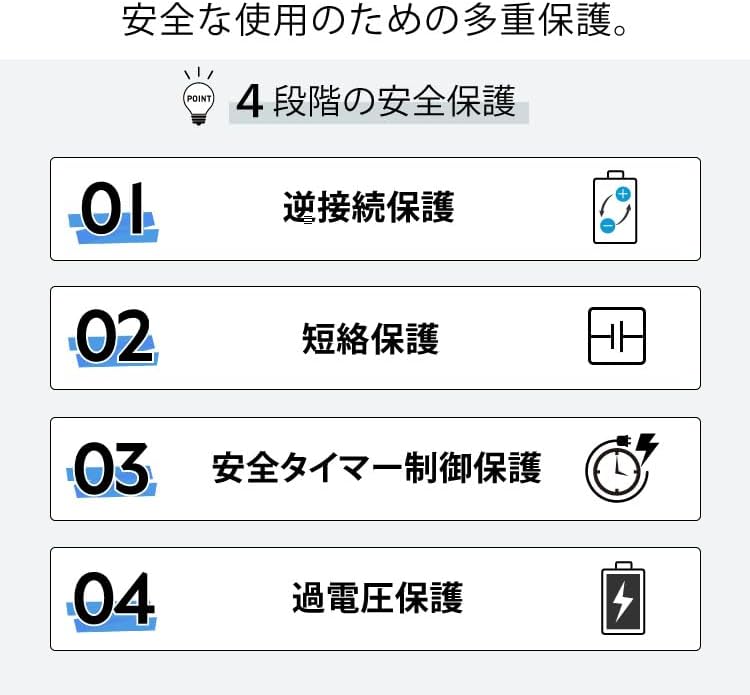
The BC-1057T charger incorporates several safety mechanisms:
- Verpolungsschutz: Prevents damage if batteries are inserted with incorrect polarity.
- Kurzschlussschutz: Schutzmechanismen gegen Kurzschlüsse.
- 12-Hour Safety Timer Control: Automatically stops charging after 12 hours to prevent overcharging.
- Übervolumentage Schutz: Schützt vor übermäßiger Volatilitättage Eingabe.
Zertifizierungen:
The product complies with international safety standards, indicated by CE and FCC marks.

3. Packungsinhalt
Das Paket beinhaltet:
- 1 x Camelion BC-1057T USB Charger
- 1 x USB Typ-A auf Typ-C Kabel

4. Einrichtung
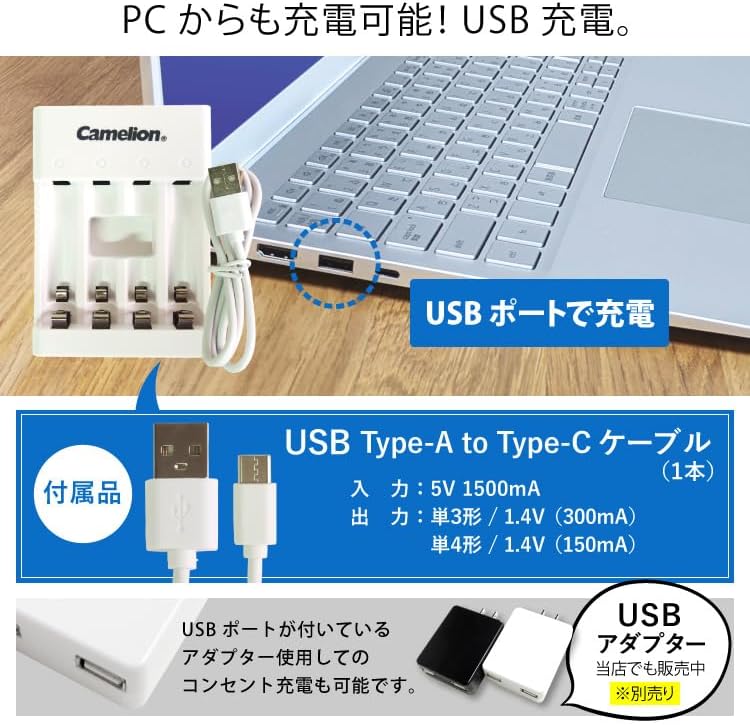
- Schließen Sie das Ladegerät an: Use the provided USB Type-A to Type-C cable to connect the charger to a USB power source. This can be a computer's USB port, a USB wall adapter (sold separately), or a power bank. The input requirement is 5V 1500mA.
- Batterien einlegen: Insert 1 to 4 AA or AAA Ni-MH rechargeable batteries into the charging slots. Ensure correct polarity (+ and -) as indicated on the charger. The charger supports simultaneous charging of both AA and AAA batteries in any of its four independent slots.

5. Bedienungsanleitung
- Once batteries are correctly inserted and the charger is connected to a power source, the indicator lamp below each slot will begin to flash, indicating that charging is in progress.
- When a battery is fully charged, its corresponding indicator lamp will stop flashing and remain steadily lit. This signals that the charging process for that battery is complete.
- You can remove the fully charged batteries. The charger will continue to charge any remaining batteries until they are also full.

6. Geschätzte Ladezeiten
The following table provides approximate charging times for common Ni-MH battery capacities. Actual charging times may vary depending on battery condition, remaining charge, and environmental factors.
| Akku-Typ | Batteriekapazität | Ungefähre Ladezeit |
|---|---|---|
| AAA (Size 4) | 600 mAh | Ca. 5 Stunden |
| AAA (Size 4) | 800 mAh | Ca. 7 Stunden |
| AA (Size 3) | 1500 mAh | Ca. 6 Stunden |
| AA (Size 3) | 2100 mAh | Ca. 10 Stunden |
7. Wartung
- Halten Sie das Ladegerät sauber und trocken. Wischen Sie die Oberfläche mit einem weichen, trockenen Tuch ab.
- Keine Scheuer- oder Lösungsmittel verwenden.
- Bewahren Sie das Ladegerät an einem kühlen, trockenen Ort auf, wenn Sie es nicht verwenden.
8. Fehlerbehebung
If you encounter issues with your charger, please try the following:
- Ladegerät lässt sich nicht einschalten: Stellen Sie sicher, dass das USB-Kabel fest mit dem Ladegerät und der Stromquelle verbunden ist. Versuchen Sie es mit einem anderen USB-Anschluss oder Netzteil.
- Batteries not charging (indicator light not flashing): Check that the batteries are inserted with correct polarity. Ensure the batteries are Ni-MH rechargeable type. Try cleaning the battery contacts and charger terminals.
- Langsames Laden: Ensure your USB power source provides sufficient current (5V 1500mA). Using a lower current source may result in slower charging.
9. Spezifikationen
| Besonderheit | Spezifikation |
|---|---|
| Produktname | USB Charger BC-1057T |
| Modellnummer | BC-1057T |
| Farbe | Weiß |
| Eingang | 5 V, 1500 mA |
| Ausgang (AA) | 1.4 V (300 mA) |
| Ausgang (AAA) | 1.4 V (150 mA) |
| Safety Timer Control | 12 Stunden |
| Maße | Ca.. 90mm x 65mm x 24mm |
| Gewicht | Ca. 55g |
| Kompatible Batterien | 1.2V AA/AAA Ni-MH rechargeable batteries (1-4 pieces) |
| USB-Anschluss | Typ-C-Eingang |
| Ursprungsland | China |
10. Garantie und Support
This product comes with a 6-month warranty from the date of purchase. Please retain your purchase receipt or proof of purchase, as it will be required for any warranty claims. For support or warranty inquiries, please contact your retailer or the manufacturer.