
1. Einleitung
Thank you for choosing the JUOVI J2621 20000mAh 45W Portable Power Bank. This device is designed to provide reliable and fast charging for a wide range of electronic devices, ensuring you stay powered on the go. Please read this manual carefully before use to ensure proper operation and safety.
2. Produktüberschreitungview
The JUOVI J2621 Power Bank features a high-capacity battery and multiple fast-charging ports, making it a versatile companion for your devices.
Hauptmerkmale:
- Universelle Kompatibilität: Supports PD 3.0 and QC 3.0 for wide compatibility with laptops, smartphones, tablets, smartwatches, Steam Deck, wireless earbuds, and more.
- 20000 mAh große Kapazität: Provides multiple charges for devices like Samsung S23/S22, iPhone 15/14, iPad mini, or MacBook Pro 14.
- LED-Digitalanzeige: Clear display to easily check the remaining battery level.
- Sicherer Ladeschutz: Eingebaute Schutzmechanismen gegen Überlastungtage, overload, overheating, overcurrent, and short circuits. Features automatic shut-off when devices are fully charged.
- Niedrigstrommodus: Double-click to enter/exit for charging small current devices like AirPods.
Packungsinhalt:
- 1 x JUOVI J2621 20000mAh Powerbank
- 1 x Benutzerhandbuch (dieses Dokument)
- 1 x 5-adriges USB-C-zu-USB-C-Schnellladekabel
3. Einrichtung
Erstladung der Powerbank:
Before first use, fully charge your JUOVI J2621 Power Bank. Connect the provided USB-C to USB-C cable to one of the power bank's USB-C ports (C1 IN/OUT or C2 IN/OUT) and to a compatible 45W or higher power adapter (not included). The LED digital display will show the charging progress. Charging is complete when the display shows 100%.
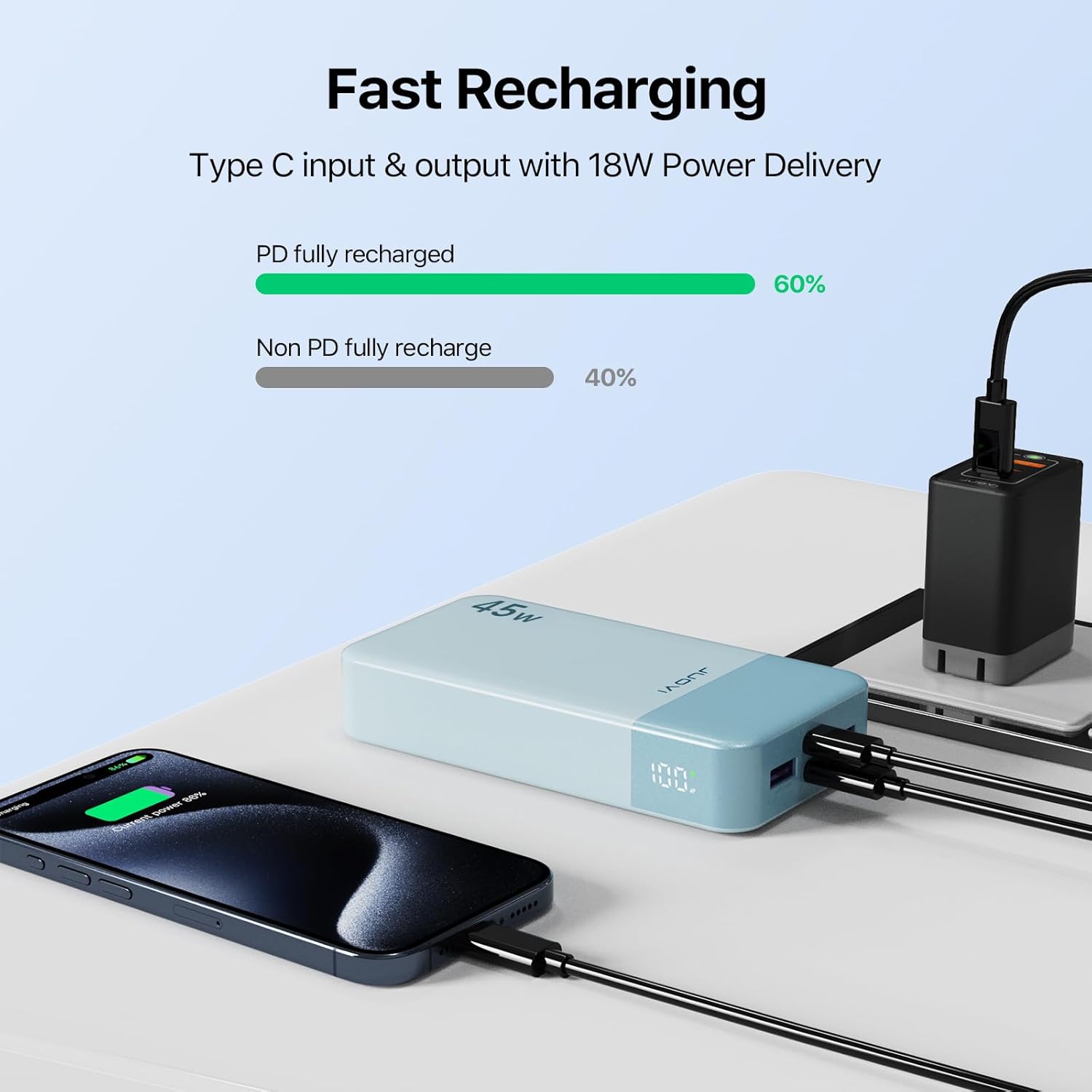
Figure 1: Recharging the JUOVI J2621 Power Bank.
4. Bedienungsanleitung
Turning On/Off and Checking Battery Level:
Press the power button located on the side of the power bank once to turn it on and view der aktuelle Batterieprozentsatztage on the LED display. The display will automatically turn off after a few seconds of inactivity. To turn off the power bank, press and hold the power button for a few seconds.
Laden Ihrer Geräte:
The power bank features two USB-A output ports (USB1 OUT, USB2 OUT) and two USB-C input/output ports (C1 IN/OUT, C2 IN/OUT). You can charge up to four devices simultaneously.
- Connect your device to the power bank using an appropriate charging cable (USB-A to device, or USB-C to device).
- Die Powerbank erkennt das angeschlossene Gerät automatisch und beginnt mit dem Ladevorgang. Das LED-Display zeigt den verbleibenden Akkustand in Prozent an.tage.
- For optimal fast charging, use the USB-C ports with compatible devices and cables.

Figure 2: Charging a smartphone with 45W Power Delivery.
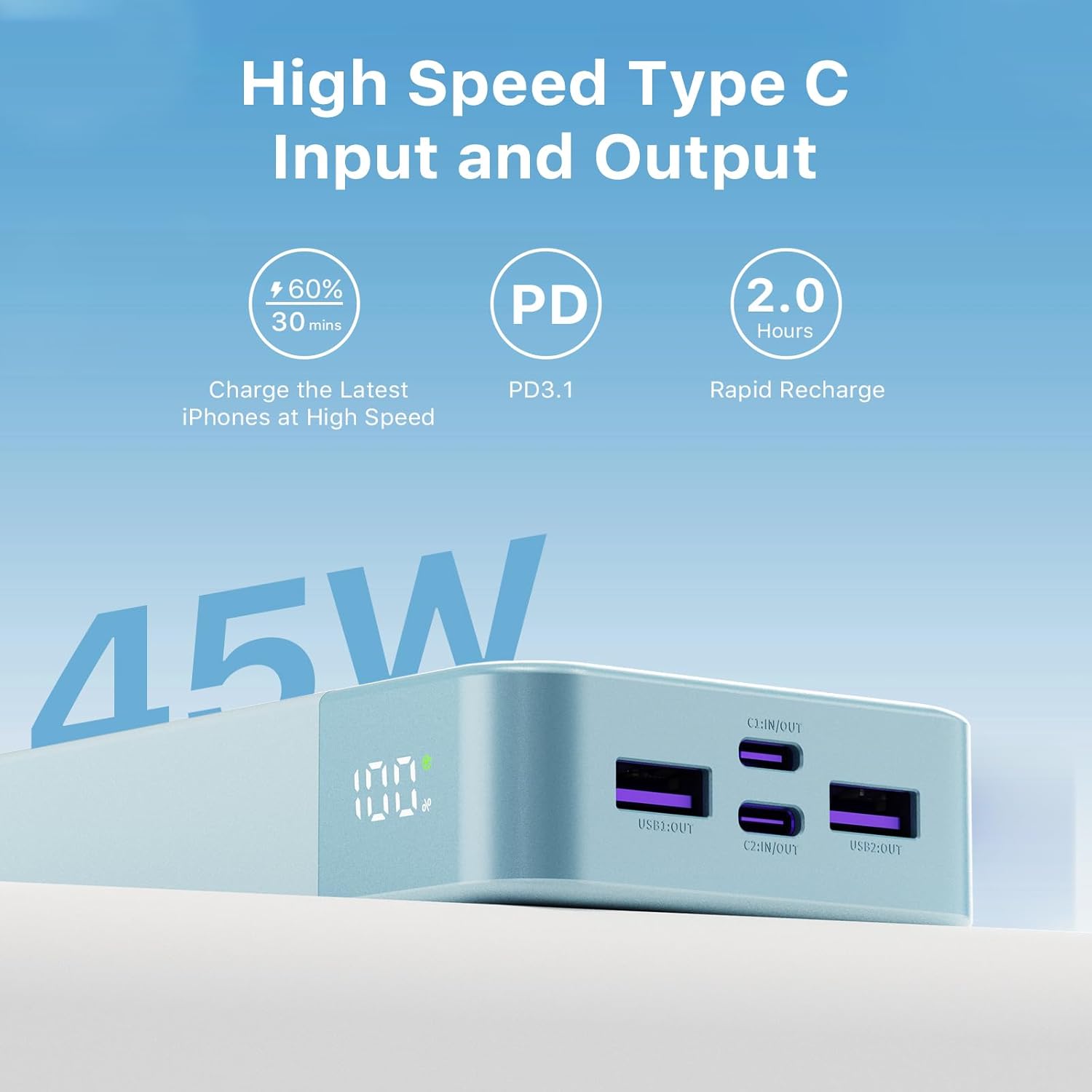
Figure 3: High-speed Type-C input and output ports.
Niedrigstrommodus:
To charge low-power devices such as wireless earbuds or smartwatches, double-click the power button to enter low-current mode. Double-click again to exit this mode.
5. Sicherheitshinweise
- Setzen Sie die Powerbank keinen extremen Temperaturen (über 60 °C/140 °F oder unter 0 °C/32 °F), direkter Sonneneinstrahlung oder hoher Luftfeuchtigkeit aus.
- Vermeiden Sie es, das Gerät fallen zu lassen, anzustoßen oder auseinanderzunehmen.
- Von Wasser und anderen Flüssigkeiten fernhalten.
- Verwenden Sie ausschließlich zertifizierte Ladekabel und Adapter.
- Betreiben Sie die Powerbank nicht, wenn sie in irgendeiner Weise beschädigt ist.
- Außerhalb der Reichweite von Kindern aufbewahren.
6. Wartung
- Reinigen Sie die Powerbank mit einem weichen, trockenen Tuch. Verwenden Sie keine scharfen Chemikalien oder Scheuermittel.
- Bewahren Sie die Powerbank an einem kühlen, trockenen Ort auf, wenn Sie sie nicht verwenden.
- Laden Sie die Powerbank mindestens einmal alle drei Monate auf, um die Batterieleistung zu erhalten.
7. Fehlerbehebung
Powerbank lädt nicht:
- Ensure the charging cable and wall adapter are functioning correctly and are securely connected.
- Versuchen Sie es mit einem anderen USB-C-Kabel oder Netzteil.
- Verify that the power adapter meets the recommended specifications (45W or higher for fast charging).
Gerät lädt nicht über Powerbank:
- Prüfen Sie, ob die Powerbank ausreichend geladen ist.
- Ensure your device's charging cable is securely connected to both the device and the power bank.
- Versuchen Sie einen anderen Anschluss an der Powerbank oder ein anderes Ladekabel.
- If charging a low-power device, ensure low-current mode is activated (double-click power button).
Langsamer Ladevorgang:
- Stellen Sie sicher, dass sowohl die Powerbank als auch Ihr Gerät Schnellladeprotokolle (PD 3.0, QC 3.0) unterstützen.
- Verwenden Sie ein hochwertiges, Schnellladekabel.
- Das gleichzeitige Laden mehrerer Geräte kann die Ladegeschwindigkeit der einzelnen Geräte verringern.
8. Spezifikationen
| Besonderheit | Detail |
|---|---|
| Modellnummer | J2621 |
| Batteriekapazität | 20000 Milliamp Stunden (74 Wh) |
| Technische Daten | 5.39 x 2.76 x 1.02 Zoll |
| Artikelgewicht | 13.2 Unzen |
| Steckertyp | 2x USB Type-A Output, 2x USB Type-C Input/Output |
| Besondere Merkmale | Auto Shut-Off, Digital Display, Over Charging Protection, Short Circuit Protection |
| Hersteller | Tianjin Zowda New Energy Technology Co.,Ltd |
| Datum der ersten Verfügbarkeit | 26. April 2024 |
9. Garantie und Support
Your JUOVI J2621 Power Bank comes with dedicated customer support. For any inquiries or assistance, please contact our 7x24 hours friendly customer service. Refer to your purchase documentation for specific warranty details.