
1. Einleitung
This manual provides detailed instructions for the setup, operation, and maintenance of your AMIR Projection Alarm Clock (Model WA146-AMUS). This digital alarm clock features a 7.9-inch LED display, a 180° rotatable projector, adjustable brightness, multiple alarm modes, and temperature display. Please read this manual thoroughly before use to ensure proper functionality and to maximize your product experience.

Bild 1.1: Vorderseite view of the AMIR Projection Alarm Clock showing its 7.9-inch display and key features like time, alarm, 12/24H, snooze, projection, 4-level brightness, temperature, and night mode.
2. Packungsinhalt
Überprüfen Sie, ob alle Artikel im Paket vorhanden sind:
- AMIR Projection Alarm Clock (WA146-AMUS)
- USB-Ladekabel (1.5 Meter)
- Bedienungsanleitung
3. Produktmerkmale
- 7.9-Zoll-LED-Display: Large, clear digital display for easy viewing.
- Um 180° drehbarer Projektor: Projects time onto walls or ceilings, adjustable for optimal viewing.
- Einstellbare Helligkeit: Four levels of display brightness (Bright, Medium, Low, Off) to suit different environments.
- Mehrere Alarmmodi: Set alarms for Monday-Friday, Monday-Saturday, or Everyday.
- Schlummerfunktion: Customizable snooze interval from 1 to 60 minutes.
- Multifunktionsdisplay: Shows time, date, and indoor temperature.
- 12/24-Stunden-Format: Easily switch between 12-hour and 24-hour time formats.
- Nachtmodus: Automatically dims the display between 18:00 and 6:00 (adjustable time range).
- Duale Stromversorgung: Operates via USB cable (for constant display) or 3 AAA batteries (for memory function during power outages).
4. Bedienelemente und Anzeige
Familiarize yourself with the clock's buttons and display elements.

Bild 4.1: Hinten view of the alarm clock, indicating the power port, battery compartment, projection lamp, and control buttons (SWAP, +, -, ALARM, MODE, PROJECT/SNOOZE).
- Bildschirm: Shows time, date, temperature, and alarm status.
- Projektion Lamp: Located on the side, projects time onto a surface.
- Stromanschluss (DC 5V): Zum Anschließen des USB-Stromkabels.
- Batteriefach: Bietet Platz für 3 AAA-Batterien als Notstromversorgung.
- SWAP Button: Used for various settings adjustments.
- '+' / '-' Schaltflächen: Adjust values during settings, or change display brightness.
- Alarmknopf: Dient zum Einstellen und Aktivieren von Alarmen.
- MODE-Taste: Durchläuft die Anzeigemodi und wechselt in die Einstellungsmodi.
- PROJECT/SNOOZE Button: Activates/deactivates projection, or triggers snooze during an alarm.
5. Einrichtung
5.1 Stromversorgung der Uhr
Der Wecker kann auf zwei Arten mit Strom versorgt werden:
- USB Cable Power (Recommended): Connect the provided USB cable to the DC 5V power port on the back of the clock and plug the other end into a USB power adapter (not included) or a USB port. The LED screen will remain constantly on.
- Batterieleistung: Insert 3 AAA batteries (not included) into the battery compartment. When powered by batteries, the display will turn off after a short period to conserve power. Press any button to activate the display. Batteries also provide a memory feature, retaining time settings during power outages when using USB power.
5.2 Erste Vorbereitung
Before first use, ensure you remove the protective film from the display screen.
6. Bedienungsanleitung
6.1 Setting the Time and 12/24 Hour Format
- Halten Sie die MODUS button for 3 seconds. The 12/24H format will flash. Use the '+' or '-' buttons to select your preferred format.
- Drücken MODUS again. The hour digits will flash. Use '+' or '-' um die Stunde einzustellen.
- Drücken MODUS again. The minute digits will flash. Use '+' or '-' um die Minuten einzustellen.
- Drücken MODUS again to confirm and exit time setting.

Image 6.1: Visual guide for setting the time and selecting 12-hour or 24-hour format using the MODE, '+' and '-' buttons.
6.2 Wecker stellen
- Halten Sie die ALARM button for 3 seconds. The alarm hour digits will flash. Use '+' or '-' um die Weckzeit einzustellen.
- Drücken ALARM again. The alarm minute digits will flash. Use '+' or '-' die Alarmminuten einstellen.
- Drücken ALARM again. The snooze time (default 5 minutes) will flash. Use '+' or '-' to set the snooze interval from 1 to 60 minutes.
- Drücken ALARM again. The alarm mode (1-5, 1-6, or 1-7) will flash. Use '+' or '-' zur Auswahl:
- 1-5: Montag bis Freitag
- 1-6: Montag bis Samstag
- 1-7: Täglich
- Drücken ALARM again to confirm and exit alarm setting.

Image 6.2: Visual guide for setting the alarm time, snooze duration, and selecting one of the three alarm modes.
6.3 Aktivieren/Deaktivieren des Alarms
After setting the alarm, a small alarm icon will appear on the display, indicating the alarm is active. To deactivate the alarm, short press the ALARM Drücken Sie die Taste so lange, bis das Alarmsymbol verschwindet.
6.4 Die Schlummerfunktion verwenden
Wenn der Alarm ertönt, drücken Sie die große Taste. PROJECT/SNOOZE button to activate snooze. The alarm will pause for the set snooze interval and then sound again. To turn off the alarm completely, press any other button.

Image 6.3: Illustration of the snooze function, showing a person pressing the large PROJECT/SNOOZE button for extra sleep time.
6.5 Einstellen der Displayhelligkeit
Drücken Sie kurz die '+' or '-' buttons to cycle through the four display brightness levels: Bright, Medium, Low, and Off.

Image 6.4: Demonstrates the four adjustable brightness levels of the clock's display: Bright, Medium, Dim, and Off.
6.6 Using the Projection Feature
The clock can project the time onto a wall or ceiling. The projection distance ranges from 1.6ft to 16ft.
- Projektion aktivieren/deaktivieren: Drücken Sie kurz die PROJECT/SNOOZE Taste zum Ein- und Ausschalten der Projektion.
- Projektionswinkel anpassen: Manually rotate the projection lamp on the side of the clock to adjust the projection angle.
- 180° Flip Projection: If the projected time appears upside down, press and hold the TAUSCHEN button to flip the projection 180 degrees.
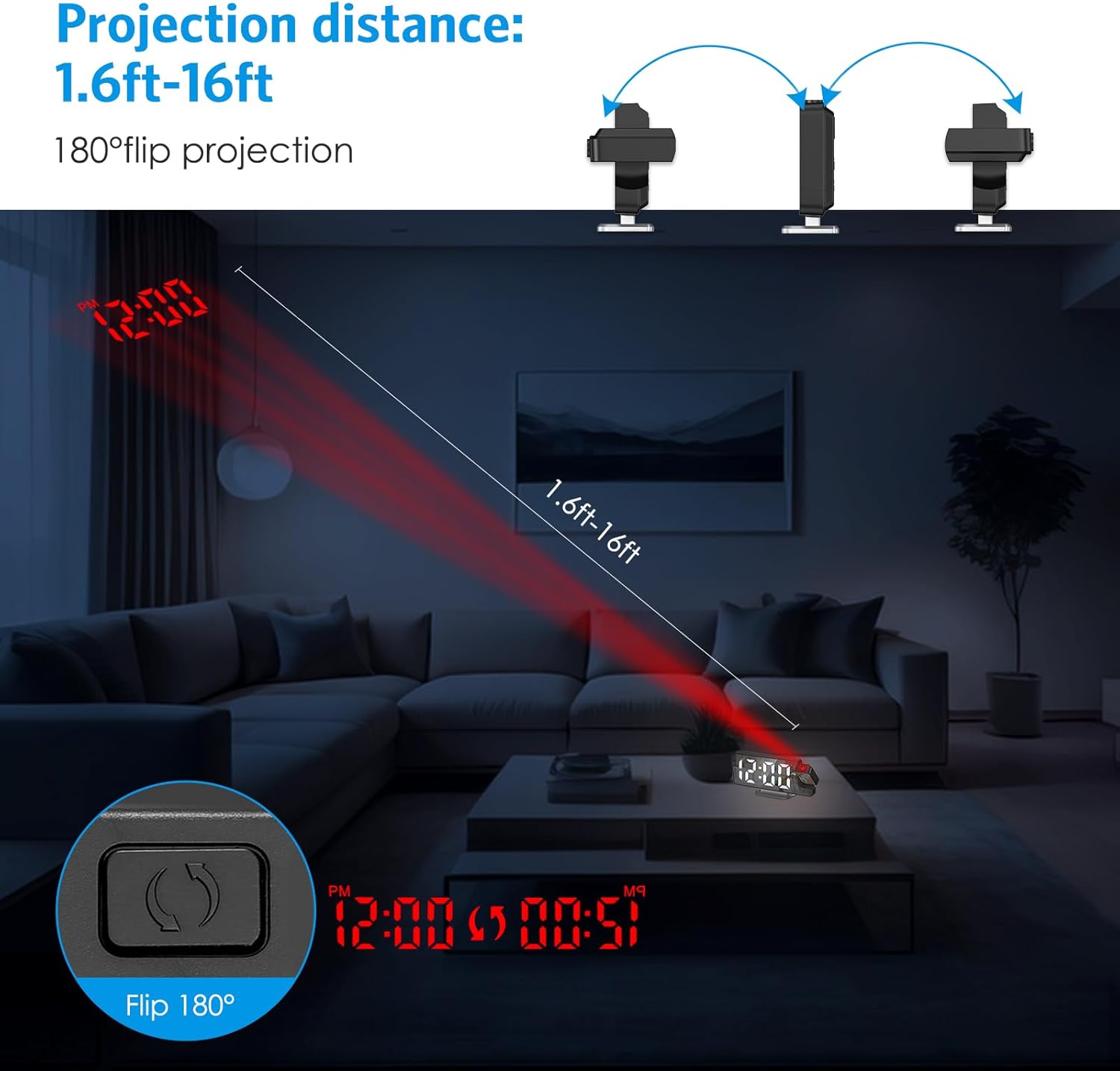
Image 6.5: Illustrates the projection distance range (1.6ft-16ft) and the 180° flip projection capability.
Video 6.1: This video demonstrates the AMIR Projection Alarm Clock's features, including 3 levels of brightness adjustment, time/date/temperature rotation on the main display, manual adjustment of projection angle, one-touch on/off projection, and 180-degree projection rotation.
6.7 Nachtmodus
Night mode automatically dims the display during a specified period to reduce light disturbance. The default night mode period is from 18:00 to 6:00.
- Activate/Deactivate Night Mode: Drücken Sie die MODUS button repeatedly until 'ON' or 'OFF' appears next to the night mode icon. Use '+' or '-' Umschalten.
- Adjust Night Mode Time Range: When night mode is active, press and hold the MODUS button until the start hour flashes. Use '+' or '-' Zum Einstellen drücken. MODUS to move to the start minute, then end hour, and end minute, adjusting each with '+' or '-'. Drücken Sie MODUS um zu speichern.

Image 6.6: The alarm clock operating in Night Mode, showing the display dimmed and time projected onto the wall.
7. Wartung
To ensure the longevity and optimal performance of your AMIR Projection Alarm Clock, follow these maintenance guidelines:
- Reinigung: Use a soft, dry cloth to wipe the display and exterior surfaces. Avoid abrasive cleaners or solvents, which can damage the finish.
- Platzierung: Stellen Sie die Uhr auf eine stabile, ebene Fläche, fern von direkter Sonneneinstrahlung, extremen Temperaturen und hoher Luftfeuchtigkeit.
- Leistung: If not using the clock for an extended period, remove the AAA batteries to prevent leakage.
8. Fehlerbehebung
Sollten Sie Probleme mit Ihrem Wecker haben, beachten Sie bitte die folgenden häufigen Probleme und Lösungen:
| Problem | Mögliche Ursache | Lösung |
|---|---|---|
| Display is off or intermittent (on battery power) | Batteriesparmodus aktiviert. | Press any button to activate the display. For continuous display, use USB power. |
| Time changes randomly or is incorrect. | Power interruption or incorrect setting. | Ensure AAA batteries are installed for memory backup. Re-set the time following Section 6.1. Avoid placing near strong electromagnetic fields. |
| Die Projektion ist verschwommen oder undeutlich. | Incorrect focus or distance. | Adjust the projection lamp's focus ring (if available) or move the clock closer/further from the projection surface. Ensure the surface is flat and clear. |
| Der Alarm ertönt nicht. | Der Alarm ist nicht aktiviert oder die Lautstärke ist zu niedrig. | Verify the alarm icon is visible on the display. Check alarm settings (Section 6.2). Ensure alarm volume is not set to minimum (if adjustable). |
| Projection is upside down. | Projection orientation needs adjustment. | Halten Sie die TAUSCHEN button to flip the projection 180 degrees (Section 6.6). |
9. Spezifikationen
| Besonderheit | Detail |
|---|---|
| Marke | AMIR |
| Modellnummer | WA146-AMUS |
| Anzeigetyp | Digitale LED |
| Bildschirmgröße | 7.9 Zoll |
| Produktabmessungen (B x H) | 4.13"W x 1.25"H (Note: This seems to be a partial dimension, likely referring to height/depth. The main image shows 7.5in width.) |
| Stromquelle | USB Cable Power (DC 5V) or 3 AAA Batteries |
| Materialtyp | Acrylnitril-Butadien-Styrol (ABS) |
| Besondere Merkmale | 2 Alarms + 3 Levels Volume, Adjustable Brightness, Large Display, Snooze, USB/Battery Powered, 180° Rotatable Projector, Temperature Display, Night Mode |
10. Garantie und Support
The AMIR Projection Alarm Clock (WA146-AMUS) comes with a Lifetime Warranty, ensuring long-term reliability. For any questions, technical assistance, or support needs, please contact AMIR customer service. Refer to the product packaging or the official AMIR webWebsite für Kontaktinformationen.