
1. Produktüberschreitungview
The ULTRAK 495 Professional 100-Lap Digital Stopwatch is designed for precise timekeeping in various sports and training activities. It features a large, easy-to-read display and multiple functions to support athletes, coaches, and referees.
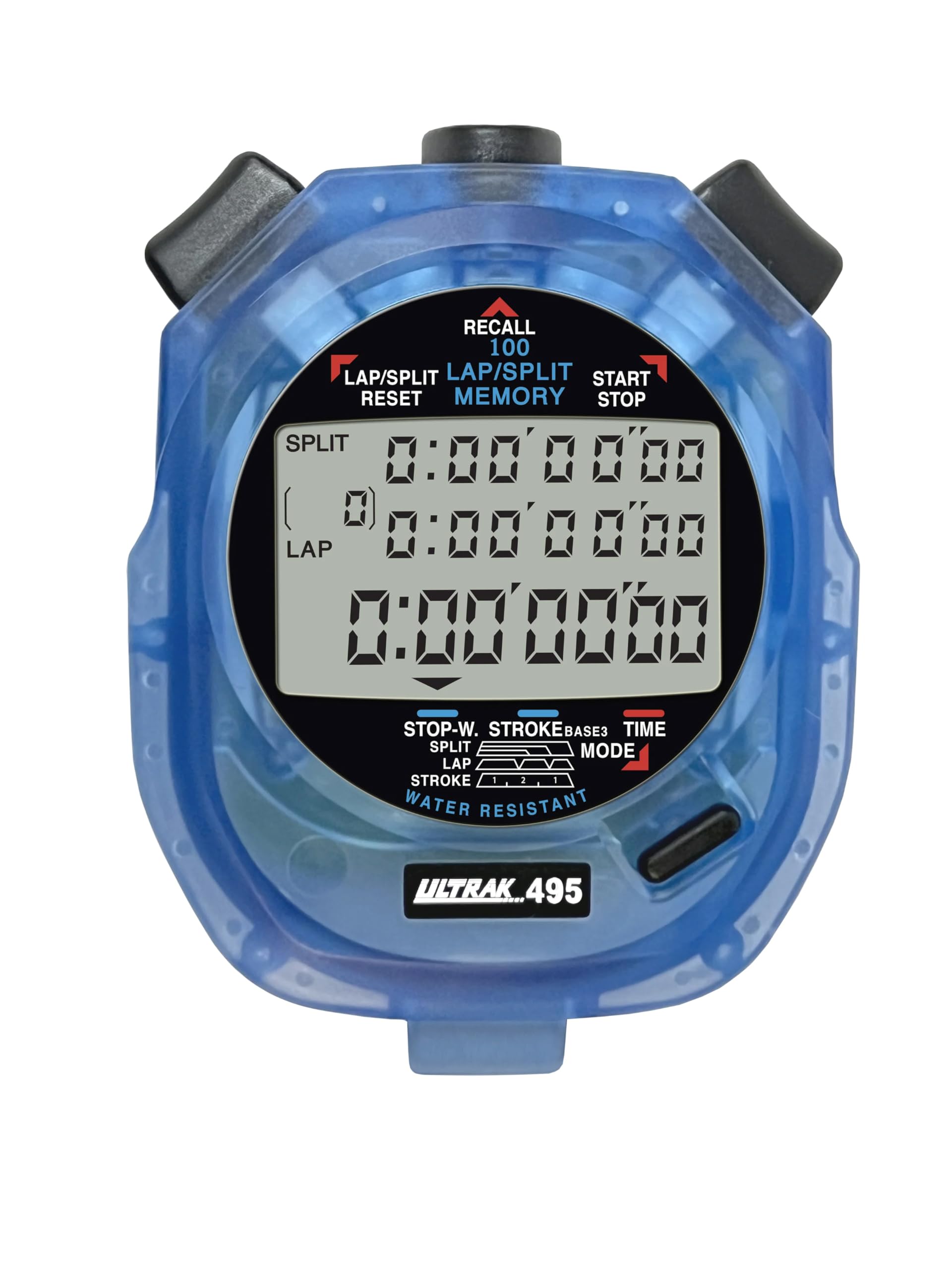
Figure 1: ULTRAK 495 Stopwatch in blue.
Hauptmerkmale:
- 100 Dual Split Recallable Memory: Enhances accuracy for track and field events, ideal for athletes and coaches requiring precise timekeeping.
- Vielseitige Funktionen: Includes stroke/frequency, time, and calendar functions, suitable for diverse sports activities.
- Wasserabweisendes Design: Allows for outdoor use in various weather conditions.
- Großes 3-reihiges Display: Ermöglicht einfache viewing of multiple lap times simultaneously.
- Langlebiger Lithium-Akku: Ensures reliability for extended use.
2. Einrichtung
2.1. Einlegen der Batterie
The ULTRAK 495 Stopwatch comes with one Lithium Metal battery pre-installed. If battery replacement is needed, refer to the Maintenance section.
2.2. Erstmalige Einstellung von Uhrzeit und Datum
So stellen Sie Uhrzeit und Datum ein:
- Drücken Sie die MODUS button repeatedly until the time/calendar display mode is active.
- Halten Sie die SATZ button (usually located on the top right) until the digits begin to flash.
- Verwenden Sie die RUNDE/SPLIT/RESET button (top left) to adjust the flashing digit.
- Drücken Sie die SATZ button to move to the next digit or setting (e.g., hours, minutes, seconds, month, day, year).
- Sobald alle Einstellungen korrekt sind, drücken Sie die Taste MODUS -Taste, um den Einstellmodus zu verlassen.

Figure 2: Stopwatch displaying various modes, including Time/Calendar.
3. Bedienung
3.1. Stopwatch Mode (Standard Timing)
This mode is used for basic timing of events.
- Ensure the stopwatch is in the standard stopwatch mode (usually indicated by "STOPWATCH" on the display). If not, press MODUS bis es erscheint.
- Drücken START/STOP (top right button) to begin timing.
- Drücken START/STOP Um den Timer erneut anzuhalten.
- Drücken START/STOP um die Zeitmessung wieder aufzunehmen.
- To reset the timer to zero, ensure it is stopped, then press RUNDE/SPLIT/RESET (top left button).
3.2. Lap/Split Timing with Memory Recall
The ULTRAK 495 can record up to 100 lap and split times.
- In stopwatch mode, press START/STOP um mit der Zeitmessung zu beginnen.
- Drücken RUNDE/SPLIT/RESET to record a split time. The display will momentarily show the split time while the main timer continues running in the background. The bottom row displays the running event or lap time.
- Repeat step 2 for each lap or split you wish to record.
- Drücken START/STOP um die Zeitmessung zu beenden.
- To recall recorded times, press the ABRUFEN button (top center). Use the RUNDE/SPLIT/RESET Und START/STOP buttons to navigate through the stored lap and split times.
- To exit recall mode, press MODUS. To clear memory, ensure the stopwatch is stopped and not in recall mode, then press and hold RUNDE/SPLIT/RESET.

Figure 3: Display showing simultaneous split, lap, and total times.
3.3. Countdown-Timer-Modus
The stopwatch includes a countdown timer function.
- Drücken MODUS bis die Countdown-Timer-Anzeige erscheint.
- Drücken und halten SATZ um in den Einstellungsmodus zu gelangen.
- Verwenden RUNDE/SPLIT/RESET to adjust the time and SATZ Um zwischen Stunden, Minuten und Sekunden zu wechseln.
- Sobald die gewünschte Countdown-Zeit eingestellt ist, drücken Sie MODUS Um den Einstellungsmodus zu verlassen.
- Drücken START/STOP Der Countdown startet. Ein Alarm ertönt, sobald der Timer Null erreicht hat.
3.4. Stroke/Frequency Measuring Mode
This mode is useful for measuring stroke rates in swimming or other repetitive actions.
- Drücken MODUS until the stroke/frequency mode is displayed.
- Drücken START/STOP to begin measuring.
- Drücken RUNDE/SPLIT/RESET at the start of each stroke or cycle. The stopwatch will calculate and display the frequency.
- Drücken START/STOP um mit der Messung aufzuhören.
4. Wartung
4.1. Reinigung
Wipe the stopwatch with a soft, dry cloth. For stubborn dirt, use a slightly damp Mit einem Tuch und milder Seife abwischen und anschließend gründlich trocknen. Scharfe Chemikalien oder Scheuermittel vermeiden.
4.2. Wasserbeständigkeit
The ULTRAK 495 is water-resistant, making it suitable for use in various weather conditions. However, it is not designed for submersion. Avoid pressing buttons while the stopwatch is wet to prevent water ingress.
4.3. Batteriewechsel
The stopwatch uses one Lithium Metal battery. When the display becomes dim or functions become erratic, it's time to replace the battery. Carefully open the battery compartment (usually on the back, secured by small screws) and replace with a new battery of the same type. Ensure proper polarity and securely close the compartment.
5. Fehlerbehebung
- Bildschirm ist leer oder dunkel: Überprüfen Sie die Batterie. Tauschen Sie sie gegebenenfalls aus.
- Stopwatch resets unexpectedly during timing: This can sometimes occur due to low battery or a temporary electrical glitch. Try replacing the battery. If the issue persists, ensure buttons are not being pressed inadvertently.
- Tasten reagieren nicht: Ensure the stopwatch is not in a locked mode (if applicable, check manual for specific lock features). If wet, ensure it is completely dry. If still unresponsive, try replacing the battery.
- Falsche Uhrzeit oder falsches Datum: Refer to section 2.2 to re-set the time and date.
6. Spezifikationen
| Besonderheit | Detail |
|---|---|
| Modellnummer | 495 |
| Erinnerung | 100 Dual Split Recallable Laps |
| Anzeige | Large 3-Row Display |
| Funktionen | Stopwatch, Lap/Split, Countdown Timer, Stroke/Frequency, Time, Calendar |
| Wasserbeständigkeit | Ja (wasserbeständig) |
| Akku-Typ | 1 Lithium-Metall-Batterie (im Lieferumfang enthalten) |
| Material | Plastik |
| Technische Daten | 0.2"T x 2.5"B x 3.5"H |
| Artikelgewicht | 3.2 Unzen |
7. Garantie und Support
For specific warranty information and customer support, please refer to the documentation included with your product or visit the official Ultrak webBewahren Sie Ihren Kaufbeleg als Kaufnachweis für eventuelle Garantieansprüche auf.