
LEKATO RM
LEKATO 61-Key Digital Piano RM User Manual
Model: RM | Brand: LEKATO
Einführung
Thank you for choosing the LEKATO 61-Key Digital Piano. This electronic keyboard is designed for both beginners and experienced musicians, featuring lighted keys, various learning modes, and versatile connectivity. This manual provides detailed instructions for setup, operation, and maintenance to ensure optimal performance and enjoyment of your instrument.
Lieferumfang
Packen Sie alle Komponenten sorgfältig aus und vergewissern Sie sich, dass die folgenden Teile enthalten sind:
- LEKATO 61-Key Digital Piano
- X-Stand
- Netzteil
- Notenständer
- Benutzerhandbuch (dieses Dokument)
- Screwdriver (for stand assembly)

Image: Contents of the LEKATO 61-Key Digital Piano package, showing the keyboard, X-stand, power adapter, music stand, user manual, and a screwdriver.
Installationsanweisungen
1. Assembling the X-Stand
The included X-stand provides stable support for your digital piano. Follow the instructions provided with the stand for proper assembly. Ensure all screws are tightened securely using the provided screwdriver.
2. Anbringen des Notenständers
Insert the music stand into the designated slots on the top panel of the keyboard. Ensure it is firmly seated to hold your sheet music or tablet securely.
3. Stromanschluss
Your LEKATO digital piano can be powered by either the AC adapter or 6 AA batteries (not included).
- Netzteil: Connect the provided AC adapter to the DC 9V port on the rear of the keyboard and then plug it into a standard wall outlet.
- Batterien: Open the battery compartment on the underside of the keyboard and insert 6 AA batteries, ensuring correct polarity.
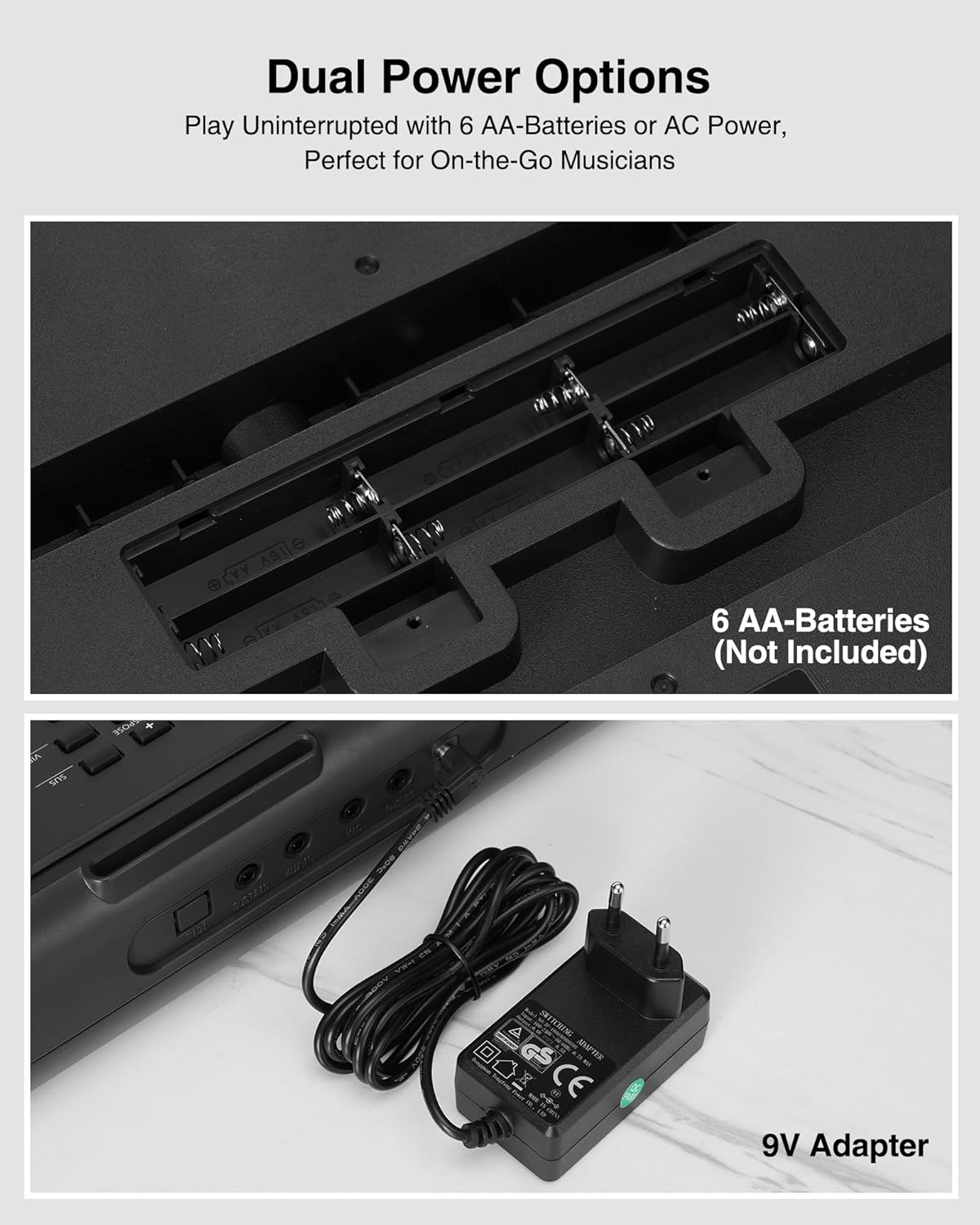
Image: The keyboard's dual power options, showing the battery compartment for 6 AA batteries and the connection for the 9V AC adapter.
Bedienungsanleitung
1. Ein-/Ausschalten
Drücken Sie die LEISTUNG button located on the left side of the control panel to turn the keyboard on or off. The LED display will illuminate upon power-on.
2. Lautstärkeregelung
Verwenden Sie die LAUTSTÄRKE + Und VOLUME - Tasten zur Einstellung des Gesamtlautstärkepegels.
3. Töne und Rhythmen
The keyboard features 300 timbres (tones) and 300 rhythms. Use the STEMPEL Und RHYTHMUS buttons, along with the numeric keypad, to select your desired sound or rhythm. The LED display will show the current selection.
4. Demo-Songs
The keyboard includes 50 demonstration songs. Press the DEMO button and use the numeric keypad to select and play a demo song.
5. Learning Modes (Lighted Keys)
The LEKATO digital piano offers two teaching modes to assist beginners, utilizing the lighted keys feature:
- Teaching Mode 1: Single Keyboard - This mode guides you by lighting up the correct keys for a selected song.
- Teaching Mode 2: Follow - In this mode, the keyboard waits for you to play the correct lighted key before proceeding to the next note.
Drücken Sie die UNTERRICHTEN button to cycle through these modes. The LIGHTED KEYS button can toggle the key lights on or off.

Image: Two individuals playing the LEKATO keyboard, demonstrating its ease of use for beginners with lighted keys and teaching modes.
6. Split Function
Der TEILT function divides the keyboard into two parts, allowing two different instrument sounds to be played simultaneously or for two players to use the keyboard at once. This is ideal for piano duets or teaching scenarios.
7. Weitere Funktionen
- Aufnahme/Wiedergabe: Verwenden Sie die REC/PROG Und SPIELEN buttons to record and playback your performances.
- Tempo: Passen Sie die Geschwindigkeit von Rhythmen und Demo-Songs mithilfe der Tempo + Und TEMPO - Schaltflächen.
- Transponieren: Change the pitch of the keyboard using the TRANSPONIEREN + Und TRANSPOSE - Schaltflächen.
- Aufrechterhalten: Drücken Sie die SUS button to add a sustain effect to notes.
- Vibrato: Drücken Sie die VIB button to add a vibrato effect.
- Metronom: Aktivieren Sie das Metronom durch Drücken der Taste METRO button to help with timing.
- Schlagzeug: Access 61 drum sounds using the SCHLAGZEUG Taste.
- Akkordmodi: Features include single-finger chords, multi-finger chords, and bass chords.
Konnektivität
The LEKATO digital piano offers various ports for enhanced musical experiences:
- MIDI: Connect to external MIDI devices for advanced music production or learning software.
- NACHHALTIGKEIT: Connect an external sustain pedal (not included) for more expressive playing.
- AUX-IN: Schließen Sie eine externe Audioquelle (z. B. Smartphone, MP3-Player) an, um zu Ihren Lieblingssongs mitzuspielen.
- MIKROFON: Connect a microphone (not included) for singing along while playing.
- TELEFONE: Plug in headphones (not included) for silent practice without disturbing others.
- Gleichstrom 9V: Stromanschluss für das Netzteil.

Bild: Eine detaillierte view of the keyboard's rear panel, illustrating the various input and output ports for versatile connectivity.
Energieoptionen
The keyboard supports two power methods:
- Wechselstromversorgung: Use the provided 9V AC adapter for continuous power.
- Batterieleistung: For portable use, insert 6 AA batteries (not included) into the battery compartment. This allows for playing on the go.
Wartung
- Reinigung: Wischen Sie die Tastaturoberfläche mit einem weichen, trockenen Tuch ab. Verwenden Sie keine Scheuermittel oder Lösungsmittel.
- Lagerung: Bewahren Sie die Tastatur an einem kühlen, trockenen Ort fern von direkter Sonneneinstrahlung und extremen Temperaturen auf.
- Batteriepflege: Wenn Sie Batterien verwenden, nehmen Sie diese heraus, wenn Sie die Tastatur längere Zeit nicht benutzen, um ein Auslaufen zu verhindern.
- Handhabung: Handle the keyboard with care to avoid dropping or impacting it, which could damage internal components.
Fehlerbehebung
- Kein Strom:
- Stellen Sie sicher, dass das Netzteil fest mit der Tastatur und einer funktionierenden Steckdose verbunden ist. Wenn Sie Batterien verwenden, überprüfen Sie, ob diese richtig eingelegt und nicht leer sind.
- Kein Ton:
- Check the volume level. Ensure headphones are not plugged in if you intend to use the built-in speakers. Verify that the correct tone is selected.
- Tasten leuchten nicht:
- Ensure the 'Lighted Keys' function is enabled and that a teaching mode or demo song is selected that utilizes this feature.
- Verzerrter Klang:
- Reduce the volume. Check for any loose connections if external speakers are used. Ensure the power supply is stable.
If you encounter issues not covered here, please refer to the support section or contact LEKATO customer service.
Technische Daten
| Besonderheit | Detail |
|---|---|
| Marke | LEKATO |
| Modellname | RM |
| Anzahl der Schlüssel | 61 |
| Fähigkeitsstufe | Intermediate (suitable for beginners) |
| Besondere Merkmale | Lighted Keys, Learning Modes, LED Screen, Music Stand |
| Konnektivitätstechnologie | Auxiliary (Jack 3.5 mm) |
| Stromquelle | Battery Powered or Corded Electric (6 AA batteries or 9V AC adapter) |
| Kopfhöreranschluss | Klinke 3.5 mm |
| Im Lieferumfang enthaltene Komponenten | X-Stand |
| Abmessungen (ca.) | 92 cm (L) x 25 cm (B) x 7 cm (H) |
| Gewicht ca.) | 3 KG |

Image: Diagram illustrating the approximate dimensions (length, width, height) and weight of the LEKATO 61-Key Digital Piano.
Garantieinformationen
Für dieses Produkt gilt eine zweijährige Garantie ab Kaufdatum. Bitte bewahren Sie Ihren Kaufbeleg für Garantieansprüche auf. Die Garantie deckt Herstellungsfehler ab, jedoch keine Schäden durch unsachgemäße Verwendung, Unfälle oder nicht autorisierte Änderungen.
Unterstützung
For further assistance, technical support, or warranty inquiries, please contact LEKATO customer service through the retailer where you purchased the product or visit the official LEKATO webWebsite für Kontaktinformationen.
Produkt überview Video
Video: Ein kurzer Überblickview of the LEKATO 61-Key Digital Piano, showcasing its features such as lighted keys, teaching modes, split function, connectivity ports, and dual power options. This video provides a visual guide to the product's main functionalities.
Ask a question about this manual
Ask about setup, troubleshooting, compatibility, parts, safety, or missing instructions. Manuals+ will review the question and use this page’s manual context to help answer it.