
Einführung
Thank you for choosing the HUABAO Karaoke Machine A108. This portable multimedia speaker system is designed to provide a versatile audio experience with features including Bluetooth connectivity, dual wireless microphones, LED lighting, and multiple input options. Please read this manual carefully to ensure proper setup, operation, and maintenance of your device.
Lieferumfang
Bitte vergewissern Sie sich beim Auspacken, dass alle folgenden Artikel vorhanden sind:
- 1 x Lautsprecher
- 2 x drahtlose Mikrofone
- 1 x Fernbedienung
- 1 x Schultergurt
- 1 x AUX-Kabel
- 1 x Typ-C Ladekabel
- 1 x Benutzerhandbuch (dieses Dokument)

Image: All items included in the HUABAO Karaoke Machine A108 package, including the speaker, two wireless microphones, remote control, shoulder strap, AUX cable, Type-C charging cable, and user manual.
Aufstellen
1. Laden Sie den Lautsprecher auf
Before first use, fully charge the speaker using the provided Type-C charging cable. The built-in 5400 mAh rechargeable battery provides 6-8 hours of playtime on a full charge, with a charging time of 4-5 hours.

Image: The HUABAO Karaoke Machine highlighting its 5400 mAh high-capacity rechargeable battery for extended playtime.
2. Installing Batteries in Microphones
Each wireless microphone requires 2 AAA batteries (included). Twist the bottom part of the microphone to open the battery compartment, insert the batteries with correct polarity, and close the compartment securely.
3. Anbringen des Schultergurts
For portability, attach the adjustable shoulder strap to the designated loops on the speaker. This allows for easy carrying during outdoor activities or travel.

Image: Two individuals carrying the lightweight and portable HUABAO Karaoke Machine using its adjustable shoulder strap.
Bedienungsanleitung
1. Ein-/Ausschalten
Locate the power button/volume knob on the control panel. Turn the knob clockwise to power on the speaker and adjust the main volume. Turn counter-clockwise to decrease volume and power off.
2. Modusauswahl
Press the "Mode" button on the control panel or remote control to cycle through available input modes: Bluetooth, USB Drive, TF Card, AUX, and FM Radio.
3. Bluetooth-Kopplung
- Switch the speaker to Bluetooth mode. The display will show "BLUE" and an audible prompt will confirm.
- Aktivieren Sie Bluetooth auf Ihrem Smartphone, Tablet, Laptop oder einem anderen kompatiblen Gerät.
- Suchen nach "HUABAO A108" in the list of available devices and select it to pair.
- Once paired, an audible confirmation will sound, and you can stream audio wirelessly.
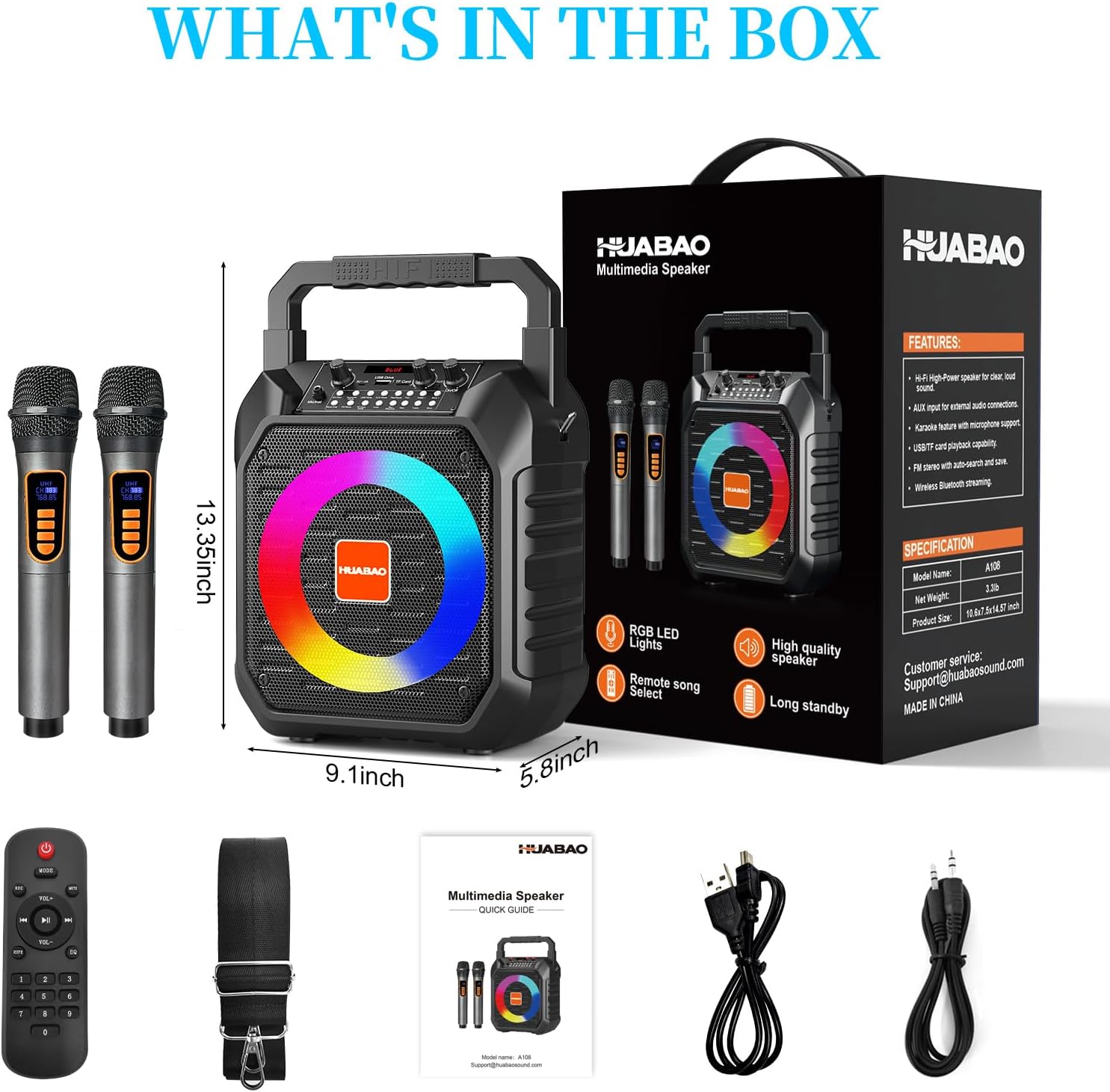
Image: The HUABAO Karaoke Machine demonstrating stable wireless connectivity via Bluetooth 5.0 with various devices like phones, tablets, laptops, desktops, and smart TVs.
4. Wiedergabe von USB-Laufwerken / TF-Karten
Insert a USB flash drive or TF card (containing MP3 files only) into the respective slot. The speaker will automatically switch to the corresponding mode and begin playback. Use the control panel buttons or remote for track navigation (Prev/Next) and Play/Pause.
5. AUX-Anschluss
Connect an external audio device using the provided 3.5mm AUX cable. Switch the speaker to AUX mode. Audio from your external device will play through the speaker.
6. UKW-Radio
Switch to FM Radio mode. Use the control panel or remote to scan for stations. The speaker will automatically search and save available FM frequencies.
7. Mikrofonnutzung
Turn on the wireless microphones. They will automatically connect to the speaker. Use the dedicated "Mic" volume knob on the speaker to adjust microphone volume. The "Echo" knob controls the echo effect for vocals.
8. LED-Lichtsteuerung
The speaker features dynamic LED lights that sync to the music. Long press the "Mode/LED" button to change different lighting effects or turn them off.

Image: The HUABAO Karaoke Machine displaying its colorful LED lighting show, which can be adjusted by pressing the Mode/LED button.
9. Treble & Bass Adjustment
Use the dedicated Treble and Bass controls on the speaker's control panel to fine-tune the audio output to your preference.

Image: Close-up of the HUABAO Karaoke Machine's control panel, highlighting the adjustable treble and bass knobs for personalized sound.
10. Verwendung der Fernbedienung
The remote control allows for convenient operation from a distance, including power on/off, mode selection, volume adjustment, track control, and LED light settings.
Video: An official HUABAO video demonstrating the features and operation of the A108 karaoke machine, including its two microphones and colorful lights.
Video: Ein offizielles Verkäufervideo zeigtasing the HUABAO Karaoke Machine with its two wireless microphones, demonstrating its functionality and ease of use.
Wartung
- Keep the speaker and microphones dry and away from moisture.
- Reinigen Sie das Gerät mit einem weichen, trockenen Tuch. Verwenden Sie keine Scheuermittel oder Lösungsmittel.
- Bewahren Sie das Gerät bei Nichtgebrauch an einem kühlen, trockenen Ort auf.
- Vermeiden Sie es, das Gerät fallen zu lassen oder starken Stößen auszusetzen.
Fehlerbehebung
| Problem | Mögliche Lösung |
|---|---|
| Kein Strom | Ensure the speaker is charged. Check the power knob is turned on. |
| Mikrofon funktioniert nicht | Check microphone batteries and ensure they are inserted correctly. Ensure microphone is powered on. Adjust microphone volume knob. |
| Bluetooth stellt keine Verbindung her | Ensure speaker is in Bluetooth mode. Turn off and on Bluetooth on your device. Forget the device and re-pair. |
| Kein Ton von USB-/TF-Karte | Sicherstellen files are in MP3 format. Check if the speaker is in the correct mode. Ensure volume is up. |
Technische Daten
- Modell: A108
- Energiequelle: Battery Powered (Built-in 5400 mAh rechargeable battery)
- Ausgangsleistung: 15 W
- Subwoofer-Größe: 6.5 Zoll
- Konnektivität: Bluetooth 5.0, AUX, USB, TF Card (MP3 files nur)
- Mikrofone: 2 x Wireless Microphones (2 AAA batteries each)
- Abmessungen: 9.1 x 5.8 x 13.35 Zoll
- Artikelgewicht: 3.3 Pfund
- Material: Plastik
- Impedanz: 3 Ohm
- Hersteller: HUABAO

Image: The HUABAO Karaoke Machine showcasing its multiple connectivity options including Bluetooth 5.0, TF Card, USB, AUX, and adjustable Treble & Bass.

Image: The HUABAO Karaoke Machine emphasizing its superior Hi-Fi sound quality with a 6.5-inch subwoofer and 15W power output.
Garantie und Support
HUABAO offers a one-year warranty and lifetime technical support for all customers. If you have any questions or concerns regarding your HUABAO Karaoke Machine A108, please do not hesitate to reach out to our customer service team.
For support, please refer to the contact information provided on the product packaging or the official HUABAO webWebsite.