
1. Produktüberschreitungview
This manual provides essential instructions for the safe and efficient use of your HUAWEI MatePad SE 11" Tablet. Please read this manual thoroughly before using the device and retain it for future reference.

Bild: Rückseite view of the HUAWEI MatePad SE 11" tablet, highlighting its lightweight (475g) and slim (6.9mm) design. The tablet features a premium metal unibody construction.
The HUAWEI MatePad SE 11" is designed for an immersive visual and audio experience, featuring an 11-inch FullView Eye Comfort screen and a powerful quad-speaker system. Its lightweight and slim design make it highly portable.
2. Ersteinrichtung
2.1. Auspacken und Packungsinhalt
Carefully unpack your HUAWEI MatePad SE 11" tablet. Ensure all items listed below are present:
- HUAWEI MatePad SE 11" Tablet (6GB+128GB)
- Ladegerät
- Typ-C-Kabel
- Kurzanleitung
- Garantiekarte
2.2. Laden des Tablets
Before first use, fully charge the tablet. Connect the Type-C cable to the tablet's USB-C port and the charger, then plug the charger into a power outlet. The tablet supports 22.5W fast charging.
2.3. Ein-/Ausschalten
- So schalten Sie das Gerät ein: Halten Sie die Ein-/Aus-Taste gedrückt, bis das HUAWEI-Logo erscheint.
- So schalten Sie das Gerät aus: Halten Sie die Ein-/Aus-Taste gedrückt und wählen Sie dann in den Optionen „Ausschalten“ aus.
- Neustarten: Halten Sie die Ein-/Aus-Taste gedrückt und wählen Sie dann in den Optionen „Neustart“ aus.
2.4. Erstkonfiguration
Folgen Sie den Anweisungen auf dem Bildschirm, um die Ersteinrichtung abzuschließen, einschließlich:
- Sprachauswahl
- Wi-Fi-Netzwerkverbindung
- HUAWEI ID login (or create a new one)
- Security settings (PIN, password, pattern, or facial recognition)
3. Bedienung Ihres Tablets
3.1. Anzeigefunktionen

Image: The HUAWEI MatePad SE 11" screen, showcasing its 11-inch FHD+ Eye Comfort display. Key features include an 85% screen-to-body ratio, 1920x1200 resolution, and 400 Nits brightness for a clear visual experience.
The 11-inch FHD+ Eye Comfort display provides an immersive visual experience. It features:
- Auflösung: 1920 x 1200 Pixel
- Augenkomfort: TÜV Rheinland certified for low blue light and flicker-free viewing, reducing eye strain during prolonged use.
- Helligkeit: 400 Nits, with 4096-level brightness adjustment.
- E-Book Mode: A dedicated mode for a paper-like reading experience.
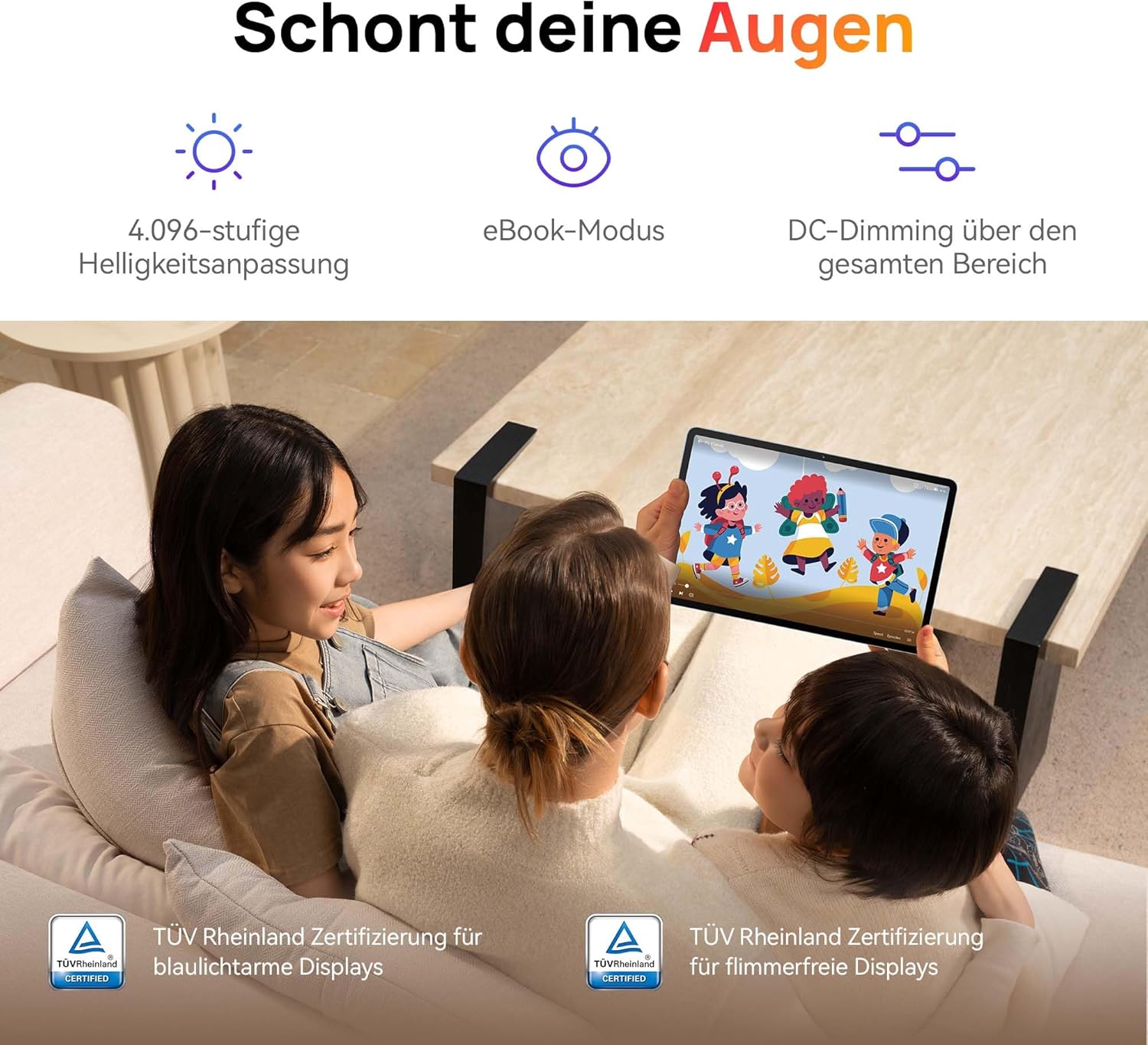
Image: Children using the tablet, illustrating the eye protection features. The display is TÜV Rheinland certified for low blue light and flicker-free operation, ensuring a comfortable viewErfahrung.
3.2. Audiosystem

Image: A user enjoying music on the tablet, demonstrating the immersive quad-speaker system. This system is optimized by HUAWEI Histen 9.0 technology for high-quality audio.
The tablet features a symmetrical quad-speaker system optimized by HUAWEI Histen 9.0 technology, providing cinematic sound quality for various applications.
3.3. Kinderecke

Image: The Kids Corner interface on the tablet, designed as a safe and engaging environment for children. Features include posture warnings, a blue light filter, and an eBook mode, along with content from BabyBus.
Kids Corner provides a safe and dedicated environment for children to learn and play. Parents can manage:
- Time limits for usage.
- Allowed applications and content.
- Features like posture warnings and blue light filters to promote healthy digital habits.
It also includes content from BabyBus, offering games, stories, and nursery rhymes.
3.4. M-Pen Lite (Optional Accessory)

Image: The HUAWEI M-Pen Lite stylus, an optional accessory that enhances interaction with the tablet for drawing, writing, and note-taking. It is supported by the HUAWEI MatePad SE 11" Stylus Set.
If you have the HUAWEI M-Pen Lite, it can be used for enhanced interaction, drawing, and note-taking. Ensure your tablet supports the M-Pen Lite stylus set.
The tablet also supports applications like GoPaint for professional and easy-to-use digital art, and HUAWEI Note for organized note-taking.

Image: GoPaint application on the tablet, illustrating its interface for digital art creation.

Image: HUAWEI Note application on the tablet, showing its capabilities for detailed note-taking.
3.5. Konnektivität
- W-lan: Connect to available Wi-Fi networks for internet access. Supports 802.11ac.
- Bluetooth: Koppeln Sie es mit Bluetooth-Geräten wie Kopfhörern, Lautsprechern oder Tastaturen.
- USB-C-Anschluss: Used for charging, data transfer, and connecting compatible accessories.
3.6. Multi-Window and Multi-Device Collaboration
The tablet supports multi-window functionality for enhanced multitasking and multi-device screen sharing for seamless integration with other HUAWEI devices.
4. Wartung und Pflege
- Reinigung: Reinigen Sie Bildschirm und Gehäuse mit einem weichen, fusselfreien Tuch. Vermeiden Sie scheuernde Materialien und aggressive Chemikalien.
- Batteriepflege: To prolong battery life, avoid extreme temperatures. Do not allow the battery to fully discharge frequently.
- Software-Updates: Prüfen Sie regelmäßig, ob Software-Updates verfügbar sind, und installieren Sie diese, um optimale Leistung und Sicherheit zu gewährleisten.
- Lagerung: Keep the tablet in a cool, dry place away from direct sunlight and moisture.
5. Fehlerbehebung
| Problem | Mögliche Lösung |
|---|---|
| Das Tablet lässt sich nicht einschalten. | Stellen Sie sicher, dass der Akku geladen ist. Schließen Sie das Ladegerät an und warten Sie einige Minuten, bevor Sie versuchen, das Gerät erneut einzuschalten. |
| Der Bildschirm reagiert nicht. | Restart the tablet by holding the Power button for approximately 10 seconds. If unresponsive, ensure the screen is clean and dry. |
| Probleme mit der WLAN-Verbindung. | Check if Wi-Fi is enabled. Restart your router and the tablet. Ensure you are within range of the Wi-Fi signal. |
| Apps are not downloading from Play Store. | The HUAWEI MatePad SE 11" runs on HarmonyOS and uses HUAWEI AppGallery. Google Play Store services are not natively supported. Use Petal Search to find and install apps or access web versions of services. |
| Langsame Leistung. | Schließen Sie unnötige Hintergrundanwendungen. Leeren Sie Cache und temporäre Dateien. files. Stellen Sie sicher, dass ausreichend Speicherplatz vorhanden ist. Starten Sie das Tablet neu. |
6. Technische Daten
| Besonderheit | Detail |
|---|---|
| Modellname | MatePad SE 11" |
| Modellnummer | 53014FHK |
| Abmessungen (L x B x H) | 26.23 x 16.38 x 0.69 cm |
| Gewicht | 475 Gramm |
| Anzeigegröße | 11 Zoll |
| Anzeigetyp | LCD |
| Bildschirmauflösung | 1920 x 1200 Pixel (FHD+) |
| Seitenverhältnis | 16:9 |
| Betriebssystem | HarmonyOS |
| Prozessor | Huawei Processor (Agassi6-W09C) |
| RAM | 6 GB |
| Speicherkapazität | 128 GB |
| Akku-Typ | Lithium-Polymer |
| Batteriekapazität | 7700 mAh |
| Laden | 22.5W Fast Charging (via USB Type-C) |
| Auflösung der Rückkamera | 8 Megapixel |
| Lautsprecher | 4 speakers with HUAWEI Histen 9.0 |
| Wireless-Technologie | WLAN (802.11ac), Bluetooth |
| USB-Anschlüsse | 1 (USB Typ-C) |
| Besondere Merkmale | 11-inch Eye Comfort Screen, Kids Corner, Multi-window, Multi-device screen sharing |
| Im Lieferumfang enthalten | Tablet, Charger, Type-C Cable, Quick Start Guide, Warranty Card |
7. Garantie und Support
7.1. Garantieinformationen
Your HUAWEI MatePad SE 11" Tablet comes with a manufacturer's warranty. Please refer to the included Warranty Card for specific terms and conditions. Spare parts availability is guaranteed for 24 months.
7.2. Kundendienst
For technical assistance, troubleshooting beyond this manual, or warranty claims, please contact HUAWEI customer support. Visit the official HUAWEI webWebsite mit Kontaktinformationen und Supportressourcen.
Online-Ressourcen: HUAWEI-Unterstützung WebWebsite